

Google Fitbit Edge Review: Is This the Fitbit to Buy, and What Does It Cost to Keep?
No tap-to-pay, a paid coaching tier and a band that needs a firm click. This Fitbit Edge review shows who should buy it and what it costs to keep.
Affiliate disclosure: As an Amazon Associate, OASTHAR earns from qualifying purchases.
OASTHAR score
- Design and Comfort8.0
- App and Software6.8
- Health and Fitness7.8
- Value7.0
- Battery Life8.8
The verdict
If you want a Fitbit with a screen for sleep, heart and all-day health tracking, the Fitbit Edge is the one I'd buy, on Android or iPhone. If you run by GPS distance or pay with your wrist, I'd skip it. It's light, the screen is easy to read, and the week of battery held up at every outlet that ran one down. Heart rate tracked a chest strap closely in the one test that used one.
The catch comes in three parts. There's no tap-to-pay, GPS is only average, and the new band connector came loose or needed force at Android Authority, Droid Life and 9to5Google. Keeping it costs nothing beyond a phone and a Google Account, unless you let the three-month coaching trial renew at a monthly fee.
Own a Charge 6 and tap to pay? Keep it. Want a small smartwatch? This isn't one, so look at the Pixel Watch 5.
Here's how I got there: hands-on findings weighed against Google's claims, with the gaps named.
Buy it ifAndroid or iPhone owners who want background health tracking, a readable screen and a week between charges.
Reasons to buy
- A true week of battery with frequent workouts, in both Android Authority's and Droid Life's run-downs.
- Light at 32 g with its band, so wearing it to bed is easy.
- Heart rate tracked a Polar H10 chest strap closely in cycling and running, in one reviewer's test.
- Works with Android phones and iPhones, and the battery can be replaced when it fades.
Skip it ifSkip it if you pay by wrist or run by GPS distance. Take the Charge 6 for Wallet or the Pixel Watch 5 for training.
Reasons to avoid
- No NFC, so no Google Wallet. The older Charge 6 has tap-to-pay if you rely on it.
- GPS is only average, with signal losses in one test, and the band connector needs a firm click.

Prices and availability can change. Details
Product prices and availability are accurate as of the date/time indicated and are subject to change. Any price and availability information displayed on Amazon.com at the time of purchase will apply to the purchase of this product.
What the Fitbit Edge is, and who it suits
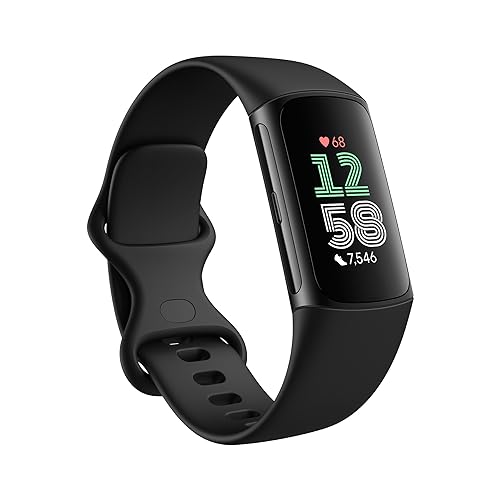
Fed up with a watch that begs for its charger every night? That's the buyer this band is built for. It's a slim aluminum tracker with a 1.3-inch AMOLED touchscreen, one mechanical side button and built-in GPS. It isn't a smartwatch, and it doesn't pretend very hard.
Those numbers come from Google's spec page, and they explain the appeal: light enough to sleep in, with a screen you can read. Android Authority, Droid Life and 9to5Google each wore one for a week or two and called it light and comfortable, bed included.
Now the limits. It runs Fitbit's own software, not Wear OS, so there are no third-party apps. You get an ECG app, SpO2, skin temperature and an altimeter for floors. You don't get tap-to-pay, a microphone or a speaker.
Say you want sleep and heart data every morning, the time on your wrist and a charger you touch once a week. That's who I'd point here, on an Android phone or an iPhone. Still torn between a band and a watch? A fitness tracker or smartwatch guide is the better first stop, and the reasons to buy the Fitbit Edge lay out the full case.
Who should buy the Fitbit Edge, and who should skip it?
Two things settle this before the band does: how you pay at the register, and how seriously you run.
- Get the Fitbit Edge if you want background health tracking, a readable screen and about a week between charges.
- Upgrade from a Charge 6 if you want the bigger screen, floors climbed or a replaceable battery, and you never pay with your wrist.
- Keep your Charge 6 if you tap to pay with it. The Edge has no NFC, and the Edge against the Charge 6 is the closer look.
- Get the Fitbit Air if you never glance at your wrist. My Edge and Fitbit Air comparison shows what the screen buys you.
- Look at the Garmin CIRQA if a monthly coaching fee bothers you. The Edge against the Garmin CIRQA covers that subscription-free, screenless band.
- Get a Pixel Watch 5 if you want payments, apps or a voice assistant and carry an Android phone. Tracker or smartwatch? The Edge against the Pixel Watch 5 answers that.
- Read the Edge against the Inspire 3 if you want the least expensive Fitbit with a screen. That older band has no GPS of its own and no ECG.
- Skip the Edge if you train by GPS distance or want sets and reps logged.
Picture the coffee line on a Monday: you hold out your wrist and nothing happens. If that would annoy you weekly, don't buy this band.
What changed from the Fitbit Charge 6?
Own a Charge 6? Here's the short version: you gain a screen and lose your wallet. Google never called this a Charge 7, though Android Authority calls it one in all but name. I couldn't find an outlet that wore the two side by side, so the table below is specs and Google's own claims.
| Feature | Fitbit Charge 6 | Fitbit Edge |
|---|---|---|
| Screen | 1.04-inch AMOLED | 1.3-inch AMOLED; 45% bigger and over 40% brighter, per Google |
| Tap-to-pay | NFC with Google Wallet | None |
| Altimeter | None | Yes, floors and elevation |
| Side button | No mechanical click | Mechanical button |
| Battery claim | Up to 7 days | Up to 7 days |
| Full charge, claimed | Two hours | About 90 minutes |
| Battery replaceable by you | No | Yes |
| Blood pressure and insulin resistance trends | No | Yes |
| Built-in GPS | Unreliable; phone GPS advised | Rated average by The Quantified Scientist |
| Security updates, at least | February 2028 | October 2028 |
| EDA stress scan | Yes | Not listed by Google; unconfirmed |
Source: Edge details from Google's spec page and its store page; Charge 6 details from Google's Charge 6 pages.
Read the battery row twice, because it surprises people. Google claims the same week for both, so don't upgrade for stamina.
How do the design, comfort and band connector hold up?
Will it stay on your wrist? Mostly yes, and that "mostly" is the part to read twice.
Start with the easy bit. The case is recycled aluminum, 39.2 x 25.6 x 11.6 mm, and weighs 17.7 g bare. There's one size, and both a small band (130 to 170 mm wrists) and a large one (170 to 210 mm) come in the box. The glass is Gorilla Glass 3, and Android Authority found the screen readable on sunny runs.
Now the connector. It's a new proprietary design, and it gave trouble at every outlet that wore the band. Droid Life's first unit was replaced because a band wouldn't lock. 9to5Google's band came off twice, once overnight. Android Authority had to jam its olive band into place.
Take that warning literally before a swim. The band is rated 5 ATM and IP68 for shallow water, and a pool floor is a bad place to learn the latch wasn't seated.
On colors, there are four, plus a Stephen Curry Special Edition. That one is the same tracker with a different band, so I'd pay extra only if you love the band. And don't assume Pixel Watch bands fit. The outlets disagree, and nothing confirms it.
How long does the battery last, and how long does charging take?
Here's the good news, and it's the main reason to buy. With the always-on display off or left alone, the Edge reached Google's week wherever it was run down. Switch always-on on, and Google itself says up to 2 days. So decide which one you want before you order.
| Source | Conditions | Published figure |
|---|---|---|
| Google claim | Default settings, pre-production units | Up to 7 days |
| Google claim | Always-on display on | Up to 2 days |
| Android Authority | Six tracked workouts, nightly sleep; always-on setting not stated | A little over 10% left after 7 days |
| Droid Life | Replacement unit; 4 one-hour treadmill runs, 7 hours of pickleball; always-on setting not stated | Over 8 days, 14% left |
| Droid Life | First unit, later replaced for a band fault | 89% to 17% in 3 days |
| 9to5Google | Always-on off; no percentages given | One charge in about two weeks |
| Google claim | Full charge from empty, 30W adapter | About 90 minutes |
| Google claim | Quick top-up when the battery is low | 5 minutes for up to 1 day |
| Droid Life | Full charge, not timed | About 90 minutes |
What I take from that table: a week is real, even with a workout most days. But one Droid Life unit drained far faster, with no cause given. So watch your first week while the return window is still open.
Charging is the slow part, and nobody has timed it with a stopwatch. Say you plug in while you shower. Google's five-minute top-up covers the next day, on its own numbers. There's no power adapter in the box, though, and Google's times assume a 30W one sold separately. The 65 mAh cell is user-replaceable, but I couldn't find what a replacement costs.
Can you trust the heart rate and GPS numbers?
Fair question, and the answer is better for your heart than for your route.
The Quantified Scientist put the Edge against a Polar H10 chest strap and got correlations of 0.98 for indoor cycling, 0.98 for running, with some cadence lock, and 0.96 for outdoor cycling. Weightlifting was weak. That's one reviewer on his own body, so I'd call it strong evidence, not settled.
Sleep held up too. Against a ZMax EEG headband, he found agreement of 92% for deep sleep, 72% for light and 75% for REM. ECG and SpO2 haven't been checked against a reference.
GPS is the weaker half, and there are two views. On one Android Authority run, the Edge logged 6.25 miles against 6.42 on Strava and an Amazfit watch. The Quantified Scientist rates the GPS as average: a quick fix, then signal losses and tracks through buildings. Google claims 40% better accuracy than the Charge 6 from internal tests, and that's a claim, not a result. iDevice relays one more short reading from Tom's Guide, secondhand.
So here's my call. If your week is spin classes and steady runs, I'd trust the heart rate. I wouldn't lift by it, and I wouldn't pace a race by its distance. The best fitness trackers list shows how rival bands compare.
What is free, what needs the paid tier, and what works on which phone?
Here's the part nobody puts on the box. The band works without a subscription, but the box quietly starts one. Three months of Google Health Premium come included, redeeming them needs a payment method, and the plan then renews by itself at a monthly fee. Don't want coaching? Set a reminder to cancel before the trial ends.
| Feature | Android 11 or newer | iPhone, iOS 16.4 or newer | Cost to keep |
|---|---|---|---|
| Activity, sleep score and stages, heart rate, HRV, SpO2, skin temperature, readiness | Yes | Yes | Free |
| ECG app and heart rhythm alerts | Yes, in select countries | Yes, in select countries | Free |
| Blood pressure and insulin resistance trends | Yes | Yes | Free |
| Notifications, media controls, Maps directions started on the phone | Yes | Listed by Google; no outlet checked an iPhone | Free |
| Quick replies to messages | Yes | Unconfirmed | Free |
| Health Coach, personal plans, on-wrist coaching cues, detailed sleep insights | Yes | Yes | Google Health Premium, monthly |
| Payments, calls on the wrist, voice replies | No | No | Not available |
| Setup with no phone or no Google Account | No | No | Not supported |
The takeaway: on Google's own list, the tracking is free and the coaching is paid. 9to5Google says most features need Premium, but I trust Google's list more here because it names each item.
Say you hand this to a parent with an iPhone. It'll pair, but they need a Google Account first, and nobody has published how it behaves on iOS.
The other costs are small and easy to miss: a power adapter, spare bands and, one day, a battery. I couldn't find an annual Premium price on Google's Edge pages.
Is the app and software good enough, and how long will it get updates?
Is it quick? Yes. Is it finished? Not quite.
On the good side, Android Authority found the custom software fast and responsive, with swipes that feel like Wear OS. Droid Life had sleep and readiness scores ready within minutes of waking. And 9to5Google rates the Quick Start tile, which saves your recent workouts, as the biggest step up from the Fitbit Air.
Then you hit the thin parts. Watch faces, tiles, the always-on display and most settings can only be changed in the Google Health app on your phone, which two outlets found clunky. There's no calendar app, and the button can't be remapped. Notification previews show only the first words until you tap Open.
Picture a street corner in a city you don't know. You can't start directions from your wrist, because Google Maps only mirrors a route you began on the phone. TechPP adds that an incoming call can be accepted on the band, but it's handed straight to your phone.
Now the fine print I went looking for. Google's security updates page guarantees the Edge security updates until at least October 2028, and the date may be extended while Google still sells the band. That promise covers security only and says nothing about new features. Warranty length isn't on Google's Edge pages, so I'd confirm it before you buy. As for split alerts or set tracking arriving later, Google has promised nothing.
What problems have shown up, and has anything been fixed?
The band is weeks old, so I don't have owner reports to weigh yet. What follows comes from the outlets that wore it and from Google itself. Nothing on this list has a confirmed fix.
| Issue | Where it showed up | Status |
|---|---|---|
| Band hard to seat or coming loose | Droid Life, 9to5Google, Android Authority; Google's setup page warns about it | Hardware design. No fix confirmed |
| Notifications not arriving | 9to5Google, for much of its time with the band | Google says a Google Health app update will address it. No fix confirmed |
| GPS distance short or signal lost | Android Authority; The Quantified Scientist; Tom's Guide, secondhand | No fix confirmed |
| Heart rate cadence lock on some runs; weak in weightlifting | The Quantified Scientist | No fix confirmed |
| A sync notification on screen at every background sync | Droid Life | No fix confirmed |
| Fast battery drain | One Droid Life unit | Cause unknown. No fix confirmed |
| No vibration alerts for splits or goals; no sets and reps | Android Authority | Nothing promised. No fix confirmed |
| Automatic workouts sometimes wrong | 9to5Google only | No fix confirmed |
How should you read that? Split it into software and hardware. Notifications, sync pop-ups and missing alerts are things an update can change, and Google has already said one is coming for notifications.
The connector is different. A latch can't be patched, and it's the item I'd weigh most. Say you swap to a dressier band for a dinner out. That's the moment to tug both sides before you leave the house.
If any row here is a dealbreaker for you, the Fitbit Edge alternatives are the bands I'd weigh in its place.
Final verdict: is this the Fitbit to buy?
For most people who want a Fitbit with a screen, yes, with eyes open. And the reason is simple: it does the quiet jobs well. It's light, it lasts a week, and the health tracking that matters most is free on Android and iPhone.
What does it cost to keep? A phone, a Google Account and nothing else, unless you choose coaching. That monthly fee is optional, but the trial renews by itself, so the choice has to be yours and not the calendar's.
The outlets split on its worth, and I think both sides are right for their own buyer. Droid Life wants a quiet tracker with a clock and may buy one. Android Authority runs and lifts, and found it thin. So if you're a casual tracker, I'd believe Droid Life. If you're a runner, weigh Android Authority and The Quantified Scientist, the two that checked GPS.
Those three cover most of the people this band will disappoint. 9to5Google put the last one bluntly: "not a Pixel Watch, not even close."
If it were my money and I wanted sleep, heart data and a clock, I'd buy the Edge and click the band in hard.
Fitbit Edge specs
- Compatibility
- Android 11 or newer, or iPhone on iOS 16.4 or newer
- Display
- 1.3-inch AMOLED touchscreen, always-on option, Gorilla Glass 3
- Battery
- Up to 7 days; up to 2 days with the always-on display
- GPS
- Built-in GPS and Galileo; no phone needed outdoors
- Water Rating
- 5 ATM and IP68; shallow-water swimming
What the experts found
 Android Authority
Comfortable, with a good screen and a true week of battery, but stuck in the middle: no NFC, a bare-bones OS, thin workout features and poor GPS make it overpriced for what it offers.
 Droid Life
A light tracker that mostly stays out of the way, lasts a full week of heavy use and finally auto-tracks workouts properly; possibly the best of Google's three, despite a fussy band connector and slow charging.
 9to5Google
A new, slightly better Fitbit that does not know what it wants to be: great battery and much better software than older trackers, but no payments, limited use beyond fitness and most features tied to a subscription.
Also consider
Fitbit Charge 6
It keeps Google Wallet tap-to-pay, and Google still sells it new with security updates to at least February 2028. Its built-in GPS is unreliable, so carry your phone on runs, and a full charge takes about two hours.

Google Fitbit Air
A screenless band of about 12 g that tracks sleep, heart rate and steps with no subscription, and lasts close to a week. There's no GPS in the band and nothing to check mid-workout, so I'd skip it for runs.

Google Pixel Watch 5 (41mm, Wi-Fi)
Wallet, Maps and on-device Gemini on a polished Wear OS watch for phones on Android 12 or newer. The 41mm is a daily-charge watch, it won't pair with an iPhone, and the Health Coach needs Google Health Premium.
Fitbit Edge: frequently asked questions
Do you need a subscription for the Fitbit Edge?
No. Google lists activity, sleep score and stages, heart rate, HRV, SpO2, skin temperature and health alerts as free. Google Health Premium adds the Health Coach, personal plans and detailed sleep insights. Three months are included, and the plan then renews automatically at a monthly fee unless you cancel.
Does the Fitbit Edge work with an iPhone?
Yes. Google lists iPhones on iOS 16.4 or newer and phones on Android 11 or newer, both through the Google Health app with a Google Account. I couldn't find a hands-on check on an iPhone, so whether quick replies work on iOS is unconfirmed.
Does the Fitbit Edge have Google Wallet or tap-to-pay?
No. The Edge has no NFC, so it can't pay at a terminal. The older Fitbit Charge 6 has Google Wallet, so I'd keep that band, or buy it, if paying by wrist matters to you.
How long does the Fitbit Edge battery last?
About a week with the always-on display off. Android Authority ended day seven with a little over 10% left, and Droid Life's replacement unit ran over eight days. Google says the always-on display cuts it to up to 2 days.
Is the Fitbit Edge GPS accurate?
Only average, on the evidence so far. Android Authority's run logged 6.25 miles where Strava and another watch read 6.42, and The Quantified Scientist saw signal losses and rated it average. It's fine for casual runs, but I wouldn't rely on it for race training.
Is the Fitbit Edge worth upgrading to from a Charge 6?
Yes, if you want the bigger screen, floors climbed and a replaceable battery. No, if you tap to pay, because the Edge drops NFC. Google claims the same battery life of up to 7 days for both, so don't upgrade for stamina.
Does the Fitbit Edge come with a charger?
It comes with a USB-C fast charging cable, but no power adapter. Google's charging times, about 90 minutes to full, assume a 30W adapter sold separately. The box also holds a small and a large band.
How long will the Fitbit Edge get updates?
Google guarantees security updates until at least October 2028, and it may extend that date while it still sells the band. The promise covers security only, not new features, so I wouldn't count on missing workout tools arriving later.