

Apple MacBook Pro 16 (M5 Pro) Review: Is It Worth the Weight?
It weighs 4.7 lb and barely beats the M4 Pro. This MacBook Pro 16 M5 Pro review covers battery, heat, the screen, which model to buy and rivals.
 By Michael KirindageUpdated
Affiliate disclosure: As an Amazon Associate, OASTHAR earns from qualifying purchases.
OASTHAR score
- Performance9.4
- Display9.2
- Battery Life9.1
- Design and Build8.8
- Value7.8
The verdict
If you edit video, code, mix audio or run local AI on battery for hours, I'd buy the MacBook Pro 16 with M5 Pro, and I'd buy the base 24GB and 1TB model. If your heaviest job is a browser full of tabs and some photo edits, I'd save a lot and get a MacBook Air 15 M5 instead.
The Pro 16 holds full speed without throttling, stays quiet in everyday work, and lasts far beyond a work day: Notebookcheck measured over 18 hours of Wi-Fi browsing. You also get HDMI, an SD slot and three Thunderbolt 5 ports, so no dongles.
The catch is the 4.7 lb weight, a mini-LED panel that uses PWM flicker, a 140W charger that falls short at full load and soldered memory. If you own an M4 Pro, keep it. And if you game or render on the GPU, the Galaxy Book6 Ultra or Blade 16 gives you more graphics power.
Buy it ifVideo editors, programmers, audio engineers and local AI users who need sustained speed, built-in ports and long battery away from a desk.
Reasons to buy
- Holds full speed with no throttling, and the fans stay inaudible in Low Power mode.
- Battery runs far past a work day: Notebookcheck measured 18h 32min of Wi-Fi browsing.
- HDMI, an SDXC slot, three Thunderbolt 5 ports and MagSafe, so most desks need no dongle.
- A very accurate 120Hz mini-LED screen, six strong speakers and a giant trackpad.
Skip it ifSkip it if you carry a laptop all day or mostly browse; the MacBook Air 15 M5 weighs far less and costs far less.
Reasons to avoid
- At 4.7 lb it's heavy to carry daily, and owners often keep a smaller laptop for travel.
- The mini-LED panel uses PWM flicker, and M4 Pro owners gain only about 20% in CPU speed.

Prices and availability can change. Details
Product prices and availability are accurate as of the date/time indicated and are subject to change. Any price and availability information displayed on Amazon.com at the time of purchase will apply to the purchase of this product.
What the MacBook Pro 16 M5 Pro is, and who it suits
Tired of a laptop that slows down or screams halfway through an export? That's the problem this one solves best. The MacBook Pro 16 with M5 Pro is Apple's big-screen workhorse: a 16.2-inch 120Hz mini-LED screen, an 18-core CPU, a 20-core GPU and fans that rarely need to work hard.
Those numbers frame it, and the measured ones come from Notebookcheck and Expert Reviews, both on 64GB and 4TB units. It lasts longer on battery than almost any laptop with this much speed, and it doesn't slow down when the work gets long. The first number is the trade: it weighs 2 lb more than a MacBook Air 13.
On the outside it's the same design Apple has used since 2021, in Space Black or Silver. You get MagSafe, three Thunderbolt 5 ports, HDMI, an SDXC card slot and a headphone jack, plus a 12MP Center Stage camera and Wi-Fi 7. Memory comes in 24GB, 48GB or 64GB, and storage starts at 1TB.
So who's it for? Picture a wedding videographer cutting a highlight reel on a train home, with the SD card from the day's shoot still warm in the side slot. That's the buyer, along with programmers, audio engineers and anyone running local AI models who wants to work away from the wall. Expert Reviews expects it to stay fast for four to six years, which matters if you buy laptops rarely.
If your work is lighter, you're paying for headroom you won't use; the next section shows where to look.
Who should buy the MacBook Pro 16 M5 Pro, and who should skip it?
Start with the longest job you run each week, not the average one. Then think about how far you carry it.
- Get the MacBook Pro 16 M5 Pro if you export video, compile code, mix audio or run local AI on battery, and you want HDMI and an SD slot built in.
- Buy the base 24GB and 1TB model if your work is CPU-heavy. BestLaptop.deals says it's the one most people should get.
- Keep your M4 Pro if it still does the job, since Notebookcheck measured about 20% more CPU speed and little else changed.
- Get the MacBook Air 15 if you mainly browse, write and edit photos. Expert Reviews says it does most of what the Pro does for about half the cost, at 3.3 lb.
- Get the Galaxy Book6 Ultra if you want Windows, an OLED touchscreen and an RTX 5070, and you'll actually use the GPU.
- Get the Blade 16 if you game seriously or render on Nvidia GPUs, and can live with loud fans.
Habits decide the rest. Say your week is three days at a studio desk and two on location. The Pro 16 is happy in both places, though your shoulder will notice the second. Now flip it: you commute by bike every day with the laptop in a backpack. Owners on MacRumors keep smaller laptops for exactly that, and I'd point you to the Air 15.
Gaming changes the call entirely. BestLaptop.deals says AAA gamers should buy a Windows laptop, and Notebookcheck measured Cyberpunk 2077 at 57.8 fps at 1080p Ultra against 98.3 fps on an RTX 5070 rival. If games come first, the Zephyrus G16 or Blade 16 are the better tools, and a budget gamer gets more from a Katana 15 HX than from any MacBook.
What changed from the M4 Pro MacBook Pro 16?
Not as much as the new chip name suggests. The chassis, screen, keyboard and ports are carried over from the M4 Pro model, and the changes sit inside.
| Feature | MacBook Pro 16 M4 Pro | MacBook Pro 16 M5 Pro |
|---|---|---|
| Geekbench 6 multi core | 22,509 | 28,436, per Notebookcheck |
| Cinebench 2024 multi core | 1,729 | 2,347, per Notebookcheck |
| Graphics | Baseline | 9% faster on average, per Digitec |
| SSD | About half as fast, per Digitec | PCIe 5.0, about 12.8 GB/s |
| Wireless | No Wi-Fi 7 | Wi-Fi 7 and Bluetooth 6 |
| Base storage | Smaller entry option | 1TB |
| Wi-Fi web, 150 nits | 19.6 h | 18h 32min, per Notebookcheck |
| Design, screen, ports | 2021 chassis, 120Hz mini-LED | Unchanged |
CPU and battery figures are Notebookcheck's, measured on both generations. The graphics gain is Digitec's average across its GPU tests, run on a 14-inch M5 Pro.
So the CPU jumped, the SSD roughly doubled in speed and base storage doubled, while graphics barely moved and battery slipped about 6% in Notebookcheck's web test. Digitec found bigger gains in real apps than in GPU benchmarks: a DaVinci Resolve export 34% faster than the M4 Pro and Lightroom exports up to 41% faster.
The battery drop sounds bad, but it's 18 hours instead of 19 and a half. Digitec calls the regression basically irrelevant in practice, and I agree.
One thing to know before you shop: an older MacBook Pro 16 with a Max chip can still beat this Pro chip in video exports, because the Max has more media engines, per BestLaptop.deals.
How do the design, keyboard, trackpad and ports hold up?
Worried about carrying it? That's the fair worry, so start there. Apple's spec page lists 4.7 lb and 0.66 in, and Notebookcheck weighed its unit at 2.121 kg. Expert Reviews calls it heavy and rather thick, and points out that the Galaxy Book6 Ultra is lighter at 1.89 kg and thinner at 15.4 mm. The Blade 16 weighs about the same as the Pro, at 4.71 lb.
The payoff is a body that doesn't flex. Expert Reviews couldn't twist the base or press the lid hard enough to mark the screen.
The trackpad is the best part to touch. Expert Reviews says it hasn't found a better pointing device on any laptop, and on the 16-inch it's huge. The keyboard is good rather than special: a little more travel than the Air, but small cursor keys on a chassis this big. The six speakers sound rich and warm, and both outlets rate them highly.
Ports are where it beats almost everything Apple sells. On the left: MagSafe 3, two Thunderbolt 5 ports and the headphone jack. On the right: a third Thunderbolt 5 port, HDMI and a full SDXC slot, per Notebookcheck. The M5 Pro drives up to three external displays, per Apple. The SD reader doesn't support SD Express.
The webcam is the weak spot. Expert Reviews found faces soft and pinkish in low light and calls Desk View low-res. Imagine a client call from a dim hotel room: you'll want a lamp nearby. If ports matter more than weight, the Pro wins; if weight matters more, the Air 15 is the laptop I'd carry.
How long does the battery last, and what charger comes in the box?
Think of a long-haul flight with no seat power and a timeline to finish. This is one of the few laptops with this much speed that gets you there. The 100 Wh battery is huge for a laptop, and Digitec found the M5 Pro used 30% less power than the M4 Pro across five video exports.
| Source | Model | Conditions | Reported figure |
|---|---|---|---|
| Apple claim | 16-inch M5 Pro | Video streaming / wireless web | Up to 24 h / 17 h |
| Notebookcheck | 64GB, 4TB | Wi-Fi web, 150 nits | 18h 32min |
| Notebookcheck | 64GB, 4TB | Wi-Fi web, full brightness | 6h 36min |
| Expert Reviews | 64GB, 4TB | Video rundown, 170 nits, wireless off | 19h 47min |
| BestLaptop.deals | 16-inch M5 Pro | Tougher real-world style test | One of the longest-lasting performance laptops it has run |
The takeaway is that brightness and load matter most. At 150 nits the Pro runs more than 18 hours, while at full brightness Notebookcheck's figure drops to six and a half.
Against rivals it still leads most. The Galaxy Book6 Ultra is the exception among RTX laptops, with 20h 52min in Expert Reviews' video test. The Blade 16 ran 12h 46min in Tom's Hardware's test, with owner reports of failed sleep in a bag, and the Katana 15 HX lasted 71 minutes gaming in PC Gamer's test.
Apple recommends at least 94W to charge and 140W for fast charging. A 180W adapter let Notebookcheck's unit draw 147 W.
How good is the mini-LED screen, and does it flicker?
Moving up from an Air's 60Hz screen? The first scroll on this one is the difference you'll notice, and the color is the difference a client will. The 16.2-inch Liquid Retina XDR panel runs at 3456 by 2234 with ProMotion up to 120Hz, P3 color and True Tone, per Apple.
Color accuracy is the headline. Expert Reviews measured about 97% of P3 and an average Delta E of 0.47 in sRGB mode and 0.73 in P3, which is the kind of accuracy colorists pay for.
Brightness is where the evidence gets messy. Apple claims 1,000 nits sustained, up to 1,000 nits SDR outdoors and 1,600 nits for HDR peaks. Expert Reviews couldn't push it past 640 nits with SDR or HDR content, even with a bright light on the sensor, and Notebookcheck cites about 630 nits at full SDR brightness. I'd expect roughly 630 to 640 nits in a normal room, which is still plenty.
Now the catch some eyes will feel. Notebookcheck lists PWM flicker and slow pixel response as cons. If dimmed screens give you headaches, that's a real reason to try one in a store first.
On that last point, the Zephyrus G16 uses PWM dimming at most brightness levels, the Galaxy Book6 Ultra flickers at 240Hz at every brightness per Notebookcheck, and the Swift 16 AI's glossy OLED reflects in bright rooms. The nano-texture option is the Pro's answer to glare. Expert Reviews found it cut a phone torch to a gentle glow and resisted smudges. It suits a colorist beside a big window.
How fast is the M5 Pro, and how hot and loud does it get?
Will it stay fast through an hour-long export? Yes, and that's the main reason to buy it over an Air. Notebookcheck saw no throttling, with the CPU settling around 62 W in High Power mode.
Those scores put it ahead of the M4 Max in Notebookcheck's charts, and Expert Reviews found it 62% faster in multi-core work than a Core Ultra 9 385H Zenbook Duo. Its SSD read and wrote at about 12.7 GB/s for Expert Reviews, more than double the standard 14-inch M5 MacBook Pro, which halves the wait when you shuffle huge video files or AI models.
Noise depends on the power mode you pick. In Low Power mode the fans were inaudible, in Auto they reached 41.6 dB(A), and in High Power they hit 51.7 dB(A) before settling near 49.6, per Notebookcheck. Surfaces peaked at 40.6 C on top and 42.4 C underneath, with palm rests at 32.8 C. BestLaptop.deals found the fans much quieter than gaming laptops'.
The GPU is the limit. Notebookcheck puts it about 15% behind an RTX 5070 laptop overall, and Expert Reviews found the RTX 5070 Galaxy Book6 Ultra well ahead in Geekbench 6 GPU. Baldur's Gate 3 ran at 83.8 fps at 1080p Ultra, close to RTX 5070 laptops, but Cyberpunk 2077 ran at 57.8 fps against 98.3 on one.
Let's say you run a large language model locally. BestLaptop.deals notes the Mac's large memory pool can hold bigger models than many Nvidia laptops, so configure memory with that in mind.
What do owners report, and are there known issues?
Here's the reassuring part: I couldn't find a widespread defect. The two patterns in the owner threads are a faint noise under heavy loads and, far more often, second thoughts about size.
On MacRumors, a few M5 Pro and M5 Max owners report faint coil whine under heavy GPU or audio loads. One 16-inch M5 Pro owner hears it in large Ableton sessions at low buffer sizes, a 14-inch owner hears it running a local language model, and one says Low Power mode stops it at once. No one in the thread reported an exchange outcome.
The size pattern is clearer. In a thread about returns, about six owners call the 16-inch bulky or heavy and keep a smaller laptop for travel, while keepers praise the big screen, build, sound and cooler running. The only return stories are secondhand, and they're about size, not faults.
So what should you do with that? If you hear whine in your first two weeks, Apple's return window is the time to act, and testing with your own heaviest app is the only fair check.
Imagine you produce music at home with headphones off. Coil whine is the issue I'd check first, since a quiet room makes it obvious. Most buyers, though, will meet the weight long before they hear anything, which is why the size question deserves your time.
Which configuration should you buy, and is a rival a better fit?
Wondering whether to pay for more memory or a Max chip? For most buyers, no. BestLaptop.deals says the base M5 Pro with 24GB and 1TB is the one most people should get, especially for programming, audio and other CPU-heavy work. Memory and storage are soldered, so choose 48GB or 64GB now only if you run local AI models or very large projects.
The Max chip is for heavy video, 3D and AI work, per BestLaptop.deals, and it costs about an hour of battery. Size matters too: the 14-inch runs about 10% slower in sustained loads and lasts less, so the 16-inch is the better home for a heavy workload.
| Laptop | Screen | Chip and graphics | Weight | Memory |
|---|---|---|---|---|
| MacBook Pro 16 M5 Pro | 16.2-inch mini-LED, 120Hz | M5 Pro, 20-core GPU | 4.7 lb | 24GB to 64GB, soldered |
| MacBook Air 15 M5 | 15.3-inch IPS, 60Hz | M5, 10-core GPU, fanless | 3.3 lb | 16GB to 32GB, soldered |
| Blade 16 | 16-inch OLED, 240Hz | Core Ultra 9, RTX 5070 Ti to 5090 | 4.71 lb | 32GB or 64GB, soldered |
| Galaxy Book6 Ultra | 16-inch AMOLED touch, 120Hz | Core Ultra 7, RTX 5070 or 5060 | 4.17 lb | 32GB, soldered |
The table shows the real choice. The Air 15 saves weight and money but has no fan and a 60Hz screen. The Blade 16 brings a 240Hz OLED and Nvidia graphics in the same weight, with loud fans and reported sleep bugs. The Galaxy Book6 Ultra is lighter, adds touch and an RTX 5070, and lasts nearly as long, though its keyboard is shallow and memory tops out at 32GB.
Two more Windows names come up with this buyer. The Swift 16 AI is a lighter OLED ultrabook with integrated Arc graphics, and the Zenbook Duo adds a second screen. Both are worth a look if you want Windows and OLED without an Nvidia GPU.
Final verdict: buy, wait, or buy something else?
Will this still feel fast when your next big project lands in 2030? On the evidence, yes, and that's why I'd buy it if your work is heavy. The MacBook Pro 16 M5 Pro holds full speed without throttling, stays quiet, lasts more than 18 hours of browsing and has the ports a working desk needs. Expert Reviews calls it a magnificent beast.
My pick is the base 24GB and 1TB model. Step up in memory only for local AI or huge projects, and choose a Max chip only if video exports are your day job.
Wait, or keep what you have, if you own an M4 Pro. You'd gain about 20% in CPU speed and a faster SSD, not a new laptop. And if you'd like a thinner design, Digitec notes rumors of one, though nothing about it is confirmed, so I wouldn't hold out.
Buy something else in these cases. If your heaviest job is a browser and some photo edits, the MacBook Air 15 M5 does most of it for about half the cost at 3.3 lb, and a MacBook Air 13 or even a MacBook Neo covers lighter work still. If you want Windows, touch and an RTX GPU with long battery, the Galaxy Book6 Ultra is the closest rival. If games or Nvidia 3D come first, the Blade 16 or Zephyrus G16 delivers more graphics power, and the Katana 15 HX does it for less if you can live with weight and short battery.
Say you're a freelance editor who works from cafes three days a week and a studio desk the other two. That's the job this laptop was built for, and it'll be the last thing in your bag to run out of power.
MacBook Pro 16 (M5 Pro) specs
- Chip
- Apple M5 Pro, 18-core CPU, 20-core GPU
- Display
- 16.2-inch mini-LED, 3456 x 2234, 120Hz, 1,600 nits HDR peak
- Battery
- 100 Wh; 18h 32m Wi-Fi web at 150 nits (Notebookcheck)
- Weight
- 4.7 lb (2.14 kg), 0.66 in thick
- Ports
- 3x Thunderbolt 5, HDMI, SDXC, MagSafe 3, 3.5 mm jack
What the experts found
 Notebookcheck
The M5 Pro makes the MacBook Pro 16 faster in the same chassis, quiet with long runtimes and a bright accurate screen, adding Wi-Fi 7 and PCIe 5.0; price, the 140W charger, PWM flicker, slow response and limited servicing are the drawbacks.
 Expert Reviews
A magnificent beast: robust build, the best trackpad around, a fantastic accurate display and battery life that is hard to beat, with power to stay fast for four to six years; most people are better served by a MacBook Air 15.
One of the best portable performance laptops you can buy: fast, quiet, efficient and premium; the base M5 Pro is the one most people should get, Max chips only for heavy video, 3D and AI, and AAA gamers should buy Windows.
Also consider

Apple MacBook Air 15 (M5, 2026)
Same M5 family with the 10-core GPU standard, a 15.3-inch screen and six speakers at 3.3 lb. It is fanless and 60Hz, so it suits browsing and photo work more than long exports.

Razer Blade 16 (2026)
A 240Hz OLED and RTX 5070 Ti to 5090 graphics in a 4.71 lb aluminum body, with Thunderbolt 5 and an SD reader. Fans get loud, and lid-closed sleep problems are reported.
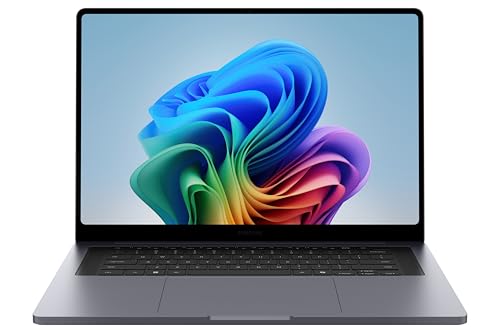
Samsung Galaxy Book6 Ultra (16in)
Lighter at 4.17 lb with a 16-inch AMOLED touchscreen, an RTX 5070 and very long battery. The keyboard is shallow, and memory tops out at 32GB.
MacBook Pro 16 (M5 Pro): frequently asked questions
Is the MacBook Pro 16 M5 Pro worth upgrading to from an M4 Pro?
Usually not, and I'd keep the money. Notebookcheck measured about 20% more CPU speed, and Digitec found graphics only 9% faster on average. The chassis, screen and ports are the same, and battery slipped slightly. From an M2 Pro, M1 Pro or Intel MacBook Pro, the upgrade is easy to justify, since exports and builds get much faster.
How long does the MacBook Pro 16 M5 Pro battery last?
A very long time for a laptop this fast. Notebookcheck measured 18h 32min of Wi-Fi browsing at 150 nits and 6h 36min at full brightness, and Expert Reviews got 19h 47min of video at 170 nits. Apple claims up to 24 hours of video streaming. Heavy exports drain it faster, but it outlasts most performance laptops.
Does the MacBook Pro 16 M5 Pro come with a charger?
Yes, in the US: Apple lists a 140W USB-C adapter and a 2 m USB-C to MagSafe 3 cable, and Notebookcheck's German unit had the same adapter. The UK box isn't confirmed. Under full load the 140W adapter can't keep up, so a 180W one helps if you render plugged in for hours. It also charges from any USB-C PD adapter of 94W or more.
Does the MacBook Pro 16 screen use PWM flicker?
Yes, it does. Notebookcheck lists PWM flicker and slow pixel response as cons of the mini-LED panel. Most people won't notice, but if dimmed screens give you headaches or eye strain, try one in a store first. OLED rivals like the Zephyrus G16 and Galaxy Book6 Ultra also flicker, so switching to Windows doesn't fully avoid it.
Is 24GB enough on the MacBook Pro 16 M5 Pro?
For most pro work, yes, and it's the model I'd buy. BestLaptop.deals recommends the base 24GB model for programming, audio and lighter creative jobs. Memory is soldered, so choose 48GB or 64GB at checkout if you run large local AI models or very big video and 3D projects. You can't add more later, and storage can't be upgraded either.
Should I get the M5 Pro or M5 Max in the 16-inch?
Get the M5 Pro unless video exports, 3D or heavy AI are your daily work. BestLaptop.deals says the Max suits those jobs and costs about an hour of battery. It also notes that an older Max chip can beat the newer Pro in video exports, because of the Max's extra media engines. For most buyers, the Pro is plenty.
Can you game on the MacBook Pro 16 M5 Pro?
Yes, light and mid-weight titles, but an RTX laptop does it better. Notebookcheck measured Baldur's Gate 3 at 83.8 fps at 1080p Ultra, close to RTX 5070 laptops, but Cyberpunk 2077 at 57.8 fps against 98.3 on one. BestLaptop.deals notes macOS still lacks game developer support, so serious gamers should look at the Blade 16 or Zephyrus G16.
Is the MacBook Pro 16 too heavy to carry every day?
For many people, yes, and owners say so. It weighs 4.7 lb and is 0.66 in thick, and about six MacRumors owners call it bulky and keep a smaller laptop for travel. If you carry it daily, the MacBook Air 15 at 3.3 lb or the Galaxy Book6 Ultra at 4.17 lb are easier on the shoulder.