

Asus ROG Zephyrus G16 (2026) Review: Is This the Gaming Laptop to Carry Every Day?
Most RTX laptops die by lunch. This Zephyrus G16 2026 review covers its 12-hour battery, frame rates, fan noise, the brick and which GPU to buy.
Affiliate disclosure: As an Amazon Associate, OASTHAR earns from qualifying purchases.
OASTHAR score
- Design and Build9.0
- Display8.9
- Battery Life8.8
- Performance8.3
- Value7.3
The verdict
If you want one gaming laptop that rides in your bag every day and still lasts a workday away from the wall, I'd buy the Zephyrus G16 (2026). It weighs 4.3 lb, its OLED measured brighter than most laptop OLEDs, and two labs got 12 to 14 hours of web browsing from it. If frame rates come first, the Razer Blade 16 with an RTX 5090 is faster in most lab charts, and thicker laptops are faster still.
The catch is everything around the screen. The RAM is soldered, the RTX 5080 runs at 135W in this thin body, gaming on battery lasts about an hour, and the 250W brick adds 1.3 lb to the bag. If you own the 2025 G16, I'd keep it unless battery life bugs you daily. If you game at a desk and never unplug, skip it for the MSI Katana 15 HX.
Here's how I got there: I read the lab tests side by side, and where they disagree, I say which I trust.
Buy it ifGamers, students and creators who carry one RTX laptop everywhere and need it to last a workday unplugged.
Reasons to buy
- Lasts a workday unplugged: Notebookcheck measured 12h 21min of Wi-Fi browsing, Tom's Guide 13h 45min.
- Bright 240Hz OLED that matches the Blade 16's panel, with accurate color out of the box.
- At 4.3 lb in aluminum, it's lighter than the Blade 16 and far lighter than the Katana 15 HX.
- Fans are calmer than on the 2025 model, and the speakers are some of the best on a Windows laptop.
Skip it ifSkip it if frame rates matter most; get the Razer Blade 16. Desk gamers get more for less with the MSI Katana 15 HX.
Reasons to avoid
- Games run 18 to 29% slower than on the RTX 5090 Blade 16, and Manual mode barely helps.
- Soldered RAM, a heavy 250W brick and about an hour of gaming on battery.

Prices and availability can change. Details
Product prices and availability are accurate as of the date/time indicated and are subject to change. Any price and availability information displayed on Amazon.com at the time of purchase will apply to the purchase of this product.
What the Zephyrus G16 (2026) is, and who it suits
Tired of gaming laptops that need a wall socket by lunch? That's the problem this one solves best. The 2026 Zephyrus G16 is Asus's thin 16-inch gaming laptop with Intel's new Core Ultra 9 386H chip, a 240Hz OLED screen and a choice of an RTX 5070 Ti or RTX 5080 graphics card.
Those four numbers are the whole pitch, and the measured ones come from Notebookcheck. It's light for this much graphics power, the battery lasts a day of classes when the Nvidia chip sleeps, and the screen is brighter than most OLED laptops manage. The last number is the real trade: 135W is less power than thicker gaming laptops feed the same RTX 5080, so it plays games slower than they do.
The outside is the same aluminum body as the 2025 model, with HDMI 2.1, Thunderbolt 4, two USB-A ports and an SD card reader.
Picture a design student with a 9 a.m. lecture, an afternoon in the library and a Baldur's Gate 3 session at a friend's place after dinner. The laptop handles the first two on battery and the third plugged in. That's who I'd point toward it: someone who carries a gaming laptop every day, between classes, offices and trains, not someone who leaves one on a desk. If yours never leaves the desk, a thicker laptop gives you more frames for the money, and the next section shows which.
Who should buy the Zephyrus G16 (2026), and who should skip it?
Start with where the laptop will spend its week, because that changes the answer more than any spec sheet.
- Get the Zephyrus G16 if you carry it daily, work unplugged for hours and game in the evening plugged in. Among the thin RTX 5080 and 5090 laptops in the lab charts, none browses longer.
- Pick the RTX 5070 Ti model if you play at 1600p with upscaling and care more about battery and cost than the last few frames. No lab has benchmarked it yet, so that call rests on its lower power limit.
- Get the Razer Blade 16 if you want the fastest thin 16-inch, Thunderbolt 5 and a third USB-A port, and you can live with loud fans in its fast mode and 0.4 lb more.
- Get the MSI Katana 15 HX if the laptop lives on a desk. It's heavier plastic at 5.3 lb, but its RAM and storage can be upgraded and it costs far less.
- Get the Galaxy Book6 Ultra if you mostly edit photos or video and game lightly. Its RTX 5070 runs at 90W, but its battery runs far longer in video tests.
- Get the MacBook Pro 16 if your work is creative apps and you don't need Windows games, since only games built for Apple silicon run well there.
- Keep your 2025 G16 if its battery life doesn't bother you, because gaming speed barely moved at 1600p.
Habits matter here too. Say you play Cyberpunk 2077 most nights at a desk with a monitor. You're paying for thinness you never use, and the Katana or Blade fits better. Now say you edit photos in a cafe all afternoon and squeeze in a match on the bus. That's the day the G16 was built for, and I'd buy it without much worry.
What changed from the 2025 Zephyrus G16, and should owners upgrade?
Same body, new insides. Asus kept the chassis, the 90Wh battery and the 4.3 lb weight, and changed the chip, the graphics power and the screen.
| Feature | Zephyrus G16 (2025) | Zephyrus G16 (2026) |
|---|---|---|
| Processor | Core Ultra 9 285H | Core Ultra 9 386H, about 20% faster, per Notebookcheck |
| RTX 5080 power, Turbo | 120W | 135W, about 20% faster graphics, per Notebookcheck |
| Wi-Fi battery at 150 nits | 9 h | 12h 21min, 38% longer |
| SDR brightness | 398 nits | 515 nits |
| Cyberpunk 2077, 1600p RT Ultra | 28 fps | 31 fps, per PC Gamer |
| Fan behavior | Pulsing fans and a high-pitched whine | Whine gone, steadier fans |
| Chassis, weight, battery size | 4.3 lb, 90Wh | Unchanged, with a stiffer deck and easier hinge |
Battery, brightness and speed gains come from Notebookcheck's comparison with the 2025 model; the frame rates and fan notes come from PC Gamer, which tested both.
Read the table from the bottom up and the story is clear. The battery and the screen are the big wins. Gaming moved much less: PC Gamer found the 2026 model ahead at 1080p, where the faster processor matters, but only a few frames ahead at 1600p, where the graphics card does the work and the extra 15W is all it gets.
The fan fix is a quieter win you'd notice daily. PC Gamer called the old model's habit of spinning up, down and up again, with a whine over the top, irritating over a full working day, and says the 2026 model has none of it.
How do the design, keyboard and ports hold up?
Worried that thin means flimsy? It doesn't here. The CNC aluminum body weighs 4.30 lb and measures 0.59 to 0.70 in thick, per Asus's spec page, and Notebookcheck weighed its unit at 4.24 lb. PC Gamer calls it one of the best looking and feeling portable 16-inch gaming laptops, with a look closer to a business laptop than a gaming one.
The keyboard is where opinions split, and it's worth knowing before you buy. Tom's Guide still calls it disappointing, and PC Gamer prefers the Razer Blade 16's longer key travel. Notebookcheck, on the other hand, rates it very comfortable. Asus did reinforce the deck against flex and added anti-fingerprint keycaps. The backlight is a single zone, so no per-key lighting. If you type for a living, try one in a store first.
Ports are good for a thin gaming laptop. You get Thunderbolt 4, a 10Gbps USB-C port, two USB-A ports, HDMI 2.1, a UHS-II SD reader and a headphone jack. Notebookcheck measured the card reader at 181 MB/s, which helps if you offload camera footage. What's missing: Thunderbolt 5 and Ethernet, which isn't in Asus's port list. Say you plug into a wired network at a LAN party or an office desk. You'll want a USB Ethernet adapter in the bag.
The speakers are a genuine highlight. Notebookcheck rates them excellent and measured 85.9 dB, louder than the Blade 16, and Tom's Guide found them loud enough to hear over the fans. There are two M.2 slots for a second drive later, but the memory is soldered. Compared with the Blade 16, you give up Thunderbolt 5 and a USB-A port, and you save almost half a pound.
How long does the battery last, and what charger comes in the box?
Here's the headline: an RTX 5080 gaming laptop that browses for twelve hours or more. But conditions decide everything, so read the table before you plan a trip around it.
| Source | Test | Conditions | Result |
|---|---|---|---|
| Tom's Guide | Web browsing | 150 nits, RTX 5080 | 13h 45min |
| Notebookcheck | Wi-Fi web | 150 nits, RTX 5080 | 12h 21min |
| Notebookcheck | Wi-Fi web | Full brightness | 7h 24min |
| PC Gamer | PCMark 10 gaming | 50% brightness, Wi-Fi off | 117 min |
| Tom's Guide | PCMark 10 gaming | RTX 5080 | 55 min |
| Asus claim | Rating | 90Wh battery | No hour rating given |
So the split is huge. Browsing, documents and video calls run past a workday. Games drain it in one to two hours, and the two gaming results differ mostly in settings. Notebookcheck also found the graphics card held to 55W on battery, which cut Cyberpunk 2077 at QHD Ultra from 83.4 fps to 46.2 fps. That's playable, but not the experience you paid for.
Now the part that bites. The 250W brick uses a proprietary plug and weighs 1.3 lb, per Tom's Guide, which brings the carry weight to 5.6 lb. USB-C charging up to 100W works for light use, so a small USB-C charger can keep it alive on a work trip. Asus claims 0 to 50% in about 30 minutes with the big brick.
What's in the box? Asus's US page lists the 250W adapter but notes that charger inclusion varies by country, region and model, which is unusual fine print. Notebookcheck's European unit and The Week's Indian unit both came with it. I couldn't confirm any region that ships without one, so check the listing before you buy outside the US.
How good is the OLED screen, and does it flicker?
Coming from a dim gaming laptop screen? This one will surprise you. It's a 16-inch OLED at 2560 by 1600 with a 240Hz refresh rate, and the measured brightness is high for an OLED. Notebookcheck got 515 nits in standard content and 1,138 nits at HDR peaks. Tom's Guide measured 469 nits and 1,052 nits. Either way, it beats the 408 nits Tom's Guide measured on the Razer Blade 16.
Color is where the two labs part ways. Notebookcheck measured 91.7% of the DCI-P3 range and a Delta E of 1.5, which means colors land close to where they should straight out of the box. Tom's Guide measured 80.4% and noted that OLED results vary with test method. I trust the Delta E figure more for photo work, because it measures accuracy, not just range.
PC Gamer put it next to the Blade 16's OLED and found it hard to say which was better. Response time is 0.22 ms, per Notebookcheck, so fast games look sharp without smearing.
The surface is glossy, so a window behind you will show up in dark scenes, though Asus claims its coating cuts reflections. Say you game in a bright dorm room at noon. Angle the screen away from the window, as with every glossy OLED in this class.
For most buyers this is the best part of the laptop, for photo edits, HDR games or a film at night. The only buyers I'd steer away are the flicker-sensitive, and nobody has published a flicker test for its main rivals either, so seeing one in person beats guessing.
How fast is it in games, and how loud does it get?
Will it run your games at full detail? At 1080p, and at 1600p with upscaling, yes. Native 1600p with ray tracing is a struggle, and it trails the RTX 5090 Blade 16 clearly. Here's what the labs measured on the RTX 5080 model.
| Game and settings | Source | Zephyrus G16, RTX 5080 | Blade 16, RTX 5090 |
|---|---|---|---|
| Cyberpunk 2077, 1080p Ultra | Notebookcheck | 114.2 fps | 139.5 fps |
| Cyberpunk 2077, QHD Ultra | Notebookcheck | 83.4 fps | Not compared |
| Cyberpunk 2077, 1600p RT Ultra, upscaling and 2x frame gen | PC Gamer | 95 fps | 112 fps |
| Cyberpunk 2077, QHD RT Ultra, no DLSS | Tom's Guide | 30 fps | 42 fps |
| Baldur's Gate 3, 1080p Ultra | Notebookcheck | 154.7 fps | 202 fps |
| Shadow of the Tomb Raider, QHD Max | Tom's Guide | 95 fps | 133 fps |
The table says one thing clearly: plan on upscaling. With DLSS and frame generation, 95 fps at 1600p with ray tracing feels smooth. Without them, it's about 30 fps.
The reason it trails is power. The RTX 5080 gets 135W in Turbo mode. Manual mode lifts that to 160W, but PC Gamer gained only 4 fps with very loud fans and an 84 C graphics peak, and Notebookcheck saw it fall back to about 110W within 30 seconds. I'd ignore Manual mode.
Noise depends on the mode you pick. Notebookcheck measured 54.8 dB(A) in Turbo, 50.1 in Performance and 42.6 in Whisper while gaming, and the fans run constantly in Turbo even at idle. Heat stays off your hands: palm rests peaked at 34.4 C under stress. For work, the chip matches the Blade 16's in Cinebench, per PC Gamer, but the 24-core HX chip in the thicker Legion Pro 7i scored far higher. So use Performance mode for daily play and save Turbo for headphones.
What do owners report, and are there known issues?
Here's the honest answer first: I couldn't find a repeated owner complaint about the 2026 model. The owner threads that came up all covered the 2024 and 2025 G16, and I won't pretend complaints about older models are evidence for this one. Nobody has published a long-term owner pattern for the 2026 model yet.
What the labs found are trade-offs, not defects, each with its fix status.
- PWM flicker at 95% brightness and below, per Notebookcheck. It's how the panel dims. No fix confirmed.
- RTX 5080 held back by the thin chassis. Manual mode adds little and can't hold its power, per Notebookcheck and PC Gamer. By design, no fix confirmed.
- Short gaming on battery, 55 to 117 minutes, with the graphics card capped at 55W unplugged. By design, no fix confirmed.
- Fans always on in Turbo, even at idle, per Notebookcheck. Switch to Whisper or Performance for daily work. No fix confirmed.
- The 2025 model's fan whine is gone on the 2026 model, per PC Gamer. Fixed by the redesign.
That's a cleaner record than its main rival's. Owners of earlier Razer Blade 16s have a long-running complaint about laptops failing to sleep in a bag, which the Blade review covers. Even so, hibernating before a long bag ride is good practice for any gaming laptop. And keep the box until your return window closes, since a thin laptop's fan or coil noise is easiest to judge in your own room.
Which configuration should you buy, and how does it compare with its rivals?
Wondering whether the RTX 5080 is worth it over the RTX 5070 Ti? For most people, I don't think so. Asus gives the RTX 5070 Ti 125W in Turbo and 140W in Manual, against 135W and 160W for the RTX 5080, so the gap is smaller here than in thicker laptops. The catch is that no lab has benchmarked the RTX 5070 Ti version yet, so I can't put a frame-rate number on the difference. Buy the RTX 5080 only if you play demanding games at native 1600p.
Memory is the decision you can't undo. It's soldered, in 16, 32 or 64GB. I'd take 32GB for gaming and creative work, and 64GB only for big 3D scenes or local AI. Storage is easier: there's a free M.2 slot, so a 1TB model can grow later. The listing linked here is the RTX 5080 with 32GB and 2TB.
| Laptop | Graphics and power | Weight | Screen | Upgradable RAM |
|---|---|---|---|---|
| Zephyrus G16 (2026) | RTX 5070 Ti or 5080, up to 160W | 4.3 lb | 16-inch OLED, 240Hz | No |
| Razer Blade 16 (2026) | RTX 5070 Ti, 5080 or 5090, up to 175W | 4.71 lb | 16-inch OLED, 240Hz | No |
| MSI Katana 15 HX | RTX 5070, up to 115W | 5.3 lb | 15.6-inch QHD IPS-level, 165Hz | Yes, up to 96GB |
| Galaxy Book6 Ultra | RTX 5070 at 90W, or RTX 5060 | 4.2 lb | 16-inch AMOLED touch, 120Hz | No |
The table shows where each wins. The Blade 16 is faster and heavier. The Katana trades weight and screen quality for cost and upgrades. The Galaxy Book6 Ultra is lightest and lasts longest, but its 90W graphics card is a step down for games. If you only need light gaming, the Acer Swift 16 AI and the dual-screen Zenbook Duo use integrated Intel Arc graphics instead, and the Acer Nitro V 15 is the budget way into an RTX 5050.
Final verdict: buy, wait, or buy something else?
Will you regret buying a thin gaming laptop instead of a fast one? Not if it leaves your desk most days. For that buyer, I'd buy the Zephyrus G16 (2026). It lasts a workday browsing, it weighs 4.3 lb, its OLED is bright and accurate, and the fan whine that spoiled the 2025 model is gone. I'd pick the RTX 5070 Ti with 32GB unless you play at native resolution.
Wait, or keep what you have, if you own the 2025 G16 and mostly game plugged in, since frame rates barely moved at 1600p. PC Gamer and Tom's Guide both marked it down on cost, so sales may change the math.
Buy something else in four cases. If raw speed matters most, the Razer Blade 16 with an RTX 5090 beats it in most lab charts, and adds Thunderbolt 5, at the cost of 0.4 lb and loud fans in its fast mode. If the laptop sits on a desk, the MSI Katana 15 HX gives you an RTX 5070 and upgradable RAM for far less money, in a heavier plastic body. If you mainly edit photos and video and game lightly, the Galaxy Book6 Ultra lasts longer and weighs less. And if you don't need Windows games at all, the MacBook Pro 16 is quieter and lasts longer still, though it weighs 4.7 lb.
For students who game only now and then, a MacBook Air 15 at 3.3 lb or a MacBook Air 13 at 2.7 lb is far easier to carry, though neither runs most Windows games. And if you're tempted by a budget Arm laptop like the IdeaPad Slim 3x, know that some games and apps don't run on Arm chips at all. The G16 is the right call when you need real RTX power and real battery in one bag.
ROG Zephyrus G16 (2026) specs
- Chip
- Core Ultra 9 386H; RTX 5070 Ti (140W) or RTX 5080 (160W) max TGP
- Display
- 16-inch 2560x1600 OLED, 240Hz, 515 nits SDR (Notebookcheck)
- Battery
- 90 Wh; 12h 21min Wi-Fi web at 150 nits (Notebookcheck)
- Weight
- 4.30 lb (1.95 kg), 0.59 to 0.70 in thick
- Ports
- TB4, USB-C 10Gbps, 2x USB-A, HDMI 2.1, UHS-II SD, 3.5 mm jack
What the experts found
 Notebookcheck
A noticeable step up on the 2025 model thanks to a brighter OLED, the more efficient Panther Lake chip and higher GPU wattage, with excellent speakers and input devices, held back by an RTX 5080 that can't use its full potential, soldered RAM, PWM and no Thunderbolt 5.
The 2026 model fixes battery life and hits harder in CPU and GPU work, with a sleek, light design and a bright display, but keeps the disappointing keyboard and heavy proprietary brick and costs far too much.
A fantastic, super-portable 16-inch gaming laptop with a stunning OLED, better performance and fixed fan noise, but priced above a near-identical Razer Blade 16, which it calls the better of the two.
Also consider

Razer Blade 16 (2026)
Same Core Ultra 9 386H with up to an RTX 5090, Thunderbolt 5 and three USB-A ports. It's faster in most lab charts, but heavier at 4.71 lb and loud in its fast mode.

MSI Katana 15 HX (B14W)
An RTX 5070 and a 16-core HX chip for far less money, with RAM and storage you can upgrade. It's a 5.3 lb plastic body with short battery life, so it suits a desk.
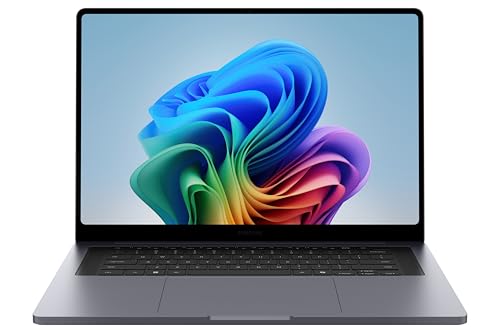
Samsung Galaxy Book6 Ultra (16in)
A 4.2 lb body with a bright AMOLED touchscreen and much longer video battery. Its RTX 5070 runs at 90W, so it's a step down for demanding games.
ROG Zephyrus G16 (2026): frequently asked questions
How long does the Zephyrus G16 (2026) battery last?
For browsing and office work, a full day. Notebookcheck measured 12h 21min of Wi-Fi browsing at 150 nits and Tom's Guide 13h 45min. At full brightness Notebookcheck's run fell to 7h 24min. Gaming is a different story: 55 to 117 minutes in PCMark 10's gaming test, with the graphics card held to 55W on battery. Pack the brick for game nights.
Is the Zephyrus G16 (2026) better than the Razer Blade 16?
It depends on what you want most. The Blade 16 with an RTX 5090 is faster in most lab charts and adds Thunderbolt 5, and PC Gamer prefers its keyboard. The Zephyrus is lighter at 4.3 lb against 4.71 lb, browses a little longer in the same lab tests and has louder speakers in Notebookcheck's test.
Should I get the RTX 5070 Ti or the RTX 5080 Zephyrus G16?
Most buyers should take the RTX 5070 Ti. Asus gives it 125W in Turbo against 135W for the RTX 5080, a small gap in this thin chassis. No lab has benchmarked the RTX 5070 Ti version yet, so the exact difference isn't known. Pay for the RTX 5080 only for demanding games at native 1600p, and spend the difference on 32GB.
Can you upgrade the RAM or storage in the Zephyrus G16 (2026)?
The RAM, no. It's soldered in 16, 32 or 64GB, so choose at checkout, and 32GB suits most gaming and creative work. Storage, yes. There are two M.2 PCIe 4.0 slots, with one free on reviewed units, and Asus says only single-sided drives fit. Adding a second SSD later is the easy way to grow; a 1TB model is a safe start.
Does the Zephyrus G16 (2026) charge over USB-C?
Yes, up to 100W, which is enough for light work like browsing and documents, so a smaller charger can carry you through a trip. For gaming you need the 250W brick, which uses a proprietary plug and weighs 1.3 lb per Tom's Guide. Asus claims the brick charges from 0 to 50% in about 30 minutes
Is the Zephyrus G16 (2026) loud when gaming?
In Turbo mode, yes. Notebookcheck measured 54.8 dB(A) in Cyberpunk 2077, and the fans stay on in Turbo even at idle. Performance mode drops that to 50.1 dB(A) and Whisper to 42.6, with lower frame rates. PC Gamer confirms the 2025 model's pulsing fans and high-pitched whine are gone. Headphones still help in Turbo mode.
Does the Zephyrus G16 (2026) OLED screen flicker?
It uses PWM dimming. Notebookcheck detected flicker at 1440 Hz at 95% brightness and below, and says most people won't notice it. If dimmed OLED screens give you headaches, see one in person first. Otherwise the panel is excellent: about 515 nits in standard content, over 1,100 nits in HDR and accurate color, with a Delta E of 1.5.
Does the Zephyrus G16 (2026) come with a charger in every country?
The US spec page lists a 250W adapter, but Asus notes that charger inclusion varies by country, region and model. Notebookcheck's European unit and The Week's Indian unit both shipped with the brick, and no region was confirmed to ship without one. If you buy outside the US, check the listing's box contents before you order.