

Asus Zenbook Duo (2026) Review: Is a Second Screen Worth the Weight?
Two 14-inch OLEDs and a 99 Wh battery: this Zenbook Duo review covers battery on one and two screens, the box by region and which chip to buy.
Affiliate disclosure: As an Amazon Associate, OASTHAR earns from qualifying purchases.
OASTHAR score
- Display9.4
- Battery Life9.0
- Performance8.8
- Design and Build8.5
- Value7.6
The verdict
If you work with two monitors at your desk and want that setup everywhere, I'd buy the Zenbook Duo (2026), and I'd buy the Core Ultra X9 model with 32GB. If one screen is enough, skip it, because the weight and cost buy you nothing. It pairs two sharp 144Hz OLED touchscreens with a fast chip that keeps its speed on battery, and Notebookcheck measured 17 hours of browsing on one screen.
The catch is the bulk and the fine print. At 3.64 lb with the keyboard it's heavy for a 14-inch laptop, the glossy screens reflect in bright rooms, memory is soldered, and a charger may not be in the box outside the US. One owner reports the keyboard dropping its Bluetooth link. If you own a 2025 Duo that works, keep it. Skip it for RTX-level GPU work and get a Galaxy Book6 Ultra; skip it for a single big screen and get a Swift 16 AI.
Buy it ifPeople who already work with two monitors and want the same setup on trains, in hotels and at client offices.
Reasons to buy
- Two 14-inch 3K 144Hz OLED touchscreens that are bright and color accurate.
- Long battery: 17h 2min of Wi-Fi browsing on one screen in Notebookcheck's run.
- Arc B390 graphics on the X9 handle 4K editing and 1080p games in the mid 40s fps.
- Thunderbolt 4 on both sides, plus HDMI, USB-A, a stylus and a sleeve in the US box.
Skip it ifSkip it if one screen is enough; the Swift 16 AI gives one bigger OLED and a microSD reader.
Reasons to avoid
- Heavy at 3.64 lb with a glossy finish, so it suits a bag and a table more than a lap.
- Memory is soldered, and outside the US the box may have no charger.

Prices and availability can change. Details
Product prices and availability are accurate as of the date/time indicated and are subject to change. Any price and availability information displayed on Amazon.com at the time of purchase will apply to the purchase of this product.
What is the Zenbook Duo (2026), and who is it for?
Ever wished you could pack a second monitor in your bag? That's the whole pitch. This is a 14-inch Windows laptop with two full OLED touchscreens stacked on a hinge, plus a keyboard that clips magnetically onto the lower screen or comes off and works over Bluetooth.
Those numbers come from Asus's spec page and, for the battery run, from Notebookcheck, which measured it on the top Core Ultra X9 388H model. So you get two big, sharp screens, a battery that still lasts past a work day on one of them, and a weight closer to a 15-inch laptop than a 14-inch one.
And the stack can sit in four ways. With the keyboard on top of the lower screen, it's a normal clamshell. Pull the keyboard off and prop the kickstand, and you get two landscape screens, one above the other. Turn it on its side for two portrait screens, or lay it flat to share with someone across the table. It won't fold into a tent.
Who is it really for? Picture a data analyst on a regional train, spreadsheet on the top screen and the team chat on the bottom, with no room for a portable monitor on the tray. Writers with research open, coders with docs beside the editor and photographers with tools below the image get the same win.
If one screen is enough, though, a regular 14-inch laptop makes more sense for you.
Who should buy the Zenbook Duo, and who should skip it?
Start with one honest question: how often do you plug into a second monitor today? Every day means keep reading. Never means this probably isn't your laptop.
- Get the Zenbook Duo if you already work with two screens at a desk and want the same setup in a hotel, on a train or at a client office.
- Get it with the Core Ultra X9 chip if you edit photos or 4K video, or want light gaming, since that model has the Arc B390 graphics every hands-on test used.
- Get the Swift 16 AI if you want one big 16-inch OLED, the same Arc B390 class graphics, a microSD reader and less bulk to carry.
- Get the XPS 13 if you mostly type, browse and take calls, and a 2.2 lb laptop matters more than a second screen.
- Get the Galaxy Book6 Ultra if you need a real Nvidia RTX GPU for 3D, AI or gaming work, and a 16-inch AMOLED is enough screen.
- Skip it if you need upgradable memory, an SD card slot or a matte screen for bright rooms.
Say you write reports from a café twice a week and spend the rest at a desk with a monitor. You'd carry a heavier bag every day for a benefit you use twice. That's a bad trade, and a MacBook Air 13 or an XPS 13 would serve you better.
Now flip it. Say you edit wedding photos in hotel rooms between shoots. A second screen for the Lightroom panels is the thing you miss most on the road, and this is the rare laptop that gives you that without a cable or a stand. That's the buyer I'd point straight at it.
So the decision is about habit, not the chip. Use both screens most days, and few laptops compete.
What changed from the previous Zenbook Duo?
Own a 2024 or 2025 Duo and wondering if this one is worth the switch? The idea is the same, two screens and a detachable keyboard, but Asus rebuilt the body and moved to Intel's Panther Lake chips.
| Feature | Zenbook Duo (2025) | Zenbook Duo (2026) |
|---|---|---|
| Graphics | Intel Arc 140T | Arc B390 on the X9, about 70% faster per Notebookcheck |
| Body and hinge | Earlier housing, wider gap | New housing, screens sit closer together |
| Kickstand | Built in | Built in, more stable per Notebookcheck |
| Screens | OLED touch | Improved 144Hz OLED touch |
| Battery life | Long | Improved, 17h 2min Wi-Fi web on one screen |
| Fan noise at full power | 39.8 dB(A) | 45.9 dB(A) |
The graphics gain, the fan readings and the build notes come from Notebookcheck, which reviewed the 2026 model against the one before it. Battery and screen sizes for the older model weren't confirmed in the reviews read, so the table doesn't guess at them.
Graphics is the big jump. The Arc B390 in the X9 model runs modern games at 1080p in the mid 40s and handles 4K editing, which the older Duo couldn't do as well. The new housing also puts the screens closer, so a window spanning both looks less broken.
There's one step back. At full power the fans are louder than before, 45.9 against 39.8 dB(A) in Notebookcheck's readings. In daily work you won't hear it, since the balanced mode runs at 39 dB(A) and the quiet mode at about 32.
Most of what makes the Duo useful was already there. This generation is faster, steadier and a little louder when pushed.
How do the design, keyboard, kickstand and ports work in real life?
Worried a laptop with two screens and a loose keyboard feels fragile? The build is the part that should put you at ease. The body is Asus's ceraluminum, and Notebookcheck found no twisting or creaking even when it pushed on it on purpose. The kickstand folds out of the back and, per the same outlet, feels steadier than before.
The keyboard has 1.7 mm of travel and docks on magnets and pogo pins, which also charge it. PCWorld found it flat and a little spongy, while Notebookcheck and Fstoppers liked typing on it. I'd side with the majority, but if you type all day, try one in a store first. PCWorld lists more than 11 hours of keyboard battery off the dock, a rating it didn't check.
What's in the box matters here too. The Asus US page lists a stylus with its own wireless charger and a sleeve. So the pen and the case aren't extra spending, at least in the US.
Ports are generous. You get a Thunderbolt 4 port on each side, so you can charge from whichever side faces the outlet, plus USB-A, HDMI 2.1 and a headphone jack. There's no SD card reader, so photographers still need a small adapter.
Now the catches. In portrait mode, PCWorld found the laptop less stable and one side's ports blocked, so plan cables before you set it up that way. At 3.64 lb with the keyboard and up to 0.92 in thick, it's heavier than a MacBook Air 15 at 3.3 lb, so you'll feel it on a long walk.
Picture an airport gate with no table. In clamshell mode it works on your knees, but the two-screen layouts need a flat surface.
How long does the battery last on one screen and on two?
Afraid two OLED screens will drain it by lunch? On one screen, honestly, no. On two, it's still a full work day for light tasks, as long as you keep brightness sensible. Every run below used the X9 388H.
| Source | Screens | Conditions | Result |
|---|---|---|---|
| Notebookcheck | One | Wi-Fi web, 150 nits | 17h 2min |
| Notebookcheck | Two | Wi-Fi web, 150 nits | About 11h 53min |
| Notebookcheck | One / two | Wi-Fi web, max SDR brightness | 11h 4min / about 8h 9min |
| Notebookcheck | One | 1080p video, 150 nits | 21h 21min |
| Notebookcheck | One | Heavy load, max brightness | 2h 18min |
| PCWorld | One / two | Video, fixed 60Hz | 22h 15m / 13h 29m |
| PCWorld | One / two | Procyon Office, fixed 60Hz | 13h 56m / 8h 49m |
| Fstoppers | One | Mixed photo work, six months | 8 to 10 h, 4 to 5 h heavy |
Read it this way: the second screen costs roughly a third of your runtime, and full brightness about as much again. Fstoppers' figures, from months of raw editing, are the realistic ones for heavy users.
Say you fly coast to coast with a spreadsheet up top and email below. PCWorld's two-screen Office run of almost nine hours says you'll land with power to spare.
For scale, Notebookcheck measured 16h 11min on the MacBook Air 13 M5, so one-screen runtime sits in the same range.
Now the box, where regions differ. The Asus US spec page names a 100W USB-C adapter in the specs, but its list of included items names only the stylus and the sleeve, so I can't confirm a US charger from that page. Notebookcheck's German unit shipped with no charger at all. Fstoppers lists an adapter without naming the region, and a UK box wasn't confirmed.
Are the two OLED screens bright and comfortable enough?
Two screens are only worth carrying if both are good. These are. Each is a 14-inch 2880 by 1800 OLED touchscreen at up to 144Hz, with pen support and the deep blacks OLED is known for.
So what does that mean for you? Brightness near 500 nits is enough for an office or a bright café, and PCWorld measured a similar 480 nits per panel. Color is accurate enough that Fstoppers trusted it for culling and first-pass grading, though it isn't a reference monitor for final client delivery. HDR reaches nearly 1,000 nits only with the ambient light sensor on, and about 640 without it.
Smoothness changes on battery. PCWorld notes the refresh rate drops on battery to save power and only goes to 144Hz on mains, which is a fair trade given the runtime above.
Two catches. First, glare. PCWorld still found the panels too glossy despite the anti-reflection coating, while Fstoppers rarely noticed reflections even with a window behind the desk. I believe both: it depends on your room. Next to a sunny window, you'll see yourself.
Second, flicker. Notebookcheck measured PWM at 720Hz. Above 70% brightness the panel switches to DC dimming, and below that you need to turn on the flicker-free setting in MyAsus. If dim OLED screens give you headaches, switch that on in the first hour.
For comparison, the Swift 16 AI gives you one larger 16-inch 120Hz OLED instead of two smaller ones.
How fast is it, and does it get hot or loud?
Will two screens slow it down? No. The Core Ultra X9 388H is one of the fastest thin-laptop chips in this batch, and Notebookcheck found it runs at the same speed on battery as on the charger, which plenty of Windows laptops can't say.
So it's more than an office machine. In Notebookcheck's game runs at 1080p, Baldur's Gate 3 on Ultra averaged 44.6 fps and Battlefield 6 hit 62 fps on Low. Assassin's Creed Shadows managed 34 fps on Low, so the newest heavy games need low settings. Fstoppers handled raw editing with AI masking and denoise quickly and quietly, plus 4K editing and export, but says 8K timelines and big focus stacks belong on a machine with a dedicated GPU.
That's where the line sits. If your work needs an Nvidia GPU, the Galaxy Book6 Ultra with its RTX 5070, or a gaming machine like the Zephyrus G16 or Blade 16, is the better tool. The Duo's Arc B390 is strong for integrated graphics, not a replacement for those.
Now heat and noise. In daily work it stays cool and near silent; PCWorld found it totally quiet in Balanced mode. Under long exports, Fstoppers heard the fans spin up and saw the chip reach the high 90s C to hold its speed, without throttling that bothered it. Notebookcheck measured 44.3 C on the bottom at full load, so keep it off your lap during a long render.
PCWorld's sample failed a sustained GPU stress test, while Notebookcheck saw GPU speed hold steady, so treat long GPU loads as likely fine, not guaranteed.
Bottom line: for office work, editing and light gaming, it's quick and calm. For hours of GPU work, buy a laptop with an RTX chip.
What do owners report, and are there known problems?
Here's the part spec sheets never mention. The issue to know about is the keyboard's wireless link. On Microsoft's Q&A forum, one owner of the 2026 Duo reports that the keyboard drops its Bluetooth connection after every dock and undock and needs re-pairing each time. Driver checks, power settings, a full Windows reset and a support tip didn't fix it, and three other users marked the same question.
How worried should you be? That's a small sample, not a proven pattern. Fstoppers used its keyboard detached for six months and says it stayed connected and pairing never crossed its mind. So I'd call it a risk worth checking in your return window, not a reason to skip.
The latency point needs a word. Notebookcheck found slight DPC latency issues with the launch BIOS and drivers, so it isn't ideal for real-time audio work like live recording. For music producers, that's worth checking after updates.
The software quirks come from PCWorld: the five-finger gesture for spreading windows worked only some of the time, and the ScreenXpert overlay was hard to disable. Annoyances, not deal breakers.
So in your first week, dock and undock the keyboard a dozen times and turn on flicker-free dimming. If the keyboard drops every time, return it.
And the reassuring part: across six months of daily editing, Fstoppers reported no failures at all. That's the longest stretch of real use I found, and it counts for a lot.
Which Zenbook Duo configuration should you buy, and how does it compare?
Five chip options for one laptop? Pick by graphics, not by name. Asus lists the Core Ultra X9 388H, X9 378H, X7 358H, Core Ultra 9 386H and Core Ultra 7 355. Every hands-on test used the X9 388H with Arc B390 graphics, and Notebookcheck warns the 386H model has a much weaker graphics chip.
So for photo, video or games, stick with an X-series chip. The US Amazon listing is the X9 378H, whose graphics core count I couldn't confirm.
Memory comes in 16GB or 32GB and is soldered, so you can't add more later. With windows across two screens, I'd buy 32GB. Storage is easier: 1TB or 2TB, plus a spare M.2 slot that Notebookcheck found behind a hatch under the kickstand.
| Laptop | Screen | Chip and graphics | Memory | Weight | Ports |
|---|---|---|---|---|---|
| Zenbook Duo (2026) | Two 14-inch 3K 144Hz OLED | Core Ultra X9 388H, Arc B390 | 16GB or 32GB, soldered | 3.64 lb | 2 Thunderbolt 4, USB-A, HDMI |
| Swift 16 AI | 16-inch 3K 120Hz OLED | Core Ultra X7 or X9, Arc B390 | 16GB or 32GB, soldered | About 3.4 lb | 2 Thunderbolt 4, 2 USB-A, HDMI, microSD |
| XPS 13 | 13.4-inch 2.5K 120Hz IPS | Core 5 320 or Core Ultra 7 355, Intel Graphics | 8GB to 32GB, soldered | 2.2 lb | 2 USB-C, no headphone jack |
| Galaxy Book6 Ultra | 16-inch AMOLED 120Hz | Core Ultra, RTX 5060 or 5070 | 32GB, soldered | About 4.2 lb | HDMI, USB-A, SD slot |
Take this from the table: the Duo is the only one with two screens, and it pays in weight. The Swift 16 AI trades the second screen for size and a microSD reader, the XPS 13 for lightness, and the Galaxy Book6 Ultra adds an RTX GPU at more weight.
On a tighter budget, the OLED OmniBook 5 14 and Swift 14 AI last long on battery, but their Snapdragon chips can't run every app or game.
My pick: X9 chip, 32GB, 1TB, then add storage later if you need it.
Final verdict: should you buy the Zenbook Duo (2026)?
Will you use the second screen most days? That's the only question that really decides it. If yes, buy it. Two excellent 144Hz OLED screens, a fast X9 chip that holds its speed on battery, and runtimes that beat most single-screen laptops make it the best dual-screen laptop I can point you to.
I'd buy the Core Ultra X9 with 32GB and 1TB. Skip the Core Ultra 9 386H model if you care about graphics, and check the charger situation if you're buying outside the US.
Wait if you own a 2025 Duo that works. The new graphics and steadier stand are nice, but the core experience is the same. And there's no sign of a newer Duo announced, so there's no reason to hold off if you're coming from a single-screen laptop.
Buy something else in four cases. If you want one big screen, a microSD reader and less weight, the Swift 16 AI is the better call. If you want the lightest everyday laptop for writing and calls, the XPS 13 at 2.2 lb fits that job. If your work needs an RTX GPU for 3D, AI or games, the Galaxy Book6 Ultra is the stronger machine. And if you're happy in macOS and don't need two screens, a MacBook Air 15 or MacBook Pro 16 makes more sense, with the Pro holding speed through long renders.
Picture yourself six months from now. If you see two screens open on a train table, a hotel desk or a client's meeting room, this laptop pays for its weight every day. If you see it closed in clamshell mode, you've bought a heavy 14-inch laptop.
Zenbook Duo (2026) specs
- Chip
- Intel Core Ultra X9 388H, Arc B390 (cheaper chips get weaker Arc)
- Display
- Two 14-inch 2880x1800 OLED touch, 144Hz, 500 nits
- Battery
- 99 Wh; 17h 2min Wi-Fi web on one screen (Notebookcheck)
- Weight
- 3.64 lb (1.65 kg) with keyboard, 0.77 to 0.92 in thick
- Ports
- 2x Thunderbolt 4, USB-A 10Gbps, HDMI 2.1, 3.5 mm jack
What the experts found
 Notebookcheck
The best dual-screen convertible on the market and worth its price: fast, accurate 144Hz OLEDs, long runtimes and stable speed, if you accept the extra bulk, soldered RAM and PWM flicker.
An almost perfect productivity laptop: two flexible OLED screens, Panther Lake speed and excellent battery life, held back by an average keyboard and a little extra weight. Editors' Choice.
After six months of photo and video work, the two screens earned their place for anyone who runs two monitors or judges images critically; single-screen users should buy a lighter Zenbook 14 OLED.
Also consider

Acer Swift 16 AI (SF16-71T, 2026)
One 16-inch 3K 120Hz OLED, Arc B390 class graphics on X7 or X9 chips, two USB-A, HDMI and a microSD reader, at about 3.4 lb. Fans get loud under heavy load.

Dell XPS 13 (2026)
Just 2.2 lb with a sharp 2.5K 120Hz touchscreen and long battery, but the Core 5 320 and base 8GB limit it to everyday work, and it has only two USB-C ports.
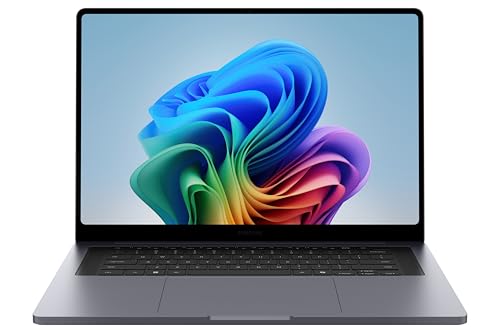
Samsung Galaxy Book6 Ultra (16in)
A 16-inch AMOLED, up to an RTX 5070 and an SD slot in about 4.2 lb. It suits 3D, AI and gaming work the Duo's integrated graphics can't match.
Zenbook Duo (2026): frequently asked questions
Does the Asus Zenbook Duo (2026) come with a charger?
It depends on where you buy. Asus's US spec page lists a 100W USB-C adapter in the specs but names only the stylus and sleeve as box items, so a US charger isn't confirmed there. Notebookcheck's German unit had no charger. Fstoppers lists one in its box without naming the region. Check the retailer's listing before you pay.
How long does the Zenbook Duo battery last with both screens on?
Notebookcheck measured about 11h 53min of Wi-Fi browsing at 150 nits with both screens on, against 17h 2min on one. PCWorld got 13h 29m of video and 8h 49m of office work on two screens. At full brightness on both, Notebookcheck's run fell to about eight hours, so dim the second panel when you can.
Can the Zenbook Duo screens fold into tent mode?
No. PCWorld confirms the screens can't fold back into a tent. You get four layouts instead: clamshell with the keyboard over the lower screen, two stacked landscape screens on the kickstand, two portrait screens side by side, and flat for sharing across a table. Portrait mode blocks one side's ports and felt less stable to PCWorld, so plan your cables and use it on a steady table.
Is the Zenbook Duo keyboard good to type on?
Most hands-on testers liked it. It has 1.7 mm of travel and docks on magnets that also charge it. Notebookcheck found practically no flex and Fstoppers was happy over six months, but PCWorld found it flat and spongy. One owner reports Bluetooth drops after docking, so dock and undock it a few times early in your return window.
Can you upgrade the RAM or storage on the Zenbook Duo?
Memory, no: the 16GB or 32GB is soldered, so buy 32GB if you plan to keep many windows open across both screens. Storage, yes. Notebookcheck found one M.2 2280 slot behind a hatch under the kickstand, so you can buy 1TB now and add or swap in a larger drive later without opening the whole case.
Which Zenbook Duo processor should I buy?
Choose an X-series chip. Every hands-on test used the Core Ultra X9 388H with Arc B390 graphics, and Notebookcheck says the Core Ultra 9 386H model has a much weaker graphics chip. The US Amazon listing uses the X9 378H, whose graphics core count I couldn't confirm, so check it if gaming or editing matters.
Does the Zenbook Duo screen flicker?
It uses PWM dimming. Notebookcheck measured 720Hz flicker, with DC dimming above 70% brightness and a flicker-free mode below that only through the MyAsus app. If dim OLED screens give you eye strain or headaches, turn that setting on right away and keep brightness above 70% where you can. Most people won't notice it at all.
Can the Zenbook Duo play games?
Yes, lighter ones and some modern titles at low settings. Notebookcheck measured 47.7 fps in Cyberpunk 2077 at 1080p Ultra, 44.6 fps in Baldur's Gate 3 and 62 fps in Battlefield 6 on Low. Assassin's Creed Shadows ran at 34 fps on Low, so for demanding games an RTX laptop like the Zephyrus G16 is the better pick.