

Apple MacBook Neo Review: Is 8GB Enough for a First Mac?
No backlight, 8GB and a USB 2 port. This MacBook Neo review weighs battery, speed and screen, and says who should buy it and who needs an Air.
By Brian Marx Reviewed by Michael KirindageUpdated
Affiliate disclosure: As an Amazon Associate, OASTHAR earns from qualifying purchases.
OASTHAR score
- Value9.2
- Design and Build8.6
- Battery Life8.2
- Display7.6
- Performance7.4
The verdict
If you want a first Mac for school, writing, browsing and streaming, I'd buy the MacBook Neo, and I'd pick the 512GB model with Touch ID. If you edit video most days, keep dozens of tabs open or type in the dark, I'd spend more on the MacBook Air 13 M5 instead.
The Neo gets the parts you touch right: an aluminum body that feels like a far pricier Mac, a bright sharp screen, silent running and battery that covers a day of light work. The catch is what Apple left out to hit the price. There's 8GB of memory that can't be upgraded, no keyboard backlight, one fast USB-C port beside a slow USB 2 one, no MagSafe and slow charging.
If your current laptop still runs fine, there's no rush. And if you need Windows apps, an OLED screen or more ports, the OmniBook 5 14 is the better fit.
Buy it ifStudents, first-time Mac buyers and light users who want a well-built, silent laptop for browsing, writing and streaming.
Reasons to buy
- An aluminum unibody that feels like a far pricier Mac, with no flex and no fan noise.
- Fast single-core speed, so apps open and pages load quickly in everyday work.
- A day of light work per charge: Notebookcheck measured 12h 51min of Wi-Fi browsing.
- Bright, accurate 500-nit screen with no PWM flicker, plus a good webcam and speakers.
Skip it ifSkip it if you multitask heavily, edit video often or type in the dark; the MacBook Air 13 M5 fixes all three.
Reasons to avoid
- 8GB of soldered memory fills under heavy tabs and edits, and you can never add more.
- No keyboard backlight, one slow USB 2 port, no MagSafe and about two hours to charge.

Prices and availability can change. Details
Product prices and availability are accurate as of the date/time indicated and are subject to change. Any price and availability information displayed on Amazon.com at the time of purchase will apply to the purchase of this product.
What the MacBook Neo is, and who it suits
Wanted a Mac but couldn't justify what an Air costs? That's the buyer Apple built this one for. The MacBook Neo is a 13-inch laptop that runs on the A18 Pro, the chip from the iPhone 16 Pro, inside the same kind of aluminum unibody you get on Apple's pricier laptops.
Those four numbers sum it up, and the measured ones come from Notebookcheck, which bought its unit on launch day. It weighs the same as the MacBook Air 13, runs a full day of browsing at moderate brightness and makes no sound at all, since there's no fan. The last number is the one to think about, because 8GB is all you'll ever have.
Apple sells it in two versions: 256GB without Touch ID and 512GB with Touch ID, both with 8GB. You get a 13-inch 60Hz screen, two USB-C ports on the left, a headphone jack, a 1080p webcam and Wi-Fi 6E. You don't get a backlit keyboard, MagSafe, Thunderbolt or a second fast port.
So who's it for? Picture a high school junior writing essays in Google Docs, joining a Zoom study group after dinner and streaming a show before bed. That's the sweet spot, and it's a job the Neo does without a sound. It also suits a parent replacing a slow family laptop, or anyone who wants macOS and an iPhone-style experience on a budget. Heavy multitaskers and video editors are the people I'd steer elsewhere, and the next section shows where each of them should look.
Who should buy the MacBook Neo, and who should skip it?
Start with what you do on a laptop in a normal week, not with the spec sheet.
- Get the MacBook Neo if you browse, write, stream, take video calls and do light photo edits, and you want a Mac that feels premium without Air money.
- Pick the 512GB model if you'll keep it four years or more. Double the storage gives macOS room to swap, and Touch ID saves typing your password all day.
- Get the MacBook Air 13 M5 if you keep many apps and tabs open, edit video often, want a backlit keyboard or need two fast ports. It starts with 16GB.
- Get the Chromebook Plus 14 if your work lives in a browser and Google's apps, and you'd like an OLED screen and even longer battery for the money.
- Get the OmniBook 5 14 if you need Windows, a USB-A port and 16GB, and you can check that your apps run on a Snapdragon chip.
Now the habits that decide it. Take a student who types notes in a lecture hall with the lights dimmed for slides. The missing backlight will bother you weekly, and Digitec names it as its biggest complaint for exactly that reason. Now flip it: you edit a family video once in a while. The Neo handles that.
And if you're on Windows by habit, weigh the switch honestly. The XPS 13 is another premium-feeling budget laptop with 8GB, a 120Hz touchscreen and a lighter body, but it drops the headphone jack and runs a slow Core 5 chip. And if you mostly want a big screen for homework at a desk, the Chromebook Plus 515 has a 15.6-inch panel, though it's dim and heavy at 3.7 lb.
What do you give up compared with the MacBook Air?
There's no older Neo to upgrade from, since this is Apple's first laptop with an iPhone chip. So the real question for most buyers is what the step down from the MacBook Air 13 M5 costs you, and whether you'd ever feel it.
| Feature | MacBook Neo | MacBook Air 13 M5 |
|---|---|---|
| Chip | A18 Pro, 6-core CPU, 5-core GPU | M5, 10-core CPU, 8-core GPU |
| Memory | 8GB, fixed | 16GB, up to 32GB |
| Multi-core speed | Baseline | 114% higher on average, per Digitec |
| Screen | 13.0-inch, sRGB, no True Tone | 13.6-inch, P3, True Tone |
| Ports | 1 USB 3, 1 USB 2, no MagSafe | 2 Thunderbolt 4, MagSafe |
| Keyboard | Not backlit, Touch ID on 512GB only | Backlit, Touch ID |
| Battery | 36.5 Wh, 12h 51min Wi-Fi web | 53.8 Wh, 16h 11min Wi-Fi web |
| Weight | 2.7 lb, 0.50 in | 2.7 lb, 0.44 in |
Both battery figures are Notebookcheck's Wi-Fi tests at 150 nits. The multi-core gap is Digitec's average across its CPU tests for the base M5 Air.
Read the table from the top down and the pattern is clear. The Neo matches the Air on weight and screen brightness, then gives ground on memory, ports, keyboard and sustained speed. Digitec puts the M5 Air 114% ahead in multi-core work and 106% ahead in its graphics tests, which you'll feel in exports and big edits, not in a browser.
Single-core speed is the surprise. Digitec found the A18 Pro almost level with the M4 in Geekbench single-core, and that's the speed that makes apps snap open.
Want more room instead? The MacBook Air 15 adds a bigger screen and six speakers.
How do the build, keyboard, trackpad and ports hold up?
Worried a cheaper Mac means a cheap-feeling one? Honestly, no. This is where the Neo earns its reputation. HotHardware, which bought one and carried it for 27 days of travel, found no flex anywhere in the aluminum and glass body, a lid you can open with one finger and no stickers on the deck.
Apple's spec page lists 2.7 lb and 0.50 in thick, so it weighs the same as the Air 13 but sits 1.4 mm thicker, as Digitec measured side by side. The edges are rounder and the bezels wider, and there's no notch. Colors are Silver, Blush, Citrus and Indigo.
The keyboard is the Magic Keyboard minus one thing: there's no backlight. HotHardware calls the 1 mm scissor keys good enough, and owners praise the feel. Notebookcheck still calls the missing backlight its biggest flaw, and I agree for anyone who types in dim rooms. Touch ID only comes on the 512GB model.
The trackpad is mechanical, not Apple's haptic one, and that's less of a loss than it sounds. It floats on springs, so it clicks the same anywhere on the glass. HotHardware calls it probably the best mechanical trackpad on any laptop, though you lose Force Touch.
Ports are the real compromise. Both USB-C ports sit on the left. The one nearer the hinge runs at 10Gb/s and drives one external 4K monitor at 60Hz. The other is USB 2 at 480Mb/s, and macOS warns you if you plug a fast drive into it. There's no MagSafe, no Thunderbolt and no USB-A, but there is a headphone jack.
Say your desk has a monitor, a webcam and a backup drive. You'll want a small USB-C hub on the fast port, and the slow port becomes the charger port. If two fast ports matter, the Air 13 or the OmniBook 5 14, with its USB-A port, suits you better.
How long does the battery last, and what's in the box?
Think of a full school day with no outlet near your seat. The Neo gets through that comfortably, as long as you keep the screen at a sensible brightness. Its 36.5 Wh battery is a third smaller than the Air's, but the iPhone chip sips power.
| Source | Model | Conditions | Reported figure |
|---|---|---|---|
| Apple claim | 8GB, 256GB | Video streaming / wireless web | Up to 16 h / 11 h |
| Notebookcheck | 8GB, 256GB | Wi-Fi web, 150 nits | 12h 51min |
| Notebookcheck | 8GB, 256GB | 1080p video, 150 nits | 13h 38min |
| Notebookcheck | 8GB, 256GB | Wi-Fi web, full brightness | 4h 49min |
| Notebookcheck | 8GB, 256GB | Heavy load, full brightness | 2h 49min |
| Pickr | 8GB, 512GB | Battery Bench test / mixed daily use | A little over 13 h / 6 to 10 h |
| HotHardware | 8GB, 512GB | 8 h of audio and 1080p video work on a flight, Wi-Fi off | 40% left |
| Digitec | Not stated | Continuous YouTube, against the M5 Air | About 25% shorter |
The brightness column tells the story. At 150 nits, Notebookcheck's runs land near 13 hours, but at full brightness Wi-Fi browsing fell under five. Digitec also found that five video exports drained it to 47%, where an M5 Air still had 82%. So light work lasts a day, and heavy work drains it much faster than an Air.
Charging is slow. Notebookcheck needed exactly two hours to fill it on a 65W adapter, with 50% after 45 minutes. HotHardware reports both ports accept up to 35W, so a bigger charger won't speed things up much.
Is the Neo's screen good enough?
Coming from a budget Windows laptop with a dim 1080p panel? You'll think this one looks great, and most people will. The 13-inch IPS screen runs at 2408 by 1506 and 60Hz, with the same 219 pixels per inch and 500-nit rating as the Air, per Digitec.
Notebookcheck's numbers back that up. It measured 548 nits at the center and 519 on average, a contrast ratio of about 1142 to 1, and 97.9% of sRGB. Color accuracy was good out of the box, with a Delta E of 1.4. And it found no PWM flicker, which matters if dimmed screens give you headaches.
Now the three catches. First, it covers only 72.2% of P3, because Apple limits it to sRGB. That's fine for school, web and streaming, but photo editors working for print or clients will want the Air's wider color. Second, there's no True Tone, so the white point doesn't adapt to warm room light. Third, Notebookcheck found it more reflective than other glossy MacBooks, with visible dithering in dark grey tones.
One owner who returned it on MacRumors found it softer than the Air he was used to. Others blame the default scaled resolution, so try another setting first.
Imagine you spend Saturday afternoons editing travel photos for an Instagram feed. The Neo's screen will do it, since sRGB is what most phones and browsers show. If you sell prints or grade video for clients, the Air 13 is the screen I'd pay for. And if you want OLED contrast at a similar budget, the Chromebook Plus 14 and OmniBook 5 14 both use OLED panels.
How fast is the A18 Pro, and does 8GB hold it back?
Will an iPhone chip feel slow on a laptop? For everyday work, no, and that's the big surprise here. Notebookcheck recorded 3,589 in Geekbench 6 single-core, and HotHardware's charts put it second only to a Mac mini M4 and ahead of every Windows laptop it had tested recently.
The middle number is the weak spot. The M4 Air scored 14,903 in the same multi-core test, so long exports, renders and big code builds take much longer. HotHardware found it throttles slightly more than an M2 Air in long 4K renders and games, though it stays fanless and silent. Notebookcheck saw the top surface peak at 40.8 C and palm rests stay below skin temperature.
Then there's memory. With 8GB, macOS swaps to the SSD when you open many apps and tabs, and this SSD reads at about 1.5 GB/s, much slower than an Air's. Digitec saw the RAM fill quickly with several programs open, and says tab hoarders are better off with an Air's 16GB. HotHardware hit two slowdowns in 27 days: a 4K iMovie edit with memory-hungry browser tabs, fixed by restarting the browser, and an hour-long 4K render alongside 4K YouTube, fixed by a reboot.
Games are a stretch. Notebookcheck ran Cyberpunk 2077 at low settings at 24.2 fps and Baldur's Gate 3 at 26.3 fps, below what it calls playable. Lighter titles like Resident Evil Village stay above 30 fps on low, and Xbox Cloud Gaming worked well.
What do owners report, and are there known issues?
Here's the good news first: I couldn't find a repeated hardware defect. On the first page of a MacRumors thread, most of about 15 owners say they're happy, praising the build, keyboard feel and sound, and two report no slowdowns with many apps and tabs open on 8GB.
The most repeated complaint is small but real. About four owners find the dark key legends hard to read on the Blue and Indigo models, and two say the Silver model solves it. If you type by sight, that's a reason to pick Silver. Views on the trackpad are mixed, and one owner misses Force Touch.
The other pattern is about expectations. In a second thread, an owner coming from a 15-inch Air returned it because the 13-inch screen felt small and less crisp, while still praising the build, keyboard, trackpad and audio. Replies point out that it's aimed at first-time Mac buyers and students, not Air owners.
Two smaller reports are worth knowing. HotHardware's two slowdowns cleared after restarting the browser or the laptop, and one MacRumors owner hit a Safari scrolling hitch after changing trackpad settings. Both are single reports, with no fix confirmed.
Let's say you're buying this for a 14-year-old who'll leave 40 tabs open for a month. The fix that works for owners is the boring one: restart the browser now and then. And if that sounds like a daily chore, the Air 13's extra memory is the real cure.
Which configuration should you buy, and is a rival a better fit?
Wondering if the base model is enough? For light use it is, but I'd still pay for the 512GB version if you'll keep it for years. Memory and storage are soldered, per Notebookcheck, and both versions have 8GB, so storage is the only thing you can choose. Double the space gives macOS more room to swap and you more room for photos, and Touch ID comes with it. HotHardware's 27-day unit was the 512GB model.
Color matters a little more than usual here. Owners report the key legends are hardest to read on Blue and Indigo, so Silver is the safe pick if you type in mixed light.
| Laptop | Screen | Chip and memory | Weight | Ports |
|---|---|---|---|---|
| MacBook Neo | 13.0-inch IPS, sRGB | A18 Pro, 8GB | 2.7 lb | 1 USB 3, 1 USB 2 |
| MacBook Air 13 M5 | 13.6-inch IPS, P3 | M5, 16GB | 2.7 lb | 2 Thunderbolt 4, MagSafe |
| Chromebook Plus 14 | 14-inch OLED | Kompanio Ultra 910, 12GB or 16GB | 2.58 to 2.78 lb | Three ports, no HDMI |
| OmniBook 5 14 | 14-inch OLED, 300 nits | Snapdragon X Plus, 16GB | 2.84 lb | 2 USB-C 10Gb/s, 1 USB-A |
The table shows where each one wins. The Air 13 doubles the memory and fixes the ports. The Chromebook Plus 14 is fanless too, with an OLED screen and battery tests from 13h 19m at Tom's Guide to about 19 hours at PCWorld, but it runs ChromeOS and its OLED flickers at 250Hz. The OmniBook 5 14 brings Windows, an OLED and 16h 56min in Notebookcheck's Wi-Fi test, but its speakers lack bass and some Windows apps don't run on its Arm chip.
Looking at bigger, cheaper Windows screens instead? The bigger IdeaPad Slim 3x and Intel-based Aspire 14 AI both start with 16GB and long battery tests, but both have dim screens, and the Aspire Go 15 drops to 8GB with an unlit keyboard and a plastic build.
Final verdict: buy, wait, or buy something else?
Is this the laptop you'll still be happy with in three years? For a student, a writer or a family laptop, I think yes, and I'd buy it. The MacBook Neo is the best-built laptop at its price, quick in everyday apps, silent and good for a day of light work. HotHardware gave it an Editor's Choice for that mix, and the owners on MacRumors mostly agree.
My pick is the 512GB model in Silver. You get Touch ID, room for macOS to swap and key legends you can read. Pair it with a small USB-C hub if your desk needs more than one fast port.
Wait if your current laptop works, because the Neo's strength is value, not a feature you're missing. A second-generation Neo is only a rumor, so I wouldn't hold out for it either.
Buy something else in these cases. If you keep many apps open, edit video often or want a backlit keyboard, the MacBook Air 13 M5 is the better laptop, and Notebookcheck calls a discounted Air the better device overall. If your life runs on Google's apps, the Chromebook Plus 14 gives you an OLED and longer battery. If you need Windows, a USB-A port and 16GB, the OmniBook 5 14 fits, once you've checked your apps run on Arm. And if you've outgrown a 13-inch screen, the MacBook Air 15 or, for heavy creative work, the MacBook Pro 16 are the steps up.
Say you're buying for a first-year college student who writes, streams and video calls home on Sundays. That's exactly the job the Neo does best, and it'll look and feel like a much pricier laptop while it does it.
MacBook Neo 13 (A18 Pro, 2026) specs
- Chip
- Apple A18 Pro, 6-core CPU, 5-core GPU
- Display
- 13-inch IPS, 2408 x 1506, 60Hz, 500 nits, sRGB
- Battery
- 36.5 Wh; 12h 51m Wi-Fi web at 150 nits (Notebookcheck)
- Weight
- 2.7 lb (1.23 kg), 0.50 in thick
- Ports
- 1x USB-C 10Gb/s, 1x USB-C USB 2, 3.5 mm jack; no MagSafe
What the experts found
 Notebookcheck
A surprisingly good laptop: premium chassis, bright accurate screen, strong single-core speed and silence, let down most by the missing keyboard backlight, plus 8GB RAM, two limited ports and slow charging; a discounted MacBook Air is the better device overall.
Sets a new bar for affordable laptops with premium build, solid performance, excellent battery life and great value; only 8GB RAM, a slow-ish SSD, no keyboard backlight and one USB 2 port hold it back. Editor's Choice.
Sets new standards in its price segment: premium build, a good screen, keyboard and trackpad and silent running; multitasking and heavy features push the A18 Pro and 8GB to their limits, so heavy users should get a MacBook Air or Pro.
Also consider

Apple MacBook Air 13 (M5, 2026)
Same 2.7 lb weight, but 16GB of memory, a backlit keyboard, two Thunderbolt 4 ports, MagSafe and P3 color. Notebookcheck measured 16h 11min of Wi-Fi browsing.
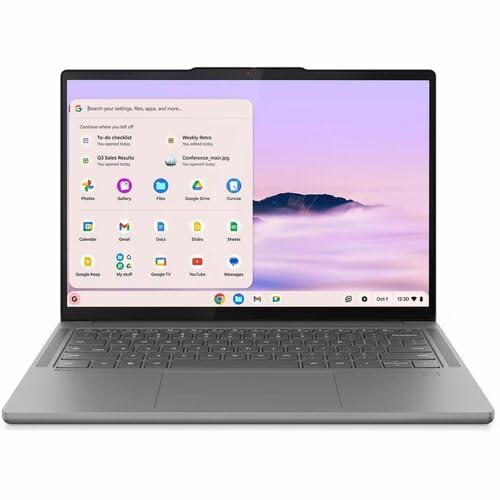
Lenovo Chromebook Plus 14 (OLED)
Fanless with a 14-inch OLED and battery tests from 13h 19m at Tom's Guide to about 19 hours at PCWorld. It runs ChromeOS, has no HDMI, and its OLED uses 250Hz PWM.

HP OmniBook 5 14 (Snapdragon X Plus)
16GB on every model, an OLED screen, a USB-A port and 16h 56min in Notebookcheck's Wi-Fi test. Check that your apps run on its Snapdragon chip, and expect speakers with almost no bass.
MacBook Neo 13 (A18 Pro, 2026): frequently asked questions
Is 8GB of RAM enough on the MacBook Neo?
For browsing, documents, calls, streaming and light photo edits, yes. Owners on MacRumors mostly report no slowdowns. With many apps and tabs, macOS swaps to a 1.5 GB/s SSD, and HotHardware hit two slowdowns in 27 days. The memory is soldered, so if you multitask heavily, the MacBook Air 13 M5 with 16GB is the safer buy.
Does the MacBook Neo have a backlit keyboard?
No. Apple's spec page lists no backlight, and Notebookcheck and Digitec both call it their biggest complaint. Pickr found the screen lights the keys enough in low light, but typing in a dark room is harder. So if you often work at night or in dim lecture halls, the MacBook Air 13 M5 has a backlit keyboard.
How long does the MacBook Neo battery last?
Notebookcheck measured 12h 51min of Wi-Fi browsing and 13h 38min of video at 150 nits, but under five hours at full brightness. Pickr saw 6 to 10 hours of mixed daily use. Digitec found about 25% less YouTube time than the M5 Air. Expect a day of light work, less under heavy loads. If you work outside in bright light, plan for a charger by mid-afternoon.
Does the MacBook Neo come with a charger?
In the US, yes: Apple lists a 20W USB-C adapter and a 1.5 m USB-C cable. Notebookcheck says European boxes include only the cable and suggests a 30W adapter. The UK box isn't confirmed. Charging is slow either way, about two hours to full even on a 65W adapter, since the ports accept up to 35W. A phone charger you already own will work in a pinch.
Can the MacBook Neo run an external monitor?
Yes, one. The USB 3 port nearer the hinge drives a single external display at up to 4K and 60Hz, with the laptop screen still on, per Apple. The second port is USB 2 and can't drive a monitor. If you need two external screens, the MacBook Air 13 M5 handles two. A USB-C hub on the fast port can add HDMI.
Should I get the 256GB or 512GB MacBook Neo?
If you'll keep it more than a couple of years, get the 512GB model. It adds Touch ID and gives macOS more room to swap with only 8GB of memory. Storage is soldered, so you can't upgrade later. The 256GB model, without Touch ID, is fine for a light second laptop that lives in a browser. Add an external drive for photos if needed.
Can you play games on the MacBook Neo?
Only light ones. Notebookcheck ran Cyberpunk 2077 at 24.2 fps and Baldur's Gate 3 at 26.3 fps on low settings, which it doesn't call playable. Resident Evil Village stayed above 30 fps on low, and Xbox Cloud Gaming worked well. For real gaming, a Windows laptop with an Nvidia GPU makes more sense. Casual and older titles are the sweet spot.
Is the MacBook Neo good for college students?
For most, yes, and it's the job Apple aimed it at. It handles essays, research, video calls and streaming, weighs 2.7 lb and lasts a day of light work. The catches are the missing backlight for dim lecture halls, one fast port and 8GB. Film, design and engineering students who run heavy software should look at the MacBook Air 13 M5.