

Acer Swift 16 AI (2026) Review: Do You Need More Than This?
A 16-inch OLED at 3.4 lb? This Acer Swift 16 AI review covers battery runs, glare, fan noise, the giant touchpad, which chip to buy and when to pick a rival.
Affiliate disclosure: As an Amazon Associate, OASTHAR earns from qualifying purchases.
OASTHAR score
- Value8.9
- Display8.8
- Performance8.7
- Battery Life8.4
- Design and Build8.1
The verdict
If you want a big Windows laptop for work, study, photo edits and casual games, I'd buy the Swift 16 AI with the Core Ultra X7 358H. It packs a sharp 16-inch OLED, Arc B390 graphics and a full set of ports into 3.42 lb. If you need Nvidia graphics for video or 3D, I'd spend more on the Galaxy Book6 Ultra instead.
The catch is the room you work in. The glossy screen reflects bright windows, performance mode gets loud, and the speakers and webcam are only average. The huge touchpad also misfires for some people. If you own the 2024 Swift 16 AI and it feels quick enough, keep it.
Skip it for the MacBook Air 15 if you want total silence, and for the Aspire 16 AI if budget matters more than graphics. And whatever you choose, check the listing says X7 or X9, because cheaper chips lose the graphics. Here's how I weighed the evidence.
Buy it ifStudents and office workers who want a big OLED, built-in HDMI, USB-A and microSD, and light gaming in a 3.4 lb laptop.
Reasons to buy
- Sharp 3K OLED at 120Hz with wide, accurate color out of the box, on a 16-inch screen.
- Arc B390 graphics run Cyberpunk 2077 near 50 fps at 1080p medium, per Notebookcheck.
- Two Thunderbolt 4, two USB-A, HDMI and microSD, so most desks need no hub.
- Light for its size at 3.42 lb, and the keyboard stays cool even under full load.
Skip it ifSkip it if you need Nvidia graphics; get the Galaxy Book6 Ultra. For silence, the MacBook Air 15 has no fan.
Reasons to avoid
- Glossy screen reflects bright windows, and performance mode fans are loud in quiet rooms.
- Speakers and webcam are only average, and the huge touchpad can misfire for some people.

Prices and availability can change. Details
Product prices and availability are accurate as of the date/time indicated and are subject to change. Any price and availability information displayed on Amazon.com at the time of purchase will apply to the purchase of this product.
What the Swift 16 AI is, and who it suits
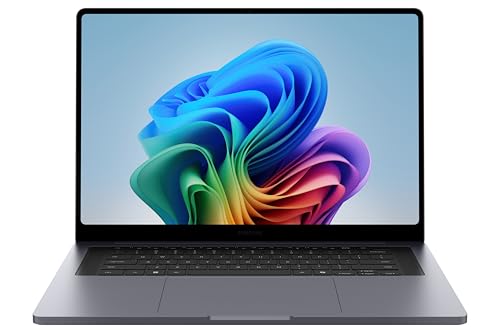
Want a big, sharp screen without hauling a heavy laptop around? That's the gap this one fills. The 2026 Swift 16 AI is Acer's thin aluminum 16-inch with a 3K OLED touchscreen and Intel's new Panther Lake chip, the Core Ultra X7 358H with Arc B390 graphics built in.
Those numbers sum up the pitch. It weighs about what a 15-inch laptop does, Notebookcheck measured more than 16 hours of browsing, and the keyboard deck stayed cool under full load. The Time Spy score is the quiet surprise: built-in graphics strong enough for real games at modest settings.
So what's the catch? Three things come up in every hands-on test I read. The screen is glossy and reflects in bright rooms, the fans get loud in performance mode, and the speakers and webcam are only average. And the touchpad is enormous, which some people love and some find gets in the way.
Where does it sit in the big-screen field? Below the Galaxy Book6 Ultra, which adds an Nvidia RTX GPU and costs far more. Beside the MacBook Air 15, which is silent and fanless but has a 60Hz screen and two ports. And above the Aspire 16 AI, a budget 16-inch with a Snapdragon chip and an IPS panel.
Picture a student carrying it from a morning seminar to a part-time design job, then editing photos on the bus home. That's the buyer I'd point here: someone who wants a big OLED, lots of ports and enough graphics for light creative work, in a bag-friendly body.
Who should buy the Swift 16 AI, and who should skip it?
Think about where you'll use it and what you'll plug in. Those two answers decide most of it, because the screen and the ports are where this laptop differs from its rivals.
- Get the Swift 16 AI if you want a 16-inch OLED, built-in HDMI, two USB-A ports and a microSD slot in a laptop under 3.5 lb.
- Buy an X7 or X9 model if you want the Arc B390 graphics, because cheaper non-X chips leave them out.
- Get the Galaxy Book6 Ultra if you edit video or game seriously and need an Nvidia RTX GPU with longer battery and a brighter screen.
- Get the MacBook Air 15 if silence matters most and macOS suits you, since it has no fan at all.
- Get the Aspire 16 AI if your budget is tight and your work is browsing and Office, after checking your apps run on Windows on Arm.
- Get the Swift 14 AI if you carry it all day and a 14.5-inch screen is enough.
- Get the Katana 15 HX if games are the point, since its RTX 5070 runs at up to 115 W.
- Skip it if you work by a bright window or in quiet rooms where fan noise annoys people around you.
Now the habit that tips it. Say you plug a monitor, a USB stick and a camera card in every morning. This laptop takes all three without a hub, and most thin rivals don't. That alone saves you a dongle and a forgotten adapter.
But say you work in a sunny office or a shared library. The glossy OLED reflects light, and performance mode is loud enough to notice in a quiet room. The balanced mode is quieter, so it's manageable, but I'd think twice if both apply to you.
And if you type numbers all day, here's a small win. It has a numpad, which the Galaxy Book6 Ultra and the MacBooks don't.
What changed from the previous Swift 16 AI?
If you own the 2024 Swift 16 AI, the short answer is: a lot more speed, mostly the same idea. The old SF16-51T used Intel's Lunar Lake Core Ultra 9 288V with Arc 140V graphics. The new SF16-71T moves to Panther Lake.
| Feature | Swift 16 AI (SF16-51T) | Swift 16 AI 2026 (SF16-71T) |
|---|---|---|
| Chip | Core Ultra 9 288V (Lunar Lake) | Core Ultra X7 358H or X9 388H (Panther Lake) |
| CPU speed | Baseline | Nearly 40% faster, per Notebookcheck |
| Graphics | Arc 140V | Arc B390 |
| 3D modelling test | About 24 fps for an Arc 140V | 36 fps, per Expert Reviews |
| Design | Sharper edges | Rounded edges, per Notebookcheck |
| Touchpad | Large haptic pad | 175.5 x 109.7 mm, Acer's largest haptic touchpad claim |
| Battery | Not compared | 70 Wh |
The 3D figure is SPECviewperf 3dsmax from Expert Reviews, which compared the new chip with Arc 140V results in general, not the old Swift itself.
So the gains land in processor and graphics speed. The CPU jump is what you feel when exporting, compiling or running many apps at once, and the graphics jump is what makes games playable.
What stayed the same? A 16-inch 3K OLED at 120Hz, the aluminum build and the big-screen, light-body formula. No outlet I read ran the old and new batteries in the same test, so I can't tell you whether battery life improved.
Say you edit 4K family videos on a 2024 Swift and wait on every export. That's the owner who gains the most here.
How do the design, keyboard and ports hold up?
Worried a light 16-inch feels cheap? It doesn't, though it isn't the stiffest either. Acer lists 1.55 kg (3.42 lb) and 14.85 mm thick in its launch specs, and PCWorld calls the aluminum body solid with a sturdy hinge you can open with one hand. Expert Reviews and PCWorld both found some give in the keyboard deck when pressing hard.
The keyboard splits opinion a little. Expert Reviews likes the light, quiet keys and the numpad with two full-size arrow keys. PCWorld finds them a bit soft and shallow, and Just Josh says the same, adding there's no ambient light sensor for the backlight.
The touchpad is the headline. At 175.5 by 109.7 mm, Acer says it's the largest haptic touchpad on any laptop, and PCWorld calls it amazing. It works with an MPP 2.5 pen, but only on the touchpad itself, since the touchscreen has no pen digitizer. That's handy for small touch-ups, less so for notes.
Ports are where it beats most thin laptops. You get two Thunderbolt 4, two USB-A, HDMI 2.1, a microSD slot and a headphone jack. The catch is layout: both USB-C ports, one USB-A and HDMI sit on the left, so the charger always plugs in on that side. There's no Kensington slot.
The 1080p webcam has a privacy shutter and IR face login, but PCWorld calls it grainy and Expert Reviews overprocessed. So for daily client calls, I'd plan on decent lighting. Compare that with the MacBook Air 13 and its two USB-C ports: if you plug in a lot, this one saves you a hub.
How long does the battery last, and what's in the box?
Will it last a full day of real work? Yes, with room to spare in most tests. The battery is 70 Wh, and Acer claims up to 24 hours of video and 14 hours of web browsing on 3K models.
| Source | Conditions | Result |
|---|---|---|
| Acer claim | Video playback / web browsing, 3K models | Up to 24 h / 14 h |
| PCWorld | 4K video loop, 250 nits, airplane mode | About 18h 28m |
| Notebookcheck | Wi-Fi browsing | 16h 17m |
| Notebookcheck | Wi-Fi browsing, max brightness, OLED dark mode | 17h 01m |
| Expert Reviews | Standard battery test | 15h 14m |
| Just Josh | Office workload loop, 300 nits | Just under 9 h |
All units used the Core Ultra X7 358H and 32GB.
The spread is the lesson here. Video loops and browsing at moderate brightness land between 15 and 18 hours, while Just Josh's brighter office loop fell to about 9. So plan on 9 to 15 hours for a heavy work day, more if you mostly read and type.
How does that compare? Expert Reviews found it about 15 minutes ahead of the MacBook Air 15 in its own test, while Notebookcheck measured 17h 12m for that Air in its browsing test. The Galaxy Book6 Ultra ran 16h 49m in Notebookcheck's browsing test, with an RTX GPU on board. So the Swift is competitive, not class-leading, and it isn't the laptop to pick for maximum unplugged hours.
Now the box. Every unit I read about came with a 100 W USB-C charger, and Notebookcheck weighed it at 473 g, noting it runs hotter than the laptop. Just Josh says retail units include a carrying sleeve. The pen is murkier: Expert Reviews says the UK unit had no stylus, and no page I read confirms one in the US box. If you want to draw on the touchpad, budget for an MPP 2.5 pen.
How good is the OLED screen, and will glare bother you?
If you watch films or edit photos, the screen is the best reason to buy it. It's a 16-inch 2880 by 1800 OLED touchscreen at 120Hz, and Notebookcheck says it drops to 48Hz when nothing moves to save power.
Read those as a strong, not record-setting, panel. Notebookcheck measured about 400 nits in SDR and over 600 in HDR, with color accurate out of the box at a Delta E under 2. Expert Reviews got 400 and 610 nits with very wide color. PCWorld thought it looked closer to 450 nits, but that was an impression, not a measurement.
Flicker shouldn't worry most people. Notebookcheck measured PWM at 481 Hz, which it calls high enough that most sensitive users won't notice, and Just Josh saw no flicker at all.
Now the honest catch: glare. The panel is glossy, and PCWorld saw reflections from soft winter daylight through a window even at full brightness. Notebookcheck and Expert Reviews agree it's reflective. Expert Reviews also notes there's no Acer app to lock the screen to sRGB or P3, which matters if you grade photos for print.
How does it compare? The Galaxy Book6 Ultra measured about 505 nits with an anti-reflective coating, so it handles bright rooms better. The Zephyrus G16 runs at 240Hz for fast games. The MacBook Air 15 stays at 60Hz. So my call: great indoors, frustrating by a sunny window.
How fast is it, how loud does it get, and can it game?
Will it handle heavy work without a dedicated GPU? Mostly, yes, and that's what Panther Lake changed. Notebookcheck says the Core Ultra X7 358H holds about 60 W in performance mode, and Just Josh found it pulls ahead of other Panther Lake X laptops in long Cinebench runs.
PCWorld measured a PCMark 10 score of 10,474 and a HandBrake encode in 882 seconds. Expert Reviews' 4K video benchmark put it ahead of the Galaxy Book6 Pro, the Zenbook Duo and the M5 MacBook Air.
| Game | Settings | Frame rate | Source |
|---|---|---|---|
| Cyberpunk 2077 | 1080p Low | 65.3 fps | Notebookcheck |
| Cyberpunk 2077 | 1080p Medium | 49.3 fps | Notebookcheck |
| Cyberpunk 2077 | 1080p High | 43.2 fps | Notebookcheck |
| Cyberpunk 2077 | 1080p Ray Tracing Low, XeSS | 50 fps | Expert Reviews |
| Doom: The Dark Ages | Low | Very playable | PCWorld |
So 1080p games at low to medium settings are fine, and upscaling helps a lot. PCWorld adds that GPU speed barely dropped on battery. Just Josh puts the Arc B390 below an RTX 4060 or 5060 in Premiere Pro and DaVinci Resolve, though, so it's no stand-in for a gaming laptop.
Heat is the best news. Notebookcheck measured the top at 32 C under stress, with the keyboard cool to the touch. Noise is the trade: 48.4 dB(A) in performance mode, which Just Josh calls close to gaming-laptop loud. Normal mode starts at 50 W and drops to 30 W, and silent mode runs near 20 W, switched with Fn and F.
Say you join a video call while exporting. Switch to normal mode first, or the fans will be on the call too. If you game every night, the Katana 15 HX with its RTX 5070 or the Nitro V 15 with its RTX 5050 bring Nvidia graphics, at the cost of weight and battery.
What do owners report, and are there known issues?
Here's the gap I have to be upfront about. I couldn't read any owner threads for this model: Reddit was out of reach and retailer review pages were blocked. So I can't tell you about long-term defects, and anyone who says owners love or hate it has more data than I could find.
What I can give you is the list of issues the hands-on tests agree on. None of them are bugs with a patch coming. They're trade-offs built into the design.
- Palm rejection slips on the huge touchpad, per Just Josh. No fix confirmed.
- Loud fans in performance mode, 48.4 dB(A) per Notebookcheck. Normal or silent mode is quieter but slower; no fix confirmed.
- Glossy screen reflections in bright rooms, per PCWorld, Notebookcheck and Expert Reviews. No fix confirmed.
- Charger and both USB-C ports on the left side only. No fix confirmed.
- Speakers that Expert Reviews calls loud but harsh in the low end, because they fire downward. No fix confirmed.
- Linux needed tweaks, per Just Josh, with several parts not working out of the box on Fedora 43. No fix confirmed.
Repairs are limited, too. Expert Reviews found the RAM and Wi-Fi soldered, with only the single M.2 SSD replaceable, and Notebookcheck lists very limited maintenance options. Warranty length wasn't shown on the pages I read, so check it at checkout and keep the receipt.
So should the empty owner record worry you? Not on its own. The hands-on tests were consistent, and the complaints are ones you can judge in a store. I'd just buy where returns are easy, since the touchpad and glare are both things you'll know about within a week.
Which configuration should you buy, and how does it compare?
Not sure which version is the right one? The chip decides it. The US model, SF16-71T-70PN, pairs the Core Ultra X7 358H and Arc B390 with 16GB and 1TB. Every outlet I read tested 32GB units, and an X9 388H version exists, but Expert Reviews says it adds little beyond a small clock bump.
The rule to remember: avoid cheaper Swift 16 AI listings with a non-X Core Ultra chip, because they lack the Arc B390 that makes this laptop interesting. And the RAM is soldered, so if you keep laptops for five years or run many apps, pick 32GB if you can find it. The single SSD can be swapped later.
| Laptop | Chip and graphics | Screen | Weight | Ports |
|---|---|---|---|---|
| Swift 16 AI | Core Ultra X7 358H, Arc B390 | 16-inch OLED, 120Hz | 3.42 lb | 2 Thunderbolt 4, 2 USB-A, HDMI, microSD |
| Galaxy Book6 Ultra | Core Ultra 7 356H, RTX 5070 or 5060 | 16-inch OLED, 120Hz | 4.17 lb | 2 Thunderbolt 4, USB-A, HDMI, SD |
| MacBook Air 15 | Apple M5, 10-core GPU | 15.3-inch IPS, 60Hz | 3.3 lb | 2 Thunderbolt 4, MagSafe |
| Aspire 16 AI | Snapdragon X, Adreno | 16-inch IPS, 120Hz | 3.4 lb | 2 USB4, 2 USB-A, HDMI, microSD |
The table shows the choice in plain terms. The Galaxy Book6 Ultra is the step up for Nvidia work, at about three quarters of a pound more. The MacBook Air 15 weighs about the same with no fan, but has two ports and a 60Hz screen. The Aspire 16 AI matches the weight and ports for far less, but runs Windows on Arm with weak graphics and an IPS screen.
And if you want something smaller, the smaller Swift 14 AI and IdeaPad Slim 3x both run on Snapdragon chips with long battery life. US units come in dark gray with gold accents, per PCWorld, while review units were silver.
Final verdict: buy, wait, or buy something else?
Do you want the most screen, ports and speed per pound without paying for an Nvidia GPU? Then I'd buy the Swift 16 AI with the Core Ultra X7 358H. It's light, cool to the touch, fast in sustained work, and good enough at games to surprise you. Expert Reviews gave it a Best Buy award, and PCWorld an Editors' Choice.
I wouldn't wait for a fixed version. The trade-offs, glare, fan noise in performance mode, weak speakers and a touchpad that can misfire, come from the design itself. If you own the 2024 Swift 16 AI and it still feels quick, keep it.
Buy something else in four cases. If you need an RTX GPU for video or 3D, the Galaxy Book6 Ultra adds one, plus a brighter, anti-reflective screen and longer battery. If silence matters most, the MacBook Air 15 never makes a sound. If budget comes first and your apps run on Arm, the Aspire 16 AI gives you a 16-inch screen and full ports for far less. And for serious gaming, the Zephyrus G16 or Katana 15 HX are built for it.
The one thing I'd check before paying is the chip name on the listing. Make sure it says X7 or X9, because that's where the graphics come from. Then picture your desk: if a monitor, a USB-A drive and a card reader all live there, this laptop plugs into all of them without a hub.
So for most buyers who want a big Windows laptop and won't game seriously, this is where I'd start.
Swift 16 AI (SF16-71T, 2026) specs
- Chip
- Intel Core Ultra X7 358H, Arc B390 iGPU (X9 388H option)
- Display
- 16in 2880x1800 OLED touch, 48-120Hz, about 400 nits SDR
- Battery
- 70 Wh; 15h 14m to 18h 28m in tests, up to 24h video (Acer)
- Weight
- 3.42 lb (1.55 kg), 0.58 in (14.85 mm) thick
- Ports
- 2x Thunderbolt 4, 2x USB-A, HDMI 2.1, microSD, 3.5 mm jack
What the experts found
 Notebookcheck
A powerful, remarkably cool daily companion: Panther Lake lifts performance well past the last model, the OLED is excellent and battery tops 16 hours, though the giant touchpad crowds typing and the webcam and speakers are average.
Incredible CPU performance, decent gaming from Panther Lake and long battery life with a beautiful OLED and amazing trackpad; the glossy screen's reflections are the main reason to pause.
 Expert ReviewsBest Buy
A near-perfect balance of style, quality, performance and value that earns a Best Buy award, let down by mediocre sound and too much bloatware.
Also consider
Samsung Galaxy Book6 Ultra (16in)
Adds an RTX 5070 or 5060, a brighter anti-reflective OLED and longer battery in a 4.17 lb body, but costs far more and drops the numpad.

Apple MacBook Air 15 (M5, 2026)
Fanless and silent with the M5 and a 10-core GPU at 3.3 lb. The trade is a 60Hz IPS screen and only two USB-C ports plus MagSafe.

Acer Aspire 16 AI (A16-11MT, Snapdragon X)
A 16-inch 120Hz screen, two USB4, two USB-A, HDMI and microSD at 3.4 lb for far less. Its Snapdragon chip means checking apps and weak graphics.
Swift 16 AI (SF16-71T, 2026): frequently asked questions
How long does the Acer Swift 16 AI battery last?
Between about 9 and 18 hours, depending on the test. PCWorld measured about 18h 28m of 4K video at 250 nits, Notebookcheck 16h 17m of browsing, Expert Reviews 15h 14m, and Just Josh just under 9 hours in an office loop at 300 nits. For a heavy work day, plan on the lower end. The battery is 70 Wh.
Does the Swift 16 AI come with a stylus?
Not in every region. Expert Reviews says the UK unit had no stylus, and no page I read confirms one in the US box. The touchpad works with an MPP 2.5 pen, but only on the touchpad, since the touchscreen has no pen digitizer. Just Josh says retail units include a carrying sleeve, and all units came with a 100 W charger.
Can the Swift 16 AI play games?
Yes, at modest settings. Notebookcheck measured Cyberpunk 2077 at 49.3 fps on 1080p Medium and 65.3 fps on Low, and Expert Reviews got 50 fps with ray tracing low and XeSS upscaling. PCWorld found Doom: The Dark Ages very playable on low. For high settings every night, a laptop with an Nvidia GPU like the Katana 15 HX is the better tool.
Is the Swift 16 AI loud?
Only in performance mode. Notebookcheck measured 48.4 dB(A) under load there, and Just Josh calls it close to gaming-laptop loud. Normal mode starts at 50 W and drops to 30 W, and silent mode runs near 20 W, which is much quieter but slower. PCWorld found the fans not particularly loud even while gaming, so your mode choice matters.
Can you upgrade the RAM or SSD?
Only the SSD. Expert Reviews found the RAM and Wi-Fi soldered, with a single M.2 2280 slot for the SSD and no room for a second drive. So pick your memory at checkout: 32GB is the safer choice if you keep laptops for years. Notebookcheck also lists very limited maintenance and upgrade options, so choose the configuration you can live with for years.
Which Swift 16 AI model should I buy?
Get one with a Core Ultra X7 358H or X9 388H, because those include the Arc B390 graphics. Cheaper non-X chips leave them out. The US model SF16-71T-70PN has the X7, 16GB and 1TB. Expert Reviews says the X9 adds little, and outside the US avoid the 1920 x 1200 OLED, which Just Josh warns may look soft.
Swift 16 AI or Galaxy Book6 Ultra?
Pick by the GPU. The Galaxy Book6 Ultra adds an RTX 5070 or 5060, a brighter anti-reflective OLED and longer battery, at about three quarters of a pound more and a far higher price. The Swift 16 AI weighs 3.42 lb, has two USB-A ports and a numpad, and covers office work, photo edits and casual games well without Nvidia graphics.
Does the screen flicker or reflect?
Flicker is unlikely to bother you: Notebookcheck measured PWM at 481 Hz, high enough for most sensitive users, and Just Josh saw none. Reflections are the real issue. The panel is glossy, and PCWorld saw window reflections even at full brightness. Indoors it looks excellent, but by a sunny window, an anti-reflective screen like the Galaxy Book6 Ultra's does better.