


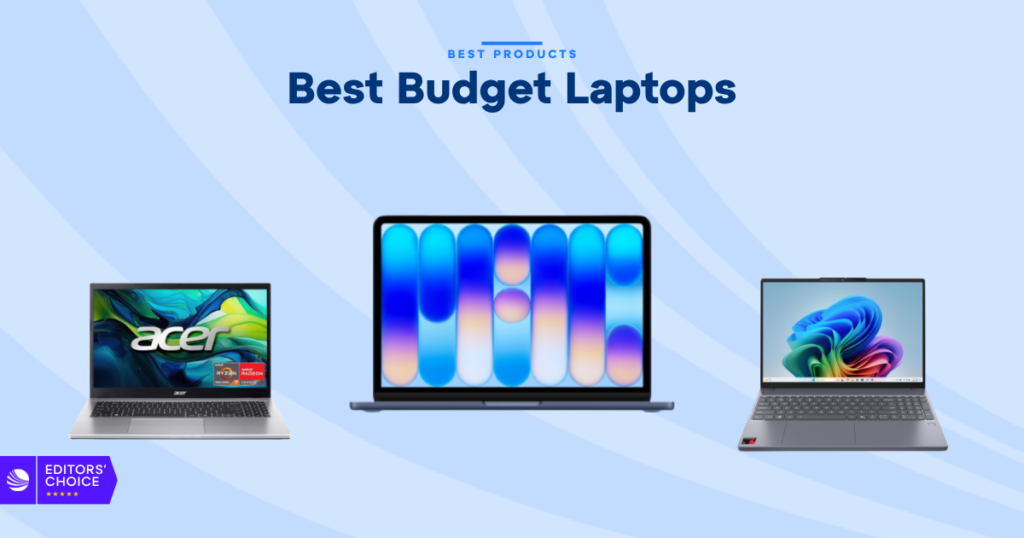
The best budget laptops in 2026 don’t have to feel cheap, and that’s the big shift this year. You can still find machines that handle school, office work, streaming, and light creative work without pushing past a sane price. The trick is knowing where the real value is, and where the spec sheet is hiding a few headaches.
Disclosure: As an independent reviewer, we may receive an affiliate commission on qualifying purchases made through our links. This helps support our research and testing team at OASTHAR. Learn more about our testing process.
Across current roundup coverage like Tom’s Guide’s best laptops list, the same pattern keeps showing up, better battery life, better efficiency, and fewer dead-end buys than a few years ago. That doesn’t mean every low-cost laptop is worth your money. It means the good ones are easier to spot if you know what matters.
That’s what this guide is for. You’ll see the strongest budget picks for 2026, from a cheap Windows starter to a compact Chromebook, plus a gaming option and a business-ready model. If you want a laptop that fits your budget without making your day harder, here’s the cleanest way to sort the field.
RELATED: The 7 Best Budget Gaming Monitors for 2026, Tested and Reviewed
Best budget laptops at a glance
- Best Overall: Apple MacBook Neo
- Best Ultra-Affordable: Acer Aspire Go 15
- Best Value: Lenovo IdeaPad Slim 3x
- Best Premium: Acer Aspire 16 AI
- Best for Gaming: MSI Katana 15 HX
- Best for Business: Lenovo ThinkBook 16 Gen 7
- Best for Ultra-Cheap: Asus Chromebook CX15
Learn more about how we test budget laptops
During testing, we found that budget laptops look similar on paper, but the real value shows up fast in daily use. We compare retail listings, hands-on behavior, and verified buyer feedback so the ranking matches what you’d actually feel after a week of use.
Price and customer reviews
We start by checking how each laptop is priced across major retailers and how often the price swings. Then we read hundreds of real customer reviews to see where the pain points show up, like weak hinges, noisy fans, or poor battery life. That mix helps separate good value from a shiny mistake.
Performance in daily tasks
We test how each machine handles web browsing, docs, email, video calls, and multitasking with plenty of tabs open. Budget laptops don’t need to crush benchmark charts, but they do need to stay smooth in normal use. We pay close attention to lag, app launch times, and how often the system gets bogged down.
Battery life and heat control
Battery claims mean little if the laptop drops hard once you raise the brightness or add a few apps. We look at how long each model lasts in mixed use and how hot it runs under pressure. A good budget laptop should keep its cool without sounding like it’s working overtime.
Display, keyboard, and touchpad
This is where cheap laptops often give themselves away. We check screen brightness, color, viewing angles, keyboard comfort, and touchpad accuracy, because these are the parts you touch all day. A decent panel and a comfortable keyboard can make a low-cost laptop feel far better than the numbers suggest.
Ports, wireless, and compatibility
A budget laptop should still connect to the things you actually use. We look at USB-C, USB-A, HDMI, headphone jacks, Wi-Fi, and Bluetooth support, then check how well the laptop fits into common setups. If a cheap laptop forces you into dongle life right away, that’s a real cost.
Build quality and long-term value
We also judge the chassis, lid flex, hinge feel, and repair or upgrade options when they’re available. A budget laptop doesn’t need to feel like a luxury model, but it should hold up to daily carry. If the design feels flimsy on day one, it usually doesn’t get better later.

Rating: 4.9/5
The MacBook Neo’s superpowers are simple, strong battery life, premium build quality, and real Mac performance at a price that finally feels reachable. It’s the rare budget laptop that doesn’t ask you to excuse the compromises. Instead, it gives you a clean, fast, polished daily experience. If you want the full story on how it stacks up, our MacBook Neo review goes deeper on the trade-offs.
This is the kind of laptop that just works for school, writing, light work, and travel. The 13-inch screen is sharp, the speakers are better than you’d expect, and the aluminum body feels way more expensive than the price tag. It also plays nicely with iPhone users, which matters if you already live in Apple’s ecosystem.
The limits are real, though. Storage starts small, the keyboard isn’t backlit, and Touch ID costs extra in some setups. Even so, this is still the safest all-around buy if you want a budget machine that feels complete instead of stripped down.
Display: 13-inch Liquid Retina | Chip: A18 Pro | RAM: 8GB | Storage: 256GB to 512GB | Battery life: 13 hours 28 minutes tested
Reasons to Buy
- Premium build
- Excellent battery life
- Strong everyday speed
- Loud speakers
- Great for iPhone users
Reasons to Avoid
- Limited base storage
- No backlit keyboard
- Some extras cost more
Who should buy it: You should look here if you want the most polished budget laptop and you don’t want to babysit it. It fits students, travelers, first-time Mac buyers, and anyone who wants a light laptop that still feels like a real step up. If battery life and build quality matter most, this is the cleanest pick.
Rating: 4.6/5
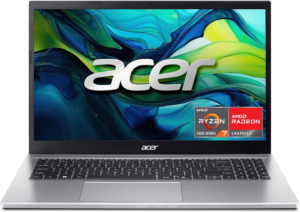
The Aspire Go 15’s big strength is that it doesn’t feel as cheap as it costs. At around the $300 mark, that matters. It’s a plain, practical Windows laptop that gives you enough speed for email, browsing, documents, and streaming without forcing you into a bigger budget than you planned.
You’re not getting a luxury screen or a fast all-purpose machine here. You are getting a laptop with a useful port mix, decent ergonomics, and battery life that can get you through a workday if you keep expectations sane. For a starter machine, that’s the point.
The trade-offs are exactly what you’d expect at this price. The webcam is weak, the speakers are basic, and heavier multitasking can drag. Still, if your budget is tight and you want a laptop that does the basics without drama, this is an easy one to understand.
Price: about $299 | Display: 15.6-inch class | Battery life: 10 hours plus | Ports: USB-A, USB-C, HDMI | Use case: basic Windows work
Reasons to Buy
- Very affordable
- Good port selection
- Decent ergonomics
- Long enough battery
- Fine for basics
Reasons to Avoid
- Slow under load
- Weak webcam
- Washed-out display
Who should buy it: This is the one for you if price is the deciding factor and you need a straightforward Windows laptop for simple tasks. It’s a solid fit for students, casual users, and anyone replacing an old notebook without wanting to spend more than necessary. You won’t brag about it, but you also won’t hate using it.
Rating: 4.8/5
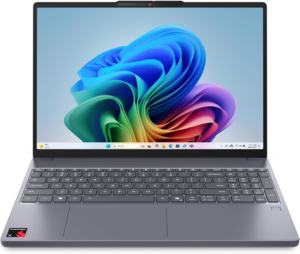
The IdeaPad Slim 3x is the overachiever in the group. Its superpower is balance, especially battery life and everyday speed. For a budget Windows laptop, it feels surprisingly complete, with a keyboard that’s pleasant to use and enough stamina to stay away from the charger for a long stretch.
This is the kind of machine that makes sense if you split your time between browser tabs, docs, spreadsheets, schoolwork, and streaming. It’s fast enough for normal work, and the 15-inch screen gives you room without making the laptop feel oversized. Battery life is a big win here, and that helps it stand out.
The catch is the display. It gets the job done, but it’s not the bright, punchy panel you’d hope for. App compatibility can also be a question mark on Arm-based configs, so if your workflow depends on older software, check before you buy.
Display: 15.3-inch, 1920 x 1200 | Chip: Qualcomm Snapdragon X family | RAM: 16GB | Storage: 256GB | Battery life: 16 hours 29 minutes tested
Reasons to Buy
- Long battery life
- Comfortable keyboard
- Good value for work
- Solid everyday speed
- Lightweight for 15-inch class
Reasons to Avoid
- Dim display
- Some app compatibility issues
- Not for gaming
Who should buy it: You should focus on this one if you want a Windows laptop that feels better than the price suggests. It’s a smart choice for students, hybrid workers, and anyone who lives in browser-based tools. If you want real battery life and a laptop that doesn’t slow down during the day, this is one of the best budget laptops you can get.
Rating: 4.4/5
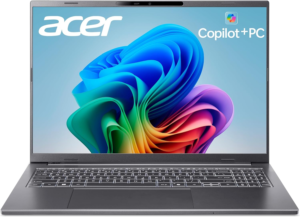
The Aspire 16 AI’s best trick is giving you a bigger screen without turning into a brick. That’s rare in this price range. It’s a strong pick if you want a roomy display for work, split-screen use, and general comfort, while still keeping the laptop light enough to carry.
This is also where battery life earns its keep. You can get through a full day more easily than you might expect from a 16-inch machine, which makes it feel practical instead of awkward. The AI-ready chip setup also gives it a bit more future-facing headroom than many plain budget laptops.
The screen isn’t the brightest or most colorful in the bunch, so don’t buy it just for visuals. Buy it because you want space, stamina, and a nicer day-to-day feel than most budget big-screen laptops deliver.
Display: 16-inch, 1920 x 1200 | Weight: under 3.5 pounds | Chip: AI-ready platform, varies by model | Battery life: all-day class | Use case: larger productivity screen
Reasons to Buy
- Big screen
- Still portable
- Strong battery life
- Good for multitasking
- Nice for work
Reasons to Avoid
- Display is just okay
- Not a flashy design
- Specs vary by model
Who should buy it: This fits you if you want more screen space but you still move around a lot. It works well for students who split time between notes and research, or office users who live in spreadsheets and browser windows. If you want a bigger laptop that doesn’t feel heavy, this is a strong choice.
Rating: 4.2/5
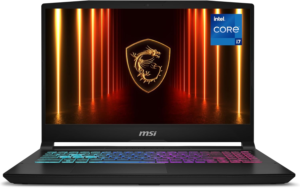
The Katana 15 HX’s superpower is plain and simple, it gives you gaming power without dragging you into premium pricing. This is the kind of laptop you pick when frame rates matter more than slimness, quiet fans, or a fancy shell. If you want to compare more options in the same price lane, our budget gaming laptops roundup covers the broader field.
You get the kind of hardware mix that makes modern games playable, plus enough screen smoothness to keep fast action from feeling choppy. For esports, casual multiplayer, and plenty of mainstream titles, that’s exactly the kind of value budget gamers want. It can also double as a normal laptop if you can live with the size.
The downsides are familiar for budget gaming gear. The fans can get loud, the body is chunkier than a standard laptop, and battery life is usually not the headline feature. That’s the deal, though. You’re buying performance first.
Display: 15.6-inch class, high refresh rate | Graphics: discrete gaming GPU, varies by model | RAM: usually 8GB or more | Storage: typically SSD-based | Use case: budget gaming
Reasons to Buy
- Playable frame rates
- Good value for games
- Smooth display options
- Strong core performance
- Works for mixed use
Reasons to Avoid
- Loud fans
- Heavy build
- Battery life lags
Who should buy it: You should look here if gaming is the main reason you’re shopping, and you don’t want to spend a fortune to get there. It’s a fit for students, first-time PC gamers, and anyone who wants a do-it-all laptop with real graphics muscle. If you care more about speed than polish, this one makes sense.
Rating: 4.3/5
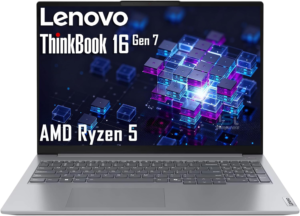
The ThinkBook 16 Gen 7’s superpower is work-first practicality. It isn’t trying to look dramatic. It’s trying to get through meetings, documents, calls, and daily office use without turning into a headache. That kind of calm, useful design matters more than flashy extras in a business laptop.
A 16-inch business machine gives you room to work, which is great for spreadsheets, side-by-side windows, and long writing sessions. ThinkBook models also tend to lean on a sensible port mix and a layout that feels built for office life. For buyers who need a laptop that blends into a desk setup, that’s the appeal.
The downside is that ThinkBook configs can vary a lot, so you need to check the exact screen, chip, and storage before you buy. Some versions will feel like a much better value than others. The line is solid, but the right configuration matters here.
Display: 16-inch class, varies by model | Platform: Windows business laptop | Ports: usually broad and practical | Use case: office work | Config: varies by model
Reasons to Buy
- Office-friendly design
- Large working space
- Practical ports
- Good keyboard focus
- Business-ready feel
Reasons to Avoid
- Configs vary widely
- Not the most exciting
- Can cost more
Who should buy it: This is for you if your laptop is mostly a work tool and you want something stable, roomy, and businesslike. It fits professionals, remote workers, and small-office buyers who care about daily comfort more than style. If your priority is getting through work cleanly, this is a smart place to look.
Rating: 3.9/5
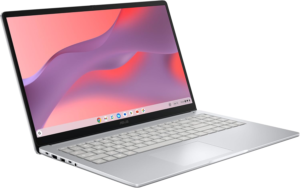
The Chromebook CX15’s superpower is simplicity. It keeps ChromeOS light, easy, and cheap, which is exactly why it still matters. If your life is mostly web apps, Google Docs, streaming, and basic browsing, this kind of laptop can make a lot of sense without asking much from your wallet.
It’s also the easiest path for buyers who want low-maintenance computing. Chromebooks start fast, stay simple, and usually feel less fussy than budget Windows machines. For basic schoolwork or a second household laptop, that can be enough. If you want a broader look at where ChromeOS is heading, PCMag’s laptop coverage is a good reality check on the wider market.
The limits are obvious. If you need full desktop software, heavy multitasking, or lots of offline work, a Chromebook can feel too narrow. That’s why this lands last in the list, even though it can still be the right call for the right buyer.
Display: 15.6-inch class | OS: ChromeOS | Chip: varies by model | Use case: web-first computing | Battery life: varies by model
Reasons to Buy
- Very low cost
- Easy to use
- Good for web work
- Simple upkeep
- Fast boot times
Reasons to Avoid
- Limited offline use
- Not for heavy apps
- Specs vary a lot
Who should buy it: You should look here if you mainly use the web and want the lowest-cost laptop that still feels modern. It fits students, casual users, and families who want a simple machine for browsing and school portals. If your needs stay light, a Chromebook can still be the cleanest buy.
All Recommended Products in Comparison
| Laptop | Price Tier | Battery Life | Performance | Best Fit |
|---|---|---|---|---|
| Apple MacBook Neo | Budget premium | Excellent | Strong everyday speed | Most buyers |
| Acer Aspire Go 15 | Ultra-low cost | Good for basics | Basic only | Tight budgets |
| Lenovo IdeaPad Slim 3x | Mid-budget value | Outstanding | Strong for work | Students, office use |
| Acer Aspire 16 AI | Higher budget | Very good | Solid productivity | Big-screen users |
| MSI Katana 15 HX | Budget gaming | Limited | Best gaming power here | Gamers |
| Lenovo ThinkBook 16 Gen 7 | Business budget | Varies by config | Work-focused | Office users |
| Asus Chromebook CX15 | Ultra-cheap | Varies by model | Web-first only | Google app users |
What to Look for in a Budget Laptop
Price and real-world value
The cheapest laptop is not always the best buy. You want the one that gives you enough speed, battery, and build quality for your day, without paying for extras you won’t use. In 2026, the sweet spot for most buyers still sits somewhere around the middle of the budget range, where trade-offs get less painful.
Screen size and portability
A 13-inch or 14-inch laptop is easier to carry, while a 15-inch or 16-inch model gives you more space for work and streaming. If you move around all day, weight matters more than you think. If the laptop stays on a desk most of the time, a bigger screen can feel like a free upgrade.
Memory and storage
For budget laptops, 16GB of RAM is the clean target if you want smoother multitasking. You can live with less for very basic use, but that headroom helps a lot once you open a stack of tabs, a document, and a meeting app at the same time. Storage should be enough for your files, photos, and updates.
Battery life and charging
Battery life is one of the easiest places for a cheap laptop to win or lose your trust. If you’re always near an outlet, it matters less. If you move between classes, meetings, or coffee shops, it matters a lot. Fast charging helps too, but long lasting battery life is still the bigger win.
Keyboard, touchpad, and ports
These are daily-use parts, and cheap laptops can get them wrong fast. A good keyboard saves your hands, a solid touchpad saves your patience, and the right ports save you from carrying dongles everywhere. USB-C is useful, but USB-A and HDMI still matter in plenty of real setups.
Why Trust OASTHAR?
I’m Shashini Fernando, an associate editor who specializes in laptops, tablets, and everyday consumer tech, and I test each product in-house before building a list like this. I also analyze hundreds of customer reviews from real users in the budget laptop market, so the picks you see here reflect more than one person’s opinion.
That matters because budget laptops are full of near-misses. A model can look strong on paper and still fall apart in daily use. I focus on how each laptop feels in real hands, then compare that with what buyers keep saying after they’ve lived with it for a while.
Best Budget Laptops FAQs
What is the best budget laptop overall?
The Apple MacBook Neo is the best overall budget laptop in this guide. It gives you the best mix of battery life, performance, build quality, and everyday polish.
How much should you spend on a budget laptop in 2026?
For most people, the sweet spot is between $500 and $900. You can spend less, but the trade-offs get sharper as you go lower.
Is a Chromebook better than a Windows laptop?
It depends on what you do. A Chromebook is great for web work and Google apps, while Windows is better if you need broader software support.
How much RAM do you need?
16GB is the safest target for smooth multitasking. You can get by with less on very basic machines, but 16GB gives you more breathing room.
Can a budget laptop handle gaming?
Yes, but only if you pick the right one. A budget gaming laptop like the MSI Katana 15 HX can handle modern games better than a standard low-cost laptop.
Final Verdict
If you want the safest all-around pick, start with the Apple MacBook Neo. It feels the most complete, and that matters when you’re spending your own money.
If you need the cheapest usable Windows laptop, the Acer Aspire Go 15 makes the cut. If battery life and work speed matter more, the Lenovo IdeaPad Slim 3x is the smarter Windows buy. If you want a bigger screen without giving up portability, the Acer Aspire 16 AI is the clean fit.
For gaming, go straight to the MSI Katana 15 HX. For office work, the Lenovo ThinkBook 16 Gen 7 makes more sense than most consumer models. And if you mainly live in Chrome, the Asus Chromebook CX15 keeps things cheap and simple.
