

Is the MacBook Neo the low-cost Mac you’ve been waiting for, or just a budget machine with an Apple logo on top? That’s the real question here, because the starting price only tells part of the story.
You’re not buying this for raw power. You’re buying it to see whether an A18 Pro chip, 8GB of memory, and a 13-inch screen can still feel like a proper Mac in daily use. That’s what this review is about, not the sticker price alone.
The short version: the Neo is better than it has any right to be, but it also makes its compromises plain. If you want the real verdict, keep reading.
RELATED: MSI Stealth 16 AI+ Review (2026): Best OLED 240Hz, RTX 5090?
Quick Summary
The MacBook Neo is not a stripped-down Mac experiment. It’s a full Mac, and that’s the whole trick. Apple found a way to bring its usual build quality, macOS polish, and all-day battery life into a laptop that starts far lower than the usual MacBook bar.
The good stuff shows up fast. The aluminum body feels solid, the screen is bright, and everyday tasks move along without drama. Writing, browsing, email, music, and classwork all feel easy enough. The fanless design also keeps things silent, which you notice more than you expect.
The tradeoffs are real, though. You get fixed 8GB memory, limited ports, and speakers that are fine, not memorable. So yes, this is a smart buy, but only if your needs stay in the lane Apple picked for it.
The Neo works because it feels like a Mac first and a budget laptop second.
Specifications
Here’s the useful part, without the fluff.
| Spec | Details |
|---|---|
| Chip | Apple A18 Pro |
| CPU | 6-core, 2 performance cores and 4 efficiency cores |
| GPU | 5-core Apple GPU |
| Memory | 8GB unified memory |
| Storage | 256GB or 512GB SSD |
| Display | 13-inch LED-backlit IPS, 2408 x 1506, 219 ppi |
| Brightness | Up to 500 nits |
| Battery | 36.5Wh |
| Ports | 2 USB-C, 3.5mm headphone jack |
| Wireless | Wi-Fi 6E, Bluetooth 6.0 |
| Camera | 1080p FaceTime HD |
| Weight | 1.23kg |
| Dimensions | 29.75 x 20.64 x 1.27cm |
| Operating system | macOS 26 |
| Starting price | $599, $499 with education pricing |
That table tells the story pretty well. You’re getting a small, light Mac with a few hard limits.
Design & Build Quality
This is where the Neo punches above its price. The aluminum chassis feels properly finished, not flimsy, and it avoids the plasticky wobble you still get on a lot of cheaper laptops. It’s thin, light, and easy to carry, which matters when you’re using it as your daily machine.
Apple also gave it real personality. You get silver, indigo, blush, and citrus, so it doesn’t disappear into the usual gray laptop crowd. It looks close enough to a MacBook Air that most people won’t need a second glance.

The keyboard is good, too. It feels soft in a nice way, and it’s comfortable for long typing sessions. The catch is obvious, no backlight. The trackpad is a mechanical one rather than the haptic setup you get on pricier Macs, so the click feels more direct. Some people will prefer that. Others will notice the difference right away.
The other small decision that matters is storage. The 256GB model skips Touch ID, while the 512GB version brings it back. That upgrade feels more useful than the spec sheet might suggest.
Display Quality
The Neo’s 13-inch display is a good fit for the laptop’s mission. At 2408 x 1506 resolution and 500 nits brightness, it’s sharp and bright enough for writing, web work, school tasks, and streaming. For a budget Mac, that’s more than fine.
What you do not get is the full premium Mac display experience. It sticks with an IPS panel and sRGB-class color instead of the wider color support you’d find on higher-end machines. That doesn’t make it bad. It just means photo work and color-sensitive edits are less ideal here.
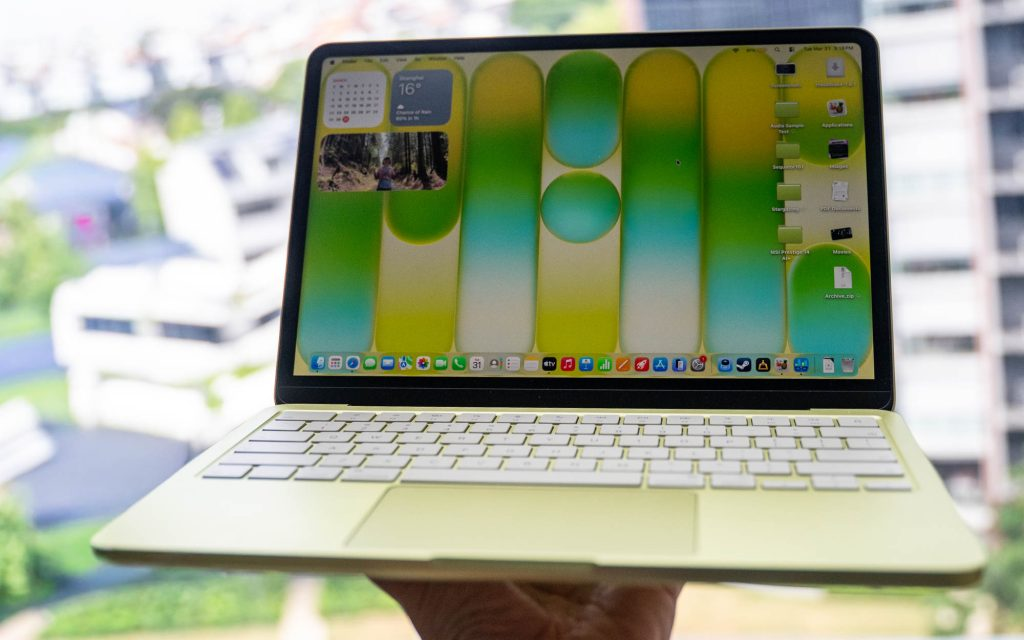
In practice, you’ll often keep the brightness high indoors. That’s not a deal-breaker, but it reminds you where Apple saved money. If your day is mostly docs, tabs, and video, the screen holds up well. If you care about perfect color, you’ll want more.
For a second opinion on the overall screen and hardware balance, Macworld’s MacBook Neo review lines up with the same basic takeaway.
Performance
This is the part that surprises you. An A18 Pro chip in a Mac sounds like a strange idea until you use it for a while. Then the weirdness fades, because the Neo feels fast in the places that matter most for everyday work.
Single-core speed is the headline. Apps open quickly, the system feels responsive, and lighter tasks never feel like they’re waiting on the laptop. Browsing, email, documents, notes, music, spreadsheets, and casual multitasking all run without a fuss. For normal computing, that’s a pretty big deal.

The limits show up when you push harder. The fixed 8GB of memory is the wall you keep running into. Open too many heavy tabs, keep several apps active, or move into more demanding creative work, and you’ll feel the pressure. macOS handles swapping well, but swap is still a workaround, not magic.
Basic photo work is fine. Light video editing can work too. Once you get into bigger edits, more plugins, or sustained multitasking, you’re in MacBook Air territory for a reason. If you want another hands-on perspective on the chip’s performance, 9to5Mac’s review reaches a similar conclusion.
Battery Life & Charging
Battery life is one of the Neo’s stronger cards. The 36.5Wh battery sounds modest, but the chip is efficient and the fanless design keeps power use down. That combination is why this laptop can last all day for lighter work.
Real life still depends on what you do. Brightness changes things fast, and video or heavier multitasking will cut into runtime sooner. For writing, browsing, and general use, you can get through a long stretch without worrying. For heavier sessions, expect a more ordinary result.
Charging is practical, not exciting. Apple includes a 20W USB-C charger, and that’s enough for basic use. It isn’t fast charging in the dramatic sense, and you shouldn’t expect a quick top-up to save the day. The good news is that the laptop doesn’t demand much to stay going.
Software & Ecosystem
macOS is a big part of the Neo’s appeal. You’re not getting a watered-down operating system to match the lower price. You’re getting the same Mac software experience, with Apple Intelligence support, smooth gestures, and the usual Apple services that make daily use easier.
If you already use an iPhone or iPad, the comfort level is obvious. Messages, Photos, AirDrop, and device handoff all make the laptop feel like part of a larger setup instead of a one-off purchase. That matters more than people admit.
The catch is still the same one you’ve seen elsewhere in this review. This is a lower-memory Mac, so the software experience is pleasant, but the machine isn’t built for heavy pro workflows. The platform is strong. The headroom is not.
Connectivity
The port setup is one of the Neo’s clearest compromises. You get two USB-C ports, a 3.5mm headphone jack, Wi-Fi 6E, and Bluetooth 6. That sounds simple enough until you look closer.
One USB-C port is faster and does the real heavy lifting. The other is slower, closer to USB 2 speeds. Both can charge, but only the faster port is the one you want for better accessory and display use. macOS will even warn you if you plug something into the wrong side and slow yourself down.
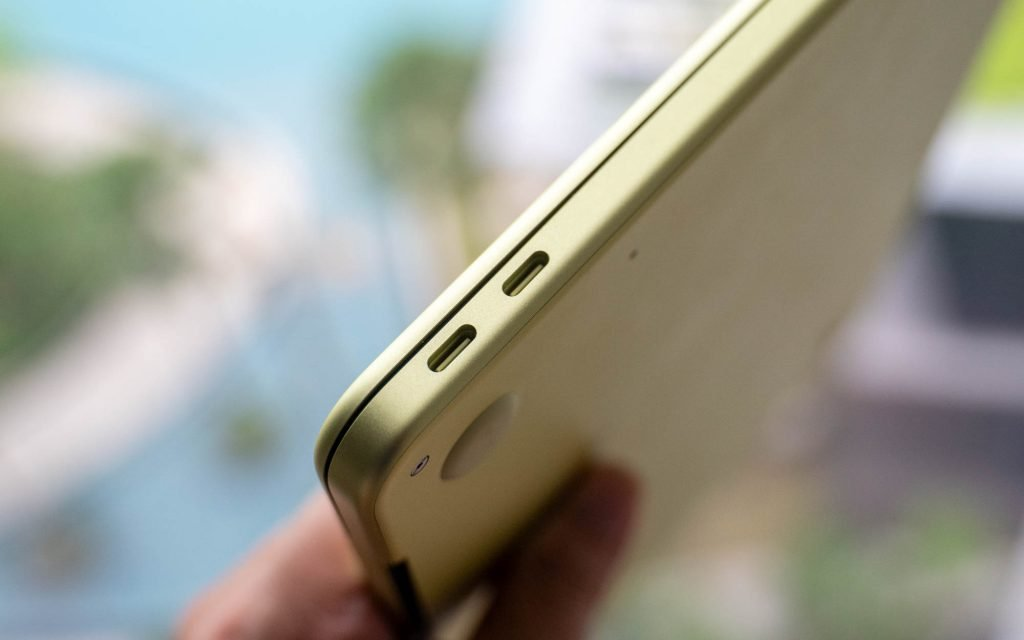
That means dongles are still part of the picture if you use a lot of gear. For one external display and a few basic accessories, you’ll be fine. If you live on multiple drives and peripherals, you’ll notice the limits. There’s also no cellular option, so this stays a standard Wi-Fi laptop.
Camera, Mic & Speakers
The 1080p webcam gets the job done. It’s fine for calls, classes, and casual meetings, which is about what you’d expect at this price. The dual microphones are in the same category, serviceable and clear enough for normal voice work.
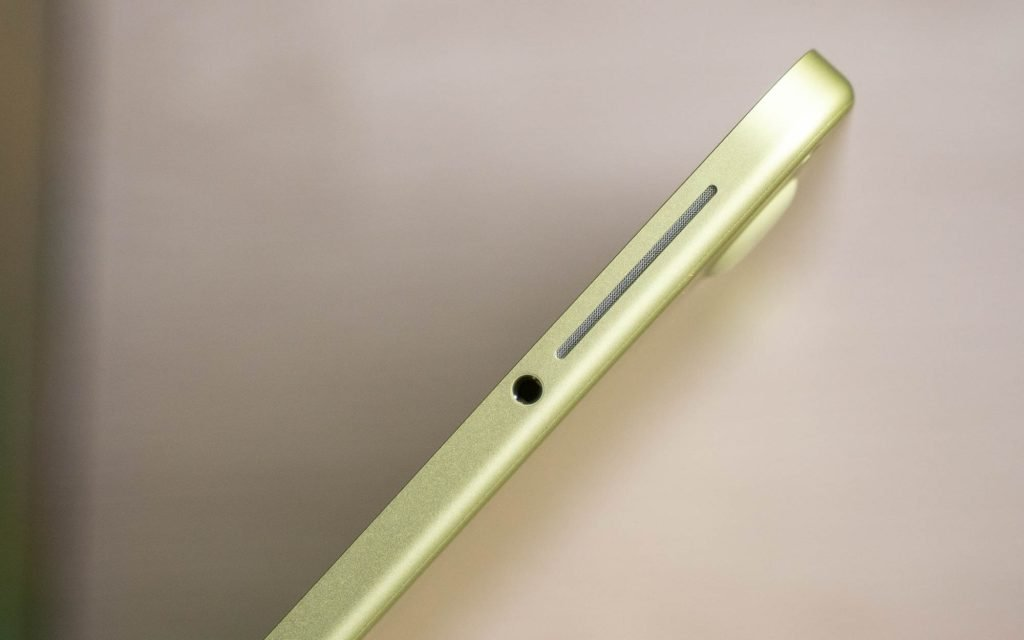
The speakers are where things stay modest. They’re side-firing and good enough for podcasts, YouTube, and light streaming, but they don’t give you the kind of sound that makes music feel special. If you care about audio, you’ll still want headphones.
Extra Features
The little details matter here. Touch ID is only on the 512GB model, which makes that version the cleaner choice if you can stretch the budget. It’s one of those upgrades that saves time every day.
The fanless design is another small win. The laptop stays quiet no matter what you’re doing, and that adds to the sense that this is a calm, easy machine. There’s no noise, no heat drama, and no distraction.
That sort of restraint is the Neo’s personality in a nutshell. It gives you the Mac parts of the Mac experience, then trims the extras to hit the price.
Price & Value
This is where the Neo gets interesting in a bigger way. A new Mac starting at $599, or $499 for education buyers, changes the conversation. It’s no longer a machine you have to explain away. It’s a Mac that sits in the same rough price zone as a lot of Windows and Chromebook options.
If you’re comparing across the market, Oasthar’s best laptops guide is a useful place to widen the search. And if you want to see how much more laptop you get when you spend more, the Galaxy Book6 Pro review shows the other end of the slim-laptop spectrum.
The Neo’s value comes from the mix, not one spec. You get Apple build quality, macOS, good battery life, and strong everyday speed without jumping into MacBook Air money. The compromises are there, but they feel tied to price, not a fake product boundary.
Who is The MacBook Neo Really for?
Buy it if you want a light, reliable Mac for school, writing, web browsing, email, and video calls. Buy it if you care more about day-to-day comfort than benchmark bragging rights. Buy it if you’ve wanted a Mac for years but never wanted to pay MacBook Air money.
Don’t buy it if you multitask hard all day. Don’t buy it if you edit 4K video often, keep a huge amount of local media, or need better speakers and more ports. Don’t buy it if you expect upgrade room later, because the 8GB memory is fixed.
If your work stays in the everyday lane, the Neo makes a lot of sense. If your laptop is more of a workstation, you should keep moving.
FAQs
Is the MacBook Neo actually a real Mac?
Absolutely. You get full macOS, proper Mac apps, iPhone-grade chip architecture, and the same polished feel Apple gives its pricier laptops. It’s not a crippled side project.
Who is the MacBook Neo best for?
You’re the target if you mostly answer email, write, browse, build spreadsheets, or stream video. It’s a smart fit for students, home users, and light work.
Is 8GB of memory enough on the MacBook Neo?
It’s enough for everyday use, but not for heavy multitasking or demanding creative work. If you keep lots of apps open, you’ll hit limits sooner than on a MacBook Air.
How fast is the MacBook Neo in real use?
For normal tasks, it feels properly quick. The A18 Pro chip handles everyday computing without fuss, and single-core performance is strong enough to make the machine feel snappy.
What’s the biggest compromise compared with a MacBook Air?
You give up headroom. The Neo has only 8GB RAM, a smaller 13-inch display, mixed USB-C ports, and no fan, so it suits lighter use rather than power work.
Conclusion
The MacBook Neo works because it gets the important stuff right. It gives you a real Mac experience at a price that finally feels reachable. It’s fast enough for everyday work, quiet in use, and strong on battery life.
The compromises are easy to see. You’re living with 8GB of memory, a simple port setup, and modest speakers. That’s the trade for getting into Apple’s laptop lineup this cheaply.
If you want a Mac for normal life, not heavy creative work, this is a smart buy. If that’s your lane, the Neo is a lot easier to recommend than the price suggests.
