


The best flip phones in 2026 do one thing better than most smartphones, they stay out of your way. If you’re buying for yourself, a parent, or a grandparent, that usually matters more than one more app or camera trick.
Disclosure: As an independent reviewer, we may receive an affiliate commission on qualifying purchases made through our links. This helps support our research and testing team at OASTHAR. Learn more about our testing process.
A good flip phone for seniors needs clear buttons, loud sound, readable text, and quick help in an emergency. That lines up with broader senior-focused research too, including SeniorLiving’s best flip phones for seniors, where ease of use keeps showing up as the deciding factor.
Our picks from the OASTHAR Product Research & Testing Team keep the focus where it belongs, on daily use. Here’s the short list first, then the full breakdown.
RELATED: The 7 Best Air Purifiers for 2026, Tested and Reviewed
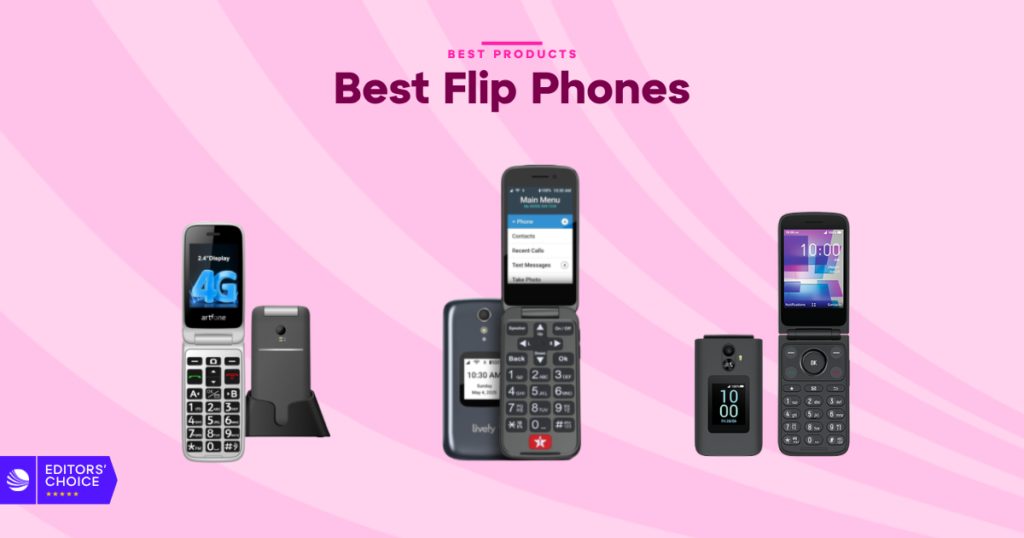
Best flip phones at a glance
- Best Overall: LIVELY Jitterbug Flip2
- Best for Accessibility: artfone C1+4G
- Best Premium: AT&T Cingular Flex 2
- Best Value: artfone G3 Pro
- Best for Durability: artfone G6 Pro
- Best for Safety: Easyfone Prime-A1 Pro
- Best Budget: TCL Flip 3
If you want the safest all-around choice, start with the Jitterbug Flip2. If larger buttons, louder audio, or an SOS feature matter more, the artfone and Easyfone models deserve a closer look. Carrier options, pricing, and feature sets can vary by seller, so check current specs before you buy.
Learn more about how we test flip phones
In our assessment, the best flip phones prove themselves in daily use, not on a spec sheet. We research major retailers like Amazon, Walmart, Target, and Currys, then compare that research with in-house checks and hundreds of customer reviews.
Ease of setup and menus
We start with the first five minutes, because that tells you a lot. A good flip phone should let you place a call, read the home screen, and find contacts without a long learning curve. We look for clear menus, logical button placement, and whether the phone feels obvious right away.
Buttons, screens, and readability
Flip phones for seniors live or die by physical usability. We check button size, button spacing, backlighting, and how easy it is to press keys accurately. Screen size matters too, but clarity matters more, so we pay close attention to font size, icon visibility, and whether external screens are useful or just there.
Call quality and speaker volume
A phone can have great buttons and still fail if calls sound weak. We look at earpiece clarity, loudspeaker strength, microphone performance, and whether voices stay clear in real-world calling. Hearing-aid compatibility and noise control matter here, especially for buyers who want fewer missed words and less call fatigue.
Safety and emergency tools
Some flip phones are built around peace of mind. We check how easy it is to use SOS buttons, speed dial, photo contacts, keypad locks, and call blocking tools. A good emergency feature should be fast, obvious, and hard to trigger by mistake. Scam-call blocking gets extra attention because it’s a daily issue.
Battery life and charging
Battery claims are only part of the story. We care more about whether a phone is easy to keep charged every day. Charging docks, USB-C support, and long talk time all help. A phone that lasts longer but uses a fiddly charger can still be the wrong pick for a senior user.
Price and Customer Reviews
We don’t judge value by price alone. We compare current pricing across major shopping platforms, then read through large numbers of customer reviews to see where real-world use matches the marketing, and where it doesn’t. That helps us spot patterns around durability, ease of use, battery behavior, and support problems.
Star rating: 4.8/5
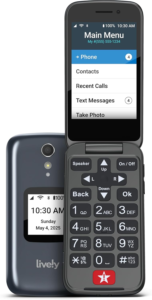
The Jitterbug Flip2 is the easy recommendation for most people. Its big strength is balance. You get the simple layout and large controls you’d expect from a senior-friendly flip phone, but you also get something many rivals miss, live support that can help when you’re stuck.
That changes the whole experience. The 3.2-inch screen is roomy for this category, the buttons are large, and the list-based menu is easier to understand than the icon-heavy menus on some other phones. One-touch speed dial and a powerful speaker keep the basics fast and clear, which is what matters most in daily use.
It also feels more complete than a bare-bones emergency phone. The Android-based software and 16GB of storage give it enough room for stable everyday use, and online activation keeps setup less stressful than older carrier-store routines. This isn’t the phone to buy if you want to tinker. It’s the one to buy when you want a phone that makes sense on day one and keeps making sense a month later.
Screen: 3.2-inch main display | Interface: simple list-based menu | Support: 24/7 Lively support | Storage: 16GB | Calling: one-touch speed dial
Reasons to Buy
- Big, clear screen
- Helpful live support
- Large easy buttons
- Simple menu layout
- Strong speaker output
Reasons to Avoid
- Not the budget pick
- Limited smart appeal
- Built for basics first
Who should buy it: This is the right fit if you want the least stressful flip phone experience. It works well for first-time flip phone users, older adults who want support on standby, and family members setting up a phone for someone else.
Star rating: 4.6/5
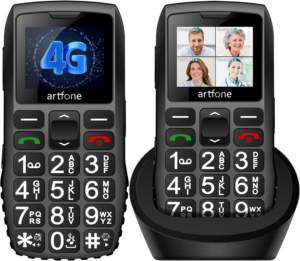
The artfone C1+4G is built around accessibility from the ground up. You notice it the second you pick it up. The buttons are large, raised, and backlit, which gives your fingers a clear target and cuts down on wrong presses.
That tactile feel is a big part of why this phone works so well. The 1.8-inch display uses large fonts and clear icons, so the layout stays readable without feeling cluttered. Sound is another plus. The high-resolution loudspeaker keeps voices clearer than you get from many ultra-basic flip phones, which makes everyday calls less tiring.
The rest of the package stays practical. You get a 1,800 mAh battery, 7 to 8 hours of talk time, and a charging dock with USB-C, which is much easier to live with than a tiny charging port alone. The SOS button supports up to five emergency contacts, and extras like voice time announcement, speed dial, keypad lock, Bluetooth, FM radio, alarms, and room for up to 1,000 contacts make it feel well-rounded without piling on clutter.
Display: 1.8-inch screen | Battery: 1,800 mAh | Charging: USB-C dock | Safety: SOS for five contacts | Audio: high-resolution loudspeaker
Reasons to Buy
- Raised backlit buttons
- Loud, clear calls
- Easy drop-in charging
- Useful SOS feature
- Great tactile design
Reasons to Avoid
- Small main display
- Few smart extras
Who should buy it: If vision, hearing, or dexterity are the main concern, this is one of the safest choices on the list. It’s a strong match for seniors with arthritis, shaky hands, or anyone who needs a phone that gives clearer physical and audio feedback.
Star rating: 4.5/5
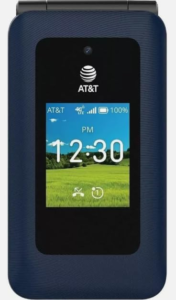
The AT&T Cingular Flex 2 is the bridge model in this group. It keeps the flip-phone form, but pushes closer to a lightweight smartphone experience. That’s the whole reason to buy it. You get more flexibility without jumping all the way back into a full touchscreen phone.
The 2.8-inch display looks sharper and more modern than most simple flip phones, which helps with menus, texts, and basic media. Day-to-day performance is solid too. A MediaTek processor paired with 512MB of RAM is enough to keep calls, texting, and menu navigation moving without the lag that makes cheap phones feel frustrating.
Where it separates itself is KaiOS. That gives you browsing, app support, and a more connected feel than the stripped-down emergency-first models on this list. The 4GB of storage and built-in camera add some extra usefulness too. The trade-off is simple, this phone isn’t the easiest or most stripped-back option here. It’s better for someone who wants a little more range from a flip phone, not less.
Screen: 2.8-inch display | Processor: MediaTek | Memory: 512MB RAM | Storage: 4GB | Software: KaiOS
Reasons to Buy
- Sharper main display
- Smoother app support
- Better browsing tools
- Useful built-in camera
- Good step-down phone
Reasons to Avoid
- Less basic to learn
- Safety tools aren’t central
Who should buy it: This one makes sense if a standard senior flip phone feels too limited. It’s a good pick when you want calls and texts to stay easy, but still want browsing, basic apps, and a more modern feel.
Star rating: 4.4/5
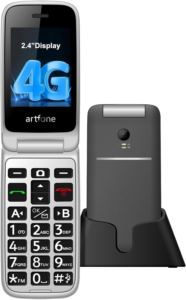
The artfone G3 Pro is the no-fuss value pick. This is the phone you hand to someone who doesn’t want to learn a system, tap through menus, or guess what a symbol means. It keeps things direct, and that alone makes it appealing.
The hardware helps a lot. You get 21 large, backlit, raised keys, so every press feels clear and deliberate. The 2.4-inch display uses large fonts and icons, which keeps the home screen readable. T9 predictive text is a nice touch too. On a flip phone, that can make texting feel much less tedious than you’d expect.
Battery life is solid rather than flashy. The 1,300 mAh battery is rated for 7 to 8 hours of talk time, and the USB-C charging dock makes daily charging easy. Voice time announcement, speed dial, SOS, Bluetooth, FM radio, alarms, and a flashlight all add usefulness without making the phone feel crowded. If you want simple, affordable, and easy to hand over with almost no explanation, the G3 Pro hits the mark.
Display: 2.4-inch screen | Battery: 1,300 mAh | Talk time: 7 to 8 hours | Charging: USB-C dock | Typing: T9 predictive text
Reasons to Buy
- Very easy layout
- Large raised keys
- Handy charging dock
- T9 helps texting
- Good value balance
Reasons to Avoid
- Average battery size
- Limited advanced features
Who should buy it: This phone fits the buyer who wants a clean, low-stress daily phone and nothing more. It’s a smart choice for older adults who mainly call, text, check the time, and want a few useful extras like a flashlight and SOS button.
Star rating: 4.3/5
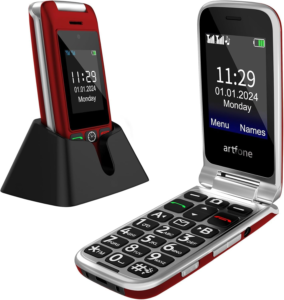
The artfone G6 Pro is the tough pick. If the phone is going to be opened and closed all day, carried in a pocket, or handled a little roughly, this model gives you more confidence than the average basic flip phone.
The hinge is the headline feature. It’s tested for 120,000 flips and opens to 170 degrees, which is a strong durability story for this category. You also get a 2.4-inch inner display and a 1.8-inch outer screen, so you can check calls, time, and messages without opening the phone every single time.
Usability doesn’t get lost in the process. The 21 large backlit buttons are easy to press, and the SOS feature supports up to five emergency contacts. Add in a loudspeaker, flashlight button, talking clock, Bluetooth, FM radio, alarms, and support for up to 1,000 contacts, and it feels complete without feeling complicated.
“The buttons are much easier to press. The screen is simple to read, and the whole interface feels straightforward instead of overwhelming.”
Hinge: tested for 120,000 flips | Displays: 2.4-inch inner, 1.8-inch outer | Buttons: 21 large backlit keys | Safety: SOS for five contacts | Extras: talking clock and flashlight
Reasons to Buy
- Strong hinge design
- Useful outer screen
- Large tactile keypad
- Good daily extras
- Solid SOS support
Reasons to Avoid
- Smart features are limited
- Built more for toughness
Who should buy it: This is a good fit if the phone needs to handle daily wear without feeling fragile. It also works well for seniors who benefit from big buttons and simple screens, but want something that feels more durable in the hand.
Star rating: 4.1/5
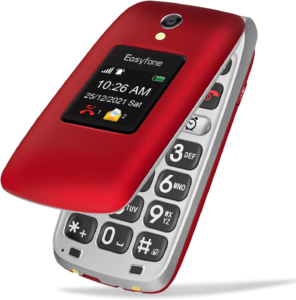
The Easyfone Prime-A1 Pro puts safety first, and it doesn’t hide it. This phone is built for the buyer who wants fast access to help, fast control over nuisance calls, and a layout that stays easy to read under pressure.
The dedicated SOS button is the reason most people will choose it. Press and hold it, and the phone starts calling emergency contacts while sending alerts. That is the kind of feature you may never want to use, but you’re glad it’s there. The one-press call block button is another smart touch because scam calls are a constant problem.
The rest of the phone stays simple and senior-friendly. It has a 2.4-inch HD main display, a 1.44-inch external screen, large icons, large fonts, and a charging dock paired with a 1,500 mAh battery. Photo speed dial, a loud HAC-compatible speaker, and 4G connectivity make it a good fit for someone who wants reassurance built into the phone, not added later.
Displays: 2.4-inch main, 1.44-inch outer | Safety: dedicated SOS button | Call control: one-press blocking | Battery: 1,500 mAh | Audio: HAC-compatible loud speaker
Reasons to Buy
- Dedicated SOS button
- Scam-call blocking
- Easy-to-read screens
- Helpful charging dock
- Strong safety focus
Reasons to Avoid
- Safety-first design
- Fewer entertainment extras
Who should buy it: This one makes the most sense if emergency access is your top concern. It’s a strong option for seniors living alone, families buying for a loved one, or anyone tired of scam calls and fiddly phone controls.
Star rating: 3.9/5
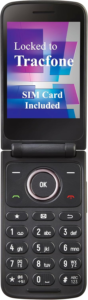
The TCL Flip 3 is the budget model that still feels current. Cheap flip phones can feel like they gave up before you even turn them on. This one doesn’t. It keeps the basics clean, then adds enough modern touches to feel usable instead of stripped down.
The dual-screen setup is a big reason why. You can glance at calls and alerts on the outside display, then open the phone when you need the main screen. Call quality gets a lift from dual microphones with noise cancellation, and the 1,850 mAh battery is rated for up to 14 hours of talk time, which is strong for an affordable flip phone.
KaiOS 3.1 and a Snapdragon processor help it feel smoother than many budget options. You also get Wi-Fi, FM radio, and a 5-megapixel camera for quick snapshots. What you don’t get is the same level of senior-specific accessibility and safety features found on the artfone or Easyfone models. If price is the main filter, though, the TCL Flip 3 is easy to like.
“I even listen to the radio again because it’s available on the phone already. It gives so much nostalgia.”
Displays: dual-screen design | Battery: 1,850 mAh | Talk time: up to 14 hours | Software: KaiOS 3.1 | Camera: 5MP rear camera
Reasons to Buy
- Strong budget value
- Useful outer screen
- Long talk time
- Wi-Fi and radio
- Clearer call setup
Reasons to Avoid
- Fewer senior-focused tools
- Basic camera only
- Less guided experience
Who should buy it: If you want to spend less but still get a flip phone that feels usable every day, this is the budget choice to beat. It’s best for buyers who are comfortable with a simpler setup and don’t need advanced accessibility features.
All recommended products in comparison
If you’re deciding between two or three models, this quick table makes the trade-offs easier to spot.
| Product | Ease of use | Safety tools | Extra features | Battery and charging |
|---|---|---|---|---|
| LIVELY Jitterbug Flip2 | Excellent, big buttons and list menu | Good, speed dial and live support | Moderate | Good, standard daily use |
| artfone C1+4G | Excellent, raised keys and clear audio | Strong, SOS for five contacts | Moderate | Strong, 1,800 mAh and USB-C dock |
| AT&T Cingular Flex 2 | Good, but more to learn | Basic | Strongest smart feature set | Standard, check current specs |
| artfone G3 Pro | Excellent, very straightforward layout | Strong, SOS and speed dial | Good, FM radio and flashlight | Good, 1,300 mAh and USB-C dock |
| artfone G6 Pro | Very good, big keys and outer screen | Strong, SOS and talking clock | Good, radio and Bluetooth | Standard, check current specs |
| Easyfone Prime-A1 Pro | Very good, big icons and simple screens | Excellent, SOS and call blocking | Moderate | Good, 1,500 mAh and dock |
| TCL Flip 3 | Good, but less senior-focused | Basic | Good, KaiOS, Wi-Fi, radio, camera | Strong, 1,850 mAh and up to 14 hours talk time |
The pattern is clear. The Jitterbug Flip2 is the safest overall buy, the artfone C1+4G is the accessibility standout, the Cingular Flex 2 is the smartest option, and the TCL Flip 3 wins on price. If you want to cross-check how major retailers group this category, Best Buy’s flip phones for seniors lineup shows the same split between simple emergency-first phones and smarter flip models.
What to look for in a flip phone
A flip phone can look simple on paper and still be annoying in real life. The right one is the phone you can read, hear, charge, and trust without extra effort.
Buttons and text you can read
Start with the basics. Look for large buttons, raised key shapes, and backlighting that makes the keypad visible in dim rooms. On the screen side, large fonts and clear icons matter more than fancy graphics. If the phone has an outer display, make sure it shows useful information like calls, time, or messages.
Loud audio and hearing support
A strong speaker can matter more than a bigger screen. If calls are hard to hear, the rest of the phone doesn’t matter much. Look for clear speaker volume, a solid earpiece, and hearing-aid compatibility if needed. Models like the Easyfone Prime-A1 Pro and artfone C1+4G stand out here because they make voice clarity a bigger priority.
SOS tools and spam control
Not every flip phone treats safety the same way. Some only add speed dial, while others give you a dedicated SOS button, emergency contact alerts, or scam-call blocking. If peace of mind is the main reason you’re buying a flip phone, this category should move to the top of your checklist, not the bottom.
Battery life and charging docks
Long talk time helps, but daily charging convenience matters too. A dock is often easier than lining up a small cable, especially for users with weak grip strength or poor vision. USB-C is a plus because it’s easier to find and replace. If charging is likely to become a hassle, a dock can be worth more than a larger battery.
Simple menus or smart extras
This is the big fork in the road. Some flip phones are best when they stay basic, while others give you browsing, apps, and a more connected feel. If what you want is the flip-phone shape with modern smartphone power, that is a different category altogether, as you can see in our Motorola Razr 2025 foldable review. For most seniors, simpler still wins.
Carrier support and daily fit
Before you buy, check 4G support, carrier compatibility, and how the phone will be used day to day. A phone that stays on the kitchen counter may benefit from a dock and loud speaker. A phone that travels in a pocket may need a stronger hinge and better outer screen. Match the design to the routine, not just the spec list.
Why Trust OASTHAR?
I’m Shashini Fernando, an associate editor who specializes in smartphones, mobile accessories, and wearables. For this guide, I tested core flip-phone usability points in-house and compared those findings with hundreds of customer reviews from real users across the flip phone market.
That mix matters because spec sheets only tell part of the story. A phone can sound perfect and still be frustrating once you start dialing, charging, or setting up speed dial. This list focuses on the flip phones that hold up where you notice it most, in real everyday use in 2026.
Best Flip Phones FAQs
What is the best flip phone overall?
The LIVELY Jitterbug Flip2 is the best overall pick. It combines big buttons, a clear screen, a simple list-based menu, and 24/7 support, which makes it the easiest safe recommendation for most buyers.
Which flip phone is best for poor vision or arthritis?
The artfone C1+4G is the strongest accessibility pick here. Its raised backlit buttons, clear icons, loud speaker, and charging dock make it easier to use if pressing small keys or reading tiny text is a problem.
Do flip phones still work on 4G networks?
Yes, many do, including several models on this list. Still, you should check current carrier compatibility before buying because supported bands and plans can vary by model and seller.
Is a charging dock worth it on a flip phone?
For many seniors, yes. A dock makes charging easier, easier to see, and harder to get wrong. That’s a big reason why the artfone and Easyfone models score well for day-to-day convenience.
Are smart-feature flip phones harder to use?
Usually, yes, at least a little. A model like the AT&T Cingular Flex 2 gives you more flexibility with apps and browsing, but the Jitterbug Flip2 or artfone G3 Pro will feel easier if your main goal is calling and texting without a learning curve.
Final Verdict
If you want one pick that covers the widest range of needs, go with the LIVELY Jitterbug Flip2. It gets the basics right, keeps the interface clear, and adds the kind of live support that can make a huge difference.
Go with the artfone C1+4G if accessibility is the main priority, the AT&T Cingular Flex 2 if you want smarter software, the Easyfone Prime-A1 Pro if safety comes first, and the TCL Flip 3 if budget matters most.
The right flip phone isn’t the one with the longest feature list. It’s the one you can pick up, use, and trust without thinking twice.
