
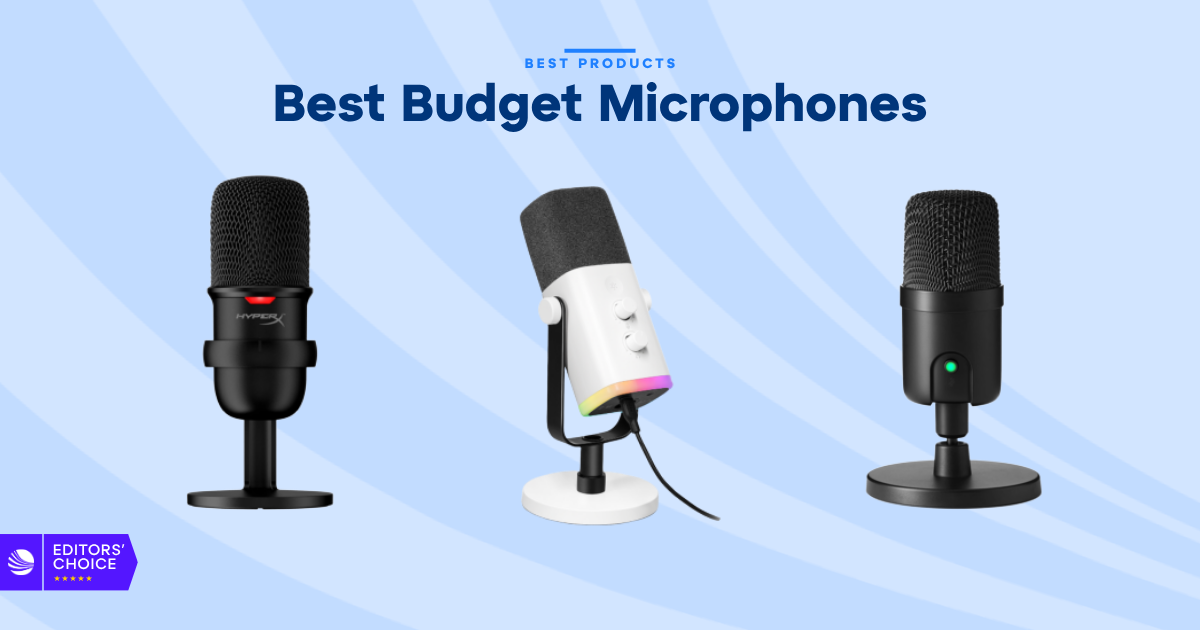
The best budget microphones can give you clear, confident audio without forcing you to spend studio-level money. Whether you’re streaming games, recording a podcast, making videos, or joining work calls, the right microphone can improve your voice more than a new camera or expensive software.
Disclosure: As an independent reviewer, we may receive an affiliate commission on qualifying purchases made through our links. This helps support our research and testing team at OASTHAR. Learn more about our testing process.
The tricky part is choosing the right type. A USB condenser mic can sound detailed at a desk, while a dynamic mic can reject more room noise. Wireless microphones are easier to carry, but desktop models usually offer better control and monitoring.
We tested the leading affordable options with those trade-offs in mind. The Fifine AM8 is our best overall pick because it gives you a strong mix of sound quality, controls, and flexibility. But the DJI Mic Mini 2, AKG Ara, HyperX SoloCast, Amazon Basics USB Condenser, Joby Wavo POD, and Fifine K688 each make more sense for different users. Here’s a look at the best budget microphones you can buy in 2026.
RELATED: The 7 Best Budget Binoculars for 2026, Tested and Reviewed
Best budget microphones at a glance
- Best Overall: Fifine AM8
- Best for Content Creators: DJI Mic Mini 2
- Best for Streamers: AKG Ara
- Best for Gaming: HyperX SoloCast
- Best Cheap: Amazon Basics USB Condenser
- Best for Podcasting: Joby Wavo POD
- Best Value: Fifine K688
Learn More About How We Test Budget Microphones
During testing, we found that affordable microphones can sound very different even when they share similar features. We compare setup, voice clarity, controls, noise handling, flexibility, pricing, and long-term user feedback.
Voice Clarity and Tonal Balance
We record speech at a normal desk distance, then listen for detail, warmth, harshness, and changes in volume. A good budget microphone should make your voice easy to understand without making it sound thin or overly bright.
We also check how the mic handles different voices. A microphone that sounds excellent with a deep voice may make a higher voice feel sharp. We look for a balanced tone that works well for calls, streams, podcasts, and videos without requiring heavy editing.
Room Noise and Plosive Control
A quiet bedroom and a busy living room create very different recording conditions. We test each microphone around keyboard noise, fan noise, nearby conversations, and light desk movement. Dynamic microphones usually have an advantage here, but placement still matters.
We also listen for popping sounds on words with strong P and B sounds. Built-in filters can help, but they don’t replace proper mic placement. We check whether each model stays usable when you speak naturally instead of sitting perfectly still.
USB Setup and Monitoring
Most budget buyers want a microphone that works quickly. We connect each model to a computer and check how easily it is recognized. We also test headphone monitoring, mute controls, gain controls, and volume adjustment when those features are available.
Latency matters when you’re streaming or recording. A headphone jack with direct monitoring can help you hear your voice without a distracting delay. We give extra credit to models that keep important controls on the microphone instead of forcing you to open software.
Pickup Pattern and Placement
A microphone’s pickup pattern affects what it hears. Cardioid models focus on the front and are usually best for one person at a desk. Omnidirectional and multi-pattern microphones can work better when you need to capture more than one voice or the sound of a room.
We test how sensitive each mic is to position. Some models need to sit close to your mouth, while others can stay farther away. The best choice depends on your desk size, room noise, and whether you need a clean setup for streaming or recording.
Build Quality and Desk Use
We inspect the stand, body, controls, cable connection, and mounting options. A microphone doesn’t need to feel heavy to be good, but it should stay stable and avoid rattling when you touch the desk.
We also look at how much space each model takes up. A large stand may look impressive but can crowd a smaller desk. A compact microphone may fit better beside a keyboard, monitor, camera, and speakers.
Price and Customer Reviews
We research major shopping platforms, including Amazon, Walmart, Target, and Currys, to track current pricing and availability. Prices can change, so we don’t treat a temporary discount as the main reason to recommend a product.
We also analyze hundreds of customer reviews for each microphone. That helps us compare our findings with real user experiences, including complaints about cables, software, stands, durability, and setup. The result is a broader view than a single test session can provide.
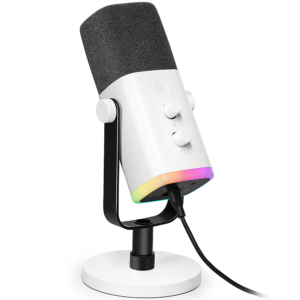
Star Rating: 4.8/5
The Fifine AM8 is the easiest recommendation in this group because it does more than most budget USB microphones. Its dynamic design helps reduce room noise, while USB and XLR connectivity give you a clear upgrade path when your setup grows.
For a first microphone, the AM8 keeps things simple. Connect it through USB, plug in your headphones, and adjust the controls on the body. You don’t need an audio interface to start recording, but you can add one later if you want more control over your signal chain.
The sound has enough warmth for spoken voice and enough detail for streams, videos, and casual music work. Like most dynamic microphones, it works best when you speak fairly close to it. That close placement helps the mic capture your voice while reducing keyboard clicks and room reflections.
Type: Dynamic | Connections: USB and XLR | Best for: Streaming, podcasting, gaming | Monitoring: Headphone output | Controls: Gain, volume, and mute controls vary by model
Reasons to Buy
- USB and XLR flexibility
- Strong room-noise control
- Clear spoken-word sound
- Useful onboard controls
- Good long-term value
Reasons to Avoid
- Needs close placement
- Stand and accessories vary
Who should buy it: The Fifine AM8 fits streamers, podcasters, gamers, and beginners who want one microphone that can grow with their setup. It’s also a smart choice if you record in a room that isn’t fully treated for sound.
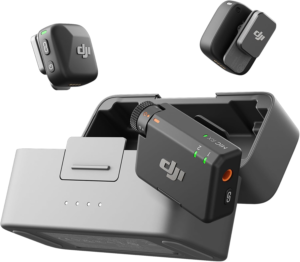
Star Rating: 4.7/5
The DJI Mic Mini 2 is the pick for creators who don’t want to stay tied to a desk. Its small wireless format makes it easier to record short videos, interviews, tutorials, walk-and-talk clips, and mobile content without placing a large microphone in front of the camera.
The biggest advantage is distance. A desktop microphone needs you to sit close to it, while a wireless transmitter can stay near the person speaking. That gives you more freedom when you’re filming in a room, outside, or in a space where a visible microphone would get in the way.
It isn’t the same type of product as the other microphones here. It doesn’t give you the broad desk controls or traditional studio feel of the Fifine AM8. But for content creators, speed and portability often matter more. Check the current package contents and device compatibility before buying because features can vary by model and bundle.
Type: Wireless lavalier system | Best for: Mobile video and interviews | Connection: Wireless receiver system | Design: Compact transmitter | Accessories: Vary by package
Reasons to Buy
- Very portable design
- Easy for mobile video
- Keeps the mic near you
- Useful for interviews
- Fast setup
Reasons to Avoid
- Less suited to desktop use
- Package contents vary
- Wireless systems need charging
Who should buy it: This microphone suits video creators, mobile journalists, teachers, and anyone who records away from a desk. It makes more sense than a desktop USB mic when the camera moves or the speaker can’t stay close to a stand.
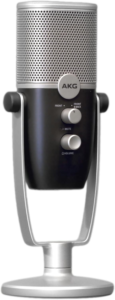
Star Rating: 4.6/5
The AKG Ara delivers the clean, open sound many streamers want without turning the setup into a project. Its condenser design picks up more detail than many entry-level dynamic microphones, which helps your voice sound present and natural during live broadcasts.
The front-facing design makes it easy to understand where you should speak. That matters because placement can make or break a cheap microphone. Sit close enough, aim the front toward your mouth, and keep the gain under control. The result is a detailed voice track that works well for commentary and live chat.
The trade-off is room noise. Condenser microphones can hear more of your surroundings, including keyboards, fans, and hard surfaces. If your room is quiet, the Ara is a strong value. If your space is loud, the Fifine AM8 or K688 may give you a cleaner result with less extra work.
Type: USB condenser | Best for: Streaming and voice recording | Pickup: Front-facing pattern | Monitoring: Headphone monitoring varies by model | Controls: Gain and mute controls vary by version
Reasons to Buy
- Detailed voice pickup
- Simple USB setup
- Good streaming sound
- Clear front-facing design
- Compact desk footprint
Reasons to Avoid
- Hears room noise
- Needs careful gain settings
- Less flexible than XLR models
Who should buy it: The AKG Ara is a good match for streamers with a reasonably quiet room. It also works for online teaching, voiceovers, and video calls when you want a more open sound than a basic headset microphone can provide.
Star Rating: 4.5/5
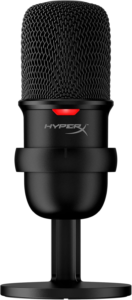
The HyperX SoloCast gets the important gaming details right. It is compact, easy to connect, and clear enough to keep your voice understandable during fast matches, group chats, and live streams. The tap-to-mute control is especially handy when you need to silence yourself quickly.
Its cardioid pickup pattern focuses on the front of the mic. That helps keep your voice ahead of some desk noise, although the mic still benefits from being positioned close to your mouth. A boom arm can improve the result, but the included stand is enough for a basic setup.
The SoloCast is less flexible than the Fifine AM8 because it focuses on USB use. It also doesn’t give you the same upgrade path as a USB and XLR model. That simplicity is part of its appeal, though. If you want a gaming mic that works without a long setup process, the SoloCast remains a safe choice. The newer SoloCast 2 may offer different controls or features, so check the current version before ordering.
Type: USB condenser | Best for: Gaming and streaming | Pickup: Cardioid | Control: Tap-to-mute sensor | Mounting: Desktop stand and boom-arm compatibility vary
Reasons to Buy
- Easy plug-and-play setup
- Clear gaming voice
- Useful tap-to-mute control
- Compact design
- Works with common computers
Reasons to Avoid
- USB-only setup
- Picks up some room noise
- Limited onboard controls
Who should buy it: The HyperX SoloCast is built for gamers who want a clean voice without dealing with an audio interface. It also fits Discord users, casual streamers, and console or PC players who want a small microphone that doesn’t dominate the desk.
Star Rating: 4.4/5
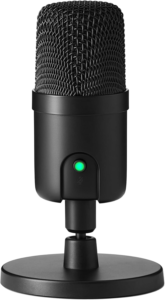
The Amazon Basics USB Condenser is a simple starting point for anyone who needs better audio than a laptop microphone can provide. It focuses on the basics, with a USB connection and a condenser design that can give your voice more detail during calls, classes, and casual recordings.
This is the kind of microphone that makes sense when your budget is tight and your needs are straightforward. You aren’t paying for a large control panel, advanced processing, or a wireless system. You connect it, select it as your input, and start talking.
Its limits are just as clear. Budget condenser microphones can pick up room reflections, fans, and keyboard noise. Accessories and specifications can also vary between listings and updates, so check the current product page before you buy. For basic use, though, it offers a low-cost step up from built-in computer audio.
Type: USB condenser | Best for: Calls, classes, and casual recording | Connection: USB | Pickup: Cardioid-style pickup varies by model | Accessories: Stand and cable contents vary
Reasons to Buy
- Low entry cost
- Simple USB connection
- Better than laptop audio
- Suitable for basic calls
- Easy for beginners
Reasons to Avoid
- Basic controls
- Room noise can be noticeable
- Product versions may vary
Who should buy it: This model is for first-time buyers who need a microphone for remote work, school, gaming chat, or occasional voice recording. If you want to build a serious podcast or music setup, a more flexible model will serve you better.
Star Rating: 4.3/5
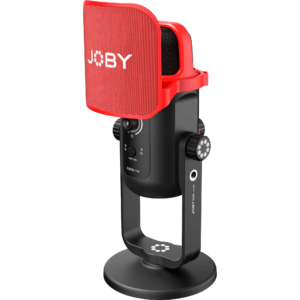
The Joby Wavo POD is tuned for spoken audio, and that makes it a natural fit for podcasts, voiceovers, and long conversations. It gives your voice a fuller presentation than many basic webcam microphones, while the desktop format keeps the setup familiar and easy to manage.
Podcasting often involves more than technical sound quality. You need a microphone that stays comfortable to use, works with different speakers, and doesn’t force you to stop the conversation every few minutes. The Wavo POD’s practical design and spoken-word focus make it easy to place in front of a host.
As with any desktop condenser mic, placement is important. Keep it close enough to capture a strong voice signal, use a pop filter when needed, and avoid placing it beside a loud keyboard. If you record two people at once, separate microphones and an audio interface may be a better option than asking one USB mic to cover the whole room.
Type: USB desktop microphone | Best for: Podcasts and voiceovers | Pickup: Front-focused pattern | Monitoring: Headphone output varies by model | Accessories: Stand and pop protection vary
Reasons to Buy
- Strong spoken-word focus
- Useful for podcast desks
- Clear voice presentation
- Simple computer setup
- Practical desktop design
Reasons to Avoid
- Room noise needs control
- Not ideal for many speakers
- Features vary by version
Who should buy it: The Wavo POD suits solo podcasters, video narrators, remote interview hosts, and creators who want a more polished voice without building a full studio. It works best when you record in a quiet room and keep the microphone near the speaker.
Star Rating: 4.2/5
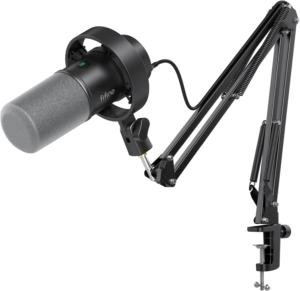
The Fifine K688 is a strong value if you prefer the controlled sound of a dynamic microphone. It keeps some background noise out of your recording and gives you both USB convenience and the option to use an XLR interface later.
That makes it useful for gaming, streaming, podcasting, and home voice recording. The sound is usually more focused than a low-cost condenser mic, but you need to speak close to the front. If you sit too far away, your voice may lose volume and detail.
The K688 isn’t the newest or most feature-rich choice in this list. The AM8 is a better all-around recommendation because it offers a more complete mix of controls and flexibility. Still, the K688 remains a good option when its current price is lower or when you want a simple dynamic microphone for a noisy room.
Type: Dynamic | Connections: USB and XLR | Best for: Streaming, gaming, and podcasting | Monitoring: Headphone output varies by model | Placement: Close-mic use recommended
Reasons to Buy
- Dynamic room-noise control
- USB and XLR connections
- Full spoken-word sound
- Good value when discounted
- Suitable for noisy rooms
Reasons to Avoid
- Requires close speaking distance
- Less detailed than condensers
- Current features may vary
Who should buy it: The K688 fits buyers who want a dynamic microphone but don’t want to spend on a traditional broadcast setup. It makes sense for a home office, gaming desk, or starter podcast where noise control matters more than maximum detail.
All Recommended Budget Microphones Compared
| Microphone | Type | Best use | Connection | Room-noise control |
|---|---|---|---|---|
| Fifine AM8 | Dynamic | Overall use, streaming, podcasting | USB and XLR | Strong |
| DJI Mic Mini 2 | Wireless lavalier | Mobile video and interviews | Wireless receiver | Depends on placement |
| AKG Ara | Condenser | Streaming and voice recording | USB | Moderate |
| HyperX SoloCast | Condenser | Gaming and casual streaming | USB | Moderate |
| Amazon Basics USB Condenser | Condenser | Calls and entry-level recording | USB | Basic |
| Joby Wavo POD | Condenser | Podcasting and voiceovers | USB | Moderate |
| Fifine K688 | Dynamic | Gaming, streaming, and podcasting | USB and XLR | Strong |
Sound Detail
Condenser microphones usually capture more fine detail. The AKG Ara, HyperX SoloCast, Amazon Basics USB Condenser, and Joby Wavo POD can give your voice an open and present sound in a quiet room.
Dynamic models take a different approach. The Fifine AM8 and K688 focus more on the voice directly in front of them. They can be easier to use in rooms with fans, keyboards, or mild background noise, but they need closer placement.
Setup Speed
The Amazon Basics USB Condenser and HyperX SoloCast are among the simplest options. They are designed for buyers who want to connect a cable and start talking.
The DJI Mic Mini 2 is also quick once the transmitters and receiver are paired. The AM8, K688, AKG Ara, and Joby Wavo POD offer simple USB setups, but their extra controls make them more useful when you want to adjust your sound.
Upgrade Potential
The Fifine AM8 and K688 have the clearest upgrade path because they support USB and XLR connections. You can begin with USB and add an audio interface later.
The other desktop USB models are more limited. That’s not a problem if you plan to use them for gaming, calls, or casual recording. It only becomes a concern if you expect to build a multi-microphone setup or record several separate tracks.
Portability
The DJI Mic Mini 2 is the obvious winner for mobile use. You can place the microphone near the speaker without carrying a desktop stand.
The desktop microphones are better for fixed recording positions. The SoloCast and Amazon Basics model take up less space, while the AM8, K688, and Wavo POD are more suited to a permanent desk setup.
What to Look for in a Budget Microphone
Choose the Right Microphone Type
The first decision is condenser or dynamic. Condenser microphones are sensitive and detailed. They work well in quiet rooms and can make speech sound open and clear.
Dynamic microphones are less sensitive to distant sounds. They often work better in untreated rooms, shared bedrooms, and busy home offices. They can sound excellent, but you need to speak close to the microphone and point your voice toward the front.
Wireless lavalier systems are different again. They put the microphone near your mouth, which is useful for videos and interviews. They aren’t a direct replacement for a desktop mic, so choose based on where you record.
Check the Connection
USB is the easiest option for most beginners. A USB microphone handles the audio conversion inside the microphone, so you don’t need a separate audio interface. Your computer can usually recognize it with little setup.
XLR connections are common in more advanced audio systems. They need an audio interface or mixer, but they give you more flexibility later. A USB and XLR microphone, such as the Fifine AM8 or K688, lets you begin simply and upgrade when you’re ready.
Wireless systems use a transmitter and receiver. Check whether the receiver works with your phone, camera, tablet, or computer. Compatibility can vary, especially between different bundles.
Look for Headphone Monitoring
A headphone jack is useful when you’re recording or streaming. Direct monitoring lets you hear your voice with little or no delay. That helps you catch background noise, loud breathing, and poor placement before they become part of the recording.
Some budget microphones only offer a mute button or gain control. Others include headphone volume, a mix control, or additional onboard settings. You don’t need every control, but physical access is faster than searching through software menus.
Consider Pickup Patterns
A cardioid microphone focuses on sound from the front. This is the most useful pattern for one person sitting at a desk. Turn the front toward your mouth and keep the rear pointed at the loudest noise source.
A figure-eight pattern can record two people sitting opposite each other. An omnidirectional pattern can capture a room, but it also picks up more unwanted noise. Most beginners should choose cardioid unless they have a clear reason to use another pattern.
Check Sample Rate and Bit Depth
Sample rate and bit depth affect the digital recording signal. Basic microphones often support standard recording quality, while some models offer higher rates or 24-bit audio.
Higher numbers don’t automatically create a better recording. Mic placement, room noise, voice technique, and the microphone’s own tuning matter more in everyday use. Still, check the current specifications if you plan to record music or edit voice tracks in detail.
Think About DSP
Digital signal processing can change the sound before it reaches your recording software. Some microphones use light processing to smooth volume changes or prevent clipping. Others aim to provide a less processed signal for editing later.
DSP can help with gaming and live streaming because laughter and sudden shouts are less likely to overload the recording. For music, a cleaner signal with little processing may give you more freedom during mixing.
Check the Stand and Mount
A microphone is only as useful as its placement. The included stand should hold the mic securely and avoid transferring every desk bump into the recording.
Check whether the microphone works with a boom arm or shock mount. You may need extra accessories if you want the mic close to your mouth without blocking your screen. A pop filter or windscreen can also reduce sharp bursts of air on certain words.
Match the Mic to Your Room
A quiet room gives condenser microphones an advantage. A noisy room often favors a dynamic model. But the room isn’t the only factor. A microphone placed close to your mouth can reject more background sound than one placed across the desk.
Hard walls and bare desks can create reflections that make recordings sound hollow. Soft furnishings, curtains, and a sensible recording position can help. You don’t need a professional studio, but you do need to control the space around the mic.
Check Software Compatibility
Most USB microphones work with common recording, streaming, and video-call apps. Your computer typically lets you select the mic as the input and your headphones as the output.
Some audio programs handle USB devices differently. If you plan to record with professional software, check compatibility before buying. A single USB mic is also not ideal for recording several separate voices at the same time. For that, an audio interface with multiple inputs and XLR microphones is usually the better setup.
Think About Multiple Speakers
One USB microphone can work for a casual two-person conversation if both speakers sit close together and the pickup pattern supports it. The result depends heavily on room noise and speaker placement.
For a regular podcast with two or more people, individual microphones give you better control. You can adjust each voice separately and reduce one person’s volume without affecting everyone else. A USB interface with multiple inputs is more suitable for that kind of setup.
Check Current Pricing and Warranty
Budget microphone prices can shift during sales, product refreshes, and bundle changes. Compare the current price with what comes in the box. A cheaper microphone may need a stand, pop filter, or cable that another model includes.
Warranty coverage also matters. Check the brand’s support policy, return window, and replacement process. A microphone is a long-term desk accessory, so reliable support can matter as much as a small difference in price.
Why Trust OASTHAR?
I’m Shashini Fernando, an associate editor who specializes in microphones, headphones, speakers, and other personal audio products. I test each product in-house and analyze hundreds of customer reviews from real users before we publish a recommendation.
For this list, we compared the best budget microphones across the main buying decisions: sound quality, noise handling, setup, controls, portability, compatibility, and value. We don’t treat a long feature list as proof of quality. A microphone has to work well for the people who will actually use it.
We also separate product types instead of forcing every microphone into one ranking. A wireless mic can be better for a creator, while a dynamic USB mic can be better for a noisy room. That is why the final list includes different picks for streaming, gaming, podcasting, mobile video, and entry-level recording.
Best Budget Microphones FAQs
What Is the Best Budget Microphone Overall?
The Fifine AM8 is the best budget microphone overall. It gives you a clear dynamic sound, USB and XLR connections, useful controls, and a practical upgrade path.
Are Budget USB Microphones Good Enough for Podcasts?
Yes. A good USB microphone can produce clear podcast audio for one speaker. The Joby Wavo POD is a strong choice for spoken audio, while the Fifine AM8 is better if your room has noticeable background noise.
Is a Dynamic or Condenser Microphone Better?
A dynamic microphone is usually better for a noisy room because it focuses more on nearby sound. A condenser microphone can capture more detail in a quiet room. Your space and recording style matter more than the label alone.
Do You Need an Audio Interface for a USB Microphone?
No. USB microphones include the digital conversion hardware needed to connect directly to a computer. You need an audio interface when you use XLR microphones or want to record multiple microphones as separate tracks.
Can You Use a Budget Microphone for Music?
You can use one for demos, vocals, instruments, and home recording. Look for a model with minimal processing and suitable recording specifications. The room, mic placement, and performance will still have a bigger effect than the price alone.
Final Verdict
The Fifine AM8 is the best choice for most buyers. It gives you the strongest mix of sound, controls, noise handling, and future flexibility. Start with USB, then add an XLR interface when you need a more advanced setup.
Choose the DJI Mic Mini 2 if you create videos away from your desk. Its wireless design keeps the microphone close to you and makes mobile recording much easier. The AKG Ara is better for streamers who record in a quiet room and want detailed condenser sound.
For gaming, the HyperX SoloCast keeps things simple. It has a compact design, clear voice pickup, and a quick mute control. If your budget is very tight, the Amazon Basics USB Condenser is a sensible entry point for calls, classes, and casual use.
The Joby Wavo POD is the better spoken-word pick for solo podcasts and voiceovers. The Fifine K688 gives you a dynamic alternative with USB and XLR flexibility. Whichever model you choose, place it close to your mouth, aim the front correctly, and control the noise around you. Those basics will do more for your recordings than spending extra on features you won’t use.