


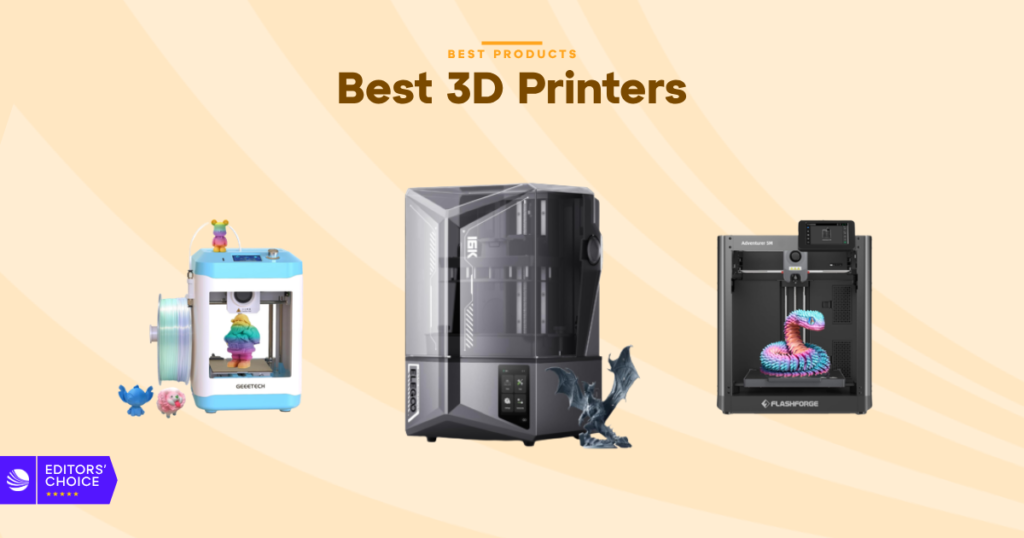
If you’re shopping for the best 3D printers, the first thing you run into is how different they are in real use. Some are built for quick beginner wins, some are tuned for resin detail, and some are all about speed or bigger builds.
Disclosure: As an independent reviewer, we may receive an affiliate commission on qualifying purchases made through our links. This helps support our research and testing team at OASTHAR. Learn more about our testing process.
That gap matters. A printer can look great on paper and still be annoying to set up, cramped for your projects, or too noisy for a desk at home. The seven picks below cover the main buying lanes, so you can match the machine to your space, skill level, and patience.
You’ll see a clear best overall, a budget-friendly large-format pick, a value play, and a few options for specific jobs. The linked product pages are in each review, so you can check current specs and pricing as you go. If you want the fast version first, start with the TL;DR below.
RELATED: The 7 Best Garmin Watches for 2026, Tested and Reviewed
Best 3D printers at a glance
- Best Overall: ELEGOO Saturn 4 Ultra
- Best for Kids: GIANTARM Mini
- Best Beginner: Entina Tina2 Basic
- Best for High-Speed: FLASHFORGE Adventurer 5M
- Best Mainstream: ANYCUBIC Photon Mono M7 Max
- Best Budget for Large Format: ELEGOO Neptune 4 Plus
- Best Value: QIDI Q2 3D Printer
Learn more about how we test 3D printers
During testing, we found that the best 3D printers are the ones that balance setup, output quality, and day-to-day ease, not just speed or flashy specs on the box.
Price and customer reviews
We select 3D printers by researching major shopping platforms like Amazon, Walmart, Target, and Currys, then we compare that with what real buyers say after months of use. That mix helps separate polished product pages from the lived experience of actual owners. We look for patterns in setup issues, print failures, noise, and support, not one-off complaints.
Build volume and print type
Size matters, but so does the type of printer. Resin machines are better for detail, while FDM printers are usually the more flexible choice for everyday parts. We compare build volume against the kinds of projects you can actually make, because a big number only helps if the machine fits your job. Mini, mid-size, and large-format printers all get judged on use, not hype.
Setup and everyday ease
A printer that takes forever to level or calibrate loses points fast. We look at assembly time, auto leveling, app control, file transfer, and whether the machine feels forgiving for a first-time user. The best models reduce the amount of fiddling you need to do before each print, which is where a lot of beginners get stuck.
Print quality and speed
Speed is nice, but clean results matter more. We judge layer consistency, surface finish, vibration control, and how well a printer keeps its accuracy when it runs faster. Resin models get extra attention for detail and edge smoothness. FDM models get checked for stringing, first-layer quality, and how stable they stay on taller prints.
Material support and temperature control
A printer that handles only one or two basic materials has a narrower ceiling. We look at nozzle temperature, chamber heating, and filament or resin support so you know what the machine can grow into. PLA is the starting point for most buyers, but better machines open the door to PETG, ABS, TPU, nylon, and stronger composite blends.
Safety, noise, and long-term ownership
A printer should fit your space, not take it over. We look at enclosure design, filtration, power-loss recovery, resin handling, maintenance needs, and whether the machine feels like a headache after the first week. If a printer is easy to clean, easier to monitor, and less likely to waste material, it gets a better score.
Star rating: 4.9/5
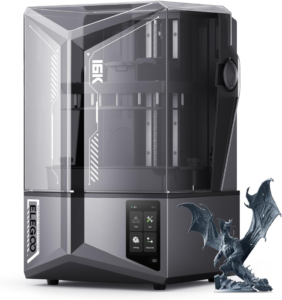
The ELEGOO Saturn 4 Ultra has the kind of superpowers that make resin printing feel less like a project and more like a routine. It gives you a 10-inch 16K mono LCD, smart tank heating, auto-leveling, and tilt release technology that pushes print speed up to 150 mm/h. That mix is a big deal if you care about detail but don’t want a printer that slows your whole week down.
This is the pick that makes the most sense if you want crisp miniatures, display parts, prop pieces, or anything else where surface finish matters. It also feels more modern than a lot of resin machines in this class because the workflow is smarter, not just sharper. The AI camera, built-in light, and monitoring alerts help you keep an eye on the job without hovering over it.
If you want a second opinion, both TechRadar’s Saturn review and PCMag’s Saturn review point in the same direction. The Saturn 4 Ultra is not just about the image quality on the box. It is about making resin printing feel easier to live with.
Display: 10-inch 16K mono LCD | Heating: Intelligent tank heating at 30°C | Speed: Up to 150 mm/h | Monitoring: AI camera with built-in light | Protection: Residue, resin shortage, and leveling alerts
Reasons to Buy
- Very sharp resin detail
- Smart heating improves flow
- Auto-leveling keeps setup easy
- Tilt release helps speed
- Monitoring tools add peace of mind
Reasons to Avoid
- Resin cleanup still takes effort
- Not the right pick for filament printing
Who should buy it: If you want resin detail first and convenience second, this is the one you should start with. It fits the buyer who wants cleaner surfaces, faster turnaround, and fewer little annoyances between prints.
Star rating: 4.7/5
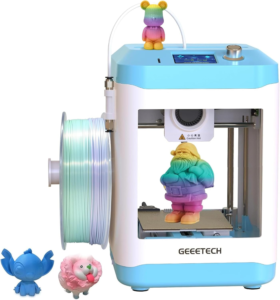
The GIANTARM Mini is built for the buyer who wants a smaller printer that does not feel fragile or intimidating. Fully assembled, simple knob controls, and one-button filament loading make it easy to hand to a beginner without a long setup session. That matters a lot if you want a printer for a desk, classroom, or family space.
It still brings enough hardware to feel useful, which is the nice part. You get 16-point auto leveling, a heated platform, and a removable magnetic build plate, so the basics are handled in a pretty friendly way. The direct drive extruder with dual metal gears also helps with more consistent feeding and better accuracy than you’d expect from a mini machine.
At up to 250 mm/s, it has enough pace to keep things moving, and the 2.4-inch color screen plus built-in lighting make it easier to use in daily life. You are not buying this for giant parts or advanced material tricks. You are buying it because it gets beginners printing fast and keeps the learning curve low.
Setup: Fully assembled | Controls: Knob-based interface | Leveling: 16-point auto leveling | Extrusion: Direct drive with dual metal gears | Speed: Up to 250 mm/s
Reasons to Buy
- Easy for new users
- Compact and desk-friendly
- Auto leveling reduces guesswork
- Simple filament loading
- Good for home or school
Reasons to Avoid
- Not made for large prints
- Fewer advanced material options
Who should buy it: If you want a small printer for kids, casual projects, or first-time use, this one makes the whole process feel less like a chore and more like a weekend hobby.
Star rating: 4.6/5
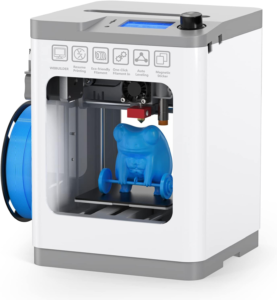
The Entina Tina2 Basic is the easiest starter pick here, and that is its main win. It comes fully assembled, and you can start your first print in as little as five minutes. That kind of setup is a huge deal if you want a printer that feels friendly from day one instead of turning into a small technical assignment.
Day to day, it keeps the experience simple. You get auto leveling, a flexible magnetic platform, offline printing through microSD, and resume printing if something interrupts the job. Dual Z-axis rails help with stability, which gives your prints a cleaner look than you might expect from a compact beginner model.
This is also one of the most practical picks for a desk, classroom, or small workspace. It does not try to be flashy. It tries to be easy, and that is often what a first printer should be. If your budget is tight, our budget 3D printers guide is a useful place to compare other low-cost options too.
Setup: Fully assembled | Start time: First print in about 5 minutes | Leveling: Auto leveling | Platform: Flexible magnetic bed | Recovery: Resume printing support
Reasons to Buy
- Fastest beginner setup
- Friendly for first-time users
- Compact footprint
- Simple offline printing
- Stable dual Z-axis design
Reasons to Avoid
- Not built for big parts
- Limited room for growth
Who should buy it: If you want something simple, small, and forgiving, this is the easy button. It is the kind of printer that helps you learn without making the learning part feel heavy.
Star rating: 4.5/5
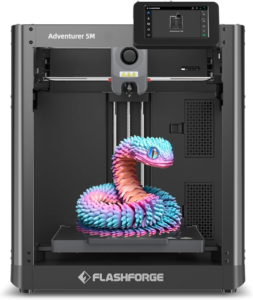
The FLASHFORGE Adventurer 5M is the printer you pick when speed is the main event. With a CoreXY structure, up to 600 mm/s travel speed, and 20,000 mm/s² acceleration, it is built to move fast. That does not just matter for bragging rights. It matters when you want shorter wait times and a more efficient print workflow.
Setup is part of the appeal too. Fully automatic bed leveling keeps the early steps easy, and the high-flow nozzle helps the machine get up to speed quickly. The 35-second warm-up to 200°C is a nice touch, especially if you do a lot of short jobs. The detachable nozzle system also makes maintenance feel less annoying than it does on many other printers.
Even with that speed bias, it does not ignore print quality. Dual fans, vibration compensation, and a 280°C direct extruder help keep prints clean while the machine is moving hard. If you want a printer that feels quick without turning setup into a mess, this one hits a strong middle ground.
Structure: CoreXY | Travel speed: Up to 600 mm/s | Acceleration: 20,000 mm/s² | Warm-up: About 35 seconds to 200°C | Nozzles: 0.25 mm to 0.8 mm options
Reasons to Buy
- Very fast print workflow
- Automatic bed leveling
- Quick nozzle changes
- Good quality at speed
- Handy mobile app control
Reasons to Avoid
- Build volume is not huge
- Best if speed matters most
Who should buy it: This is the printer for you if waiting around bothers you more than anything else. It feels built for fast turnarounds, especially when you want a solid everyday FDM machine that does not waste time.
Star rating: 4.4/5
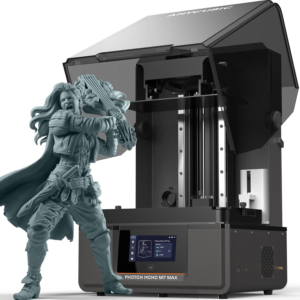
The ANYCUBIC Photon Mono M7 Max gives you the resin detail people want, but with a build size that feels useful in the real world. Its 298 x 164 x 300 mm build volume is big enough for full-size masks, larger cosplay parts, terrain pieces, and batches of smaller models. That is the kind of room that keeps you from cutting everything into too many little sections.
The print engine is strong too. Light Turbo 3.0, the COB light source, and the Fresnel lens work together to keep the light angle tight and the uniformity high. That helps detail stay crisp across more of the build plate. Anti-aliasing and high-precision lead screws also help layer lines look smoother and surfaces feel more refined.
Convenience matters here as well. The dynamic heating resin vat helps with temperature control, while auto fill and one-key recycling make resin handling less messy. The one-hand cover is a small but useful touch. If you want a mainstream resin printer that feels capable and easy to live with, this is a smart place to land.
Build volume: 298 x 164 x 300 mm | Light system: Light Turbo 3.0 with COB and Fresnel lens | Uniformity: Over 90% | Detail tools: Anti-aliasing and high-precision lead screws | Resin handling: Auto fill and one-key recycling
Reasons to Buy
- Large resin build area
- Sharp detail across the plate
- Good for cosplay and terrain
- Easier resin handling
- Strong fit for batch printing
Reasons to Avoid
- Resin cleanup still applies
- Bigger than a tiny desktop resin printer
Who should buy it: If you want a resin machine that can handle larger real projects, this is a strong step up. It gives you detail without trapping you in a small print area.
Star rating: 4.2/5
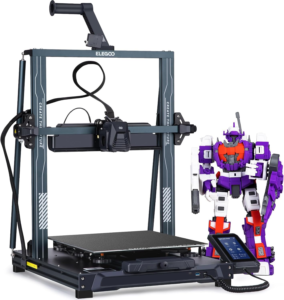
The ELEGOO Neptune 4 Plus is the budget-friendly large-format pick that makes the most sense for people who want room without going premium. The 320 x 320 x 385 mm build volume is the main draw. It gives you space for taller parts, bigger props, or multiple pieces at once, which is where smaller printers start to feel tight.
It also keeps speed on the table. With Klipper firmware and up to 500 mm/s output, it is not forcing you to choose between size and a slow workflow. Input shaping, pressure advance, and X/Y acceleration sensors help cut vibration and keep the print cleaner when the pace goes up. That is a good balance for a printer in this price zone.
The hardware setup is more serious than the price might suggest. You get a dual gear direct drive extruder with a 5.2:1 reduction ratio, a 300°C nozzle, a 60W ceramic heater, and auto PID calibration. It supports PLA, PETG, ABS, TPU, and nylon, which gives you a wider lane than many budget large-format printers.
“The accuracy of the prints were completely on point without having to print multiple test prints and adjustments. It came ready to rock straight out of the box after assembly.”
Wi-Fi, USB, and LAN transfer round it out, so the daily workflow feels modern enough without getting fussy.
Build volume: 320 x 320 x 385 mm | Speed: Up to 500 mm/s | Extruder: Dual gear direct drive with 5.2:1 ratio | Nozzle: 300°C high-temp nozzle | Connectivity: Wi-Fi, USB, and LAN
Reasons to Buy
- Large build volume
- Strong speed for the price
- Good material support
- Stable extrusion setup
- Easy file transfer options
Reasons to Avoid
- Large printers need more desk space
- Not as polished as premium options
Who should buy it: If you want the biggest print area without paying a top-tier price, this is the one to watch. It gives you room, speed, and enough control to handle serious projects.
Star rating: 4.1/5
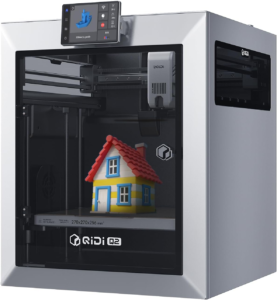
The QIDI Q2 3D Printer is the strongest value play in the group. It feels more ambitious than a basic entry-level machine, because you get an enclosed CoreXY printer with 65°C active chamber heating, full auto leveling, and speeds up to 600 mm/s. That is a lot of hardware for a machine that is still trying to stay approachable.
The real trick here is flexibility. The nozzle doubles as the leveling sensor, which helps the first layer feel more accurate and the setup feel less like a chore. The full metal CoreXY structure, precision linear rails, and upgraded 1.5 GT synchronous belt all help keep the motion stable, especially when you push speed. It handles everyday materials like PLA and PETG, but it also opens the door to ABS, TPU, PA, PC, and composite filaments with carbon or glass fiber.
You also get smart extras that make the machine feel complete, not half-finished. The AI camera, power loss recovery, and triple filtration system give it a more finished feel for home use. If you want one printer that can grow with you, this is the value pick that deserves a close look.
Chamber: 65°C active heated chamber | Speed: Up to 600 mm/s | Frame: Full metal CoreXY with linear rails | Materials: PLA, PETG, ABS, TPU, PA, PC, and composites | Safety: Triple filtration and power loss recovery
Reasons to Buy
- Strong all-around value
- Enclosed design helps with tougher materials
- Fast motion system
- Good first-layer setup
- Broad filament support
Reasons to Avoid
- Not the simplest budget printer
- More machine than a casual user needs
Who should buy it: If you want one printer that gives you room to grow, this is a smart bet. It brings speed, enclosure, and material support together without drifting into pure premium pricing.
All recommended products at a glance
Here is the fast comparison view, so you can see where each printer fits before you go deeper.
| Product | Print type | Best for | Size or speed edge | Main trade-off |
|---|---|---|---|---|
| ELEGOO Saturn 4 Ultra | Resin | Best overall | 10-inch 16K display, up to 150 mm/h | Resin cleanup |
| GIANTARM Mini | FDM mini | Kids and beginners | Simple controls, 250 mm/s | Small build space |
| Entina Tina2 Basic | FDM mini | Easy starter setup | Fully assembled, first print in minutes | Limited room to grow |
| FLASHFORGE Adventurer 5M | FDM | High-speed printing | 600 mm/s travel, 20,000 mm/s² acceleration | Smaller build area |
| ANYCUBIC Photon Mono M7 Max | Resin | Large detailed prints | 298 x 164 x 300 mm build volume | Resin workflow |
| ELEGOO Neptune 4 Plus | FDM | Budget large prints | 320 x 320 x 385 mm, 500 mm/s | Big footprint |
| QIDI Q2 3D Printer | Enclosed FDM | Best value all-rounder | 600 mm/s, 65°C chamber | More printer than a basic starter |
The table makes one thing clear. Resin wins on fine detail. FDM wins on flexibility, easier cleanup, and material range. Once you know which side of that line you want to live on, the shortlist gets much easier.
What to look for in a 3D printer
Pick the right print type
The first decision is resin or FDM. Resin printers give you cleaner detail, smoother surfaces, and better results for miniatures or display work. FDM printers are the better all-around choice for toys, tools, brackets, and general home projects. If you want one machine to handle a wide spread of jobs, FDM is usually the easier place to start.
Match the build volume to your projects
Build volume decides how much you can print in one shot. Small machines are fine for tiny figures or desk items, but they can feel cramped fast. Bigger printers are more useful if you want cosplay parts, props, or multiple parts at once. If your budget is tight, start with the budget 3D printers guide and compare size before you chase speed.
Look at setup and software
A printer that takes too much tinkering can wear you down. Auto leveling, good file transfer, and simple controls matter more than people expect. If you are new to the hobby, look for a printer that gets you from box to first print without a long learning curve. The best starter models keep the setup boring in a good way.
Check speed, but don’t ignore quality
Fast printing sounds great until the layers look rough or the machine shakes itself loose. You want a printer that keeps its shape and detail when the speed goes up. That means looking at acceleration, vibration control, and extrusion quality, not just the top speed printed on the spec sheet.
Think about materials and heat
PLA is easy, but it is not the end of the road. Better printers support PETG, TPU, ABS, nylon, and even composites. If you plan to print stronger parts or flexible pieces, pay close attention to nozzle temperature and chamber heating. Those details decide how far the machine can go once you move past basic test prints.
Don’t skip safety and maintenance
Cleaning resin, changing nozzles, clearing jams, and replacing parts are all part of ownership. Enclosures, filtration, power-loss recovery, and easy maintenance are worth real money because they save time later. A printer should fit your space and your patience level, not just your wishlist.
Why Trust OASTHAR?
I’m Shashini Fernando, an associate editor who specializes in consumer tech, 3D printers, and smart home gear. I test each product in-house and analyze hundreds of customer reviews from real users in this 3D printer market before I help build a list like this for 2026.
That mix matters because a spec sheet only tells part of the story. A printer can look fast, large, or polished on paper and still be annoying in daily use. By pairing hands-on checks with real customer feedback, you get recommendations that are built around how these machines behave after the first unboxing rush fades.
Best 3D Printers FAQs
What is the best 3D printer overall?
The ELEGOO Saturn 4 Ultra is the best overall pick here. It gives you excellent resin detail, smart heating, automatic leveling, and a cleaner workflow than most printers in its class.
Which 3D printer is best for beginners?
The Entina Tina2 Basic is the easiest starter choice. It comes fully assembled, starts fast, and keeps the setup simple enough for first-time users.
Is resin or FDM better for you?
Resin is better if you care most about fine detail and smooth surfaces. FDM is better if you want easier cleanup, more material choices, and more everyday flexibility.
What is the best 3D printer for large prints?
The ELEGOO Neptune 4 Plus is the best large-format budget pick, while the ANYCUBIC Photon Mono M7 Max is the better choice if you want large resin prints with high detail.
Is a faster 3D printer always better?
No. Speed helps, but only if the printer still keeps its quality, stability, and ease of use. A slower machine that prints cleanly can be the better buy for a lot of people.
Final verdict
If you want the safest all-around pick, go with the ELEGOO Saturn 4 Ultra. It gives you the strongest mix of detail, smart features, and real-world ease. If you want the easiest starter, the Entina Tina2 Basic keeps things simple without a steep setup curve.
If you need more space, the ELEGOO Neptune 4 Plus gives you a big build area at a better price. If speed matters most, the FLASHFORGE Adventurer 5M is the one to beat. And if you want the best mix of value, enclosure, and material support, the QIDI Q2 3D Printer is the one that feels the most complete.
