

Budget PC shopping in 2026 is tricky, but it’s not hopeless. The best budget gaming PCs now show up in more sizes and styles, from small towers that fit tight desks to mainstream prebuilts that leave room for future upgrades.
Disclosure: As an independent reviewer, we may receive an affiliate commission on qualifying purchases made through our links. This helps support our research and testing team at OASTHAR. Learn more about our testing process.
At this price tier, the GPU still decides most of your gaming experience. That’s why many smart configs pair a sensible Core i5 or Ryzen 5 class CPU with a stronger graphics card, instead of spending big on the CPU and settling for weak graphics.
This guide keeps it simple. You’ll get seven clear picks, what each one does best, and the trade-offs that matter when you’re trying to play modern games without burning your whole budget.
RELATED: The 8 Best Hearing Protections for 2026, Tested and Reviewed
Best budget gaming PCs at a glance
- Best Overall: HP Victus 15L
- Best for 1080p Gaming: CyberPowerPC Gamer Xtreme
- Best Compact Option: Asus TUF Gaming T500
- Best Customizable Build: NZXT Player One PC
- Best Expandable: Dell Tower Plus
- Best Value Performance: HP Omen 35L
- Best Stylish: Alienware Aurora R16
For broader context on what’s popular across price tiers this year, TechRadar’s roundup is a useful cross-check: TechRadar best gaming PC list.
Learn more about how we test gaming desktops
In our assessment, a “budget” gaming PC only counts if it stays smooth in real games, not just in a spec sheet. During testing, we found that small details (cooling, RAM speed, airflow, bloatware) can make two similar-looking configs feel totally different.
Price and Customer Reviews
We start by tracking prices across major retailers and brand stores, then we compare that against what people actually report after weeks of use. We analyze hundreds of customer reviews to spot repeat issues (fan noise, crashes, poor packaging, weak Wi-Fi). That helps you avoid systems that look good on paper but disappoint at home.
Real-Game Performance at 1080p
We focus on the resolution most budget buyers use: 1080p. We prioritize steady frame pacing and “feels smooth” gameplay, not just peak FPS. When available, we check performance claims against published review testing, then we note what settings typically make sense (high vs ultra, ray tracing off vs on).
Thermals, Noise, and Sustained Loads
Budget towers often cut corners on airflow. So we pay attention to whether performance drops after longer sessions. Fan tuning software can help, but a good case and cooler matter more. We also flag when a compact design tends to run louder, because small cases have less room to move heat.
Upgrade Path and Serviceability
A budget desktop gets way more valuable if you can upgrade RAM, storage, and the GPU later. We look at access panels, standard parts, PSU headroom, and clearance for longer graphics cards. Compact systems can be great, but they’re more likely to restrict upgrades.
Software Load and Setup Experience
We check how clean the Windows setup feels. Too much preinstalled software can slow updates, add pop-ups, and waste storage. We also weigh whether the system includes basic utilities that are actually helpful (fan control, lighting control), versus clutter.
Availability and Config Transparency
We prefer lines that clearly show what you’re buying (exact CPU, GPU, RAM, SSD). With budget prebuilts, the same name can hide multiple configs. If details vary by model, we call that out and keep the recommendation focused on the configurations that make sense.
Star rating: 4.8 / 5.0
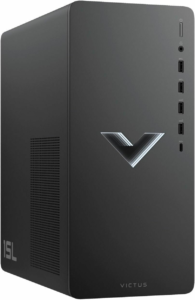
The Victus 15L’s superpower is simple: it gets you into real PC gaming without the usual budget-PC regret. It’s compact, widely available, and it’s often priced low enough that you still have room in your budget for the upgrades that matter most (RAM and storage).
In 2026, that matters because “entry-level” can still mean playable 1080p, as long as your expectations match the config. Many Victus 15L models are built for mainstream esports and lighter AAA settings, and the line has a long track record of being a practical first tower. On the other hand, the smallest configs can feel cramped fast if you stick with 8GB RAM and a tiny SSD.
If you want more background on how this line performs and where it falls short, this review is a solid reference point: HP Victus 15L review details.
CPU: Varies by model | GPU: Varies by model | RAM: Often 8GB to 16GB | Storage: Often 256GB to 1TB SSD | Size: Compact tower
Reasons to Buy
- Strong entry-level value
- Small footprint for desks
- Easy “first upgrades” path
- Good for esports staples
Reasons to Avoid
- Hotter, louder in some configs
- Base RAM and SSD can be tight
- Not built for 4K ambitions
Who should buy it: This fits when you want a straightforward starter desktop for 1080p gaming and everyday use, and you’d rather spend carefully than chase peak parts. It also works well when your desk space is limited but you still want a real tower.
Star rating: 4.6 / 5.0
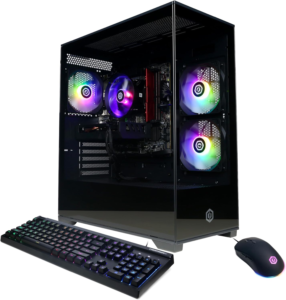
The Gamer Xtreme’s superpower is selection. CyberPowerPC tends to offer lots of configurations, and that matters in 2026 because the “right” budget gaming PC often comes down to a smart CPU and GPU pairing, not a brand name on the case.
When you’re aiming for smooth 1080p, this line is usually built around the right idea: a midrange CPU, 16GB-class memory in many configs, and a modern GPU that can hold high settings without constant compromises. The experience can vary, though, because CyberPowerPC sells many builds under similar naming. That means you need to pay attention to the exact GPU, PSU, and cooling in the spec list.
If you want to see how CyberPowerPC structures its current configuration approach, this official configurator page shows the kind of choices that can change the value fast: CyberPowerPC Xtreme XT configurator.
CPU: Varies by build | GPU: Varies by build | RAM: Varies by build | Storage: Varies by build | Cooling: Varies by build
Reasons to Buy
- Many configs at different budgets
- Strong 1080p focus potential
- Often good parts-per-dollar
- Easier to find GPU variety
Reasons to Avoid
- Value depends on exact config
- Cooling quality isn’t uniform
- Some builds prioritize looks
Who should buy it: This works when you want a budget tower aimed at high-refresh 1080p and you’re willing to compare a few configurations to land on the best mix. It’s also a good fit when you want a traditional mid-tower feel instead of a tiny box.
Star rating: 4.4 / 5.0
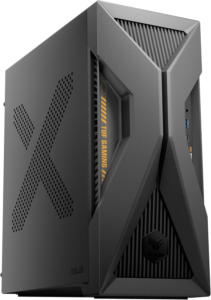
The TUF Gaming T500’s superpower is space efficiency. When you want a gaming desktop that doesn’t take over your room, a compact tower can feel like the “right kind” of budget upgrade, especially if you’re coming from a laptop or console setup.
A compact chassis, however, always comes with trade-offs. Smaller cases can run warmer and louder under load, and they can be harder to work in if you ever plan to upgrade. In other words, this category tends to reward you for picking the right config up front (enough RAM, a solid SSD, and a GPU that matches your monitor).
It also fits the 2026 vibe of “console-sized” and low-profile gaming PCs, where convenience matters as much as raw performance. For a broader view of what counts as budget-worthy this year, you can cross-check picks and pricing trends here: IGN budget gaming PC roundup.
CPU: Varies by model | GPU: Varies by model | RAM: Varies by model | Storage: Varies by model | Case: Compact tower
Reasons to Buy
- Desk-friendly size
- Clean, simple gaming setup
- Good fit for small rooms
- TUF line is widely known
Reasons to Avoid
- Less upgrade-friendly layout
- Thermals depend on config
- Fewer “tinker” benefits
Who should buy it: This is for when your priority is a smaller desktop that still feels like a real gaming PC. It makes the most sense when you want a neat, low-clutter setup and you don’t plan heavy hardware swaps.
Star rating: 4.3 / 5.0
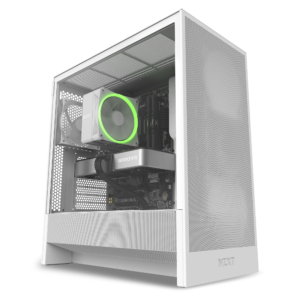
The Player One’s superpower is clarity. NZXT’s approach tends to feel more straightforward than the messy budget prebuilt market, because the design, airflow, and parts choices are usually built around a clean baseline, not just a flashy spec headline.
In practice, that means a case that’s easier to live with. You’re getting sensible port access, tidy internal layout, and a build that usually feels less chaotic than “mystery meat” budget towers. It’s also the kind of system where upgrading storage or RAM later doesn’t feel like a chore, which helps your budget stretch further over time.
This isn’t always the cheapest option in a pure dollars-to-FPS race, but it often wins on day-to-day ownership. If you want a general snapshot of what’s considered budget-friendly with current GPUs, PC Gamer’s coverage of low-cost, worth-buying prebuilts is a helpful signal: cheapest gaming PC worth buying.
CPU: Varies by configuration | GPU: Varies by configuration | RAM: Varies by configuration | Storage: Varies by configuration | Case airflow: Typically strong focus
Reasons to Buy
- Clean, tidy build style
- Usually good airflow design
- Easier upgrades than tiny PCs
- Practical port selection
Reasons to Avoid
- Not always the lowest price
- Configs can sell out
- Extras vary by bundle
Who should buy it: This fits when you want a budget system that feels well put together and easy to maintain. It also works when you care about the whole experience, not just peak FPS for the price.
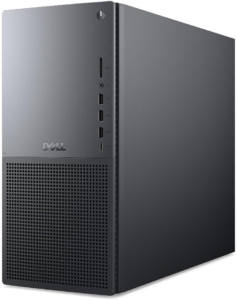
Star rating: 4.2 / 5.0
The Tower Plus superpower is “room to grow.” Dell’s value here isn’t that it’s the cheapest, it’s that the platform can make sense as a long-term desktop that also happens to game well when configured properly.
That balance matters in 2026. A lot of people buying budget gaming PCs also want a system for school, work, streaming, and creative apps. A tower that’s comfortable as an everyday PC can be the smarter pick than an aggressive “gamer” box that’s loud, hot, and packed with clutter.
If you want a detailed breakdown of how this system is positioned and tested, this review is a good reference: Dell Tower Plus review.
CPU: Varies by config | GPU: Varies by config | RAM: Varies by config | Storage: Varies by config | Chassis: Traditional tower
Reasons to Buy
- Better long-term expandability
- Strong everyday PC behavior
- Less “RGB tax” feel
- Good for mixed workloads
Reasons to Avoid
- Gaming value depends on config
- Not the smallest footprint
- Some configs cost more
Who should buy it: This is a strong match when you want a desktop that can handle gaming and daily tasks without feeling like a one-purpose machine. It also fits if upgrades over time are part of the plan.
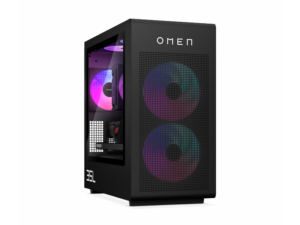
Star rating: 4.1 / 5.0
The Omen 35L’s superpower is balance. It’s built to sit in the sweet spot where you get strong gaming performance, decent thermals, and a case that doesn’t fight you when it’s time to add storage or swap parts.
This kind of PC also lines up with a key budget truth in 2026: you usually get a better gaming result by prioritizing the GPU first, then picking a capable midrange CPU. Many Omen 35L configurations follow that logic, which is why it can feel like a better value than systems that overspend on CPU tiers you won’t fully use at 1080p.
The catch is that Omen configs vary a lot, and price swings can be big. Still, if you want a performance-forward budget tower that doesn’t feel cheap, it belongs on the shortlist.
CPU: Varies by model | GPU: Varies by model | RAM: Often 16GB to 32GB class | Storage: Often 1TB SSD class | Upgrades: Standard parts in many builds
Reasons to Buy
- Strong value at the right price
- Solid case for upgrades
- Good “all-around” gaming feel
- Better headroom than micro-towers
Reasons to Avoid
- Pricing moves a lot
- Some preinstalled software
- Not a small PC
Who should buy it: This works when you want one system that handles modern games, multitasking, and future upgrades without drama. It’s also a good fit if you’re moving toward 1440p later but you’re starting at 1080p now.
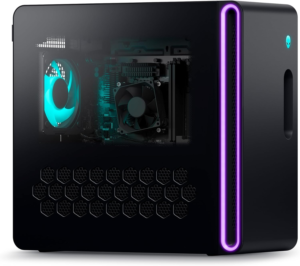
Star rating: 4.0 / 5.0
The Aurora R16’s superpower is design that doesn’t look like a toy. It’s a more office-friendly Alienware than past generations, which can be a real benefit if your gaming PC sits in a shared space or a clean setup matters to you.
With Alienware, the conversation is always about trade-offs. You’re often paying extra for the chassis, the brand, and the overall fit and finish. That can still be worth it if you want a polished tower and you’d rather not compare ten near-identical prebuilts from different sellers.
If you want a detailed look at how the R16 is built and how it differs from older Alienware styles, this review is a helpful reference: Alienware Aurora R16 review.
CPU: Varies by configuration | GPU: Varies by configuration | RAM: Varies by configuration | Storage: Varies by configuration | Design: Clean, modern tower
Reasons to Buy
- Clean, stylish case
- Strong mainstream gaming potential
- Brand support ecosystem
- Fits “mixed” setups well
Reasons to Avoid
- Often pricier for performance
- Upgrades can be less friendly
- Value depends on sales
Who should buy it: This fits when you care about how your PC looks and feels, not just raw FPS-per-dollar. It’s also a strong pick if you want a mainstream prebuilt experience with fewer unknowns.
All recommended products in comparison
| Pick | Best for | Size and desk fit | Upgrade feel | Budget gaming target |
|---|---|---|---|---|
| HP Victus 15L | First-time buyers | Very compact | Moderate (tight space) | 1080p entry and esports |
| CyberPowerPC Gamer Xtreme | High-FPS 1080p | Mid-tower varies | Varies by build | 1080p high settings focus |
| Asus TUF Gaming T500 | Small rooms | Compact | Lower (compact layout) | 1080p mainstream |
| NZXT Player One PC | Clean ownership | Mid-tower | Higher (friendly layout) | 1080p high, some 1440p configs |
| Dell Tower Plus | Long-term PC use | Traditional tower | Higher (space to expand) | 1080p, depends on GPU |
| HP Omen 35L | Balanced value | Mid-tower | Higher (standard parts) | 1080p high, some 1440p |
| Alienware Aurora R16 | Style and polish | Compact-ish tower | Moderate | 1080p to 1440p (config dependent) |
What to look for in a budget gaming PC
GPU first, then CPU
For most games, the graphics card matters most. A stronger GPU with a sensible midrange CPU usually beats a premium CPU paired with weak graphics. This is even more true if you plan to move from 1080p to 1440p later.
16GB RAM as the practical floor
A lot of budget towers still ship with 8GB in their cheapest configurations. That can work for lighter games, but it often causes stutters in modern titles and heavy multitasking. If the system supports easy RAM upgrades, that’s a big value booster.
SSD size you won’t regret
Many entry systems still ship with 256GB to 512GB SSDs. That fills up fast once you install a few big games. A 1TB SSD is a comfort upgrade that improves daily life, even if it doesn’t raise FPS.
Cooling and case airflow
Budget PCs can run hot, especially compact ones. Better airflow means steadier performance over longer sessions and less fan noise. If two PCs have similar specs, pick the one with the better case design and cooling approach.
Upgradability and standard parts
A good budget tower can last longer if it uses standard components and gives you space to add storage or swap a GPU. Tiny chassis designs can be great, but they’re less forgiving when you want to change hardware later.
Config transparency
Model names don’t guarantee specs. Always check the actual CPU, GPU, RAM, and storage listed for that exact configuration. In 2026, the same product line can include both “great value” builds and overpriced ones.
Why Trust OASTHAR?
I’m Shashini Fernando, an associate editor who specializes in consumer tech, including gaming desktops, laptops, and PC accessories. You’re getting picks shaped by hands-on testing habits, market research across major retailers, and analysis of hundreds of real customer reviews, so the list reflects what people actually live with in 2026, not just what looks good in a spec table.
Best Budget Gaming PC FAQs
What is the best budget gaming PC overall?
HP Victus 15L is the best overall entry-level pick here because it regularly hits the lowest cost of entry while still delivering real 1080p gaming in the right configurations.
Are budget gaming PCs in 2026 good enough for new AAA games?
Yes, at 1080p with sensible settings. The key is matching the GPU to your goals, since ray tracing and ultra settings can raise the hardware bar fast.
Is 1440p realistic on a budget prebuilt?
It can be, but it depends on the exact GPU in the configuration. Many “budget” lines include both true entry builds and stronger midrange builds under the same name.
Should you prioritize a bigger SSD or a better GPU?
The GPU changes what games you can run well and what settings feel smooth. The SSD changes how comfortable daily use feels, especially with big installs and updates.
Do compact budget PCs run louder?
They often do, because small cases have less airflow and smaller cooling solutions. A compact PC can still be a great fit, but noise and heat are more common trade-offs.
Final Verdict
If you want the simplest low-cost entry, HP Victus 15L is the cleanest starting point. If your goal is fast 1080p performance and you’re comparing configurations carefully, CyberPowerPC Gamer Xtreme fits the brief. For small desks, Asus TUF Gaming T500 keeps the footprint down, while NZXT Player One PC is the pick when you want a tidy build that’s easier to live with.
If long-term expandability matters most, Dell Tower Plus stands out. If you want a strong balance of performance and upgrade comfort, HP Omen 35L is the value performer. If you care about design and a polished tower presence, Alienware Aurora R16 is the stylish entry.
