

Acer Chromebook Plus 515 Review: Is a Big, Cheap Chromebook Enough?
Dim screen, five hours of video, 3.7 lb. This Acer Chromebook Plus 515 review weighs that against its speakers and ports, and says which model to buy.
Affiliate disclosure: As an Amazon Associate, OASTHAR earns from qualifying purchases.
OASTHAR score
- Value8.2
- Design and Build7.7
- Performance7.4
- Battery Life6.6
- Display5.9
The verdict
If you want a big-screen Chromebook for homework, email and streaming at a desk, I'd buy the Acer Chromebook Plus 515. If you carry a laptop all day, I'd skip it and spend more on the Chromebook Plus 14. It has a roomy 15.6-inch screen, a keyboard writers like, a large smooth touchpad, loud clear speakers and HDMI built in, and Google promises updates until June 2032.
The catch is the screen and the battery. The panel measured under 275 nits, so bright rooms wash it out, and TechRadar's video test ran just 5h 13m. At 3.7 lb, it's heavy for a backpack. If you own any Chromebook Plus already, keep it. Skip this one if you need Windows apps, and get the Acer Aspire Go 15. For a brighter, lighter premium pick with 8GB of memory, look at the MacBook Neo. Below, I weigh every published battery and screen test so you know which version to buy.
Buy it ifStudents and families who want a big, simple, well-supported Chromebook that mostly stays on a desk or table.
Reasons to buy
- Big 15.6-inch screen and a full-size keyboard that writers praise for long typing sessions.
- Loud, clear speakers that Tom's Guide calls the best it has heard on a Chromebook.
- HDMI, USB-A and two USB-C ports built in, and it charges from either side.
- Automatic ChromeOS updates until June 2032, per Google's update list.
Skip it ifSkip it if you carry a laptop all day; the Chromebook Plus 14 is lighter, silent and lasts nearly twice as long.
Reasons to avoid
- Dim screen, measured under 275 nits, washes out near windows and outdoors.
- Battery runs about five hours of video, and 3.7 lb is heavy to carry all day.

Prices and availability can change. Details
Product prices and availability are accurate as of the date/time indicated and are subject to change. Any price and availability information displayed on Amazon.com at the time of purchase will apply to the purchase of this product.
What the Acer Chromebook Plus 515 is, and who it suits
Need a big screen for homework or spreadsheets without spending much? That's the job this laptop does best. It's a 15.6-inch Chromebook with a full-size keyboard, built-in HDMI and two speakers that sound far better than the price suggests, and it gets ChromeOS updates until June 2032.
Read those four numbers together and the shape is clear. It's roomy and supported for years, but it's heavy for a Chromebook and the battery is ordinary. The web figure comes from Tom's Guide, whose writer used it for a few weeks and called it one of the best Chromebooks for writing, editing and browsing.
So who is it for? Picture a high school student who does Google Classroom at the kitchen table, then plugs into the family TV over HDMI for a movie on Friday night. Or a parent who wants a laptop for email, bills and video calls that nobody has to babysit with antivirus. Both get a big, simple machine that updates itself in the background.
Here's the thing you should know before anything else. It runs ChromeOS, so you get web apps and Android apps from the Play Store, not Windows or Mac software. If school or work needs a specific desktop program, stop here and look at a Windows laptop like the Acer Aspire Go 15.
And one more honest note up front. Every hands-on review used the launch version with a Core i3-1215U and 128GB, while the current listing has a Core i3-1305U and 256GB. The chassis, screen and speakers are the same, so the findings carry over, but check touch and backlight on the exact model you buy.
Who should buy the Chromebook Plus 515, and who should skip it?
Start with where the laptop will live. This one is happiest on a desk, a table or a sofa near a plug, and that single fact sorts most buyers.
- Get the Chromebook Plus 515 if you want the biggest screen and the best speakers you can get on a budget Chromebook, and the laptop mostly stays at home or in a classroom.
- Get it if you plug into a TV or monitor often, because HDMI and USB-A are built in and USB-C charges from either side.
- Get the Chromebook Plus 14 if you carry the laptop all day. It's about a pound lighter, silent, and its battery ran 15h 14m in Notebookcheck's web test.
- Get the Acer Aspire Go 15 if you need Windows programs on a similar 15-inch budget. It ran almost 14 hours of video for PCMag, though its keyboard is shallow and unlit.
- Get the MacBook Neo if you want a far brighter screen and a premium metal body at 2.7 lb, and can live with 8GB of memory and no keyboard backlight.
- Skip it if you work by bright windows or outdoors. The screen measured under 275 nits.
Say you're a college student with three classes back to back and a library shift after. Six hours of real use is what Tom's Guide counted on, so you'd be hunting for an outlet by mid-afternoon, and that's where the Plus 14 or the Lenovo IdeaPad Slim 3x, at 16h 29m in Tom's Guide's test, earn their keep.
But say you're buying for a kid who does homework at the same desk every evening. Weight and battery stop mattering, and the big screen, keyboard and speakers look like smart money. That's the buyer I'd point straight at this laptop.
Bottom line: buy it for a home base. Buy something lighter for a backpack.
What changed from the Chromebook 515, and what does Chromebook Plus get you?
Coming from an older Chromebook that crawls with ten tabs open? That's the upgrade this model was built for. It replaced Acer's plain Chromebook 515 under Google's Chromebook Plus label, and TechRadar called the speed difference night and day, while noting it's heavier and thicker than the original 515.
The Plus label is a floor Google sets, and here's how this laptop meets it, using Google's Chromebook Plus page and its Auto Update policy list.
| What you get | Chromebook Plus promise | Chromebook Plus 515 |
|---|---|---|
| Memory | At least 8GB | 8GB or 16GB, soldered |
| Storage | At least 128GB | 128GB to 512GB by configuration |
| AI tools | Gemini across ChromeOS, Help me read, Magic Eraser | Included; most need an internet connection |
| Updates | 10 years from the platform's release | Automatic updates until June 2032 |
| AI subscription | 12 months of Google AI Pro offered at no cost | Offer must be redeemed by January 31, 2027 |
Take two things from that table. The hardware floor is real, so you won't get a 4GB Chromebook that chokes on Docs. And the update date is the one to note, because it's the day this laptop stops getting security fixes. June 2032 gives you more than five years from now, which covers a high school career.
The AI subscription is the fine print. After 12 months, Google's offer renews at its monthly rate unless you cancel, and Gemini in Google AI Pro is for adults 18 and over. Acer's own page still describes the older Google One AI Premium plan with 2TB, while Google's page now says Google AI Pro with 5TB. Set a calendar reminder the day you redeem it.
How do the build, keyboard, touchpad and ports hold up?
Worried a budget laptop will feel cheap? This one mostly doesn't, and that's its quiet strength. The gray plastic body is plain, but Acer says it's independently verified to MIL-STD-810H durability, and Laptop Mag called it sturdy and attractive.
The keyboard is the reason writers like it. Laptop Mag typed 89 words per minute at 93% accuracy, a touch above its usual pace, and praised the key travel. TechRadar liked the snap of each press and the wide keys. One dissent is worth hearing: RTINGS found the keys slightly mushy. Speakers flank the keyboard, so there's no number pad, which matters if you enter columns of figures all day.
The OceanGlass touchpad is a highlight. Laptop Mag measured it at 5.1 by 3.4 inches and found it spacious, responsive and accurate. Acer says it's made with recycled ocean-bound plastic, and it has a smooth, glass-like feel.
Ports are where it beats pricier laptops. You get a USB-C port, a headphone jack and a lock slot on the right, plus a second USB-C, a USB-A and HDMI on the left. Either USB-C port charges it, and both can drive a display. So picture a classroom where the only outlet is on the wrong wall. You just plug into the other side.
There are limits. HDMI is version 1.4, there's no SD card slot and no Ethernet jack. And at 3.7 lb and 0.79 inches thick, it's a real load next to the 2.7 lb MacBook Neo or the 2.2 lb Dell XPS 13. The 1080p webcam has a physical privacy shutter, and TechRadar called its image middling unless your room is well lit.
How long does the battery last, and what's in the box?
Here's the honest part. Acer claims 10 hours, and no outlet got there in its own test. The real answer depends on whether you browse or stream.
| Source | Model | Conditions | Reported figure |
|---|---|---|---|
| Acer claim | Series | Google power_LoadTest | 10 h |
| Tom's Guide | i3-1215U, 8GB | Web surfing at about 150 nits | 8h 16m |
| Tom's Guide | i3-1215U, 8GB | Real work over a few weeks | 6-plus hours |
| Laptop Mag | i3-1215U, 8GB | Lab test, conditions not described | 8h 21m |
| TechRadar | i3-1215U, 8GB | Movie playback loop | 5h 13m |
So read it this way. Browsing on a dim screen gets you past eight hours. Streaming video gets you about five. Laptop Mag notes its 8h 21m sits below the 9h 50m average for Chromebooks it has tested, which tells you this is ordinary, not bad.
Say you start a binge of a favorite show on a long bus ride. By the fourth or fifth episode, you'll want a plug. Compare that with the Chromebook Plus 14, which ran 15h 14m on Notebookcheck's web test, or the Acer Aspire 14 AI, at 17-plus hours of video for PCMag. Battery is the single biggest reason to spend more.
Charging helps. Acer claims 50% in about 30 minutes, and TechRadar found a full recharge took a little under an hour. The battery is rated at 53Wh by RTINGS.
Now the box. Acer's US page doesn't list what's inside. The series is rated for a 65W maximum power supply, and every unit reviewed charged over USB-C. Acer's UK spec page lists that 65W supply, and a snippet of the same page lists a power adapter and cord, which I couldn't confirm on the full page. I found no region that ships it without a charger, but check the listing if you buy outside the US.
Is the screen good enough?
Fair question, and it's the weakest part of the laptop. The 15.6-inch panel is 1080p IPS at 60Hz with an anti-glare coating. Sharp enough for Docs and Netflix, but dim and a little flat.
The measurements agree. Tom's Guide found an average of 263.2 nits, peaking around 275 in one corner, with 42% of the DCI-P3 color range. Laptop Mag measured 270.6 nits against a 435-nit average for the Chromebooks it has tested, and 43.4% DCI-P3. Those are low numbers. For comparison, the Chromebook Plus 14's OLED measured about 380 nits at Notebookcheck, and the MacBook Neo is rated at 500.
| Outlet | Brightness | DCI-P3 color |
|---|---|---|
| Tom's Guide | 263.2 nits average, about 275 peak | 42% |
| Laptop Mag | 270.6 nits | 43.4% |
What does that mean in your day? Indoors, it's fine. Tom's Guide had no trouble watching shows or reading detail, but advises against a sunny day outdoors. Near a big window at noon, you'll push brightness to full and still squint. Colors look muted, so photos won't pop the way they do on a phone.
TechRadar called the display lovely, and I'd read that as taste. The two outlets that put a meter on it both found it dim, and I trust the measurements more than the impression.
Touch is optional. The launch units had none, the current Amazon listing has a touchscreen, and Acer's UK model I checked has none. If you want to tap and scroll like a tablet, confirm it in the listing before you check out.
Who won't mind? Anyone indoors, watches shows in the evening, or plugs into a TV or monitor most of the time. Anyone who edits photos, sits by a window, or studies on a sunny campus bench should look at the Chromebook Plus 14 or the HP OmniBook 5, both with OLED screens.
How fast is it, and what can't it run?
Will it keep up with a pile of tabs? For school and office work, yes. Tom's Guide had 15-plus tabs open with music streaming and no trouble, and Laptop Mag called its everyday performance strong for the price.
Those numbers come from the launch Core i3-1215U. Tom's Guide found it faster than the Lenovo Flex 5i Chromebook Plus in multi-core and web tests, though slower in single-core. TechRadar says it starts in seconds and wakes almost instantly, and even Adobe Photoshop didn't slow it down. Now the ceiling. The Chromebook Plus 14 scored 7,628 multi-core in Tom's Guide's own test, about 40% more, so heavy multitaskers will feel the gap.
Heat isn't a concern. After 15 minutes of HD video, Laptop Mag measured 92.5 F on the bottom, under its comfort threshold, and the fan never turned on.
Here's what bites. It runs web apps and Android apps only. No Windows programs, no Mac apps, and Tom's Guide warns that serious photo or video editing is hard. Gaming means streaming: TechRadar played Baldur's Gate 3 and Cyberpunk 2077 smoothly over GeForce Now, but you need fast Wi-Fi, and there's no Ethernet jack.
The Chromebook Plus AI tools work. Tom's Guide found Live Captions accurate and Magic Eraser reliable for removing someone from a photo, but the text generator often got details wrong, so you'd fact-check every line. I'd treat the AI as a bonus, not a reason to buy.
Say your kid needs a specific test app or a coding program for class. Ask the school if it runs on ChromeOS first. If it needs Windows, the Acer Aspire Go 15 or the IdeaPad Slim 3x is the safer buy, though the Slim 3x's Arm chip can't run every Windows app either.
What do owners report, and are there known issues?
I looked for a repeated owner complaint and couldn't find one. Searches of Reddit's ChromeOS community and Google's Chromebook forum turned up buying questions, not a pattern of failures. That's reassuring, but it's not proof, so here are the known issues the hands-on tests did find.
| Issue | Who found it | Status |
|---|---|---|
| Dim screen, 263 to 271 nits | Tom's Guide, Laptop Mag | Hardware limit, no fix confirmed |
| Video battery about 5 hours, short of the 10-hour claim | TechRadar | Hardware limit, no fix confirmed |
| Launch units lack touch and keyboard backlight | Earlier hands-on units | Not a defect; later configs add both |
| Google AI offer failing to activate | One forum thread | Single report, no fix confirmed |
The first two are the ones that change minds, and they're built into the hardware. No update will make the panel brighter or the battery bigger.
The AI offer item is a small one, but it's the kind of fine print that stings. A search result from Google's Chromebook Community describes an owner whose AI plan activation kept failing. I couldn't open the thread itself, so treat it as a single report, not a pattern. If the 12 months of Google AI Pro matter to you, redeem it in the first week, while the return window is still open.
Say you write papers in bed after the lights go out. Without a backlight, you're typing by the glow of a dim screen. The current Amazon configuration is described with touch, but confirm the backlight in the listing's spec sheet, not the photos.
One last thing owners of older Chromebooks ask: does it stop working in 2032? No. Google says it keeps a self-checking secure mode, but it stops getting new security fixes, which is when I'd replace it.
Which configuration should you buy, and how does it compare?
Confused by all the versions? You're not alone. Acer sells this one laptop with Core i3, i5 or i7 chips from two generations, 8GB or 16GB of memory, 128GB to 512GB of storage, and touch and backlight as options, per Acer's US page and RTINGS.
Here's my rule. The 8GB Core i3 with 256GB, the configuration now on Amazon, is the one to get for Docs, Classroom, streaming and video calls. Memory is soldered, so if you keep dozens of tabs and Android apps open, pick 16GB now, because you can't add it later. I'd skip the 128GB units unless the price gap is large.
| Laptop | Screen | Weight | Battery figure | Software |
|---|---|---|---|---|
| Chromebook Plus 515 | 15.6-inch IPS, about 263 to 271 nits | 3.7 lb | 8h 16m web, Tom's Guide | ChromeOS until June 2032 |
| Chromebook Plus 14 | 14-inch OLED, about 380 nits | 2.58 to 2.78 lb | 15h 14m web, Notebookcheck | ChromeOS until June 2035 |
| Acer Aspire Go 15 | 15.3-inch 1200p IPS, dim | 3.75 lb | Almost 14 h video, PCMag | Windows |
| MacBook Neo | 13-inch, about 519 nits | 2.7 lb | 12h 51m Wi-Fi, Notebookcheck | macOS |
The table shows the trade. This Acer gives you the biggest screen and the most ports for the least money, and pays for it in weight, battery and brightness. The Chromebook Plus 14 fixes all three and costs more. The Aspire Go 15 adds Windows but keeps a dim screen and a shallow keyboard. The Neo is the bright, light premium pick with 8GB and no backlight.
Want a big screen on Windows with a smoother panel? The Acer Aspire 16 AI has a 16-inch 120Hz touchscreen, though its Arm chip needs a software check first.
Final verdict: buy, wait, or buy something else?
So is a big, cheap Chromebook enough? For a home or classroom laptop, yes, and this is one of the better ones. The Chromebook Plus 515 gives you a roomy 15.6-inch screen, a keyboard writers praise, a big accurate touchpad, speakers Tom's Guide calls the best it has heard on a Chromebook, and HDMI built in. Updates run until June 2032. I'd buy it for a student who works at a desk or a household that wants a simple shared laptop.
The catches are just as clear. The screen is dim, video battery is about five hours, and 3.7 lb is a lot to carry. None of that can be fixed after you buy.
Wait? There's no reason to. Acer hasn't announced a 15-inch successor, and the update date is set. If you do buy, redeem the AI offer by January 31, 2027 and set a reminder before it renews.
Buy something else in four cases. If you carry the laptop all day, get the Chromebook Plus 14, which is lighter, silent and lasts far longer. If you need Windows on a budget, get the Acer Aspire Go 15. If you want a bright screen and premium build, and 8GB is enough, get the MacBook Neo. And if battery matters more than anything, the IdeaPad Slim 3x, the Acer Swift 14 AI and the MacBook Air 13 all ran past 16 hours in published tests, though they cost more and none runs ChromeOS.
Here's how I'd decide in one line. If the laptop stays near a plug, this Acer is the smart money. If it travels, spend more.
Chromebook Plus 515 (CB515-2H/2HT) specs
- Chip
- Intel Core i3-1305U, Intel UHD Graphics (launch units: i3-1215U)
- Display
- 15.6-inch 1920 x 1080 IPS, 60Hz, about 263-271 nits, touch optional
- Battery
- 53Wh; 8h 16m web at about 150 nits (Tom's Guide)
- Weight
- 3.7 lb (1.68 kg), 0.79 in thick
- Ports
- 2x USB-C 3.2 Gen 1, 1x USB-A, HDMI 1.4, 3.5 mm jack
What the experts found
A sturdy, capable Chromebook that's great for writing, browsing and streaming, with surprisingly good speakers and useful AI tools, held back from greatness by a middling screen and battery.
 Laptop Mag
A steal for an AI-capable Chromebook: modest specs but strong everyday performance, a great keyboard and a sturdy, attractive build; the dim, flat screen and below-average battery are the trade-offs.
A solid productivity machine that also handles light editing and native or streamed gaming; its main downfall is battery life that can't keep up. 4 out of 5.
Also consider
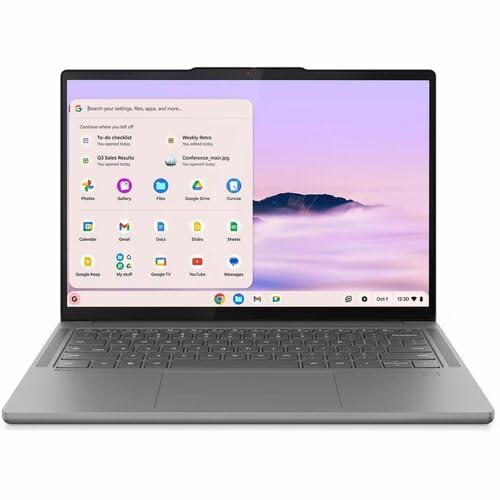
Lenovo Chromebook Plus 14 (OLED)
About a pound lighter, fanless and silent, with an OLED screen and 15h 14m in Notebookcheck's web test. It has no HDMI and costs more, but updates run to June 2035.

Acer Aspire Go 15 (AG15-51P, Core i5-1334U)
A 15.3-inch 1200p Windows laptop that ran almost 14 hours of video for PCMag, with HDMI, two USB-A and two USB-C ports. Its keyboard is shallow and unlit, and the screen is dim too.

Apple MacBook Neo 13 (A18 Pro, 2026)
A 2.7 lb aluminum MacBook with a bright, accurate 500-nit screen and about 13 hours in Notebookcheck's tests. It has 8GB of memory, no keyboard backlight and one slow USB 2 port.
Chromebook Plus 515 (CB515-2H/2HT): frequently asked questions
When does the Acer Chromebook Plus 515 stop getting updates?
Google's Auto Update policy list gives June 2032 for both the CB515-2H and the touchscreen CB515-2HT. After that it still starts and runs, with a self-checking secure mode, but it gets no new security or feature updates. That's more than five years of support from today, which covers most of a high school or college career.
Does the Chromebook Plus 515 come with Google AI Pro?
Google's Chromebook Plus page offers 12 months of Google AI Pro at no cost, redeemed by January 31, 2027. After a year it renews at the monthly rate unless you cancel, and Gemini in AI Pro is for ages 18 and over. Acer's page still describes the older Google One AI Premium plan, so check the terms when you redeem.
How long does the Acer Chromebook Plus 515 battery last?
It depends on the task. Tom's Guide measured 8h 16m browsing at about 150 nits and Laptop Mag 8h 21m, but TechRadar's video loop lasted 5h 13m. Tom's Guide counted on six-plus hours of real work. Acer's 10-hour claim wasn't matched in any published test, so carry the charger on long days.
Does the Chromebook Plus 515 have a touchscreen and backlit keyboard?
Both are options, not standard. The launch units that were reviewed had neither, while the current Amazon configuration is listed with a touchscreen. Acer lists the backlit keyboard as optional, so check the spec sheet of the exact listing before you buy, not just the product photos. A backlight matters if you type in dim rooms at night.
Can the Chromebook Plus 515 run Windows apps or games?
No. ChromeOS runs web apps and Android apps from the Play Store, not Windows or Mac programs. Games mean Android titles or cloud streaming: TechRadar played Baldur's Gate 3 and Cyberpunk 2077 smoothly over GeForce Now with a good connection. If you need Windows software, the Acer Aspire Go 15 is the closer budget pick, so check your school's app list first.
Is the Chromebook Plus 515 screen bright enough?
Indoors, yes; near a sunny window, no. Tom's Guide measured 263.2 nits on average and Laptop Mag 270.6 nits, both low, with about 42 to 43% of the DCI-P3 color range. It's sharp at 1080p and has an anti-glare finish, but colors look muted, photos won't pop, and outdoor use on a sunny day is hard.
Can you upgrade the memory in the Chromebook Plus 515?
No. The LPDDR5X memory is soldered, so whatever you buy is what you keep. The 8GB model handles Docs, Classroom, streaming and 15-plus tabs, per Tom's Guide. If you plan on dozens of tabs plus Android apps for years, choose a 16GB configuration at checkout instead, since there's no second chance.
Should I get the Chromebook Plus 515 or the Chromebook Plus 14?
Get the Plus 515 if the laptop stays at a desk and you want the bigger screen, HDMI and a budget price. Get the Plus 14 if you carry it around: it's lighter, silent, has an OLED, ran 15h 14m in Notebookcheck's web test and gets updates until June 2035, but costs more and lacks HDMI.