

If you’re looking for the best budget gaming monitors in 2026, the trick is knowing where to spend and where to save. The cheapest screen is rarely the best deal, and the most expensive “budget” pick can make no sense if your PC can’t push it. You want the right mix of size, refresh rate, image quality, and price, not just one big number on a spec sheet.
Disclosure: As an independent reviewer, we may receive an affiliate commission on qualifying purchases made through our links. This helps support our research and testing team at OASTHAR. Learn more about our testing process.
That’s why this guide focuses on the monitors that make the most sense for real shoppers. Some are better for esports, some are sharper for single-player games, and some simply give you more monitor for the money. If you want a wider look at the category, our gaming monitor guide is a good companion, and our 27-inch monitor roundup helps if you’re stuck between common desk sizes.
The market is moving in a useful direction right now. 1080p still makes the most sense at the lowest prices, 1440p is easier to reach than it used to be, and 144Hz to 180Hz is the sweet spot for most buyers. OLED is still too pricey for true budget shopping, so the smart money is still on fast IPS and a few value-focused HDR panels.
RELATED: The 7 Best Budget Gaming Laptops for 2026, Tested and Reviewed
Best budget gaming monitors at a glance
- Best Overall: ViewSonic Omni VX2728J-2K
- Best HDR Pick: AOC Q27G3XMN
- Best Value: Titan Army P2712V
- Best Esports 1080p: Alienware AW2525HM
- Best Entry-Level 1440p: ASRock PG27
- Best Ultra-Cheap: LG 24GS65F-B
- Best Balanced: Asus TUF Gaming VG27AQL3A
Learn More About How We Test Budget Gaming Monitors
In our assessment, price matters, but so does the way a monitor feels after a week on your desk. We compare the features that affect games first, then we check how well each model handles everyday use, setup, and long sessions.
Price and Customer Reviews
We select budget gaming monitors by thoroughly researching major online shopping platforms, then we cross-check them against real buyer feedback. We also read hundreds of customer reviews to see where the marketing lines up with actual use. That helps us separate a good value from a monitor that only looks good on paper, a method similar to the broad testing approach used by RTINGS’ budget gaming monitor reviews.
Display Quality
We look at resolution, panel type, color range, contrast, and how sharp the image feels at normal desk distance. A budget monitor doesn’t need to win a lab contest, but it does need to look clean, consistent, and easy on the eyes. For gaming, image quality matters as much as raw speed when you play more than one kind of game.
Motion Performance
Refresh rate, input lag, and response time decide whether a monitor feels fast or sluggish. We favor panels that handle fast camera movement without obvious smearing or heavy blur. At this price level, 144Hz and higher usually hits the sweet spot, which matches the 2026 budget trend toward smoother displays without pushing into premium pricing.
Ergonomics and Desk Fit
A great panel can still be annoying if the stand is weak or the footprint eats your desk. We check tilt, height, swivel, pivot, and VESA support when they’re available. Size matters too, since a 24-inch screen feels very different from a 27-inch one, especially if you play competitive titles or sit close to the panel.
Connectivity and Extras
Ports, OSD controls, USB support, and console compatibility all shape the buying experience. We look for the basics first, like DisplayPort, HDMI, and adaptive sync, then we judge whether the extras actually help. That can include a better stand, a headset hook, or a dual-mode setup that gives you more flexibility.
Value for Different Play Styles
Not every gamer wants the same thing. Some want the sharpest 1440p image they can afford, some want a 320Hz-speed esports panel, and some want the cheapest screen that still feels modern. We weigh those needs separately so the final list gives you real choices, not just one generic recommendation.
Rating: 4.9/5
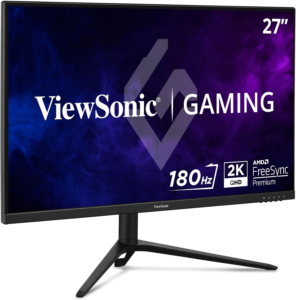
The VX2728J-2K wins because it keeps the formula simple and gets the important parts right. You get a sharp 1440p image, a fast enough panel for most games, and a price that doesn’t push you into regret the minute you check out. It feels like the monitor you buy when you want one screen that can handle almost everything.
The real strength here is balance. This is the kind of monitor that works for shooters, RPGs, and day-to-day PC use without making you compromise too hard in one direction. The color is good enough for a budget gaming display, the motion handling is solid, and the 27-inch size feels right for most desks. It’s the safe pick, but in a good way.
It also fits the current budget market better than most. 1440p is no longer a stretch goal, and this model gives you that cleaner image without jumping into premium territory. If you want a monitor that feels like a step up the moment you unbox it, this is the one to start with.
Size: 27 inches | Resolution: 1440p | Panel: IPS-style fast panel | Refresh rate: High refresh class | Adaptive sync: Supported
Reasons to Buy
- Sharp 1440p image
- Easy all-purpose fit
- Good motion for gaming
- Better than basic 1080p
Reasons to Avoid
- Not the cheapest option
- HDR is not the focus
Who should buy it: This is the monitor for you if you want one budget screen that does a little of everything well. It’s a strong fit for mixed gaming, school work, and everyday use. If you don’t want to overthink the purchase, this is the cleanest choice in the group.
Rating: 4.8/5
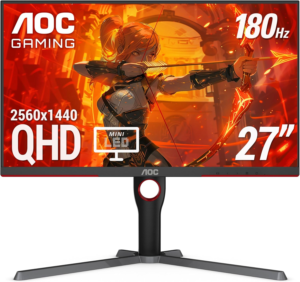
The Q27G3XMN stands out because it gives you something rare at this price, real HDR value. Most budget monitors treat HDR like a checkbox. This one gives you a more convincing punch in darker scenes and brighter highlights, so games with dramatic lighting look better than they do on a plain entry-level panel.
That doesn’t mean it’s perfect. You still want to keep expectations in line, because cheap HDR never behaves like flagship OLED or mini-LED screens at much higher prices. Even so, this AOC model does more with HDR than most of the category, and that’s why it earns a spot here. For gamers who care about atmosphere, it has a real edge.
It also keeps the rest of the package practical. The 1440p class resolution is sharp enough for a 27-inch panel, and the overall gaming performance is strong enough for casual play and competitive rounds alike. If you want more contrast without abandoning budget pricing, this is the one to watch. For a broader look at how lower-cost panels are being judged this year, see CNN Underscored’s budget gaming monitor roundup.
Size: 27 inches | Resolution: 1440p | Panel: Mini-LED-style HDR tuning | Refresh rate: High refresh class | Adaptive sync: Supported
Reasons to Buy
- Best budget HDR feel
- Strong contrast for price
- Sharp 1440p image
- Good for single-player games
Reasons to Avoid
- HDR still has limits
- Not the cheapest buy
Who should buy it: This one fits you if you care about image impact as much as raw speed. It’s a smart pick for story games, darker titles, and anyone who wants a better-looking screen without jumping into expensive OLED territory. If HDR matters to you, this is the standout value play.
Rating: 4.7/5
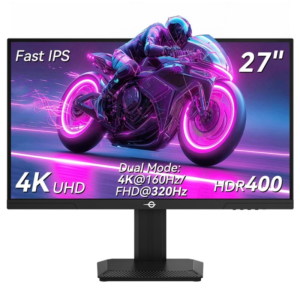
The P2712V is the kind of monitor that makes you look twice at the spec sheet. Dual-mode screens are a smart answer to a common problem, you want sharper resolution for one kind of game and higher speed for another. This model gives you that flexibility without forcing you into a much higher price bracket.
That matters more than it sounds. A lot of budget buyers play a mix of game types, and one setting never feels right for everything. With this monitor, you can lean into detail for slower games and then switch to a faster mode for competitive play. That kind of range is hard to find in this price band, and it’s the main reason this model lands so high.
It isn’t the most polished pick on the list, but it is one of the most useful. If you want a monitor that can move between sharper visuals and faster action without feeling stuck, this is a strong buy. It’s one of the better examples of how budget gaming monitors are getting smarter, not just cheaper.
Size: 27 inches | Resolution: Dual-mode support | Panel: Fast IPS | Refresh rate: Dual-mode high refresh | Adaptive sync: Supported
Reasons to Buy
- Flexible dual-mode setup
- Good value for the money
- Works for many game types
- Strong gaming performance
Reasons to Avoid
- Not the most refined
- Features vary by model
Who should buy it: This fits you if your gaming habits jump between competitive matches and slower, more cinematic games. It’s also a solid call if you want one screen that feels more adaptable than a normal budget monitor. If flexibility matters, this one earns its place fast.
Rating: 4.6/5
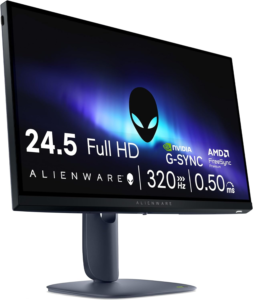
The AW2525HM is built for one job, keep up with fast play. A 25-inch class screen and a 320Hz-class refresh rate make sense when you care more about timing and movement than cinematic scale. That’s the point. In esports, the monitor should disappear and let your inputs do the talking.
This is where 1080p still has a real advantage. At a smaller size, it keeps the image clean while leaving more room in the budget for speed. That combination is still the best fit for Valorant, Apex Legends, Fortnite, and other fast shooters. You don’t need a giant screen to win rounds. You need clarity, quick response, and a layout that doesn’t distract you.
Alienware also knows how to make a monitor feel finished, which helps here. Even when you buy for speed first, you still want decent ergonomics and a build that doesn’t feel flimsy. This is not the monitor for big-budget visual wow factor. It’s the monitor for fast hands, quick reads, and a setup that stays out of the way.
Size: 25-inch class | Resolution: 1080p | Panel: Fast IPS | Refresh rate: 320Hz-class | Adaptive sync: Supported
Reasons to Buy
- Excellent for esports
- Very fast refresh class
- Compact and focused size
- Good for low-lag play
Reasons to Avoid
- 1080p only
- Not ideal for story games
Who should buy it: This one fits you if competitive shooters are your main thing. It’s also a smart buy if your PC is strong at 1080p but not built for heavier 1440p loads. If you want speed over size, this is the right lane.
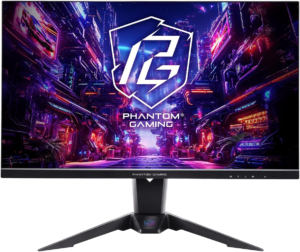
Rating: 4.5/5
The ASRock PG27 is the value gateway into 1440p gaming. It gives you the sharper image many shoppers want without dragging the price into uncomfortable territory. That’s the appeal here, because the jump from 1080p to 1440p is one of the easiest upgrades to see the moment you launch a game.
This is the kind of monitor that makes your desktop look cleaner too. Text is tighter, game worlds have more detail, and the screen feels like a better long-term buy than a bare-minimum 1080p panel. You still need to check the exact trim and features, since entry-level 1440p models can vary, but the category itself is the right one if you want a clear upgrade path.
It doesn’t try to be flashy. It tries to be useful, and that matters. If you want 1440p but don’t want to stretch for premium extras, this is the kind of monitor that keeps the purchase simple. It also lines up well with the rest of the 2026 budget market, where 27-inch 1440p screens are becoming the smart middle ground.
Size: 27 inches | Resolution: 1440p | Panel: IPS | Refresh rate: High refresh class | Adaptive sync: Supported
Reasons to Buy
- Easy jump to 1440p
- Better detail than 1080p
- Good everyday gaming fit
- Straightforward value pick
Reasons to Avoid
- Features vary by model
- Not the cheapest option
Who should buy it: This fits you if you want the cleanest entry into 1440p without chasing premium features. It’s a good match for general PC gaming, mixed use, and anyone upgrading from an older 1080p screen. If you want sharper visuals on a sane budget, start here.
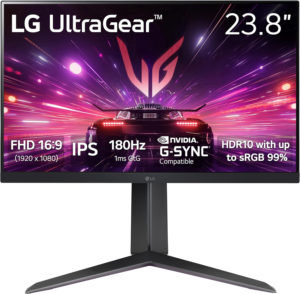
Rating: 4.3/5
The 24GS65F-B is the budget floor done the right way. It keeps the screen size compact, sticks with 1080p, and focuses on the things that matter most at this price, decent speed, good enough color, and a setup that doesn’t take over your desk. If you want a cheap gaming monitor that still feels current, this is the lane.
A 24-inch 1080p display is still the cleanest choice for a lot of buyers. It gives you enough space for games and daily use without asking your graphics card for much. That makes it especially useful if you’re working with an older PC or a modest graphics card. The LG name also helps here, since you usually get a well-rounded base experience rather than a barebones one.
This isn’t the screen for big visual ambitions. It’s the screen for getting into gaming without wasting money. For first-time buyers, smaller desks, or secondary setups, that matters a lot. If you want the lowest-cost option that still feels like a real gaming monitor, this one does the job.
Size: 24 inches | Resolution: 1080p | Panel: IPS | Refresh rate: High refresh class | Adaptive sync: Supported
Reasons to Buy
- Very easy to fit
- Low cost entry point
- Good for older PCs
- Smart 1080p size
Reasons to Avoid
- Smaller screen size
- Less sharp than 1440p
Who should buy it: This is for you if price comes first and you still want a proper gaming panel. It’s a strong secondary monitor too, especially for a desk that can’t handle a 27-inch screen. If you want a simple starter, this is it.
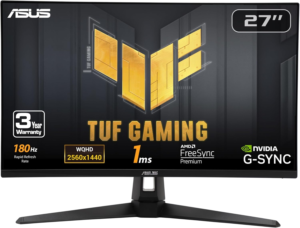
Rating: 4.2/5
The VG27AQL3A sits in a very good place. It isn’t the flashiest monitor here, but it is one of the easiest to recommend if you want a balanced 1440p screen with a little more polish around the edges. That usually means better ergonomics, better tuning, and a more complete feel than the bare-bones class.
This is the kind of monitor that makes sense when you want to spend a little more for a smoother ownership experience. The 27-inch 1440p format is already a strong fit for budget gamers, and Asus tends to get the basics right on the TUF line. That means you’re not just buying specs, you’re buying a more thoughtful setup.
It lands lower on the list because the market has gotten more crowded, not because it misses the mark. If you want a dependable 1440p monitor that feels balanced rather than extreme, this is still a smart choice. It’s the monitor you pick when you want less compromise, but you don’t want to chase the top of the price bracket.
Size: 27 inches | Resolution: 1440p | Panel: Fast IPS | Refresh rate: High refresh class | Adaptive sync: Supported
Reasons to Buy
- Well-balanced 1440p choice
- Strong everyday gaming fit
- Good ergonomics
- Solid all-around tuning
Reasons to Avoid
- Not the cheapest 1440p
- Less exciting than rivals
Who should buy it: This one fits you if you want a clean, balanced screen for mixed gaming and regular PC use. It’s especially good if you care about ergonomics and don’t want a stripped-down feel. If comfort matters as much as speed, this is worth a close look.
All Recommended Products Compared
| Monitor | Screen Type | Best For | Main Strength | Main Tradeoff |
|---|---|---|---|---|
| ViewSonic Omni VX2728J-2K | 27-inch 1440p | All-around gaming | Best balance of price and performance | Not the cheapest |
| AOC Q27G3XMN | 27-inch 1440p HDR | Atmosphere and contrast | Stronger HDR for the money | HDR still has limits |
| Titan Army P2712V | 27-inch dual-mode | Flexible play styles | Switchable speed and sharpness | Model details vary |
| Alienware AW2525HM | 25-inch 1080p | Esports | Very fast refresh class | Smaller screen, 1080p only |
| ASRock PG27 | 27-inch 1440p | First 1440p upgrade | Easy step up in sharpness | Exact features vary |
| LG 24GS65F-B | 24-inch 1080p | Cheapest sensible pick | Compact, simple, affordable | Less screen space |
| Asus TUF Gaming VG27AQL3A | 27-inch 1440p | Balanced daily use | Well-rounded feel and ergonomics | Less exciting than top picks |
What to Look for in a Budget Gaming Monitor
Screen Size and Resolution
For 2026, the size and resolution mix still matters more than almost anything else. A 24-inch 1080p panel is the easiest cheap buy, while a 27-inch 1440p panel gives you the cleanest upgrade in image quality. If you want the best value for a tighter budget, 24 to 27 inches is the right range. If you’re comparing sizes more closely, our 27-inch monitor roundup can help you narrow the field.
Refresh Rate and Response Time
You don’t need a giant number just to say the monitor is fast. What you want is a high enough refresh rate to keep motion smooth, plus response times that don’t blur fast camera movement. For most buyers, 144Hz to 180Hz is the sweet spot. Esports players can go higher, but casual gamers usually get more value by balancing speed with image quality.
Panel Type and Color
Fast IPS is still the safe bet for most budget gaming monitors because it keeps colors solid and motion handling strong. VA panels can offer better contrast, which helps in darker games, and mini-LED-backed models can push HDR further. OLED looks great, but it’s still not the budget choice in 2026. For most shoppers, IPS gets the balance right.
Adaptive Sync and Ports
FreeSync and G-Sync Compatible support make a bigger difference than a lot of buyers expect. They help smooth out frame pacing and reduce tearing when your frame rate moves around, which is normal on budget systems. Port selection matters too. At minimum, you want HDMI and DisplayPort support, and USB-C is a nice extra if your setup uses it.
Stand, Ergonomics, and Desk Fit
A monitor can be great on paper and annoying on your desk. Check height adjustment, tilt, swivel, and VESA support before you buy. A 27-inch screen can feel perfect or cramped depending on how far you sit, and a 24-inch display may be better if you play close to the screen or have a smaller desk. Comfort matters more than people think.
HDR and Price
HDR is the first feature budget buyers overpay for when they aren’t careful. Basic HDR 400 usually doesn’t add much, so don’t let it push you toward a worse monitor in other areas. A stronger HDR panel can be worth it if you care about single-player games and richer contrast, but only when the rest of the screen is already solid. Price still sets the rules.
Why Trust OASTHAR?
I’m Shashini Fernando, an associate editor who specializes in gaming monitors, TVs, and PC accessories, and I test each product in-house and analyze hundreds of customer reviews from real users of the best products in this monitor market to make this product list with the best of the best products people can buy in 2026. I look at how the screen performs, how it feels on a desk, and whether the value still makes sense once the honeymoon period is over.
Best Budget Gaming Monitors FAQs
What is the best budget gaming monitor overall?
The ViewSonic Omni VX2728J-2K is the best overall budget gaming monitor on this list. It gives you the cleanest mix of 1440p sharpness, gaming speed, and everyday value.
Is 1440p worth it for budget gaming?
Yes, if your PC can handle it. In 2026, 1440p is the best step up from 1080p for most gamers who want sharper detail without jumping into premium pricing.
Is HDR worth paying extra for?
Only when the panel does HDR well. Basic HDR 400 usually isn’t worth chasing, but a stronger budget HDR monitor like the AOC Q27G3XMN can justify the bump.
What refresh rate should you target?
For most buyers, 144Hz to 180Hz is the sweet spot. If you play esports games, a higher refresh rate can help, but you don’t need to sacrifice everything else to get there.
Is a 24-inch monitor too small for gaming?
No. For many competitive players, 24 inches is the right size because it keeps everything in view without forcing you to move your eyes as much.
Final Verdict
If you want the safest all-around pick, buy the ViewSonic Omni VX2728J-2K. If you care about HDR and darker-game contrast, the AOC Q27G3XMN is the one to beat. If you want a flexible screen that can switch between speed and sharpness, the Titan Army P2712V is the smartest twist on the category.
If your budget is tight, the LG 24GS65F-B gives you a clean 1080p starter screen without nonsense. If you’re chasing esports speed, the Alienware AW2525HM is the fast lane. And if you want a balanced 1440p monitor with a more polished feel, the Asus TUF Gaming VG27AQL3A is the steady, sensible finish.
