

Is the TCL Note A1 NXTPAPER actually a smart buy if you’re shopping for an E Ink-style note tablet like reMarkable or the Kindle Scribe? If you want a device that feels like paper but doesn’t crawl when you turn pages, this one deserves a close look.
You’re getting a “notes-first” tablet with a matte NXTPAPER Pure screen, fast 120Hz refresh, and a stylus experience built around friction and control. At the same time, it’s not trying to be your next Netflix and gaming slab.
In this review, you’ll see what matters in real use: the screen and glare control, writing feel, battery expectations (LCD vs E Ink), software limits, and whether the price makes sense in February 2026.
RELATED: Best Budget Tablets 2025
Quick Review
If your goal is to read, annotate, and write without getting pulled into app chaos, the TCL Note A1 NXTPAPER makes a strong case. It feels like a digital notebook first, and a tablet second.
Here’s the fast verdict:
- NXTPAPER Pure matte display feels paper-like and cuts reflections.
- 120Hz refresh rate makes page turns and pen strokes feel immediate.
- T-Pen Pro stylus supports 8,192 pressure levels, with an eraser and dual tips.
- Slim and light build at 5.5mm and 500g helps during long note sessions.
- Split View workflows support reading, writing, and transcription at once.
- Tradeoff: “locked down” app vibe, because TCL pushes focus over freedom.
- Tradeoff: LCD battery reality, you shouldn’t expect multi-week E Ink stamina, and the screen is around 300 nits outdoors.
For a manufacturer-level feature overview, check the official TCL Note A1 NXTPAPER product page.
What you will love right away
The “paper only” idea lands fast. Unlike older NXTPAPER concepts that let you switch display modes, the Note A1 commits to the matte look full-time, so you’re not bouncing between “tablet mode” and “paper mode.”
That matte layer also works with the 120Hz panel in a way E Ink devices usually can’t. Scrolling and flipping pages feels smooth, and your pen line stays close to your tip.
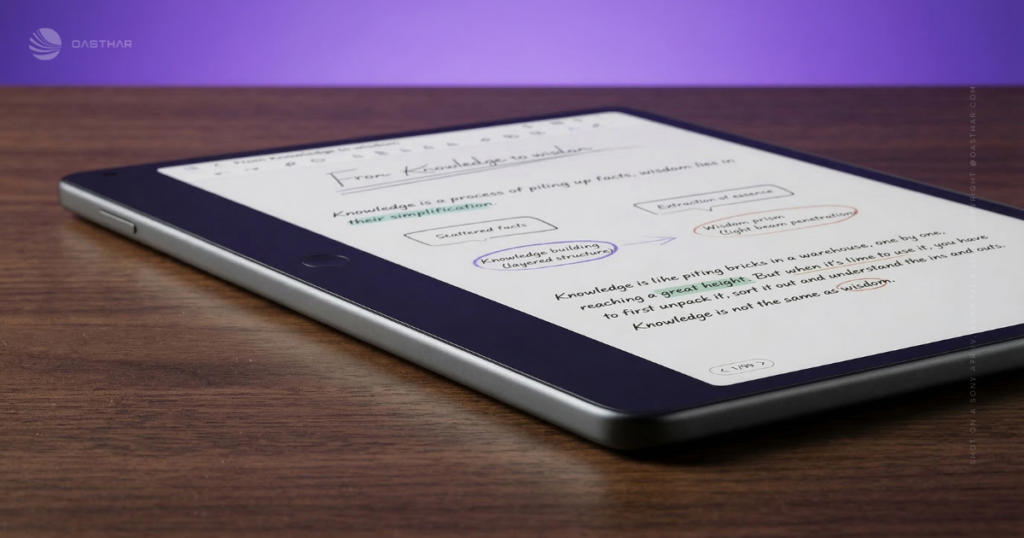
Daily handling helps too. The wide side bezel gives your thumb a safe parking spot, and the home button shortcuts (new note, voice note) make quick capture feel natural.
What might annoy you after a week
The software is opinionated. You’re not buying a normal Android tablet experience, and that’s the point. Still, if you love installing any app you want, you may feel boxed in.
Also, this is LCD. Even with a big 8,000mAh battery, you should expect more charging than an E Ink note device that sips power for weeks.
If you want “paper vibes” plus “full tablet freedom,” this probably isn’t your device. It picks a side.
Specifications
Here’s a quick spec sheet with what’s been clearly reported across hands-ons and product coverage, including ZDNET’s CES hands-on and early write-ups.
| Spec | TCL Note A1 NXTPAPER |
|---|---|
| Display size | 11.5-inch |
| Resolution | 2200 x 1440 (2.2K) |
| Aspect ratio | 3:2 |
| Refresh rate | 120Hz |
| Color | 16.7 million colors |
| Brightness | 300 nits |
| Battery | 8,000mAh |
| Charging | 33W |
| RAM / Storage | 8GB / 256GB |
| Thickness / Weight | 5.5mm / 500g |
| Chipset | MediaTek Helio G100 |
| Stylus | 8,192 pressure levels, dual tips, eraser, haptics, under 5ms latency |
| Audio / Mics | 2 speakers, 8 microphones |
| Rear camera | 13MP with autofocus |
| Connectivity | Bluetooth 5.3, USB-C, pogo pin |
| Price | 549 euros retail (Kickstarter pledge pricing varies) |
The takeaway: the spec mix screams “writing and reading comfort,” not raw horsepower.
Design & Build Quality
The Note A1 feels built around one truth: you’ll hold it like a notebook. It uses an aerospace-grade aluminum body, and the 5.5mm thickness makes it feel more like a pad than a chunky tablet.

At 500g, it’s not weightless, but it’s reasonable for an 11.5-inch device. The wide bezel matters more than you’d think, because it reduces accidental touches when you’re gripping it one-handed.
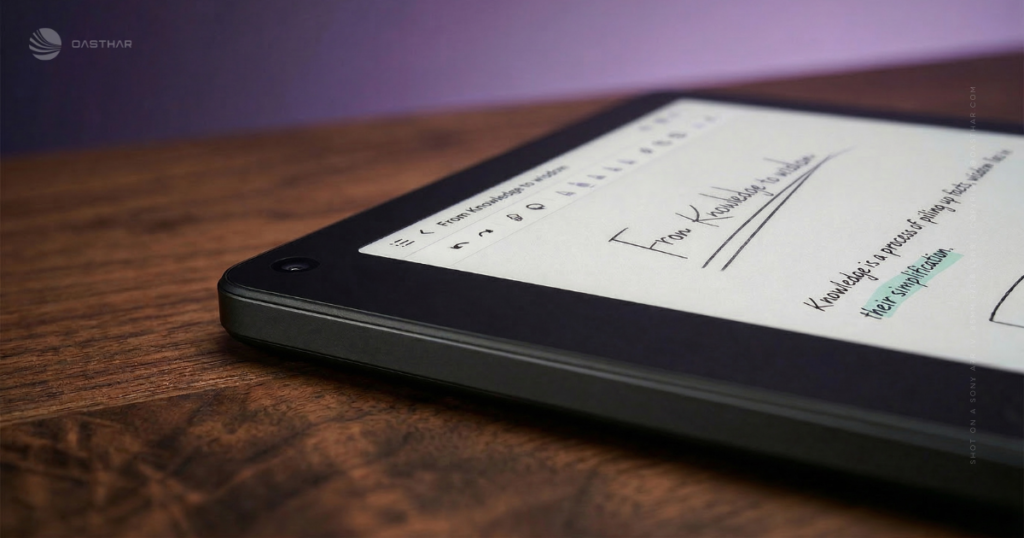
Little practical details help desk use. The corners have small grippy touches, so it’s less likely to slide when you tap around or write fast.
Grip, buttons, and daily comfort
That thicker side bezel isn’t just styling. It gives you a consistent grip zone, which makes long reading sessions less annoying.
The customizable home button is also a real win for momentum. You can jump home, create a new note with a shortcut, or start a voice note quickly, which is perfect when you’re trying to catch an idea before it disappears.
Display Quality
NXTPAPER Pure is a matte, anti-reflective LCD that’s trying to fix the two big complaints about normal tablets: glare and eye fatigue. You still get full color (16.7 million colors), so PDFs, highlights, and diagrams stay useful, not washed into grayscale.
The 11.5-inch 3:2 shape is also a quiet advantage. Documents look taller and more natural, and split-screen layouts don’t feel squeezed.
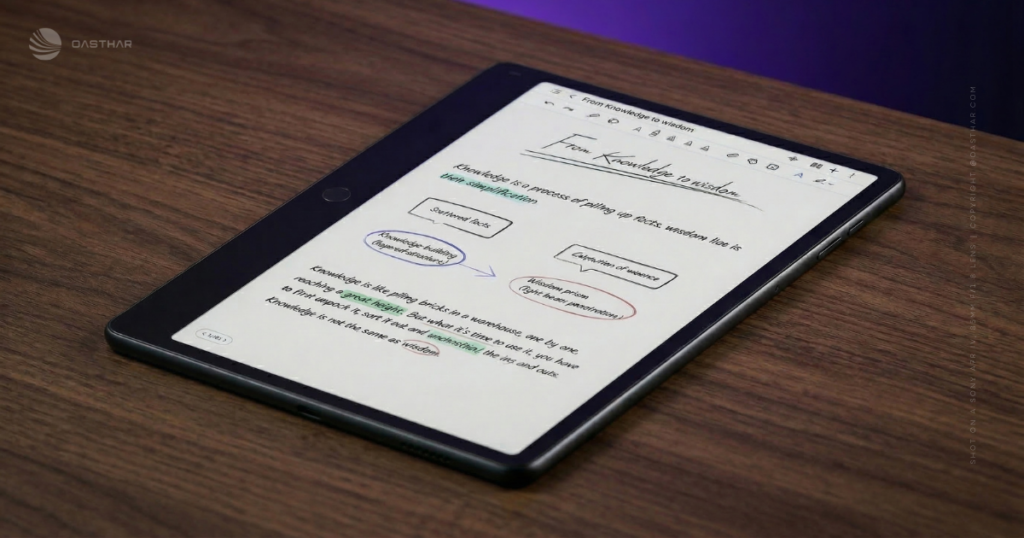
That said, brightness is a real limiter. At about 300 nits, it can struggle in harsh sun. Outdoors, you’ll care more about shade and screen angle than you would on an E Ink reader.
For another early perspective on what TCL is aiming for, see Expert Reviews’ first look at the Note A1.
120Hz on a “paper-like” screen, why it changes everything
E-paper note tablets can feel like turning pages through molasses. Here, 120Hz makes scrolling and page flips feel closer to a normal tablet, just without the glossy glare.
That speed also improves the pen experience. Your strokes track cleanly, and quick underlines don’t feel like they lag behind your hand.
Glare control and eye comfort for long reading
The matte layer reduces reflections in bright rooms, which means less “tilt the screen until it behaves.” You also get eye comfort modes and auto color temperature adjustments, so the screen can warm up under harsh lighting.
TCL points to certifications like TÜV and SGS as support for the eye-comfort angle, but the practical win is simple: you can read longer without feeling like your eyes are drying out.
Performance
The MediaTek Helio G100, paired with 8GB of RAM, is a sensible choice for what this tablet is. Notes, big PDFs, web reading, and split view are the main jobs, and the hardware supports that without drama.
You shouldn’t shop for this as a gaming tablet or a heavy editing machine. The Note A1 is more like a well-organized desk than a full workshop. It’s built to keep you moving through pages, notebooks, and meetings, not to render video timelines all afternoon.
If you want a broader “notes-first tablet” take, this ZDNET hands-on with the Note A1 matches the productivity-first positioning.
How fast it feels when you write
The under 5ms stylus latency claim matters most when you write fast. You’ll notice it in quick bullets, messy meeting notes, and rapid highlighting.
Big documents also benefit. Switching notebooks and moving between split panes stays responsive, helped by that 120Hz screen.
Battery Life & Charging
With an 8,000mAh battery, you can realistically plan for a full day of reading and note-taking, plus extra depending on brightness and how much you use transcription.
Still, LCD rules apply. A 120Hz panel uses more power than E Ink, and color backlighting costs energy. If you’re coming from an e-reader that lasts ages, you’ll need to reset expectations.
Charging helps soften the blow. USB-C and 33W charging mean you can top it up quickly, instead of treating it like an overnight-only device.
Software & Ecosystem
The Note A1 runs Android under the hood, but it doesn’t feel like a normal Android tablet. TCL has pushed a simplified, productivity-heavy interface, with fewer paths into time-wasting apps.
Microsoft tools and integrations are part of that story, including Edge and Outlook, plus Copilot support in the broader workflow. The point is clear: you can do research, email, and writing, while still staying in a “notes-first” mindset.
You also get Split View features designed for real work. The headline setup is reading, writing, and transcribing audio at the same time. If you live in lectures or meetings, that layout can replace a pile of paper and a separate recorder.
For a deeper walkthrough of this device’s positioning as a reMarkable and Scribe alternative, you can compare notes with this TCL Note A1 NXTPAPER review.
Notes, audio recording, and AI tools that save time
Voice notes are easy to start from a shortcut, and the 8-mic array is there to capture clearer audio in rooms that aren’t studio-quiet.
After you record, AI tools can help with transcription, summaries, translation, and writing enhancements. In real life, this is about turning a long meeting into a short list you can act on.
App limits, and why that is the point
TCL isn’t selling an open-ended app playground here. You may be able to add some Google apps, but it’s not the promise, and it’s not what the UI is built around.
If you want a controlled workspace, the limits feel comforting. If you want endless customization, those same limits feel like friction.
Connectivity
Bluetooth 5.3 is confirmed, and it’s useful for keyboards, headphones, and quick audio accessories. You also get USB-C for charging and data, plus a pogo pin connector for accessories like a keyboard case.
Wi-Fi details and cellular options aren’t clearly confirmed in the sources referenced here, so you shouldn’t buy the Note A1 expecting LTE or 5G. Treat it as a focused note device first, and confirm the exact model details before you check out.
Cameras, Microphones & Speakers
You get a 13MP rear camera with autofocus, which makes sense for scanning handouts, snapping a whiteboard, or dropping an image into a note. This isn’t about photography, it’s about capture.
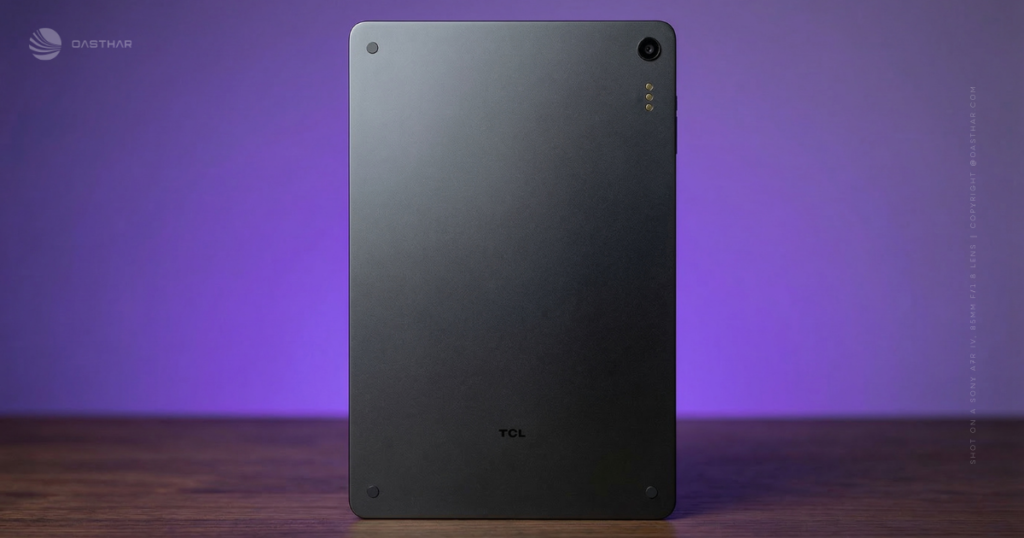
The 8 microphones matter more than the camera for most people. For lectures and meetings, better pickup can mean cleaner transcripts and fewer “what did they say?” moments later.
Two speakers round it out for basic playback, and they’re handy for listening to a recording without reaching for headphones.
Extra Features
The stylus experience is the make-or-break feature, and TCL didn’t phone it in. The included T-Pen Pro supports 8,192 pressure levels, with dual tips and an eraser. It also uses haptics that change based on the tool you pick, which can make pencil vs marker feel more distinct.
You also get an “Inspiration space” style tool that lets you circle content on-screen and capture it as a snippet, while keeping a link back to the source. If you research a lot, this feels like a digital corkboard that doesn’t turn into a mess.
Sync is handled through TCL’s Toolbox app, and TCL has said you don’t need a subscription for syncing. That matters if you hate buying hardware, then renting basic features.
T-Pen Pro writing feel, tips, and haptics
The matte screen texture adds just enough drag that your handwriting looks more controlled. Combined with low latency, it feels closer to pen-on-paper than pen-on-glass.
If you journal, study, or sketch, the pressure range helps your notes look more readable. It’s less about art perfection, and more about keeping your strokes consistent when you’re moving fast.
Price & Value
Pricing needs careful wording because it varies by region and sales channel. Early coverage has pointed to 549 euros retail pricing, while US retail has been reported around $549 in early availability. Kickstarter pledge pricing has shown lower numbers at times, and shipping fees and country limits can apply.
Value depends on what you’re paying for.
- You’re paying for a matte, eye-friendly 120Hz screen, not an ultra-bright outdoor panel.
- You’re paying for focus-first software and note tools, not a wide-open app store.
- You’re paying for a serious pen feel, not an entertainment tablet experience.
If that matches your daily routine, the price makes more sense than it looks on a spec sheet.
Who is it for?
If you like gadgets but hate distraction, this tablet fits a certain personality really well.
Buy it if:
- You take lots of handwritten notes and want paper-like friction without E Ink sluggishness.
- You read and mark up PDFs, and you want full color for highlights and diagrams.
- You sit in meetings or lectures and want recording plus transcription in the same device.
Do not buy it if:
- You want a “real Android tablet” with a normal app store and endless installs.
- You need outdoor, direct-sun readability as your main use case.
- You expect multi-week battery life like classic E Ink devices.
FAQs
Is the TCL Note A1 really a 120Hz paper-like tablet?
Yes, you’re getting a 120Hz NXTPAPER LCD tuned for a matte, paper-textured feel. It stays smooth for scrolling and page turns, unlike typical e-ink refresh behavior.
Does NXTPAPER feel like real paper when you write?
It gets surprisingly close because the screen has added friction and a matte layer. With the included T-Pen Pro haptics, your strokes feel less “glass-on-plastic”.
Is it better than reMarkable or Kindle Scribe for note-taking?
If you want speed and color, it’s a strong pick, 120Hz and 16.7 million colors make highlighting and UI navigation feel instant. E-ink rivals still win on battery.
Can you install apps, or is it locked down?
It runs a customized Android experience that’s intentionally focused. You don’t get a normal Google Play setup, so you’ll rely on what’s preloaded and any sideloading you’re comfortable with.
What’s actually preinstalled for productivity and work?
You’ll find Microsoft-focused tools such as Edge and Outlook, plus note and office apps (varies by region). The whole interface pushes reading, writing, and document work first.
How good is the stylus for drawing and pressure control?
The T-Pen Pro supports 8,192 pressure levels and low latency, so shading and line weight changes feel natural. Dual tips and an eraser help it behave like real stationery.
Are the AI features useful, or just marketing fluff?
They’re practical if you take meetings or lectures. You can record, transcribe, summarize, and translate notes, so your messy scribbles can turn into shareable text fast.
Will the screen be easier on your eyes than an iPad?
That’s the point of NXTPAPER, it’s built to cut glare and reduce perceived harshness. It also carries eye-care certifications (including TÜV), which helps for long reading sessions.
How long does the 8,000 mAh battery last in real use?
For notes, reading, and light office work, you should expect all-day battery and then some. Still, it’s an LCD tablet, so it won’t match e-ink week-long runtimes.
What’s the price, and when can you actually buy it?
Pricing has been shown around €549 in EU announcements, and it has also appeared on Kickstarter around $419. Availability depends on your country and shipping windows.
Is it good for students who get distracted easily?
Yes, because the software is designed to keep you in “notes-first” mode, not entertainment mode. Split View also helps you read, write, and transcribe audio in one place.
What’s the biggest reason not to buy the Note A1?
If you expect a normal Android tablet with a full app store and endless entertainment options, you’ll feel boxed in. It’s built to stay focused, sometimes stubbornly so.
Final Verdict
The TCL Note A1 NXTPAPER is easiest to recommend when you want focus, not freedom. You’re buying the NXTPAPER Pure matte 120Hz screen, a strong pen experience, and a slim design that’s comfortable to hold. You also get practical productivity features like split view, audio recording, AI transcription, and summaries. The downsides are real: limited apps, LCD battery tradeoffs, and a brightness ceiling that can feel tight outdoors. If your priority is distraction-free note-taking with fast, smooth writing, it’s a compelling pick, and it’s not trying to be anything else.
