

Can a laptop finally stop forcing you to choose between “easy to carry” and “easy to work on”? The Lenovo ThinkPad Rollable XD is Lenovo’s answer, at least as a CES 2026 concept.
As of February 2026, you can’t buy it, you can’t spec it out, and you can’t point to a battery-life chart. What you can do is look at what Lenovo showed in demos and what early hands-on reports described, then judge whether this design solves a real problem.
This review sticks to what’s been shown and reported so far: how the rollable screen works, why the outside “world-facing” strip matters, and the practical questions that still block a real buying decision (price, full specs, battery life, long-term durability).
RELATED: MSI Stealth 16 AI+ Review (2026): Best OLED 240Hz, RTX 5090?
Quick Review
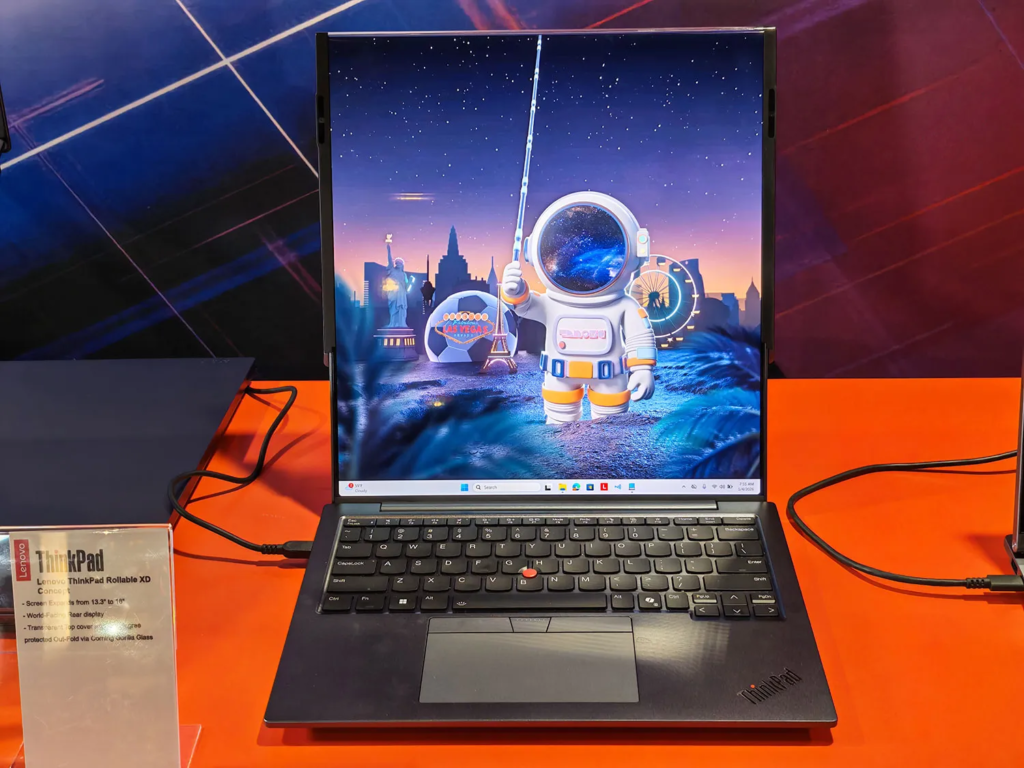
The ThinkPad Rollable XD is a ThinkPad that changes shape when you need it to. In its compact mode, it behaves like a normal 13.3-inch laptop. With a swipe along the top spine, the flexible OLED scrolls upward into a tall screen that lands around 15.9 inches to nearly 16 inches, depending on how it’s described in coverage.
The design twist is where Lenovo put the magic. The rolling panel and motors live in the lid, not tucked into the base. That also enables a second idea: part of the display stays visible through the outside of the lid, under a transparent cover, so you can see widgets and glanceable info even when the laptop is closed.
If you want the bigger-screen benefit without hauling a bigger laptop, this concept is worth watching. Just keep your expectations anchored. Because it’s a concept, price, full specs, and battery life aren’t public.
For broader context on Lenovo’s recent review coverage and form-factor experiments, you can also browse the Oasthar latest tech reviews.
The one feature that changes everything
Vertical space is what you run out of first. It’s the missing ingredient when you’re reading a full page, scanning a long spreadsheet, or keeping code and documentation visible at the same time.
Lenovo’s pitch is simple: you travel with a 13.3-inch footprint, then “unroll” more display when you sit down to work. Lenovo has also claimed that, fully extended, you get over 50 percent more screen area compared to the compact mode (that’s Lenovo’s figure, not an independent measurement).
If you live in docs, dashboards, and chats, that extra height can feel like adding a second monitor, minus the extra bag.
Biggest unknowns before you can call it a real ThinkPad you should buy
This concept still leaves a list of real-world questions unanswered:
- Weight and thickness: the lid has motors and a glass cover, but there’s no published number.
- Durability over years: flexible OLED plus moving parts needs proof, not promises.
- Battery life: larger active OLED area plus motors could change the math.
- Ports: only limited ports have been shown so far.
- Outer-strip readability: brightness and glare outdoors are unknown.
- Repairability: roll mechanisms rarely play nice with easy servicing.
- Price: Lenovo hasn’t said a word about cost or release timing.
If you want another perspective from early hands-on time, PCMag’s prototype write-up is a useful companion read: PCMag’s Rollable XD prototype impressions.
Specifications
Here’s the snapshot based only on what’s been shown and reported so far.
| Spec | What’s known so far |
|---|---|
| Status | Concept / prototype (not for sale) |
| Announcement | CES 2026 |
| Display type | Flexible OLED |
| Main display size | 13.3-inch compact mode to ~15.9-inch to nearly 16-inch tall mode |
| Roll mechanism location | Inside the lid |
| Exterior display idea | “World-facing” strip visible on the lid when closed |
| Cover material | Corning Gorilla Glass Victus 2 (transparent lid area) |
| Controls shown | Touch swipe along the spine to expand and retract, voice control mentioned |
| Keyboard hallmark | ThinkPad TrackPoint |
| Ports confirmed in coverage | USB-C ports (limited info) |
| Physical security | Kensington lock shown |
| Price and release | Not announced |
Treat every missing spec as a warning label, not a rounding error. Until Lenovo ships something, you’re judging a direction, not a product sheet.
Design & Build Quality
At a glance, the Rollable XD still reads as a ThinkPad. You get the familiar keyboard layout cues and the red TrackPoint that ThinkPad fans will notice instantly.
Then you see the lid. Part of it is transparent, and you can literally see the display wrapping and the mechanism living inside. It’s a bold choice for a business-looking line, but it also makes the concept feel honest. You’re not being asked to pretend nothing mechanical is happening.
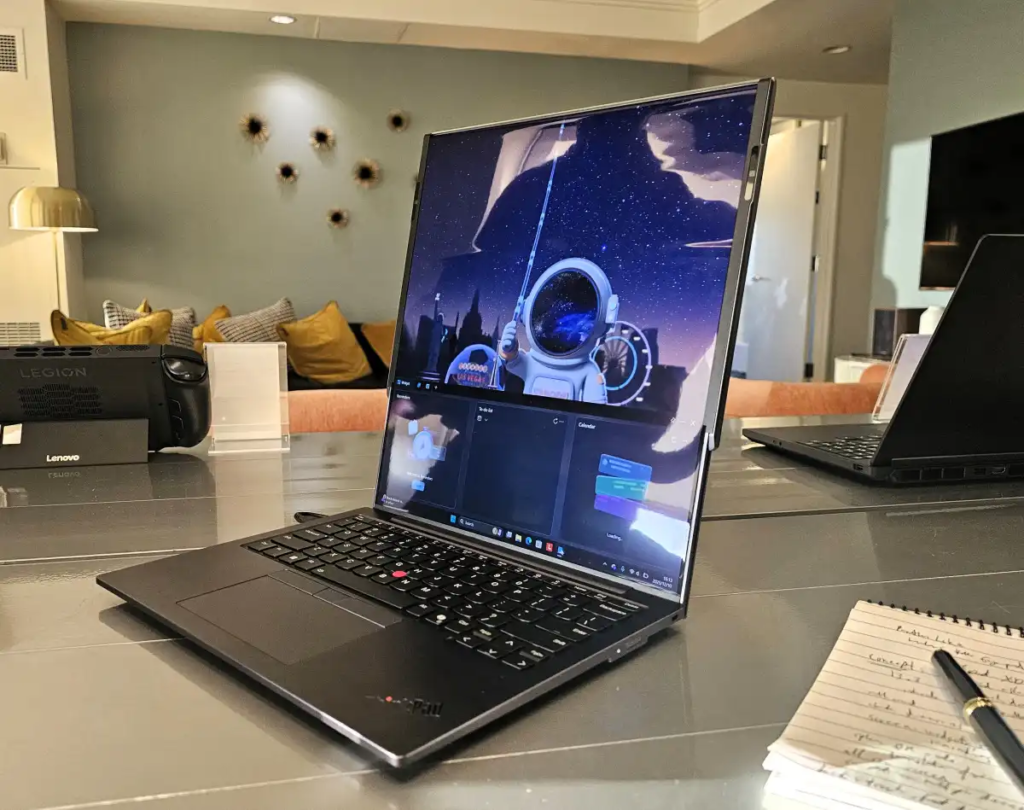
This lid-first approach is also a clear break from earlier Lenovo rollables that hid the rolling panel in the chassis. If you’ve been following Lenovo’s rollable streak, coverage has framed this as Lenovo continuing to experiment with multiple ways to “grow” a laptop screen (not just one).
For another hands-on take that matches the “weird but useful” vibe, Tom’s Guide’s demo impressions add good color: Tom’s Guide hands-on impressions.
How the lid-first roll design changes balance and portability
When the roll system lives in the lid, the base doesn’t need to hide part of the display under the keyboard deck. In theory, that helps two things.
First, you keep more of the panel usable, instead of “wasting” a section that must tuck into the chassis. Second, shifting the mechanism can change how the laptop balances in your hands and on your lap, because the base is not doing all the heavy lifting.
The practical benefit is easy to picture on a plane tray table. You can start compact, then extend once you have space. Still, until Lenovo shares weight and hinge details, you should treat portability gains as a possibility, not a guarantee.
Durability worries you should think about
Corning Gorilla Glass Victus 2 is a serious cover material, and it suggests Lenovo is thinking about scratches and day-to-day handling. That said, glass introduces its own annoyances.
Fingerprints are the obvious one. Glare is the quieter problem, especially if the outer strip is meant to be readable in bright rooms or near windows.
Then there’s the core issue: rollable OLED plus moving parts. Dust, grit, and repeated motion can become long-term stress points. A concept can look great at CES and still struggle in a backpack, week after week.
Display Quality
This is not a “better panel” story yet. There’s no confirmed resolution, brightness, or refresh rate in the available details, so you shouldn’t assume anything about image quality.
Instead, the display story is about shape. You get a normal-sized laptop screen for travel, and a tall screen for work. That’s it. And honestly, that simplicity is the appeal.
The tall orientation also has a clear bias toward productivity. It’s built for reading, writing, and scanning long content. If your day is mostly side-by-side creative apps, you might still prefer a wider external monitor.
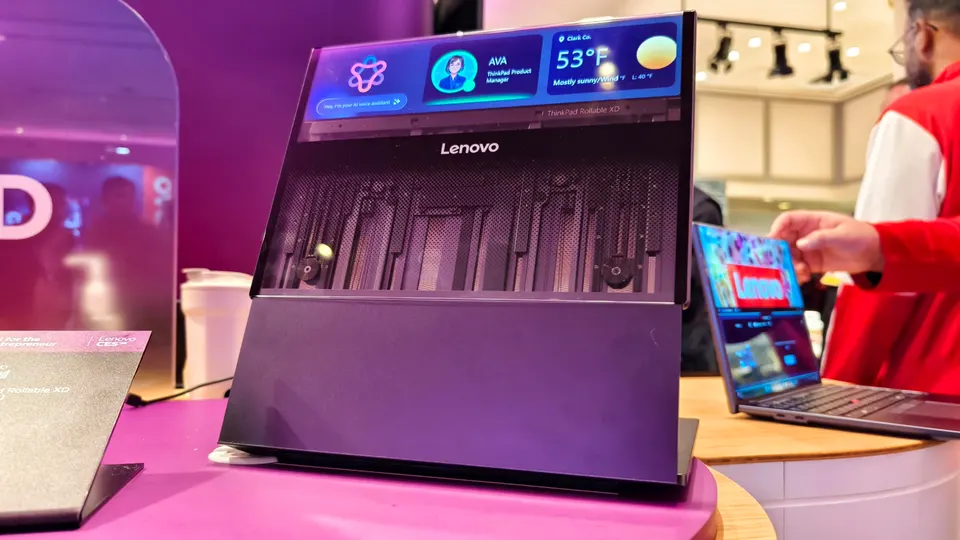
13.3-inch to almost 16 inches
You feel the difference most in “scroll-heavy” work. A taller screen can show more spreadsheet rows at readable zoom. It can keep a full document page in view. It can also let you keep chat or reference notes visible during a video call.
In demos, the extension is triggered by touch input along the top spine, and the panel scrolls upward into its taller position. That interaction matters more than it sounds. If it feels slow or fussy, you’ll stop using it. If it feels instant, it becomes muscle memory.
The outer “world-facing” strip, useful widgets or just a gimmick?
The outside strip is the oddest part, and also the most practical when it’s done right. When the lid is closed, you can still see touch-friendly widgets through the lid area. Reported examples include notifications, calendar items, and even an AI chatbot concept on the exterior.
Real-life uses are easy to imagine:
- You glance at your next meeting before walking into a room.
- You keep a timer or agenda visible while presenting.
- You use it as lightweight signage at a booth or event.
The limits are just as real. The visible area is small. Brightness is unknown. Privacy is a concern if it shows sensitive notifications at the wrong time.
Performance
Performance talk is mostly off the table right now. Lenovo hasn’t published CPU, GPU, RAM, or storage for this concept. That’s normal for prototypes, but it changes how you should judge it.
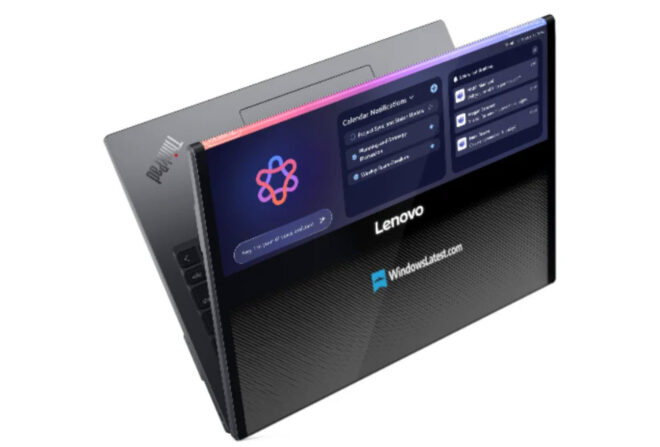
Here, “performance” is less about benchmark scores and more about whether the whole experience feels confident. The roll action needs to be smooth. The screen needs to stay stable. The system needs to react quickly when the display changes size, because window resizing lag will ruin the point.
What you can and cannot judge today
You can’t evaluate compute power from the public info. There’s no confirmed chip platform, and you shouldn’t buy into rumors as facts.
You can judge the intent, though. This concept targets hybrid work friction: too little screen on the road, too much laptop at home. Some demo chatter has hinted at a future Intel Panther Lake pairing, but treat that as a possibility, not a spec.
If you want a second detailed report focused on the mechanics and the “180-degree wrap” idea, PCMag also published another angle on the design: PCMag on the stretchy lid wrap.
The real performance question
If this becomes a real product, the make-or-break test is boring, and that’s a compliment.
You’ll want to see:
- Speed: does it extend fast enough that you don’t wait on it?
- Stability: does the screen wobble at full height when you type?
- Hinge feel: does the lid stay planted, or does it feel top-heavy?
- Lap behavior: does it remain usable when you’re not on a desk?
Those are the tests that turn a CES trick into a daily tool.
Battery Life & Charging
Lenovo hasn’t shared battery-life or charging details for the ThinkPad Rollable XD concept. That’s the single biggest gap for anyone who travels.
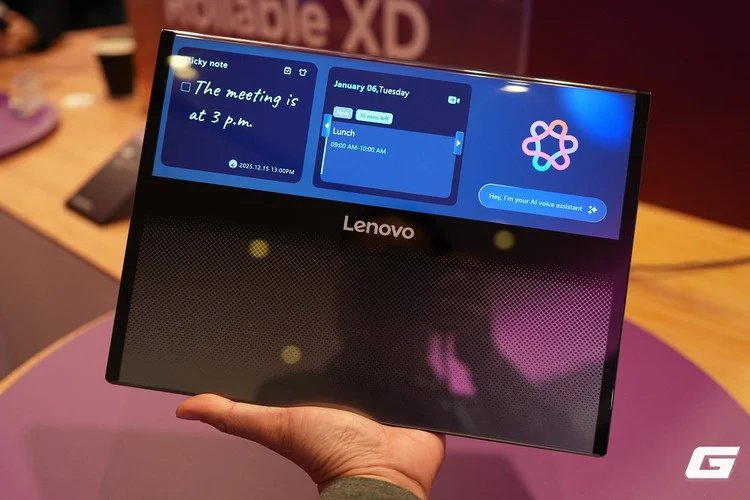
Three things could affect runtime: the motorized roll action, the larger active OLED area when extended, and the always-visible outer strip if it’s meant to stay on for glanceable info. None of that is automatically bad, but it needs real measurements.
If this ships, you should demand published battery testing, clear charging wattage, and battery health controls that fit a work laptop.
Software & Ecosystem
A transforming screen only works if the software doesn’t fight you. Window management has to feel natural as the panel changes size. Apps need to scale without turning into awkward letterboxed rectangles.
Lenovo has also floated concept-level AI touches around voice assistance, live translation, and “lid-closed” interactions that use sensors and the outside strip. The idea is attractive, but it’s also the part that’s easiest to fake in a demo. You’ll want to see it running like a normal workflow, not a staged scenario.
To keep up with related coverage and comparisons across the site, the Oasthar blog section is a handy hub.
Controls that need to feel effortless
The core control shown is straightforward: you swipe along the spine to expand or retract. That’s good, because you don’t want a screen transformation hidden behind a menu.
The outside widgets add a second interaction surface. If they stay responsive and useful, they can reduce the “open laptop, check one thing, close laptop” loop. Voice control, if it works well, can help when your hands are busy, like joining a call while carrying a bag.
If Lenovo gets the software right
Best case, you use it like two devices.
Compact mode is for tight spaces and quick tasks. Tall mode is for focused work, like writing, analyzing data, and keeping multiple vertical panes visible. The outside strip becomes the “phone-like” glance layer for reminders and status.
Still, the software experience is unproven. If resizing feels clunky, you’ll avoid the feature. If it feels natural, you’ll wonder why laptops stayed flat for so long.
Connectivity
Wireless specs have not been published for this concept, so there’s nothing solid to confirm about Wi-Fi, Bluetooth, or cellular options.
That makes the physical ports more important, because business laptops often end up in conference rooms, hotels, and client offices where adapters become a daily tax.
What ports are confirmed so far
So far, coverage has shown USB-C ports and a Kensington lock. That’s useful, but incomplete.
Your wish list, if this becomes real, should be practical: USB-A for legacy devices, HDMI for direct displays, a headset jack for quick calls, and possibly SIM or eSIM options for travel. None of those are confirmed here, but they’re the ports you’ll miss the first time you leave a dongle at home.
Cameras, Mic & Speakers
No camera, mic, or speaker specs were highlighted in the available CES coverage. That’s a problem for a device positioned around productivity and hybrid work.
The tall-screen mode could be great in calls, because you can keep chat, notes, and the meeting window visible without feeling cramped. But the experience still lives or dies on audio and camera quality. If Lenovo ever ships this, those basics need to match the ambition of the screen.
Extra Features
Three extras stand out because they change how you interact with the laptop day to day.
First, the outer strip can keep information visible when the lid is closed. Second, the transparent section shows off the internal mechanics, which makes the tech feel tangible. Third, there’s a “knock” interaction described in coverage that extends the display slightly when closed, creating a better grip point for opening.
Those ideas sound small, but they’re all about reducing friction.
The transparent lid and visible mechanics
Seeing the mechanism move is undeniably satisfying. It’s like watching a mechanical keyboard switch through a clear case, you can tell there’s real engineering behind the trick.
Still, you’ll also live with the downsides. Transparent surfaces show smudges. Glass can reflect overhead lights. And in some meetings, a glowing lid display might draw attention when you’d rather blend in.
The right answer depends on whether you want your laptop to be a tool, or a tool that also makes a statement.
Price & Value
There’s no announced price, because this is still a concept. So value is hypothetical for now.
However, rollable laptops have already shown the pricing direction. Lenovo’s shipping ThinkBook Plus Gen 6 Rollable has been cited around $3,299, and that’s important context because it shows how expensive flexible OLED and mechanical systems can be, even before you add a transparent lid display concept.
That doesn’t mean the Rollable XD will cost the same. It just tells you to brace for a premium if it ever becomes real.
For a wider roundup of Lenovo’s CES 2026 hardware highlights, this overview is useful context: Lenovo CES 2026 highlights.
Why rollable laptops often cost a lot
Costs stack up fast. Flexible OLED panels cost more than standard laptop screens. Motorized assemblies add parts and precision. Custom glass and tight tolerances raise manufacturing difficulty. Lower volumes tend to keep prices high.
If you’re paying premium money, you should demand premium support. That means strong warranty coverage, clear durability claims backed by testing, and service options that don’t treat repairs like a full replacement.
Who is it for?
You can’t buy the ThinkPad Rollable XD today, but you can still decide if the idea fits your work style. This concept is aimed at people who run out of screen before they run out of CPU.
Buy if you want more vertical space without carrying a big laptop
- You live in long documents and you’re tired of constant scrolling.
- You work in spreadsheets or dashboards, and more visible rows would save time.
- You travel often, and a 13-inch footprint matters in tight spaces.
- You like glanceable info and you’d actually use widgets on the closed lid.
- You enjoy new form factors, even if they start expensive and niche.
Don’t buy if you need proven reliability, a fair price, and full specs today
- You need a laptop you can purchase now, not a concept to track.
- You hate moving parts, because you don’t want another failure point.
- You prioritize thin and light simplicity, even if it means less screen.
- You dock to a big monitor anyway, so the roll feature won’t pay off.
- You worry about privacy, since an outward-facing display can expose info.
FAQs
Is the ThinkPad Rollable XD a real product yet?
No, it’s a CES 2026 concept. Lenovo hasn’t confirmed a release date, final specs, or pricing, so you can’t buy it yet, even if it looks demo-ready.
How does the screen grow from 13.3 inches to 16?
You start with a 13.3-inch view, then the flexible OLED scrolls upward inside the lid area to about 16 inches. It’s rollable, so you avoid a fold crease.
What’s the point of a vertical rollable screen?
You get more visible rows in spreadsheets, more page height for docs, and taller dashboards without shrinking text. It targets travel setups where a 16-inch laptop feels too big.
Does it change the aspect ratio or just add height?
It mainly adds vertical space. The idea isn’t an ultra-wide trick, it’s giving you a taller workspace that feels closer to a portable monitor when extended.
What is the “world-facing display” on the lid?
Part of the same OLED stays visible through a transparent Gorilla Glass Victus 2 lid. In concept images, it shows things like notifications, calendar info, or an AI prompt.
Can you use it while the laptop is closed?
That’s the pitch. The outer strip is meant to stay glanceable when shut, using sensors and mics for context, but the exact software behavior still isn’t confirmed.
Final Verdict
The Lenovo ThinkPad Rollable XD is a CES 2026 concept that tackles a real problem: not enough screen on the go. Its core idea is strong, a 13.3-inch ThinkPad that grows vertically to about 16 inches, plus an exterior “world-facing” strip under Gorilla Glass Victus 2. What holds it back is simple, and unavoidable: no price, no full specs, and no battery-life data.
If Lenovo proves durability, nails window management, and keeps the experience stable at full height, this could become a genuinely useful work machine. Until then, it’s exciting to watch, not something you can responsibly “recommend” as a purchase.
The ThinkPad Rollable XD is a trade: new screen freedom in exchange for big unknowns. If your workflow depends on vertical space, this concept probably made you nod at least once. Still, the smart move is patience, wait for a shipping model and real testing before treating it as a true replacement for a standard ThinkPad.
