

Should you buy the Galaxy Z TriFold if what you really want is one pocket device that can act like both a phone and a small tablet? That’s the whole promise here, and it’s the first time a Samsung foldable has felt purpose-built for that job, instead of just being a phone that happens to open wider.
In this review, you’ll get the practical stuff that matters: how it feels in your hand and pocket, what the hinges and creases are like, whether the big screen is actually useful, how DeX changes the work vibe, plus battery, charging, cameras, audio, and who should buy (or skip) at this price.
Quick review
The Galaxy Z TriFold is a three-panel, two-hinge foldable that opens into a 10-inch screen, while still giving you a 6.5-inch cover display for normal phone tasks. Its best trick is simple: when you open it up, it finally feels like you’re using a real tablet-sized canvas, not a slightly bigger phone screen.
What it does best is productivity and “big screen life” on the go: multitasking doesn’t feel cramped, typing is easier, and Samsung DeX makes more sense because you actually have room to work.
The tradeoffs are real. It’s thick when closed (12.9mm), heavy (309g), pricey, and you have to learn the closing order (left panel first). You also don’t get a mid-fold tent or laptop-style stance.
If your top priority is the biggest screen in a pocketable Samsung, you’ll get it. If you want maximum portability for the money, you’ll feel the compromises. For ongoing real-world observations, CNET’s live testing is worth bookmarking: CNET’s ongoing Galaxy Z TriFold review.
Specifications
Here are the specs that should drive your decision, because they shape daily use more than marketing phrases ever will.
| Spec | Galaxy Z TriFold |
|---|---|
| Cover display | 6.5-inch AMOLED, 2520 x 1080, 1 to 120Hz |
| Inner display | 10-inch AMOLED, 2160 x 1584, 1 to 120Hz |
| Peak brightness | Inner up to 1600 nits, cover up to 2600 nits |
| Chipset | Qualcomm Snapdragon 8 Elite for Galaxy |
| RAM | 16GB |
| Storage | 512GB or 1TB (no microSD) |
| Rear cameras | 200MP wide, 12MP ultrawide, 10MP telephoto |
| Selfie cameras | 10MP cover, 10MP internal |
| Battery | 5,600mAh |
| Charging | 45W wired, Qi wireless |
| OS | Android 16 with One UI 8 |
| Weight | 309g |
| Thickness (closed) | 12.9mm |
| Durability | IP48 |
In real life, the battery size, weight, and two displays matter most. After that, it’s the uncomfortable one: the $2,899 starting price.
Design & build quality
You buy this design for one reason: utility. Closed up, you’re looking at a phone that behaves like a normal handset on its 6.5-inch cover screen, only thicker in the pocket and chunkier in the hand. Open it, and the vibe changes fast. The TriFold spreads out into a wide 10-inch display that’s closer to a compact tablet than a stretched phone.
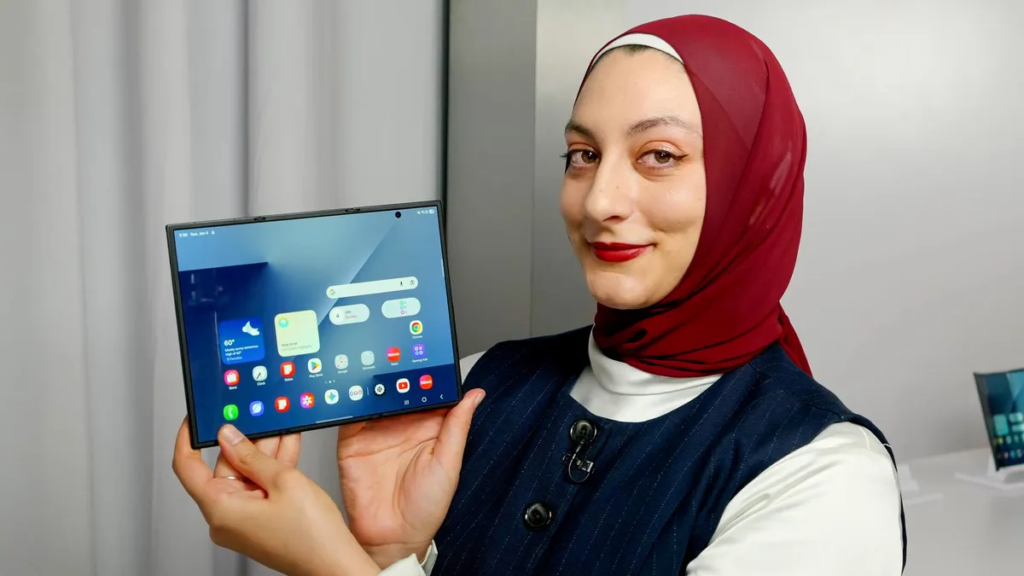
The engineering is the story here. Two hinges mean two creases, but they’re more subdued than you might expect, and in normal lighting you tend to stop thinking about them. That said, you do have to respect the folding sequence. Samsung even bakes in a warning so you don’t force it the wrong way.
It’s also impressively thin once opened: about 3.9mm to 4.2mm depending on the panel. Then you close it and you’re back to 12.9mm thickness, which is where the “wow” turns into “okay, this is a lot.” For another perspective on the form factor appeal, see ZDNET’s early impressions: ZDNET’s Galaxy Z TriFold hands-on.
Hinges, creases, and the “close it the right way” learning curve
The folding order exists because the hinges don’t behave the same way. In plain terms, one fold needs to happen first so the stack closes cleanly without pinching. If you do it wrong, the phone nudges you with haptic feedback and an on-screen alert. Give it a day or two and the motion becomes muscle memory.
You will see two creases if you hunt for them. Still, they’re not the kind that shout at you during normal scrolling.
Portability checks
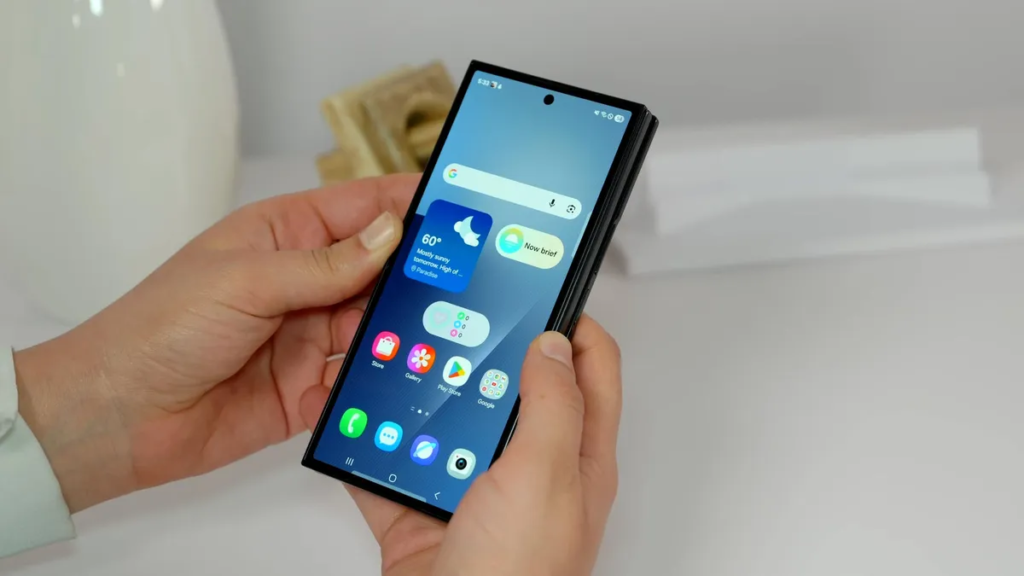
The cover screen is the fast path. Texts, email, and quick app checks feel “regular phone,” which is the point. Meanwhile, the closed 12.9mm thickness is hard to ignore if you’re coming from a slim slab phone.
Then there’s the 309g weight. It can feel manageable during use, yet it’s not a light device. If you’re sensitive to pocket bulk, this is where you decide whether the 10-inch payoff is worth it.
Display quality
The inner display is the selling point, and the numbers back that up: 10-inch AMOLED, 2160 x 1584, and 1 to 120Hz refresh. The cover display is also no afterthought, with 6.5-inch AMOLED, 2520 x 1080, and the same adaptive refresh range.
The practical win is how the big screen changes the feel of everything you already do. Reading feels less cramped. Typing looks more like a mini-tablet keyboard instead of a squeezed compromise. Games get breathing room. Video is the big one, because a wider canvas can reduce that “why am I watching black bars on an unfolded phone?” frustration that smaller foldables sometimes trigger.
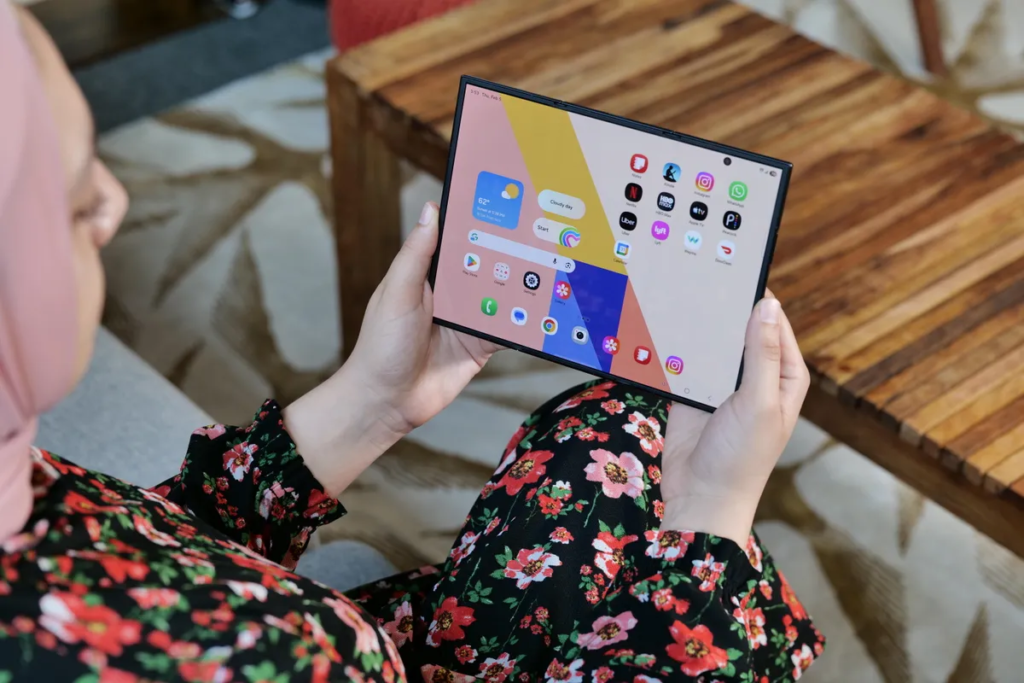
Brightness behavior is also split in a useful way. The inner screen is rated up to 1600 nits, while the cover can hit 2600 nits, which is the one you’ll want outdoors when the sun is being rude. If you want another angle on day-to-day questions, Tom’s Guide has a solid Q-and-A style breakdown: Tom’s Guide TriFold hands-on answers.
Cover screen vs inner screen
You’ll live on the cover screen for quick work: notifications, maps, music, two-factor prompts, and short replies. Then you’ll open the TriFold for anything that takes longer than a minute, like reviewing documents, reading, editing photos, or watching a full episode.
Adaptive refresh helps both screens feel smooth without burning power all the time. The cover’s higher brightness ceiling is also the “get stuff done outside” screen.
Multitasking and DeX feel more natural on a 10-inch screen
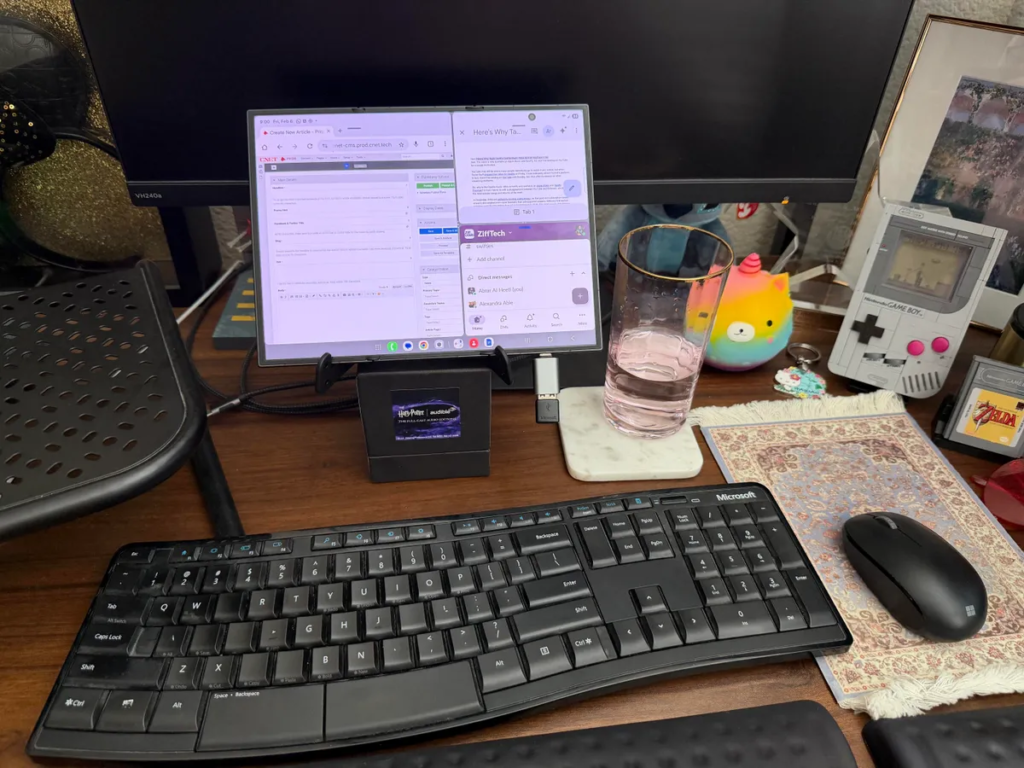
Samsung lets you run up to three apps side-by-side, and the TriFold’s size makes that layout feel less like a compromise. You can keep a chat open next to a doc while a browser sits in the third panel, and it doesn’t instantly become tiny-text misery.
DeX benefits too. It still won’t replace a laptop for everyone, but on a 10-inch canvas it finally feels like a real “mini computer” mode, especially if you pair a keyboard and mouse.
Performance
Samsung’s Snapdragon 8 Elite for Galaxy paired with 16GB RAM is the right combo for what this device is trying to be. You’re not buying a 10-inch foldable to politely run one app at a time. You want fast switching, stable multi-window behavior, and enough headroom that the big screen doesn’t feel like a gimmick.
Storage is simple: 512GB or 1TB, and that’s it. There’s no expandable storage, so it’s worth being honest about your media habits. If you shoot lots of video, remember it supports up to 8K capture, and those files get large fast.
If you like cross-checking spec lists, here’s a straightforward reference page: Android Headlines Z TriFold specs.
Battery life & charging
The TriFold packs a 5,600mAh battery, and that matters because a 10-inch screen can tempt you into longer sessions. On paper, the larger battery should help it handle real use better than smaller foldables with less capacity. Samsung also supports 45W wired charging and Qi wireless charging, which is what you want on an expensive daily device.
One detail that feels strangely refreshing in 2026: Samsung includes a charging brick in the box, not just a cable. That saves you extra spend on day one.
As for longevity, treat early “all-day” expectations like you should with any new form factor: your usage decides everything. Heavy multitasking and max brightness will always tax a battery faster than casual scrolling.
Software & ecosystem
You’re getting Android 16 with One UI 8, and the main benefit is how Samsung handles big-screen behaviors. Multi-window tools, split views, and app layouts feel more natural on 10 inches because there’s space for them to breathe.
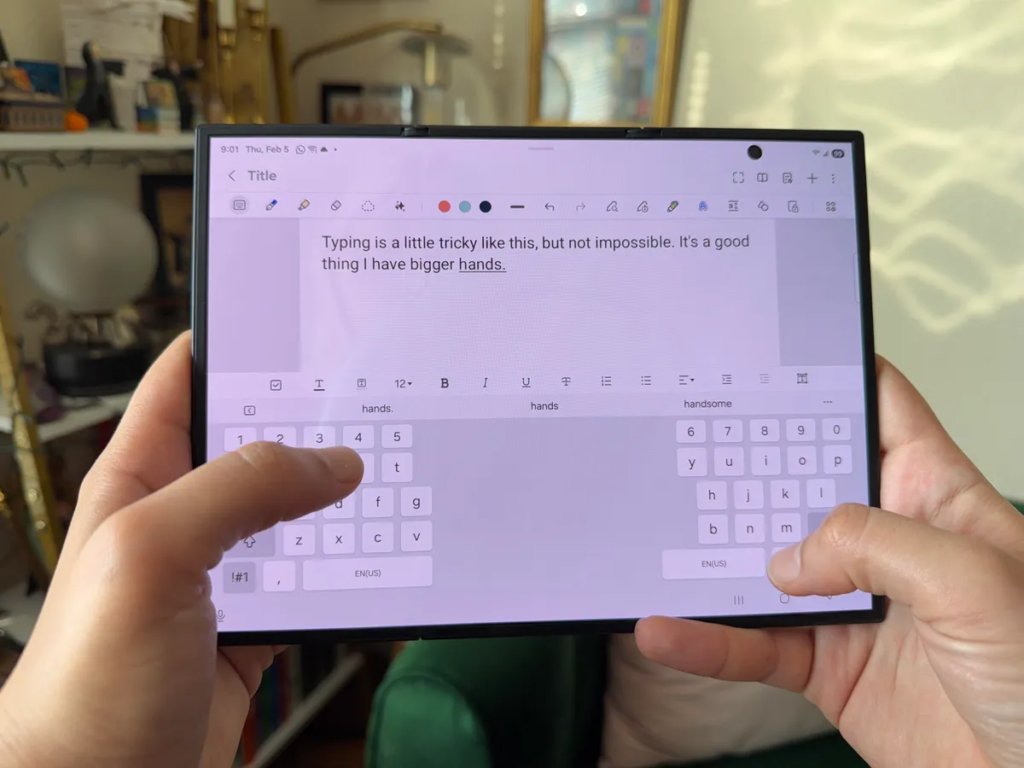
Galaxy AI features are also more enjoyable here, not because the AI is “stronger,” but because the canvas is bigger. Photo editing tools like Photo Assist, Generative Edit, and Sketch to Image are simply easier to use when your fingers are not covering half the scene. DeX fits into that same idea: the software is trying to let you work, not just consume.
If you already live in Samsung’s ecosystem, the TriFold feels like the largest extension of that setup you can put in a pocket.
Connectivity
Connectivity is modern where it counts: Wi‑Fi 7, Bluetooth 5.4, and NFC are all here, so accessories and payments are covered. Charging and data run through USB‑C, and Qi wireless charging gives you the drop-it-and-go option.
What’s missing is familiar: there’s no headphone jack, and there’s no microSD slot. So if you rely on wired audio, you’ll be living the USB‑C dongle life, or going fully wireless.
Cameras, mic & speakers
Camera hardware is strong for a foldable: a 200MP wide, 12MP ultrawide, and 10MP telephoto on the back, plus 10MP selfie cameras on the cover and inside. That gives you a sensible set of tools: wide for daily shots, ultrawide for groups and landscapes, and telephoto when you need reach.
Video capture goes up to 8K, which is impressive, although it can be overkill unless you crop or archive. The bigger win is editing. On a 10-inch screen, sorting photos and doing touch edits feels less fiddly. You can see what you’re doing without squinting.

Audio matters on a device like this because you’ll actually watch things on it. Speaker performance has been described as good for such a thin device, and it’s loud enough for casual viewing without immediately pushing you toward earbuds.
Extra features
The TriFold carries an IP48 rating, which helps with dust and water resistance, though it doesn’t make the phone invincible. It’s still a foldable with moving parts, so a little caution pays off.
You also get a fingerprint sensor, which is still the quickest, least-annoying unlock method in daily life. Galaxy AI is part of the package too, and again, the main advantage is ease of use on a bigger display.
In the box, Samsung includes the charging brick and cable. Some bundles and regions also include a case, which can be a real quality-of-life upgrade on a device this expensive.
Price & value
The Galaxy Z TriFold starts at $2,899 for the 512GB model. That number will either make you laugh or start doing mental math about what you can sell to justify it. The value argument is simple: if you were already carrying a phone and a small tablet, this tries to replace both.
Where it feels overpriced is also simple: you still have to accept foldable compromises like thickness, weight, and a learning curve, while paying luxury pricing. Early availability and pricing details have been widely reported, including timelines and configurations: How-To Geek price and availability rundown.
If you want the most screen you can fit in a pocket, the price starts to make sense. If you just want a “nice phone,” it won’t.
Who is it for?
You’ll get the most out of the Galaxy Z TriFold if you already use your phone like a tiny workstation.
Buy it if:
- You want a true phone-plus-tablet hybrid, and 10 inches changes how you read, watch, and work.
- You multitask a lot, and you like the idea of three apps on screen without feeling cramped.
- You use DeX, or you want a pocket device that can act like a small desktop setup with a keyboard and mouse.
- You care about flagship camera hardware, and you want a big screen for quick edits.
Don’t buy it if:
- You hate heavy phones because 309g is not subtle.
- You want a slim pocket feel, and 12.9mm closed will bug you every day.
- You’re price-sensitive, because $2,899 is a major commitment.
- You need a mid-fold stand mode, since this design pushes you toward fully open or fully closed use.
- You need microSD or a headphone jack, because you won’t get either.
If you’re still unsure about foldables in general, it can help to compare the lifestyle fit with a flip-style device, like the Motorola Razr 2025 foldable review, since the portability tradeoffs are very different.
FAQs
Is the Galaxy Z TriFold really a 10-inch phone?
Yes, you get a 10-inch internal AMOLED when fully opened, plus a 6.5-inch cover display for normal phone stuff like texts, email, and quick scrolling.
When does the Galaxy Z TriFold launch in the US?
US availability started January 30, 2026, after launching earlier in places like Korea. If you shop early, don’t be surprised if stock moves fast.
How much does the Galaxy Z TriFold cost in 2026?
The US starting price is $2,899 for the 512GB model. That puts it above most foldables, so you’re paying mainly for the bigger, three-panel design.
Is it comfortable to carry, or too thick and heavy?
You’ll feel it. It’s around 309g, and it’s about 12.9mm thick when closed. Still, the cover screen helps it feel like a normal phone.
How’s the battery life on a 10-inch folding screen?
You’re working with a 5,600mAh battery and 45W wired charging, so it’s built for long days. Big-screen use still drains faster than phone-only use.
Are the screen creases and two hinges a real issue?
You’ll see two creases, but they’re not as distracting as you’d fear. Closing takes practice, and the phone nudges you with haptics and alerts if you fold wrong.
Does the Z TriFold camera match other flagship Samsungs?
You get a 200MP main, plus 12MP ultrawide and 10MP telephoto, with two 10MP selfie cameras. It shoots up to 8K, so it’s not a compromise camera.
Is Samsung DeX actually useful on the TriFold’s big screen?
Yes, because you’ve got room. With Samsung DeX on a 10-inch display, multitasking and doc work feel less cramped than on smaller foldables.
Final verdict
The Galaxy Z TriFold is easiest to judge with one question: do you want a 10-inch screen badly enough to carry a thicker, heavier phone and pay $2,899? If yes, the display experience feels like the first Samsung foldable that truly earns the “phone-tablet hybrid” label.
You also get strong fundamentals, including Snapdragon 8 Elite for Galaxy, 16GB RAM, a 5,600mAh battery, and 45W charging. Still, the fold order learning curve and closed thickness are daily realities. For power users who live in multi-window and DeX, it makes sense. For value seekers, a cheaper foldable or a normal flagship will feel smarter.
If you’re shopping with your own money, the practical takeaway is simple: pick the TriFold for the screen-first life, not for elegance. Decide whether you want the biggest pocketable canvas available, or whether a more affordable foldable, or even a standard slab phone, fits your day better. Either way, you’ll be happier if you choose based on how you actually use your device, not how cool it looks when it opens.
