

You’re not choosing between two “nice” 16-inch laptops, you’re choosing two very different priorities. Galaxy Book 6 Pro vs Lenovo Yoga Pro 9i Aura Edition comes down to this, Samsung wins for battery life and portability, Lenovo wins for raw creator and gaming power.
Samsung’s thin, light build pairs a 16-inch AMOLED with a big 78Whr battery that can push close to 20 hours in video looping. Lenovo counters with an H-series Core Ultra 9 and RTX 50-series graphics options, plus a loud, punchy six-speaker setup and OLED choices that look unreal for HDR.
Next, you’ll get a clean breakdown across specs, design, display, performance, battery and charging, software and ecosystem, connectivity, camera and audio, extras, price, who each one fits, and the final verdict.
RELATED: Galaxy Book6 Pro vs Apple MacBook Pro M4: Which is Better?
Quick Summary
- Carry weight: Galaxy Book 6 Pro stays travel-friendly at about 3.5 lb; Yoga Pro 9i is closer to a “move it room to room” machine at about 4.25 lb (plus a huge power brick).
- Screen behavior: Both are OLED, but Samsung’s AMOLED runs 30 to 120Hz to save power while reading; Lenovo offers OLED options including a 3.2K tandem OLED that can get dramatically brighter for HDR.
- Gaming and creator speed: Galaxy Book 6 Pro surprises with strong Intel Arc integrated gaming; Yoga Pro 9i goes harder with Nvidia RTX 5050/5060/5070 options and workstation-style performance.
- Battery life: Galaxy Book 6 Pro posted about 15+ hours in a web-browsing battery test; Yoga Pro 9i was reported around 4 hours per charge on default settings.
- Ports and workflow: Lenovo includes a full-size SD card reader; Samsung skips microSD.
- Software extras: Both ship with extra apps, but Lenovo’s upsell pop-ups can feel more intrusive.
If you mostly travel and work unplugged, you’ll lean Samsung. If you mostly create or game, you’ll lean Lenovo.
Specifications
Here’s the cleanest side-by-side view using only the confirmed details from the provided source material.
| Spec | Samsung Galaxy Book 6 Pro | Lenovo Yoga Pro 9i Aura Edition (16-inch) |
|---|---|---|
| Display size | 16-inch | 16-inch |
| Display resolution | 2880 x 1800 | 2880 x 1800 (2.8K) or 3200 x 2000 (3.2K) |
| Refresh rate | 120Hz variable (30 to 120Hz) | 120Hz variable |
| CPU (tested/mentioned) | Intel Core Ultra X7 358H (also listed: Core Ultra 5) | Intel Core Ultra 9 285H |
| GPU | Intel Arc Graphics (3rd Gen, integrated) | Nvidia GeForce RTX 5050/5060/5070 (varies by config) |
| RAM | 16GB or 32GB LPDDR5X | 32GB or 64GB LPDDR5X-8400 (soldered) |
| Storage | 256GB or 1TB | One or two PCIe Gen 4 M.2 SSDs (up to 1TB each) |
| Ports (key set) | 2x Thunderbolt 4, USB-A, HDMI 2.1, 3.5mm | HDMI 2.1, 2x Thunderbolt 4/USB4, 2x USB-A, SD card reader, 3.5mm, proprietary power |
| Size and weight | 14.05 x 9.76 x 0.47 inches, 3.5 lb | 14.28 x 9.99 x 0.7 inches, ~4.25 lb |
| Wireless (confirmed) | Not confirmed in provided sources | Wi‑Fi 7, Bluetooth 5.4 |
| Webcam (confirmed) | Not confirmed in provided sources | 5MP webcam + ToF sensor |
| Battery life (test/observed) | 15:17 web browsing (150 nits) | About 4 hours per charge (reported, default mode) |
For most buyers, four rows matter more than the rest: GPU type, weight, battery life, and ports (especially SD card and Thunderbolt). Those decide how the laptop fits your days, not just your benchmarks.
If you want extra context on the Yoga line’s creator positioning, this Lenovo Yoga Pro 9i Aura Edition review at PCMag is a helpful companion read.
Winner: Tie because the spec sheet “wins” depend on whether you value battery and weight (Samsung) or RTX graphics and SD workflow (Lenovo).
Design & Build Quality
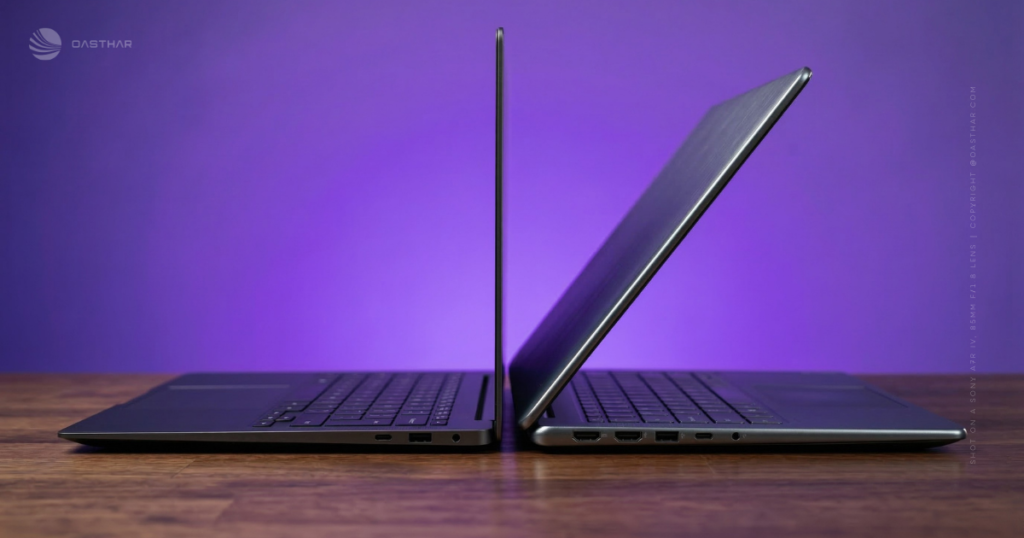
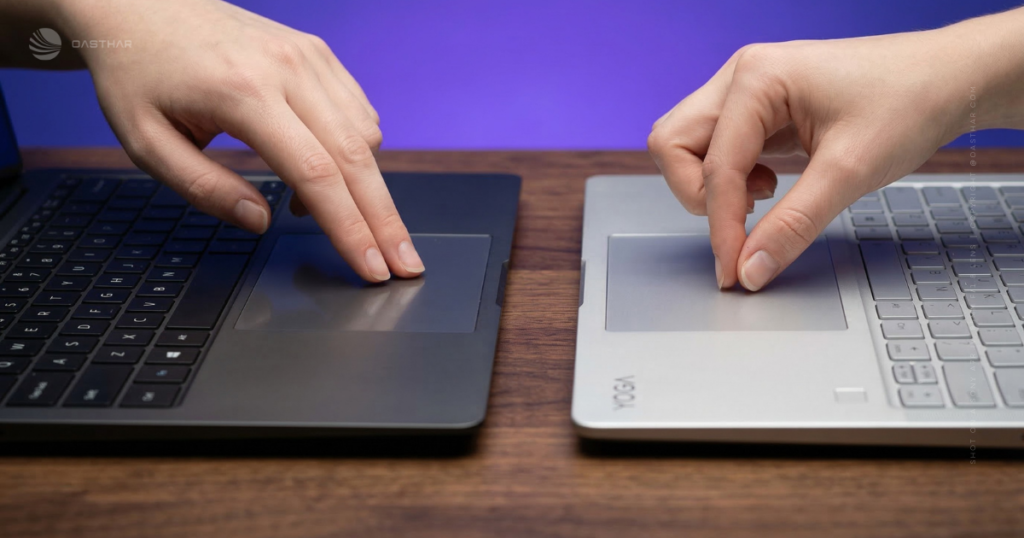
The Galaxy Book 6 Pro goes for thin, light, and minimalist. At 0.47 inches thick and 3.5 lb, it fits the “grab it with one hand” test. You also get a centered keyboard because Samsung dropped the numpad, and that matters more than it sounds. Your shoulders stay square, and long typing sessions feel more natural. The larger haptic touchpad also helps when you’re editing, scrolling, or dragging windows for hours.
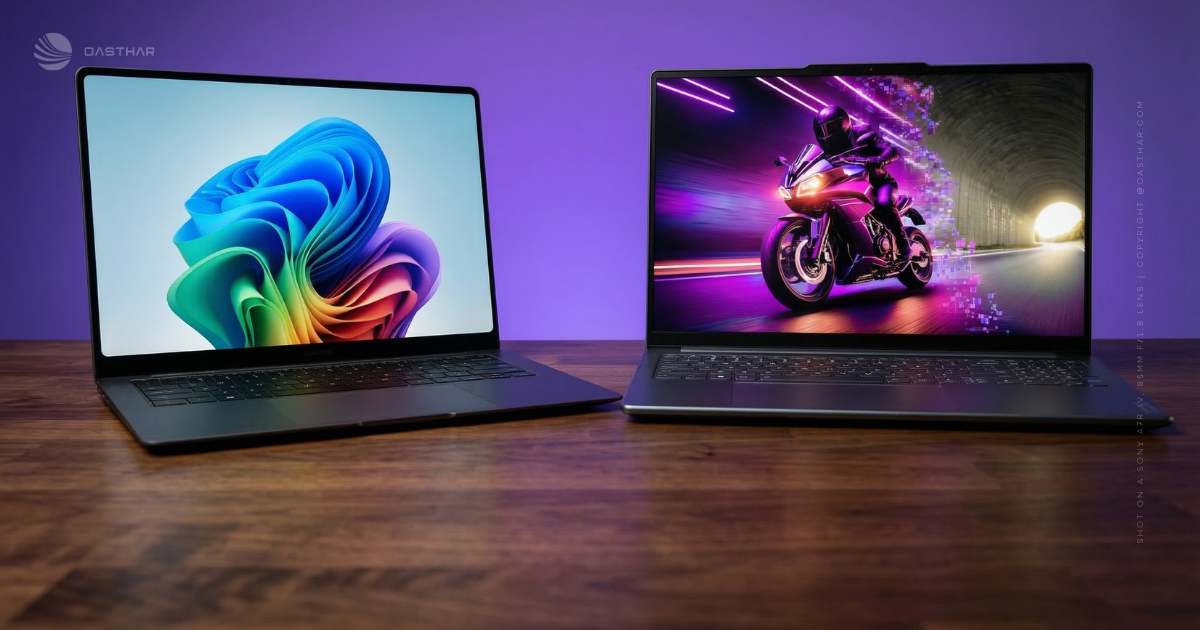
The Yoga Pro 9i Aura Edition feels premium and extremely solid, with metal construction and basically no flex. Still, it’s big. The extra weight (about 4.25 lb) and thicker chassis show up fast in a backpack. The keyboard includes a numpad, which pushes your typing position left. Some reviewers also called out wrist comfort issues, partly because the front edge can feel sharp and the keyboard sits farther back on the deck. The touchpad is huge, which is nice, but it can trigger accidental gestures unless you tweak settings.
If you’re still weighing other travel-friendly options, Oasthar’s best laptops 2025 guide is a solid way to sanity-check what matters for your use.
Winner: Samsung Galaxy Book 6 Pro because it’s easier to carry daily, and the centered keyboard makes long typing sessions simpler.
Display Quality
Both laptops sell you on OLED for a reason. You get deep blacks, punchy contrast, and that “everything looks expensive” effect when you stream video or edit photos.
Samsung’s 16-inch Dynamic AMOLED 2X panel runs 2880 x 1800 with a variable refresh rate that can drop to 30Hz. In practice, that means it can sip power while you read, then feel smooth at 120Hz when you scroll or game. Lab measurements in the provided material put it around 457 nits SDR and 570 nits HDR, and the anti-reflective layer helps with overhead lights indoors.
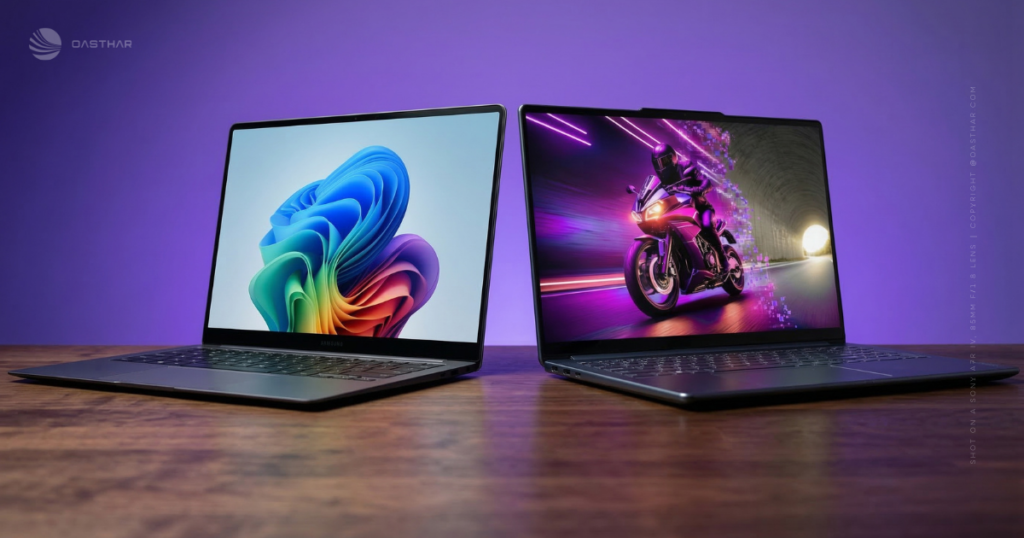
Lenovo gives you two OLED touch options, and the high-end one is the headline. The 2.8K OLED model is already bright (stated up to 500 nits SDR and 700 nits HDR), but the 3.2K tandem OLED steps into a different class, with stated brightness up to 1000 nits SDR and 1600 nits HDR. That extra headroom helps when you’re grading HDR content or working near a sunny window. Reflections can still happen on OLED, even with coatings, so placement and lighting still matter.
For another perspective on the Yoga Pro 9i’s screen and creator focus, see CNET’s Yoga Pro 9i Aura Edition review.
Winner: Lenovo Yoga Pro 9i Aura Edition because its tandem OLED option targets higher brightness and HDR headroom, which you’ll actually notice in difficult lighting.
Performance
Think of these two like sports cars with different engines. One is tuned for efficiency, the other for brute force.
In the provided review material, the Galaxy Book 6 Pro (Intel Core Ultra X7 358H with 32GB RAM) handled a heavy “real person” workload, like 20 to 30 Chrome tabs plus video, without stutters. You also get the surprise factor: Intel Arc integrated graphics that can run demanding games well when settings are chosen smartly. Benchmarked examples in the source include strong results at 1080p, with standout performance in titles like Cyberpunk 2077 for an integrated GPU setup.
The Yoga Pro 9i Aura Edition comes in with an Intel Core Ultra 9 285H and optional Nvidia GeForce RTX laptop GPUs (5050/5060/5070 depending on config). That pairing is built for creators and gamers who don’t want compromises. In the cited review, Call of Duty: Black Ops 6 configured itself at 1920 x 1200 with high settings and stayed above 90 FPS, helped by both the GPU and the high-quality OLED. The tradeoff is predictable: higher heat under load, more fan noise during gaming, and less battery headroom.
If you want “play and create anywhere,” the Galaxy Book is impressive. If you want “push settings and don’t babysit performance,” the Yoga is the safer bet.
If you like spec comparisons as a second opinion, this ProductChart laptop comparison tool can help you spot patterns across similar models, even though it’s not a substitute for hands-on reviews.
Winner: Lenovo Yoga Pro 9i Aura Edition because dedicated RTX graphics and a high-end H-series CPU give you more consistent headroom for demanding creator apps and modern games.
Battery Life & Charging
This is the clearest separation between the two.
The Galaxy Book 6 Pro posted 15 hours and 17 minutes in a continuous web-surfing test at 150 nits. That kind of result changes how you plan your day. You can take it to class, work through a coffee shop session, then keep going at home without hunting for an outlet. The 30Hz low-refresh mode also fits this vibe, since the laptop doesn’t waste energy when you’re doing static work.

The Yoga Pro 9i, in the cited review, averaged about 4 hours per charge on default settings. That’s the cost of pushing an Ultra 9 H-class CPU and an RTX GPU in a big 16-inch frame. Lenovo includes a large proprietary 170W power supply, and you can charge via USB-C up to 100W, which helps for topping off, but it doesn’t change the core reality.
Winner: Samsung Galaxy Book 6 Pro because the tested battery life is in a different league for unplugged days.
Software & Ecosystem
Both laptops ship with extras, and your patience for “helpful” apps matters.
On the Galaxy Book 6 Pro, Samsung leans into Galaxy AI branding. Features mentioned include AI Select, AI Cutout, and natural-language file search. If you already use Samsung phones or tablets, the cross-device perks are more convincing. You can share control across screens and treat phone content more like it’s local. On the other hand, if you’re not in that ecosystem, the pre-installed Samsung apps can feel like clutter you’ll ignore or uninstall.
Lenovo’s Yoga Pro 9i bundles Lenovo Vantage plus Aura Edition utilities co-developed with Intel. Smart Connect stands out because it replaces Intel Unison and supports cross-device actions like copy and paste, file drag and drop, and even using your phone camera as a webcam. Still, the provided review also called out bundled software like McAfee and upsell prompts inside Lenovo’s utilities, which can get annoying. One more practical point: in the cited configuration, the Yoga isn’t a Copilot+ PC because its NPU is listed at 13 TOPS, so you shouldn’t buy it expecting every local Windows AI feature.
For a broad sense of how reviewers weigh laptops and usability over time, RTINGS’ comparison format is useful, even across different models, such as this RTINGS laptop comparison page.
Winner: Tie because both include bloat, but each has at least one real utility depending on your devices and tolerance for pop-ups.
Connectivity
Lenovo is the easy one to score on pure wireless specs. The provided material lists Wi‑Fi 7 and Bluetooth 5.4 on the Yoga Pro 9i, which is what you want if you’re on modern routers or you move big files over a fast network.
For the Galaxy Book 6 Pro, the provided sources focus more on device features than radio specs, so you shouldn’t assume a Wi‑Fi generation without checking the exact configuration you’re buying. What you can count on, from the review material, is that Samsung’s ecosystem features are strongest when you pair the laptop with Galaxy devices.
Winner: Lenovo Yoga Pro 9i Aura Edition because its Wi‑Fi 7 and Bluetooth 5.4 are explicitly confirmed in the provided sources.
Cameras, Mics & Speakers
If you live in Zoom or Teams, the Yoga Pro 9i gives you more confirmed hardware. It includes a 5MP webcam plus a time-of-flight sensor, and it also uses a four-mic array. For audio, Lenovo goes big with a six-speaker layout (two tweeters and four woofers) and Dolby Atmos, and the cited review praised both loudness and clarity, especially in games and movies.
Samsung’s provided material doesn’t confirm camera specs, so it’s hard to score it on webcam quality from this dataset. What is clear is the design shift toward audio: the Galaxy Book 6 Pro has a new quad speaker setup flanking the keyboard, and it’s described as fuller than past models. That should help with casual streaming and meetings, even if it won’t replace a good headset mic.
Winner: Lenovo Yoga Pro 9i Aura Edition because you get stronger confirmed camera and speaker hardware, plus a track record of very loud, clean output.
Extra Features
Ports decide whether you carry dongles, so it’s worth slowing down here.
The Galaxy Book 6 Pro includes 2x Thunderbolt 4, USB-A, HDMI 2.1 (8K at 60), and a 3.5mm jack. That’s a smart everyday set. However, there’s no microSD slot, so photographers and drone owners may need a reader.
The Yoga Pro 9i matches the modern basics and adds creator-friendly extras: HDMI 2.1, 2x Thunderbolt 4/USB4, 2x USB-A, a full-size SD card reader, and a proprietary power connector. That SD slot is the big quality-of-life win if you shoot photo or video. For upgrades, Lenovo lets you open the bottom, replace the battery, and replace or add SSDs, but the RAM is soldered. On biometrics, the Yoga includes Windows Hello ESS facial sign-in, and the provided review notes there’s no fingerprint reader.
Winner: Lenovo Yoga Pro 9i Aura Edition because the SD card reader and stronger expansion story reduce friction for creator workflows.
Price & Value
Pricing is messy right now, so stick to what’s known.
For the Galaxy Book 6 Pro, the provided sources say US availability is expected in early spring, but they don’t lock final US pricing in the material you shared. That means you should expect some configuration shopping and maybe a wait.
Lenovo’s Yoga Pro 9i pricing is clearer in the cited material. An example “base” configuration with 32GB RAM, 1TB storage, RTX 5050, and the 2.8K display is listed around $1900. A higher package with 64GB RAM, the 3.2K tandem OLED, and RTX 5070 is listed around $2430, with an optional second 1TB SSD add-on priced separately.
Value comes down to what you’ll feel every day. Samsung’s value is time away from the charger. Lenovo’s value is time saved in exports, renders, and higher settings in games.
Winner: Tie because the better value depends on whether you’re buying battery life and weight (Samsung) or RTX power and a brighter OLED option (Lenovo).
Who is it For?
Choose Galaxy Book 6 Pro if…
- You travel often, and 3.5 lb actually matters in your bag.
- You work unplugged, and you want battery life that can cover a full day.
- You want OLED for media, plus a variable refresh range that helps efficiency.
- You game casually, and you like the idea of strong integrated Arc performance.
- You own Galaxy devices, and you’ll use Samsung’s cross-device features.
Choose Lenovo Yoga Pro 9i Aura Edition if…
- You want RTX graphics, because your games and creator apps benefit from it.
- You care about HDR brightness, and the 3.2K tandem OLED appeals to you.
- You use SD cards, and you don’t want to live on dongles.
- You do heavy multitasking, and you want a high-end H-series CPU with headroom.
- You’re mostly on power, and battery life is a lower priority than performance.
FAQs
Which laptop fits travel better, weight, size, and charger?
If you move a lot, you’ll prefer the Galaxy Book 6 Pro at about 3.5 pounds and ultra-thin. The Yoga Pro 9i is heavier and ships with a huge 170 W brick.
Which one lasts longer on battery during real workdays?
For unplugged days, you’ll get far more time from the Galaxy Book 6 Pro (Tom’s Guide measured 15:17 in a Wi-Fi web test). The Yoga Pro 9i averaged around 4 hours.
Which is better for gaming performance and high frame rates?
If you want consistent high settings, pick the Yoga Pro 9i, it pairs an Intel Core Ultra 9 285H with RTX 5050, 5060, or 5070 graphics. The Galaxy Book 6 Pro can game surprisingly well, but it relies on integrated Intel Arc.
Which laptop is better for creators editing video and 3D work?
For heavy creator workloads, you’ll usually do better with the Yoga Pro 9i because you can configure up to RTX 5070 graphics and 64 GB RAM. The Galaxy Book 6 Pro stays focused on thin-and-light productivity.
How do the OLED displays compare for brightness and HDR?
Both give you a sharp 16-inch 2880×1800-class OLED at 120 Hz. The Yoga Pro 9i can be configured with a brighter 3.2K tandem OLED (claimed up to 1600 nits peak HDR), while Galaxy Book 6 Pro testing showed roughly 457 nits SDR and 570 nits HDR.
Final Verdict
If you want the cleanest answer, start with battery and weight. The Galaxy Book 6 Pro is the better daily carry, and its tested endurance makes it easy to recommend for school, travel, and coffee shop work. On the other side, the Yoga Pro 9i Aura Edition is built for people who want RTX graphics and OLED options that push HDR brightness higher. If your laptop doubles as a gaming rig or a creator workstation, Lenovo makes the safer pick. If your laptop needs to last all day without drama, Samsung fits better.
One-line recommendation: Pick the Galaxy Book 6 Pro for mobility and battery, pick the Yoga Pro 9i Aura Edition for RTX performance and creator-first features.
