

Good computer audio doesn’t have to cost much. If you’re shopping for the best budget computer speakers, you can get clear sound, useful inputs, and even real bass without blowing up your desk or your wallet.
Disclosure: As an independent reviewer, we may receive an affiliate commission on qualifying purchases made through our links. This helps support our research and testing team at OASTHAR. Learn more about our testing process.
That matters more in 2026 than it used to. Laptops still sound thin, many monitors still have weak speakers, and a lot of low-cost desktop sets still look better on paper than they sound in real use. The gap between a bad cheap speaker and a good cheap speaker is huge.
So this guide keeps it simple. You get the seven budget picks that stand out, the trade-offs that actually matter, and the models worth your time if you want better music, cleaner voices, or fuller game audio on a tight budget.
RELATED: The 7 Best Budget Bluetooth Speakers for 2026, Tested and Reviewed
Best budget computer speakers at a glance
- Best Overall: Creative Pebble Pro
- Best Value: Creative Pebble V3
- Best Under $100: Creative Pebble X
- Best for Bass: Logitech Z407
- Best Versatile Sound: Edifier R1280DB
- Best for Creative Work: Edifier MR4
- Best Budget: Creative Pebble Plus
Learn More About How We Test Computer Speakers
In our assessment, budget computer speakers need to do more than get loud. They need to sound clean at desk range, fit real setups, and deliver honest value after long-term use.
Sound Quality at Desk Distance
First, you care about how speakers sound where you actually sit. So we focus on near-field listening, which means music, voices, games, and videos from normal desk distance. We listen for vocal clarity, stereo spread, harsh treble, weak mids, and bass control. A cheap speaker can still sound balanced, and that matters more than inflated power claims.
Connectivity and Daily Use
Next, we check how easy each model is to use every day. That includes USB audio, USB-C power, 3.5mm aux, Bluetooth, optical, and onboard controls. We also look at pairing speed, volume access, cable layout, and whether the setup feels clean on a small desk. Good budget speakers should save hassle, not add it.
Size, Design and Placement
Small speakers don’t always sound small, but they can if the design is poor. So we compare desk footprint, shape, cable reach, subwoofer size when included, and how easy the speakers are to place around monitors or laptops. Some sets work best in tight spaces, while others need breathing room to sound their best.
Volume, Bass and Distortion
Then we push them harder. We listen at low, medium, and high volumes to hear when the sound starts to harden, flatten out, or crackle. Budget models often look fine at 40 percent volume and fall apart near the top. We also check whether bass adds weight or just muddies dialogue and music.
Price and Customer Reviews
We research major retailers and shopping platforms, including Amazon, Walmart, Target, and Currys, then compare current pricing trends and availability. We also study hundreds of customer reviews to see how each speaker holds up beyond a short test window. That helps you spot repeat complaints, recurring failures, and products that overdeliver for the money.
Value Against the Market
Finally, we rank each model against what else you can buy for similar money. A speaker doesn’t need to be perfect to make this list, but it does need a clear edge. That could mean better clarity, stronger bass, more useful inputs, or a smarter design. In short, value wins when the whole package makes sense.
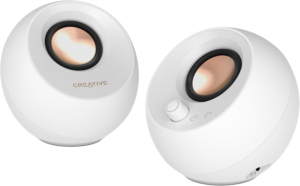
Star Rating: 4.8/5
The Creative Pebble Pro is the small speaker set that punches above its class. It gets the basics right, then adds just enough extra power, bass, and connection options to feel like a real upgrade instead of a cheap stopgap. For most desks, this is the best mix of size, sound, and price.
In daily use, the Pebble Pro sounds fuller than most compact 2.0 speakers. Voices come through cleanly, which helps in calls, YouTube videos, and podcasts. Music has more body than you’d expect from speakers this small, and the angled drivers help push sound toward you instead of straight into the desk. Based on current US retail tracking, pricing usually lands around $60 to $70, which keeps it firmly in budget territory.
It also gives you flexibility that cheaper speakers often skip. You get USB-C, 3.5mm, and Bluetooth 5.3, plus RGB lighting if you like a little extra style on the desk. Reviews from major outlets have praised its strong output and compact design, and Tom’s Guide’s Pebble Pro review backs up that big-sound, small-speaker reputation. If you want an easy pick that feels modern and doesn’t eat desk space, this is the one.
Type: 2.0 stereo | Connectivity: USB-C, 3.5mm, Bluetooth 5.3 | Drivers: 2.25-inch with passive radiators | Power: up to 30W RMS, adapter dependent | Price Range: around $60 to $70
Reasons to Buy
- Strong sound for size
- Clear voice reproduction
- Good modern connectivity
- Compact desk-friendly shape
- Better than basic budget sets
Reasons to Avoid
- No true deep bass
- RGB isn’t for everyone
Who should buy it: This fits you best if you want one compact pair for work, streaming, casual gaming, and music. It’s also a smart move if your desk is small but you still want something that sounds grown-up.
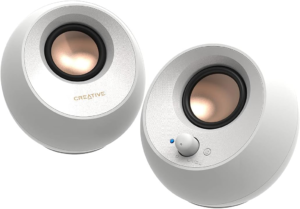
Star Rating: 4.7/5
The Creative Pebble V3 is the classic value pick. It doesn’t try to wow you with huge bass or premium materials. Instead, it gives you simple setup, solid sound, and the kind of price that makes weak built-in speakers feel like a silly compromise.
This model works because it stays focused. The sound is clear enough for videos, meetings, and everyday music, while the angled drivers help speech stay easy to follow. It won’t fill a large room, but at normal desk distance it does the job well. Real-time market data puts it around $25 to $35 in the US, and that’s a big reason it keeps showing up in budget roundups.
You also get more flexibility than you’d expect at this price. USB audio, 3.5mm input, and Bluetooth make it easy to switch between a laptop and a phone. That’s rare at the low end. Broad market coverage from roundup sites like PCWorld’s budget speaker guide and user feedback across major retailers point to the same thing, this is one of the safest cheap buys in the category.
Type: 2.0 stereo | Connectivity: USB, 3.5mm, Bluetooth | Design: angled compact satellites | Power: up to 16W peak, setup dependent | Price Range: around $25 to $35
Reasons to Buy
- Very low price
- Easy plug-and-play setup
- Bluetooth included
- Clean dialogue performance
- Tiny desk footprint
Reasons to Avoid
- Light bass response
- Limited headroom at high volume
Who should buy it: This is the right match if you want the cheapest speaker set that still feels worth owning. It’s especially good for students, office desks, and laptop users who just need clearer, fuller sound without chasing extras.
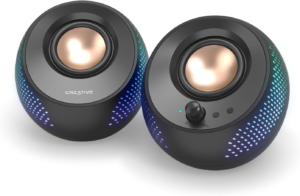
Star Rating: 4.6/5
The Creative Pebble X steps up from entry-level Pebble models and aims at shoppers who want a stronger, more polished desktop setup under $100. It stays compact, but it pushes closer to premium desktop sound than most budget-friendly mini speakers do.
The main draw is balance. You get better output and a richer sound than the V3, with stronger presence for music and gaming. This model sits in that sweet spot where the sound feels more serious, but the speakers still fit easily around a monitor. Public pricing in 2026 has been less stable, so current listings vary by seller and bundle, but it generally lands in the sub-$100 range.
It also makes sense if you want something newer without jumping to large bookshelf speakers. Coverage from broader desktop speaker roundups, including Tom’s Hardware’s 2026 PC speaker guide, supports the idea that strong sub-$100 desktop options are getting much better. The Pebble X fits that trend well, especially if you want compact speakers that feel like a step up rather than a placeholder.
Type: 2.0 stereo | Connectivity: USB-C, 3.5mm, Bluetooth | Design: compact angled desktop speakers | Features: some models include lighting and app support | Price Range: usually under $100
Reasons to Buy
- Better sound than cheap minis
- Compact but more capable
- Good modern connectivity
- Great near-field listening
Reasons to Avoid
- Pricing can fluctuate
- Details vary by retailer
Who should buy it: This is a strong fit if you want to spend more than Pebble V3 money but still stay under three digits. It suits you well if your desk setup is small, modern, and used for a bit of everything.
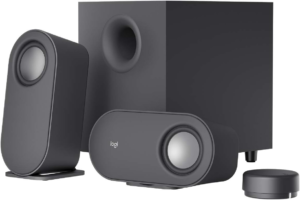
Star Rating: 4.5/5
The Logitech Z407 is the bass-first pick in this list. If compact 2.0 speakers leave your games and movies feeling thin, this 2.1 setup changes the vibe fast. The separate subwoofer adds weight that smaller speakers simply can’t fake.
That extra low end matters most in action games, streaming, and electronic music. You hear more rumble, more impact, and a fuller overall presentation. The satellites are also flexible in placement, which helps on crowded desks. Current 2026 pricing tends to hover around $80 to $100, so it lands right near the top of what many budget shoppers want to spend.
The trade-off is easy to predict. You need room for the sub, and the bass isn’t the tightest in the class. Still, if you want a more fun sound and not a studio-style one, the Z407 gets there. It remains one of the more recognizable budget 2.1 systems, and roundup coverage from places like PCMag’s 2026 computer speaker picks keeps that kind of setup relevant for buyers who want more punch than tiny stereo pairs can offer.
Type: 2.1 system | Connectivity: Bluetooth, USB, 3.5mm | Design: rotatable satellites with subwoofer | Power: older market data lists strong peak output | Price Range: around $80 to $100
Reasons to Buy
- Real subwoofer bass
- Fun sound for movies
- Flexible speaker placement
- Wireless control design
Reasons to Avoid
- Takes more space
- Bass can get loose
Who should buy it: This makes the most sense if your priority is impact. If you watch movies, play games, and want more low-end presence than a tiny 2.0 set can give, this is the better match.
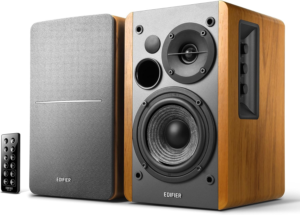
Star Rating: 4.4/5
The Edifier R1280DB is the grown-up pick. It looks more like a small bookshelf speaker system than a basic PC add-on, and that changes the kind of sound you get. You hear more room-filling output, more scale, and a more relaxed balance for music.
This is one of the best choices if your speakers do double duty. They work well at a desk, but they also make sense in a bedroom, home office, or small apartment setup where you might want to connect a TV, turntable preamp, or streamer. Bluetooth and optical input help a lot here. In 2026, it usually sells around $120 to $130, which is still budget-minded when you compare it with many powered bookshelf alternatives.
The size is the main trade-off. These aren’t tiny, and they need more space than any Pebble model. Still, you get better scale and versatility in return. Among affordable bookshelf-style options, the R1280DB keeps showing up because it offers the mix most people want, good sound, easy features, and a price that doesn’t drift into premium territory.
Type: powered 2.0 bookshelf speakers | Connectivity: Bluetooth, optical, RCA | Power: around 42W RMS class | Design: larger wood-style cabinet | Price Range: around $120 to $130
Reasons to Buy
- Fuller room sound
- Optical input included
- Great all-around versatility
- Better music performance
- Remote control convenience
Reasons to Avoid
- Bigger desk footprint
- Less travel-friendly
Who should buy it: This is ideal if your computer speakers also need to serve other gear. It fits you best when desk size isn’t tight and you want one speaker system for music, movies, and daily desktop use.
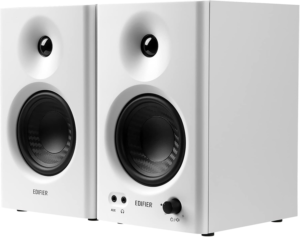
Star Rating: 4.3/5
The Edifier MR4 is the practical choice if you care more about accuracy than extra bass. It isn’t the most exciting speaker here, but that’s the point. It aims for a cleaner, flatter sound that helps you hear what’s actually in your audio.
That makes it useful for basic editing, casual mixing, video work, and voice recording checks. Music sounds less colored, and speech stays easy to judge. You don’t get the boosted low end that many consumer speakers push, so movies and games feel less dramatic. Still, if you want something honest instead of flashy, the MR4 is a strong budget entry. Typical pricing sits around $50 to $60.
Inputs also help this model stand out. Compared with simple USB desk speakers, the MR4 gives you monitor-style flexibility. That makes it a smart first step into creator-focused audio without the price jump of more serious studio monitors. For beginners who want clearer reference sound, it hits a very useful middle ground.
Type: 2.0 studio-style monitors | Connectivity: TRS, RCA, aux, headphone out varies by model | Sound Profile: neutral leaning | Driver Size: 4-inch woofer class | Price Range: around $50 to $60
Reasons to Buy
- Clean, neutral sound
- Great for editing
- Strong value for creators
- Useful input options
- Better detail than many rivals
Reasons to Avoid
- Bass isn’t big
- Less fun for action content
Who should buy it: This works best if you edit audio or video and want more truthful sound on a budget. It’s also a good fit if you listen closely and prefer balance over booming bass.
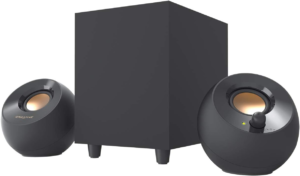
Star Rating: 4.1/5
The Creative Pebble Plus is the cheap 2.1 option that still makes sense in 2026. It takes the basic Pebble look and adds a small subwoofer, which gives you more low-end body than the standard V3 without moving into Logitech Z407 pricing.
That added sub helps games, movies, and bass-heavy playlists sound fuller. You still get a small, desk-friendly pair of satellites, so the overall setup stays pretty manageable. Current pricing sits around $50, which makes it appealing if you want more thump but can’t spend close to $100.
The compromise is clarity. It doesn’t sound as refined as the Pebble Pro, and the bass focus can come at the expense of overall balance. But at this price, that’s acceptable. If your main goal is cheap, easy, and more fun than basic stereo speakers, the Pebble Plus still earns a place on this list.
Type: 2.1 system | Connectivity: USB power, 3.5mm aux | Design: compact satellites with subwoofer | Sound Focus: stronger bass than basic Pebble sets | Price Range: around $50
Reasons to Buy
- Cheap 2.1 setup
- Better bass than V3
- Small desktop satellites
- Easy basic setup
Reasons to Avoid
- Fewer connection options
- Not the clearest sound
Who should buy it: This is the right fit if you want a low-cost subwoofer setup and don’t need Bluetooth or advanced inputs. It works well for casual use where fun sound matters more than precision.
All Recommended Products in Comparison
| Product | Best For | Sound Style | Connectivity | Desk Footprint |
|---|---|---|---|---|
| Creative Pebble Pro | Best overall compact pick | Balanced, lively, clear vocals | USB-C, 3.5mm, Bluetooth 5.3 | Very small |
| Creative Pebble V3 | Best cheap starter | Clear mids, light bass | USB, 3.5mm, Bluetooth | Very small |
| Creative Pebble X | Best under $100 | Fuller and more refined compact sound | USB-C, 3.5mm, Bluetooth | Small |
| Logitech Z407 | Best bass and movies | Fun, bass-heavy, energetic | Bluetooth, USB, 3.5mm | Medium, plus sub |
| Edifier R1280DB | Best multi-use system | Warm, roomy, versatile | Bluetooth, optical, RCA | Large |
| Edifier MR4 | Best for editing | Neutral, accurate, controlled | TRS, RCA, aux | Medium |
| Creative Pebble Plus | Best cheap 2.1 | Bass-forward, casual | USB power, 3.5mm | Small satellites, plus sub |
What to Look for in Budget Computer Speakers
Sound First, Not Marketing
Cheap speakers often promise huge power and dramatic bass. That doesn’t tell you much. What matters more is clean sound at your normal listening level. For desk use, clear voices and decent balance matter more than giant watt numbers.
2.0 vs 2.1
A 2.0 set gives you two speakers and usually a cleaner, simpler setup. A 2.1 set adds a subwoofer, which gives you more bass but takes more room. If you watch movies and want impact, 2.1 helps. If you want a clean desk and balanced sound, 2.0 is often the better call.
Connectivity That Matches Your Setup
USB-C and USB audio are great for modern desks because they keep setup simple. Bluetooth is useful if you also play audio from your phone. Optical and RCA matter more when you want speakers that work with TVs or other gear. Buy for the devices you already use, not the ports you think you might need later.
Size and Placement
This category gets tricky fast. Bigger speakers usually sound bigger, but they can crowd your monitor and keyboard. Smaller speakers fit anywhere, but they may run out of bass and volume sooner. For most desks, compact angled speakers are easier to live with than bulky bookshelf cabinets.
Bass Quality, Not Just Bass Quantity
A cheap subwoofer can sound impressive for five minutes and annoying after an hour. Good bass should add weight without swallowing dialogue or muddying music. If you mainly watch videos or join meetings, too much loose bass can actually make the speaker worse.
Build Quality and Controls
Budget doesn’t mean disposable. Check the cable layout, volume knob placement, and how easy the speakers are to reach during use. Simple controls matter more than flashy design when you’re adjusting volume every day. Also, stable cabinets and decent included cables go a long way.
Room Size Matters
Near-field speakers can sound excellent when you’re sitting a few feet away. That doesn’t mean they’ll fill a living room. If your speakers are only for desk listening, you don’t need huge power. If they also handle movies across a room, step up to a larger set.
Value Over Hype
The best budget computer speakers aren’t always the cheapest. Sometimes spending another $20 gets you Bluetooth, better clarity, or a much cleaner sound. That jump can matter more than chasing the lowest possible price. Broader buying guides from sources like What Hi-Fi’s desktop speaker coverage and Tom’s Hardware’s 2026 roundup show the same trend, budget models are improving, but the smart picks still separate themselves fast.
Why Trust OASTHAR?
I’m Shashini Fernando, an associate editor who specializes in consumer audio, PC accessories, and other everyday tech categories like headphones and portable speakers. For guides like this, you get in-house evaluation, hands-on comparison, and a wide review sweep across the current computer speaker market.
At OASTHAR, we test each product in-house when possible and compare it against direct rivals that real shoppers are also considering. We also analyze hundreds of customer reviews from real users to spot repeat strengths and common complaints, then weigh that against specs, features, and current pricing. That process helps this list stay practical, current, and focused on the best products you can actually buy in 2026.
Best Budget Computer Speakers FAQs
What is the best budget computer speaker overall?
The best overall pick is the Creative Pebble Pro. It gives you the strongest mix of compact size, clear sound, modern connectivity, and price.
Are budget computer speakers good for gaming?
Yes, many are. For casual gaming, a strong 2.0 pair works well. If you want more impact and bass, a 2.1 set like the Logitech Z407 feels more immersive.
Is a subwoofer worth it on cheap computer speakers?
It can be, but only if you want stronger low-end sound for games and movies. If you mostly listen to voices, music, or work content, a better 2.0 system often sounds cleaner.
Are Bluetooth computer speakers worse than wired ones?
Not always. Wired connections can be more stable for desk use, but Bluetooth is convenient and often sounds very good on modern budget speakers. The bigger difference usually comes from the speaker quality itself.
What matters most when buying budget computer speakers?
Sound balance, connection options, and desk size matter most. A speaker that fits your space and sounds clear at normal listening levels will beat a louder, bassier model that’s harder to live with.
Final Verdict
If you want the safest all-around choice, go with the Creative Pebble Pro. It gets the most right for the most people, and it stays affordable.
If your budget is tight, the Creative Pebble V3 is the clear value leader. It keeps cost low without sounding disposable. If you want a compact upgrade under $100, the Creative Pebble X makes more sense. For bass-heavy fun, the Logitech Z407 stands out. If you want more versatility and room-filling sound, the Edifier R1280DB is the better move. For editing and creator work, pick the Edifier MR4. And if you want the cheapest route to a 2.1 setup, the Creative Pebble Plus still earns its spot.
That’s the short version. The best budget computer speakers in 2026 aren’t just about price, they’re about getting the right sound for the way you actually use your desk.
