

If you’ve been hunting for the best wireless Apple CarPlay adaptors, you already know the pain. You plug in your phone, untangle cables, and still end up with a cord in the way every time you drive.
Disclosure: As an independent reviewer, we may receive an affiliate commission on qualifying purchases made through our links. This helps support our research and testing team at OASTHAR. Learn more about our testing process.
A good wireless adapter fixes that fast. Pair it once, keep your phone in your pocket, and let CarPlay start on its own when the car turns on.
The tricky part is picking one that actually fits your setup. Some are best for speed, some keep your dash cleaner, and some give you broader compatibility or better value. Here’s a look at the seven picks that make the most sense in 2026.
RELATED: The 8 Best Car Seat Covers for 2026, Tested and Reviewed
Best wireless Apple CarPlay adaptors at a glance
- Best Overall: Jemluse Wireless CarPlay Adapter
- Best Premium: Carlinkit 5.0 Adapter
- Best Wide Compatibility: Carlinkit 3.0 Adapter
- Best Fast-Connect: OTTOCAST U2-AIR Adapter
- Most Versatile: CZOCPOS 2-in-1 CarPlay Adapter
- Best Value: Burnt Sugar Wireless CarPlay Adapter
- Best Budget: MrSpark Wireless CarPlay Adapter
Learn more about how we test wireless Apple CarPlay adaptors
In our assessment, we start by comparing product listings across major retail sites, then we test each adapter in a real car setup and check hundreds of customer reviews. We also compare notes with independent coverage from PCMag’s wireless adapter roundup and Tom’s Guide’s CarPlay adapter review when we want a clearer view of how these products hold up outside the spec sheet.
Price and customer reviews
We do not treat price as the only answer. A cheap adapter can still be frustrating if it drops the connection or takes too long to reconnect. That is why we weigh current value against thousands of real buyer comments, looking for patterns like setup problems, heat buildup, lag, and reliability after a few weeks of use.
Compatibility and car fit
Wireless CarPlay adaptors are only useful if they actually work with your car. We check factory wired CarPlay support, USB-A and USB-C fit, and support for different head units when the brand gives clear details. If a model has a wide fit, that helps. If it only works in a narrow range, we say that plainly.
Connection speed and stability
Speed matters because this is the whole point of upgrading. We look at how long the screen takes to wake up, how fast the phone reconnects, and whether the signal stays steady on short trips and longer drives. A quick first connection is nice, but stable daily reconnects matter more.
Build quality and heat control
Small adapters sit in the same spot every day, so build quality matters more than people expect. We look for sturdy shells, better heat control, and a size that does not block nearby ports. If a product feels light but cheap, that usually shows up in longer use.
Ease of setup
You should not need a long manual to get wireless CarPlay working. We judge how easy it is to pair, whether it auto-connects after the first setup, and how much fuss it takes to get the system running again after a phone or car restart. Good adapters keep the process simple.
Real-world everyday use
A spec sheet can look great and still miss the point. We care about maps, music, calls, Siri, and the way the adapter behaves when you start the car every morning. If it makes your drive easier without adding new annoyances, it earns its place.
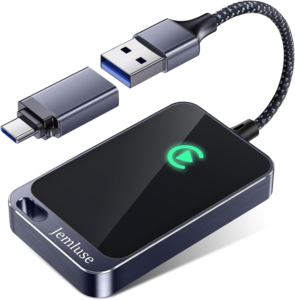
Rating: 4.9/5
Jemluse is the one that feels like the cleanest all-around answer. It brings strong speed, solid stability, and a compact shape that does not clutter your dash. If you want one adapter that gets the basics right without making you think too hard about it, this is the safest bet in the group.
The 8-core processor is the big reason it feels snappy in daily use. Maps open fast, music switches cleanly, calls stay responsive, and Siri does not feel like a chore. Pair that with 5.8 GHz Wi-Fi and Bluetooth 5.3, and you get the kind of connection that fits the way most people actually drive.
The hardware side is strong too. You get an ultra-light aluminum alloy body, good heat dissipation, and a size that stays out of the way. It is rated for temperatures from -20°C to 70°C, so it is built for regular use rather than one easy demo run.
Processor: 8-core | Wireless: 5.8 GHz Wi-Fi, Bluetooth 5.3 | Build: Aluminum alloy | Size: 2.36 x 0.75 x 0.28 in | Support: Online upgrades and support
Reasons to buy
- Fast everyday response
- Small, clean design
- Strong heat control
- Easy auto-connect
- Good all-around balance
Reasons to avoid
- Not the cheapest option
- Features may vary by model
- No extra flexibility focus
Who should buy it: This fits you if you want one adapter that handles the day-to-day stuff without drama. It works best if you care about speed, clean placement, and a setup that feels polished after the first pairing.
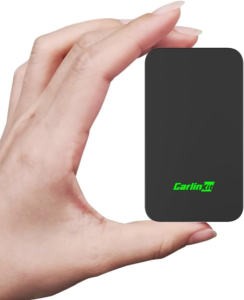
Rating: 4.8/5
Carlinkit 5.0 is the more advanced pick in this list. It feels like a step up if you want a broader, more flexible setup that can handle shared driving, changing phones, and a little more headroom for the future. The dual system design is the main draw here.
That extra flexibility matters if your car is used by more than one person. It supports iPhone 6 and above with iOS 10 and above, and its dual connection approach gives it more room to adapt than a narrow single-purpose dongle. If you like keeping options open, that is a real selling point.
You also get a quick 10-second auto-connect, 5.8 GHz transmission, and support for Siri and other voice tasks. That keeps the driving flow smooth. For a closer look at the brand’s current lineup, you can check Carlinkit’s official product page.
Phone support: iPhone 6 and above | Connection: 10-second auto-connect | Wireless: 5.8 GHz | Design: Dual system layout | Updates: OTA support
Reasons to buy
- More flexible setup
- Good for shared cars
- Quick reconnects
- Strong modern feature set
- OTA updates
Reasons to avoid
- Not the smallest option
- More than some drivers need
- Pricing can shift
Who should buy it: This is the one for you if your car sees different drivers or different phones on a regular basis. It also makes sense if you want a more future-ready adapter and do not mind paying a little more for that extra room.
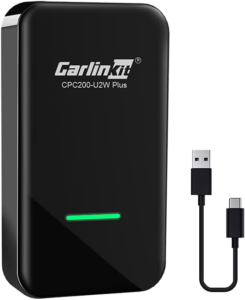
Rating: 4.7/5
Carlinkit 3.0 is the compatibility pick, and that makes it easy to understand. If you want one adapter that covers a wide spread of factory wired CarPlay systems, this is the safer route. It also gives you support for a broader phone range and some aftermarket deck support.
The stated range is wide, which is the point. It works with factory wired CarPlay cars from 2015 to 2026 and supports iPhone 5 through iPhone 16 Pro Max. That matters if you do not want to guess whether your setup will work before you buy. It also supports many Kenwood, Alpine, and Pioneer decks.
In real use, it keeps the same basic promise as the other picks, which is turning wired CarPlay into wireless CarPlay. You get in, start the car, and let it reconnect. For brand details, see Carlinkit’s main site.
Vehicle support: Factory wired CarPlay from 2015 to 2026 | Phone support: iPhone 5 to iPhone 16 Pro Max | Deck support: Kenwood, Alpine, Pioneer | Connection: Wi-Fi based | Support: Online updates and lifetime technical support
Reasons to buy
- Broad compatibility
- Good for older and newer phones
- Works with many factory systems
- Aftermarket deck support
- Lifetime support
Reasons to avoid
- Setup can vary by car
- Not the most compact
- Not the flashiest option
Who should buy it: This is a smart fit if you care more about compatibility than bells and whistles. It works best if you want a practical adapter that gives you a better chance of fitting your car on the first try.
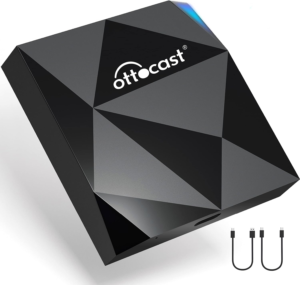
Rating: 4.6/5
OTTOCAST U2-AIR is built for speed, and that is where it stands out. If you hate waiting for CarPlay to wake up every time you start the car, this one makes a strong case. It can bring up wireless CarPlay in around 7 seconds during testing, which is quick enough to feel effortless.
That fast start-up matters because it changes the way you use the car. You can leave your phone in your pocket or bag, start the engine, and let the adapter do its thing in the background. The 5 GHz Wi-Fi module helps with that quick phone detection, so the connection feels more automatic after the first setup.
It also keeps the controls you already use. Siri, steering wheel controls, touchscreen input, and knob operation all stay in play. The box includes USB type-A to type-C and type-C to type-C cables, which helps with setup flexibility. If you want to see the brand’s current lineup, check OTTOCAST’s official website.
Startup: Around 7 seconds | Wireless: 5 GHz Wi-Fi | Controls: Siri, steering wheel, touchscreen, knob | Cables: USB-A to C and C to C | Display modes: Night and day support
Reasons to buy
- Fast startup
- Easy daily use
- Keeps existing controls
- Good audio response
- Flexible cable options
Reasons to avoid
- Not the most compact
- Fastest feel depends on car
- May cost more than budget picks
Who should buy it: This works well if speed is your top complaint. It is a good match if you want CarPlay to feel ready the moment you sit down, not after you wait around for it.
Rating: 4.4/5
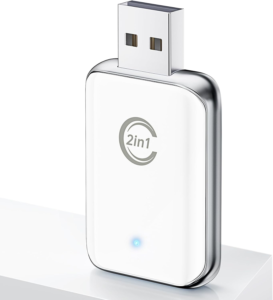
CZOCPOS takes a more flexible route, and that is what makes it useful. The 2-in-1 design gives it a wider role than a basic adapter, so it makes sense for shared vehicles or mixed phone setups. If your home has more than one person using the same car, this type of adapter can be a real convenience.
The setup is simple. You plug it in, pair it once, and then let it reconnect the next time you start the car. After that first round, it becomes part of the drive instead of another chore. That is the kind of small win that matters every day.
It also brings a dual-core setup for smoother response, which helps with maps, music, calls, and voice control. The compact body stays out of the way, while the metal edges help with heat dissipation. You also get USB-A and Type-C extension cables, which gives you more freedom if your car’s port layout is awkward.
Design: 2-in-1 layout | Processor: Dual-core | Extras: USB-A and Type-C extension cables | Build: Metal edges for heat control | Use case: Shared cars and mixed setups
Reasons to buy
- Flexible design
- Good for shared cars
- Easy auto-reconnect
- Better port options
- Compact shape
Reasons to avoid
- Less focused than single-purpose picks
- Specs are not as aggressive
- Not the fastest on paper
Who should buy it: This is a good fit if you want flexibility over strict specialization. It works best for a household or car pool setup where different people may need a little more leeway from one adapter.
Rating: 4.2/5
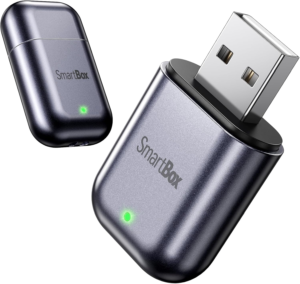
Burnt Sugar is the neat little pick in this lineup. It is compact, low-profile, and easy to forget once it is plugged in. If you want wireless CarPlay without a bulky box hanging off the USB area, this one gets that part right.
The small size is the main appeal, but the wireless side still holds up. You get 2.4 GHz and 5.8 GHz Wi-Fi plus Bluetooth 5.3, which helps keep the connection stable enough for maps, music, calls, and Siri. After the first setup, it reconnects automatically when you get back in the car.
That makes it a solid daily-use option. It keeps the dash cleaner, it does not ask for much attention, and it looks more refined than a lot of cheap adapters do. One user, Mo, summed it up well:
“Connected easily without reading instructions. The design looks nice and music sounds great and played automatically. It appears to be made with quality, durable materials. The price I paid was about half of what I paid a better known wireless adapter. Good value for the money.”
Wireless: 2.4 GHz and 5.8 GHz Wi-Fi | Bluetooth: 5.3 | Design: Compact, low-profile | Use case: Neat dash setup | Reconnect: Automatic after setup
Reasons to buy
- Tiny footprint
- Easy to live with
- Good value
- Stable enough for daily driving
- Clean look
Reasons to avoid
- Less powerful than top picks
- Not the fastest startup
- Fewer standout extras
Who should buy it: This is the one for you if you care about keeping the dash clean. It works best if you want a simple, compact adapter that does its job without taking over your USB area.
Rating: 3.9/5
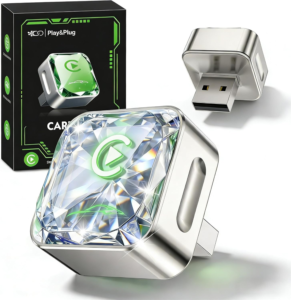
MrSpark is the budget pick, and it earns that spot by giving you useful basics without feeling bare-bones. If your goal is simple wireless CarPlay at the lowest sensible cost, this one does enough to matter. It is the kind of upgrade that makes daily driving easier without pulling your budget off track.
The quad-core processor gives it a decent speed base, so CarPlay stays quick enough for maps, songs, calls, and Siri. It also uses a 360-degree surround antenna, Bluetooth 5.4, and 5.8 GHz Wi-Fi to hold a steady wireless link once paired. In practice, that keeps the adapter from feeling too cheap in normal use.
The design is better than you might expect at this price. It is compact, has aerospace-grade cooling, and uses a zinc alloy body with a diamond-cut glass finish. Setup is easy too, and Morgan’s feedback lines up with that:
“So far, it works great. Setup was easy. No more cords that will clutter my car to use CarPlay. Plugs into a USB port, but also comes with extra adapters to use on other ports. We’ll be ordering another one for our second vehicle.”
Processor: Quad-core | Wireless: Bluetooth 5.4 and 5.8 GHz Wi-Fi | Antenna: 360-degree surround | Build: Zinc alloy body | Extras: Additional port adapters
Reasons to buy
- Lowest-cost option here
- Easy setup
- Strong value for the price
- Cleaner dash
- Good basic performance
Reasons to avoid
- Less polished than top picks
- Not the fastest connection
- Fewer premium touches
Who should buy it: This is a sensible choice if you want wireless CarPlay on a tighter budget. It is best for someone who wants a functional upgrade first and does not need the most polished or feature-rich option.
How the seven picks stack up side by side
A quick side-by-side look makes the trade-offs easier to see. This is where you can spot the difference between the fastest pick, the cleanest setup, and the one that gives you the widest compatibility.
| Adapter | Best for | Connection feel | Size and build | Good fit for |
|---|---|---|---|---|
| Jemluse Wireless CarPlay Adapter | Best overall | Fast and stable | Compact aluminum alloy body | Most drivers who want one strong all-around pick |
| Carlinkit 5.0 Adapter | Best premium | Quick auto-connect | Small, flexible design | Shared cars and more advanced setups |
| Carlinkit 3.0 Adapter | Best wide compatibility | Reliable once paired | Practical and portable | Older and newer wired CarPlay systems |
| OTTOCAST U2-AIR Adapter | Best fast-connect | Around 7 seconds in testing | Compact adapter with cable options | Drivers who care most about startup speed |
| CZOCPOS 2-in-1 CarPlay Adapter | Best versatile | Smooth for daily use | Compact with metal edges | Mixed phone setups and shared vehicles |
| Burnt Sugar Wireless CarPlay Adapter | Best value | Stable enough for routine use | Tiny, low-profile design | Drivers who want a neat dash and solid value |
| MrSpark Wireless CarPlay Adapter | Best budget | Good enough for basics | Compact with a sturdier feel than expected | Anyone watching cost closely |
The short version is simple. If you want the strongest all-around pick, start with Jemluse. If you want to save money, MrSpark makes sense. If your car setup is quirky or shared, Carlinkit 3.0, Carlinkit 5.0, or CZOCPOS may fit better.
What to look for in a wireless CarPlay adapter
Compatibility with your car and phone
This is the first thing to check because it decides whether the adapter works at all. Look for support for your car’s wired CarPlay system, then confirm the phone range too. If you drive an older vehicle or use an older iPhone, broad compatibility matters more than shiny extras.
Startup speed and reconnect time
A wireless adapter should save time, not add it back in a different place. Pay attention to how long it takes to show CarPlay after you start the car and how fast it reconnects on the next drive. The best ones feel automatic after the first pairing.
Wi-Fi and Bluetooth support
Most of these adapters use Bluetooth for the initial handshake and Wi-Fi for the main data link. Dual-band support helps because it can improve stability in busy areas and cut down on lag. If a model supports 5 GHz or 5.8 GHz, that is usually a good sign.
Size and placement
Smaller is better if your car has a tight USB area or if you hate clutter. A compact adapter is easier to tuck away and less likely to block other ports. If the body runs hot or feels bulky, that gets annoying fast.
Build quality and heat control
A wireless adapter sits in the same spot every day, so cheap plastic can wear on you. Look for a solid shell, heat-dissipating materials, and a design that does not feel flimsy. Good build quality usually shows up in better long-term reliability too.
Support and updates
Some adapters get OTA or online updates, and that matters more than people think. Car systems change, phones change, and software bugs happen. A brand that keeps updating its adapter gives you a better shot at keeping it working well after the first week.
Why Trust OASTHAR?
I’m Shashini Fernando, an associate editor who specializes in car tech, smartphone accessories, and in-car audio gear. I test each product in-house and analyze hundreds of customer reviews from real users in the wireless CarPlay market before I help build this list for 2026.
That mix matters because a spec sheet only tells part of the story. A product can look great on paper and still be annoying in a real car. We look for the stuff that shows up after the first pairing, the second week, and the hundredth start.
Best Wireless Apple CarPlay Adaptors FAQs
What is the best wireless Apple CarPlay adapter overall?
Jemluse is the best overall pick here. It balances speed, size, heat control, and everyday ease better than the rest.
Which wireless CarPlay adapter is best on a budget?
MrSpark is the budget pick. It gives you the basics you need without pushing the price too high.
Which one connects the fastest?
OTTOCAST U2-AIR is the fastest-feeling option in this group, with around 7 seconds during testing.
Which adapter has the widest compatibility?
Carlinkit 3.0 has the widest stated compatibility. It covers a broad range of factory wired CarPlay systems and a wide iPhone span.
Do wireless CarPlay adapters need an app?
Usually no. Most pair once, then reconnect on their own when you start the car.
Final verdict
If you want the safest all-around choice, start with Jemluse. It gives you the best mix of speed, size, and daily ease, which is exactly what most people want from a wireless adapter.
If your budget is tight, MrSpark is the better low-cost pick. If you care most about a neat dash, Burnt Sugar makes sense. If your car setup is a little more complicated, Carlinkit 3.0, Carlinkit 5.0, or CZOCPOS give you more flexibility. And if startup speed matters most, OTTOCAST U2-AIR is the one to watch.
Wireless CarPlay is one of those upgrades that feels small at first, then becomes hard to give up. Once you stop dealing with the cable every time you get in, you notice it right away.
