

Is the Galaxy S26 Ultra worth your money, or is it just Samsung doing the usual Ultra refresh with a shinier coat of paint? The short answer is that it’s still one of the best Android phones you can buy, but the upgrades are modest if you already own a recent Ultra.
In this review, you get the full picture, design, display, speed, battery, cameras, software, extra features, price, and who should actually buy it. That matters here, because this phone is expensive enough that you should know exactly what you’re paying for.
If you want the quick verdict, keep reading.
RELATED: Galaxy Z TriFold Review (2026): Best 10-Inch Phone + Tablet?
Quick Summary
The Galaxy S26 Ultra is not a huge redesign, and that’s the first thing you need to know. Samsung has stayed close to the formula that already worked, which means you still get top-tier camera hardware, a big and excellent display, fast performance, and the kind of long software support that makes the price easier to swallow over time.
The tradeoffs are easy to spot, though. It’s a very large phone, the battery size is still conservative for this class, and the jump from the last Ultra model is small if you upgrade every year. If you’re coming from an older Samsung, or another brand altogether, the case for this phone gets a lot stronger.
If you want Samsung’s best camera phone and you don’t mind the size, this is still an easy phone to respect.
That broad read lines up with reviews from TechRadar and Android Authority, both of which point to the same basic truth, the Ultra is still a heavyweight, even if it isn’t swinging harder than last year.
Specifications
Here’s the short version of what matters most.
| Spec | Galaxy S26 Ultra |
|---|---|
| Display | 6.9-inch LTPO AMOLED, 3120 x 1440, 120Hz |
| Peak brightness | 2600 nits |
| Processor | Snapdragon 8 Elite Gen 5 for Galaxy |
| RAM | 12GB, 16GB on 1TB model |
| Storage | 256GB, 512GB, 1TB |
| Rear cameras | 200MP main, 50MP ultrawide, 10MP 3x telephoto, 50MP 5x telephoto |
| Selfie camera | 12MP with autofocus |
| Battery | 5000mAh |
| Charging | 60W wired, 25W wireless |
| Dimensions | 163.6 x 78.1 x 7.9mm |
| Weight | 214g |
| Water resistance | IP68 |
| Software | Android 16, One UI 8.5, 7 years of updates |
| Connectivity | 5G, Wi-Fi 7, Bluetooth 6, NFC, UWB, USB-C |
Design & Build Quality
Samsung has softened the look of the Ultra again. The corners are rounder, the screen is flat, and the phone feels a little less sharp in the hand than older models. That helps with comfort, even if it doesn’t make a 6.9-inch phone feel small. It still feels like a big slab of premium hardware, because that’s exactly what it is.

The build is strong on paper and in use. You get an aluminum frame, Gorilla Armor 2 on the front, Gorilla Glass Victus 2 on the back, and IP68 resistance. That means you don’t need to baby it, but you still probably want a case. The camera bump makes that easier to justify than ever.
How it feels in the hand and pocket
You can feel the weight and size every time you pick it up. At 214g, it’s not absurdly heavy, but it’s still a phone you notice in a pocket. One-handed use is possible in short bursts, then reality kicks in and reminds you this is a two-hand phone.
The rounded edges help, though. They make the grip a bit friendlier, especially if you’re scrolling for a while or holding it during a commute. Samsung has moved this line away from the sharper, more angular feel, and that’s a good call.
What changed in the camera bump and S Pen design
The camera area is more prominent now, and the phone rocks on a table more than you’d like. That’s one of those small annoyances that doesn’t matter until you try typing without a case, then it’s all you notice.
The curved body also affects the S Pen slot. It still works fine, but the pen fit is more directional than before, so you need to insert it correctly. It’s not a dealbreaker, but it is the kind of thing you’ll notice the first few times.
Display Quality
The display is one of the easiest wins here. You get a 6.9-inch LTPO AMOLED panel with a 120Hz refresh rate, QHD+ resolution, and an anti-reflective coating that helps a lot in daily use. It’s sharp, smooth, and easy to enjoy whether you’re reading, editing, or watching video.
Brightness is strong too, though not class-leading on paper at 2600 nits. In real life, it still holds up outdoors well. Colors look rich without getting cartoonish, and the big canvas makes photos and video feel properly immersive.
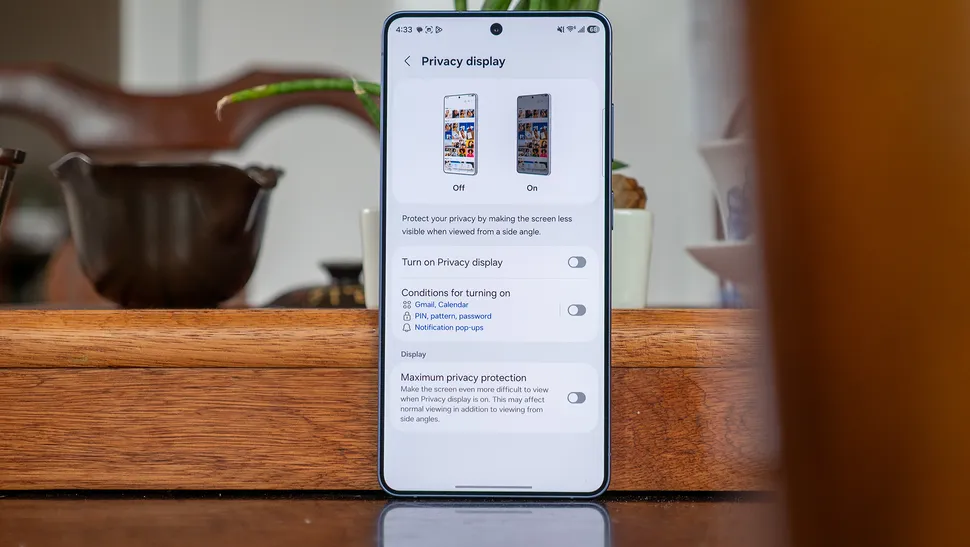
Why the Privacy Display matters
Privacy Display is the standout new feature. It cuts down side viewing angles, so people sitting next to you can’t easily peek at messages, banking apps, or anything else you’d rather keep private. That’s genuinely useful on a train, in a coffee shop, or anywhere you’re surrounded by people.
The tradeoff is easy to understand. You lose some brightness, some viewing angle flexibility, and some image quality when the feature is on. If you’re trying to show someone a photo or edit an image from a slight angle, it gets in the way. So you’ll probably use it as a switch, not a permanent setting.
Brightness, color, and outdoor use
With Privacy Display off, the screen looks like what you want from a flagship Samsung panel, bright, punchy, and clean. The anti-reflective layer helps when sunlight hits the glass, and that matters more than another spec-sheet number.
If you care most about the look of a phone screen in daily use, this one delivers. It may not win every paper comparison, but it feels excellent.
Performance
The Snapdragon 8 Elite Gen 5 for Galaxy gives you all the speed you need and then some. App launches are quick, scrolling is smooth, and heavy games don’t make the phone feel strained. Samsung also gives you 12GB of RAM on most models, with 16GB on the 1TB version.
The year-over-year jump isn’t dramatic, and that’s fine. You’re not buying this phone because it’s twice as fast as last year’s model. You’re buying it because it stays fast under pressure, and it should keep doing that for years.

What speed feels like in daily use
In normal use, the phone feels calm. That’s the best word for it. It doesn’t hesitate when you jump between camera, browser, messages, and maps. Even AI tools and photo edits happen with very little fuss.
That matters more than benchmark bragging rights. You feel the consistency all day, not just in a synthetic test.
When the extra RAM matters
If you multitask hard, game a lot, or shoot and edit plenty of video, the 16GB model makes more sense. Most people don’t need it, but power users will appreciate the cushion.
Battery Life & Charging
Samsung kept the battery at 5000mAh, and that feels a little cautious for a phone this expensive. It’s still good enough for most people, but it doesn’t dominate the class the way you might hope.
Real-world battery life is solid, not spectacular. You should get through a normal day without drama, but it’s not the sort of phone that makes you forget the charger exists.
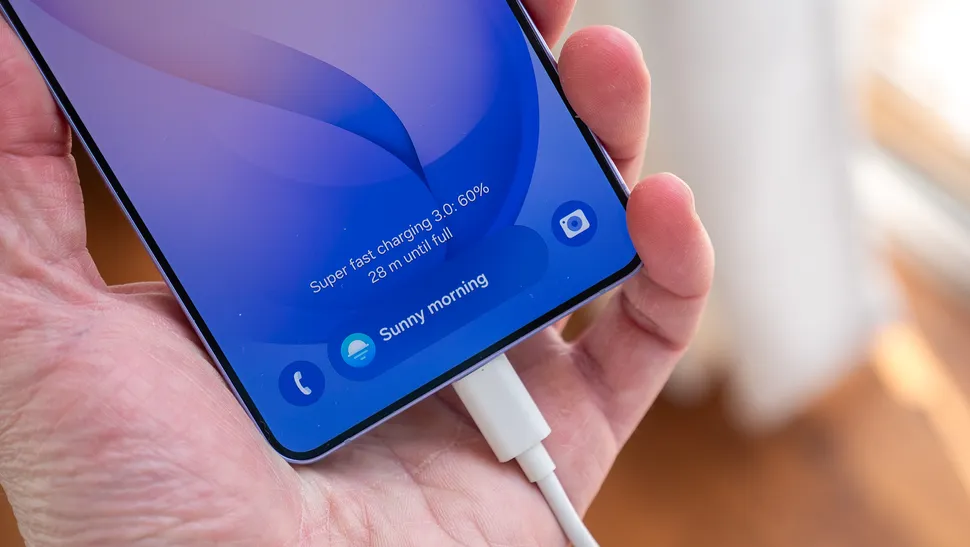
How long it lasts in normal use
Mixed use, browsing, video, photos, and a bit of gaming should get you comfortable all-day results. The phone is efficient enough to feel dependable, which is what you want from a flagship.
Still, if battery endurance is your top priority, some rivals do better.
What faster charging changes
The move to 60W wired charging helps more than you might think. It makes a short top-up feel meaningful, which is useful if your day gets messy. Wireless charging remains at 25W.
Just remember, you need a compatible charger, and Samsung doesn’t put one in the box.
Software & Ecosystem
Android 16 with One UI 8.5 is one of the strongest parts of the phone. Samsung’s software is polished, full of useful controls, and supported for seven years. That’s a big deal if you keep phones for a long time.
The Galaxy AI tools are there if you want them, and easy to ignore if you don’t. Things like call screening, audio cleanup, photo editing tools, and screen tricks are useful in the right moments, even if not every feature becomes part of your daily routine. If you also use Samsung tablets, watches, or earbuds, the ecosystem gives you more reasons to stay in the family.
One UI and Galaxy AI in everyday use
This is where Samsung keeps earning its spot near the top. One UI feels finished. It gives you real control without making the phone feel cluttered.
Galaxy AI is more mixed, but the better features are practical. You can use them to cut noise, handle calls, and clean up content without opening a separate app.
Why long software support matters
Seven years of updates changes the value equation. It helps protect your purchase and gives you a longer runway before you need to think about replacing the phone. On a device this pricey, that matters.
Connectivity & Signal Features
You get the modern stuff here, 5G, Wi-Fi 7, Bluetooth 6, NFC, UWB, dual SIM support, and USB-C. In normal use, that means fast wireless connections, easier accessory pairing, and better support for tracking and sharing features. It’s the kind of spec sheet that disappears into the background, which is what you want.
Cameras, Mic & Speakers
The camera array is still the big reason to buy an Ultra. You get a 200MP main camera, a 50MP ultrawide, a 10MP 3x telephoto, and a 50MP 5x telephoto, plus a 12MP selfie camera with autofocus. The results are bright, detailed, and punchy, with strong color and excellent versatility.

The main camera is the star. It handles most scenes with ease and gives you the safest, best-looking shot most of the time. The 3x camera is useful, but it’s still more of a middle step than a headline act. The 5x lens is the stronger zoom option and gives you the reach you’ll actually use.
What the main and zoom cameras do best
The 200MP main sensor is great for detail and flexibility. It gives you room to crop and still keep a lot of image quality. That’s handy when you’re shooting things like travel scenes, food, or people at a distance.
The 5x telephoto is where the system starts to feel special. It gives you useful reach without falling apart too quickly, and that’s what makes the camera setup feel complete.
How it handles low light, video, and selfies
Low light performance is strong across the board. Samsung’s Nightography tuning helps keep scenes bright and usable, and the zoom lenses hold up better than you might expect.
Video is also a highlight. You get 8K recording and up to 4K at 120fps, plus the Horizon Lock style stabilization feature that keeps footage steady even when you rotate the phone. The 12MP selfie camera is fine, but it feels a little behind the rest of the package for this price.
Extra Features
The S Pen is still built in, and that gives you note-taking, sketching, and precise navigation without needing extra gear. It’s still useful, even if the missing Bluetooth remote tricks take away some of the old magic.
Fingerprint unlock is quick thanks to the ultrasonic sensor, and face unlock is there too. Add IP68 water resistance and strong glass protection, and you get a phone that feels easy to live with.

Samsung skipped Qi2 magnets, which is a shame if you care about accessory convenience. If that sort of thing matters a lot to you, you’ll notice the gap.
What the S Pen still helps you do
You’ll use it for quick notes, marking up screenshots, and getting exact taps in cluttered menus or editing tools. That’s enough to make it worth keeping around.
Security and durability in daily life
The phone feels secure and tough enough for normal life. You’re not buying it for ruggedness, but you are buying peace of mind.
Price & Value
This is an expensive phone, full stop. The base 256GB model starts at $1,299, the 512GB version jumps to $1,499, and the 1TB model lands at $1,799. That makes the base model the only one that feels remotely sane.
If you want a direct comparison point, Ars Technica landed in the same place, a phone that is fast and polished, but priced like Samsung expects you to care about every premium detail.
Where the base model makes sense
The 256GB version is the one most people should look at first. It keeps the price closer to the edge of reason, and it already gives you the full experience.
If value matters more than bragging rights, you may also want to look at best budget Android phones before you commit.
When a rival phone may be the better deal
If you care more about battery life, display specs, or pure cost, some rivals look better on paper. Samsung gives you the stronger ecosystem and the better camera spread, but that doesn’t automatically make it the smartest buy for everyone.
Who Is It For?
Buy this if you want:
- A top-tier Android camera phone with strong zoom and reliable color.
- A huge, sharp display for media, editing, and reading.
- Long software support and a phone that should age well.
- The S Pen, because you actually use a stylus.
Don’t buy this if you want:
- A smaller or lighter phone you can use comfortably one-handed.
- The best battery life you can get for the money.
- The strongest value for your dollar.
- A massive upgrade from last year’s Ultra.
If you want Samsung but don’t want the full Ultra size, the Galaxy S25 Edge review is worth a look, though you’ll be choosing a different set of tradeoffs.
FAQs
Is the Galaxy S26 Ultra worth upgrading from the S25 Ultra?
You probably don’t need to rush. The S26 Ultra is still a small year-over-year move, with the biggest gains in charging, display privacy, and a few camera tweaks rather than a full rethink.
What changed most on the Galaxy S26 Ultra?
The biggest changes are the Privacy Display, faster 60W wired charging, and the updated ultrawide and 5x telephoto cameras. You also get Snapdragon 8 Elite Gen 5 for Galaxy and up to 16GB RAM.
Is the Galaxy S26 Ultra still the best Android phone?
For a mainstream Android flagship, it’s still right at the top. You’re getting class-leading software, strong performance, excellent camera versatility, and seven years of updates, even if the upgrade is restrained.
How good is the Galaxy S26 Ultra camera system?
You get four rear lenses, including a 200MP main camera, 50MP ultrawide, and 3x plus 5x telephotos. In real use, you’ll see punchy colors, solid detail, and strong low-light results.
Should you buy the base model or the higher storage options?
The 256GB model is the easiest one to recommend, because it keeps the price at $1,299. The 512GB and 1TB versions climb fast, so they make more sense only if you really need the extra space.
Final Verdict
The Galaxy S26 Ultra is still a class-leading phone, even if it plays things safe. You get a great camera system, one of the best Android displays around, fast performance, and years of software support.
The biggest knocks are the price, the size, and the fact that the upgrades feel small if you already own a recent Ultra. Even so, Samsung has kept the core experience strong enough that the phone still feels easy to recommend.
If you want the best mix of camera quality, display quality, and long support in a mainstream Android flagship, this is one of the safest picks you can make. If you care more about value or battery endurance, you should look elsewhere first.
