

Shopping for the best budget audio interfaces in 2026 feels simple until you hit the details. One box has two inputs but weak headphone power, another sounds great but locks you into a single mic, and a third is built for streaming, not music.
Disclosure: As an independent reviewer, we may receive an affiliate commission on qualifying purchases made through our links. This helps support our research and testing team at OASTHAR. Learn more about our testing process.
The good news is you don’t need pricey gear to get clean, low-noise recordings. You just need the right match for how you record: solo vocals, guitar, podcasts with a guest, or a live stream with lots of audio sources.
Below are the seven budget-friendly interfaces that make the most sense this year, with clear tradeoffs so you can pick fast and move on.
RELATED: The 8 Best Hearing Protections for 2026, Tested and Reviewed
Best budget audio interfaces at a glance
- Best Overall: Focusrite Scarlett 2i2 4th Gen
- Best for Beginners: Rode AI-1
- Best for Portable Use: Shure MVX2U Gen 2
- Best Ultra Affordable: Rode AI Micro
- Best for Solo Recording: Focusrite Scarlett Solo 4th Gen
- Best for Streaming Setups: Elgato Wave XLR
- Best for Multi-Track Entry: PreSonus AudioBox USB 96
Learn more about how we test audio interfaces
In our assessment, budget interfaces only count as “good” when they stay quiet, feel stable day to day, and don’t create extra work in your setup. During testing, we found that the best picks aren’t always the ones with the longest spec sheet, they’re the ones that behave well in real sessions.
Sound quality and noise
You listen for hiss at normal speaking levels, and you check how the interface reacts when you push gain higher. We focus on clarity, background noise, and how forgiving the preamp feels with dynamic mics. We also watch for harsh high-end, muddy lows, and digital artifacts that can show up in budget converters.
Gain range and headroom
You test how much usable gain you get before noise becomes obvious, because that’s the difference between “plug in and record” and “why does this sound thin?” We also check clipping behavior, since beginners often record too hot. Interfaces with better headroom make your first recordings less frustrating.
Monitoring and headphone power
You check direct monitoring behavior, monitor mix control, and how easy it is to avoid delay while recording. Headphone output matters more than most people think, especially if you use higher-impedance studio cans. Weak headphone amps force you to crank levels, which can raise noise and make sessions tiring.
Driver stability and ease of setup
You look for dropouts, random disconnects, and weird behavior after sleep or reboots. Setup should be simple on Windows and macOS, and it should work cleanly with common DAWs and streaming apps. If a device needs special steps to do basic recording, it loses points fast.
Build quality and controls
You handle the knobs, ports, and chassis because budget gear gets tossed in backpacks, dragged across desks, and plugged in daily. Smooth gain knobs, solid jacks, and clear meters matter more than flashy design. If the interface feels flimsy or the controls feel vague, you’ll notice it every time you record.
Price and customer reviews
We select best audio interfaces by thoroughly researching major shopping platforms such as Amazon, Walmart, Target, and Currys. Then we evaluate each item using an in-house process tailored to audio interfaces, and we analyze hundreds of real customer reviews to compare what people experience versus what the product promises on paper. That way, the picks reflect how these units hold up over time.
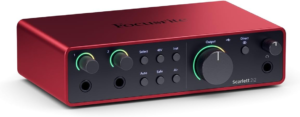
Rating: 5.0 out of 5
It’s the rare budget interface that works for almost everyone. The Scarlett 2i2 4th Gen gives you two combo inputs for mic or instrument, clean preamps, and enough flexibility to record a vocal and guitar at the same time, or run two mics for a simple podcast.
The real win is how easy it is to live with. You get simple monitoring, solid everyday reliability, and a sound that stays clear without you having to fight levels. For beginners, it feels predictable. For more experienced users, it stays out of the way and just records.
Also, it’s a smart “grow with you” buy. Even if you upgrade later, a 2i2 still makes sense as a travel interface or backup, because it’s compact and widely supported.
Inputs: 2 combo mic/line/instrument | Audio quality: up to 24-bit/192kHz | Power: USB-C bus-powered | Phantom power: Yes | Monitoring: Direct monitoring
Reasons to Buy:
- Two inputs for real sessions
- Clean sound with low noise
- Easy monitoring for beginners
- Strong value year to year
Reasons to Avoid:
- No MIDI I/O
- Light build feel for some setups
Who should buy it: This fits you if you want one affordable interface that can handle vocals, guitar, and the occasional second mic without drama. It’s also a great pick when you don’t want streaming-only features, you just want dependable recording. Official product page: Scarlett 2i2 4th Gen specs
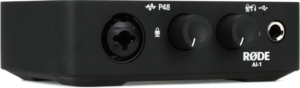
Rating: 4.9 out of 5
The Rode AI-1 is all about removing friction. You get a single Neutrik XLR-¼-inch combo input, two ¼-inch speaker outputs, and a ¼-inch headphone output, all in a compact, weighty metal body. Setup is plug-and-play over USB-C, so your desk stays clean.
For beginner recording, it nails the basics. The gain range is strong (up to about 60 dB), and the interface supports 24-bit audio, so you can capture clean voice tracks without riding the edge. The front panel layout is simple, and that matters when you’re learning how to set levels without clipping.
The limitation is obvious, you only get one input. That’s perfect for solo vocals, voiceover, or guitar, but it won’t cover two mic guests or stereo hardware without workarounds. If you always record one source at a time, the AI-1 feels like a “forever” budget pick.
Input: 1 Neutrik XLR-¼-inch combo | Outputs: 2 x ¼-inch speakers, ¼-inch headphones | Gain range: up to 60 dB | Bit depth: 24-bit | Power: USB-C
Reasons to Buy:
- Extremely easy to run
- Compact, sturdy metal build
- Clean signal for voice
- Great for one-mic workflows
Reasons to Avoid:
- Single input only
- Not built for guest podcasts
Who should buy it: This matches you if you’re recording solo and you want the simplest “XLR to computer” setup that still feels premium. It’s especially good if you value solid hardware over extra channels you won’t use.
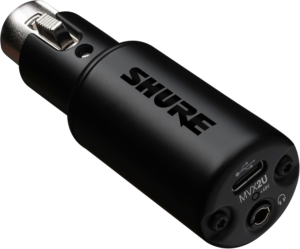
Rating: 4.8 out of 5
If you want portability first, the Shure MVX2U Gen 2 is the most practical tool on this list. It’s a compact single-channel XLR interface that lets you run an XLR mic into a laptop, and in many setups, even into modern phones and tablets, as long as your device supports it. The whole point is “bring your mic anywhere” without carrying a full desktop box.
What makes it feel modern is the built-in DSP approach. You can use Shure’s MOTIV apps to control processing and save settings, and the device can keep the last-used setup when you switch devices. For creators who record in imperfect rooms, that’s a big deal because you can keep your sound consistent even when the space isn’t.
It’s still a single-channel device, so it’s not for multi-mic recording. Think of it like a high-quality inline bridge between your XLR mic and your USB-C world, with monitoring support via a 3.5 mm headphone output and up to about 60 dB of gain on tap.
Input: XLR (single channel) | Gain: up to +60 dB | Audio quality: up to 24-bit/48kHz | Monitoring: 3.5 mm headphone out | Power: USB-C bus-powered
Reasons to Buy:
- Very portable form factor
- Strong gain for dynamic mics
- App-controlled DSP options
- Easy monitoring on the go
Reasons to Avoid:
- Not a multi-input interface
- DSP workflow won’t fit everyone
Who should buy it: This fits you if you record away from your desk and you want to keep using a real XLR mic. It’s also a smart pick when you don’t want to pack a full-size interface for travel.
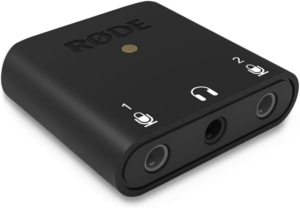
Rating: 4.7 out of 5
The Rode AI Micro is the budget pick for people who want to spend as little as possible and still get a recognizable brand behind it. It’s often positioned as an ultra-compact interface for simple recording jobs, and it’s priced far below many “starter studio” boxes.
The tradeoff is that you’re buying minimalism. You won’t get the same monitor control or expandability you’d see on larger interfaces, and features can vary by model and bundle. Still, for basic voice capture, simple instrument recording, or a small travel kit, it can be the right kind of basic.
It also sits in a nice spot if you’re building a compact setup and you don’t want a big interface on your desk. Just keep your expectations realistic, it’s meant to be small and affordable first.
Category: ultra-compact interface | Use case: simple recordings | Power: USB bus-powered (varies by setup) | Size: travel-friendly | Focus: low-cost entry
Reasons to Buy:
- Very affordable category pick
- Small, easy to pack
- Good for basic recording
Reasons to Avoid:
- Limited controls
- Not built for growth
Who should buy it: This is for you if price is the main limiter and you only need simple capture. It’s also a solid “starter” interface when you’re unsure you’ll stick with XLR long term.
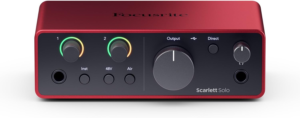
Rating: 4.7 out of 5
The Scarlett Solo 4th Gen is the “don’t overbuy” version of the 2i2. You get a mic input plus an instrument input, which covers the most common beginner setup: one vocal mic and one guitar or bass, recorded one at a time.
In practice, it’s a clean solo recording tool. You still get the Focusrite sound people buy these for, and it’s easy to learn. Monitoring is straightforward, and you don’t waste money on extra channels you won’t touch.
The main limitation is the same as any one-mic interface, you can’t record two mics at once. That means it’s not the best fit for in-person interviews or guest podcasts. For solo creators, though, it’s one of the safest budget picks in 2026.
Inputs: 1 mic, 1 instrument | Audio quality: up to 24-bit/192kHz | Power: USB-C bus-powered | Phantom power: Yes | Monitoring: Direct monitoring
Reasons to Buy:
- Great sound for the money
- Simple layout for beginners
- Perfect for solo vocals
Reasons to Avoid:
- No second mic input
- Not ideal for guests
Official product page: Scarlett Solo 4th Gen details
Who should buy it: This fits you if you record alone and want a reliable brand-name interface that doesn’t cost more than your needs. It’s also a smart pick when desk space is tight.
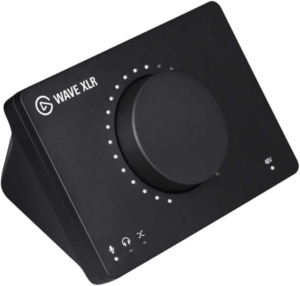
Rating: 4.6 out of 5
The Wave XLR is a budget interface that’s aimed straight at streamers. The hardware is only part of the story. What you’re really buying is the software mixing workflow, where you manage multiple audio sources and route them cleanly, which matters when your stream has game audio, chat, music, and mic all at once.
For raw music recording, it’s not the top value. You’re paying for stream-friendly features and a smoother creator workflow. If you mainly record vocals for songs, a more “studio-first” interface can make more sense.
Pairing it with an XLR mic that matches Elgato’s style is common, and the brand’s own mics show the kind of sound people expect in that ecosystem. A useful reference point is TechRadar’s take on an Elgato XLR mic that’s often used with Wave XLR style setups: Elgato Wave DX review.
Inputs: 1 XLR | Focus: streaming mix control | Power: USB bus-powered | Monitoring: direct monitoring (varies by setup) | Workflow: software mixer support
Reasons to Buy:
- Strong streaming workflow
- Helps manage multiple sources
- Easy creator-focused setup
Reasons to Avoid:
- Single input only
- Less “studio-first” value
Who should buy it: This is for you if live content is your main job and you want better control of your stream audio without buying a full mixer. It’s also a good fit if you care more about routing than multi-input recording.
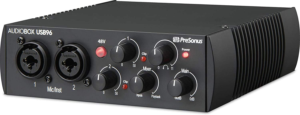
Rating: 4.4 out of 5
The AudioBox USB 96 sticks around because it covers the basics at a low price. You get two combo inputs for simple two-source recording, and you also get MIDI I/O, which is still a real need if you use older keyboards or controllers that don’t run USB.
The downside is that it’s an older style of budget interface, and you can feel that compared with newer competitors. You may notice more noise than the best picks above, and the overall experience can feel less refined, depending on your computer and headphones.
Still, if you want two inputs and MIDI without spending much, it can be the most practical entry point. Just keep your expectations set for “good enough to start” rather than “polished studio tool.”
Inputs: 2 combo | Audio quality: up to 24-bit/96kHz | Extras: MIDI I/O | Power: USB bus-powered | Monitoring: direct monitoring
Reasons to Buy:
- Low-cost two-input recording
- MIDI support included
- Solid for first setup
Reasons to Avoid:
- Older design compared to rivals
- More noise than top picks
Who should buy it: This fits you if you need MIDI plus two inputs on a strict budget. It’s also a decent starter option when you’re learning multi-track basics and you don’t want to spend much upfront.
All recommended products in comparison
| Product | Inputs (simultaneous) | Best for | Max resolution (common configs) | Monitoring and workflow |
|---|---|---|---|---|
| Focusrite Scarlett 2i2 4th Gen | 2 | Most people, vocals + guitar, two mics | Up to 24-bit/192kHz | Direct monitoring, simple studio workflow |
| Rode AI-1 | 1 | Beginners, solo voice, guitar | 24-bit (check current specs) | Straightforward knobs, clean monitoring |
| Shure MVX2U Gen 2 | 1 | Portable XLR recording | Up to 24-bit/48kHz | 3.5 mm monitoring, DSP via apps |
| Rode AI Micro | Varies by model | Lowest-cost entry | Varies by model | Minimal controls, travel-friendly |
| Focusrite Scarlett Solo 4th Gen | 1 mic + 1 instrument | Solo recording | Up to 24-bit/192kHz | Direct monitoring, beginner-friendly |
| Elgato Wave XLR | 1 | Streaming setups | Varies by workflow | Software mixing and routing focus |
| PreSonus AudioBox USB 96 | 2 | Entry multi-track + MIDI | Up to 24-bit/96kHz | Direct monitoring, basic studio workflow |
What to look for in a budget audio interface
Choose your channel count first
Inputs decide everything. If you record solo voice or solo guitar, a one-input interface is fine and often cheaper. If you ever plan to record a guest, two mics, or vocal plus guitar at the same time, you’ll want two inputs now, not later.
Gain that matches your mic
Dynamic mics often need more gain than people expect. Interfaces with roughly 60 dB of gain give you more breathing room, especially if you’re not using an external booster. If your recordings sound quiet unless you crank gain, you’ll also raise noise, which makes editing harder.
Monitoring that doesn’t annoy you
Direct monitoring keeps your voice from sounding delayed in your headphones. Look for simple monitor controls and a headphone output that can drive your headphones without you maxing the knob. This matters more for long sessions than most spec lists suggest.
Power and portability
Most budget interfaces are USB-powered, which is great for a clean desk or travel. Still, check your ports. USB-C is common now, but some gear still uses older USB connections, and you may need an adapter. If you record outside your home setup, compact size becomes a real feature.
Software matters, but only if you’ll use it
Some interfaces include routing, DSP, or software bundles. That can be useful, but it can also be clutter if you just want clean audio into your DAW. A streaming-first interface can be amazing for streams and annoying for music, so match the software to the job.
Build quality and ports
Budget gear gets plugged in constantly. Solid jacks and stable knobs save you headaches later. Metal cases often survive travel better, while lighter plastic units can be fine if they stay on a desk.
Why Trust OASTHAR?
I’m Shashini Fernando, an associate editor who specializes in consumer audio gear, creator tools, and everyday PC accessories. You’re getting picks shaped by in-house testing plus real-world feedback, because we test each product hands-on and analyze hundreds of customer reviews from people using budget audio interfaces every week. The goal is simple, help you buy one interface that won’t waste your time in 2026.
Best Budget Audio Interfaces FAQs
What is the best budget audio interface overall?
The Focusrite Scarlett 2i2 4th Gen is the best overall pick because it balances sound, two-input flexibility, and easy monitoring better than the rest.
Is a one-input interface enough for a podcast?
It’s enough for solo podcasts and voiceover. If you plan to record in-person guests on separate mics, you’ll want at least two inputs.
Do you need 24-bit audio for good sound?
It helps because it gives you more recording headroom, which makes levels less stressful. Still, mic choice, room noise, and technique matter just as much.
What’s the best budget option for travel?
The Shure MVX2U Gen 2 stands out for travel because it’s designed for portable XLR recording and quick monitoring without hauling a full interface.
Should you prioritize MIDI I/O in 2026?
Only if you use older hardware that needs MIDI ports. If your controller uses USB, you can skip MIDI and spend more on cleaner preamps instead.
Final Verdict
If you want one safe buy that covers most beginner and hobbyist recording, choose the Focusrite Scarlett 2i2 4th Gen. If you record solo and want the simplest possible box that still sounds clean, the Rode AI-1 is the no-fuss pick. If portability is the main goal, go with the Shure MVX2U Gen 2. For the smallest spend, Rode AI Micro is the ultra-affordable entry point, while the Scarlett Solo 4th Gen is the better “solo but future-proof” choice. Streamers should look hardest at the Elgato Wave XLR, and if you need MIDI on a tight budget, the PreSonus AudioBox USB 96 is the practical starter option.
