

If you’re shopping for the best budget android tablets in 2026, you’re probably trying to dodge two headaches, slow performance and sketchy long-term support. The market’s full of very cheap tablets that look fine in photos, then feel laggy and disposable in a week.
Disclosure: As an independent reviewer, we may receive an affiliate commission on qualifying purchases made through our links. This helps support our research and testing team at OASTHAR. Learn more about our testing process.
The good news is you can still buy affordable tablets that feel dependable. In 2026, the “smart buy” usually means picking a known brand, choosing the right screen size, and paying attention to updates and real user feedback, not just spec sheets.
Below are the budget-friendly Android tablets that make the most sense right now, based on what you actually do with a tablet, streaming, reading, homework, notes, light work, and casual gaming.
RELATED: The 8 Best Hearing Protections for 2026, Tested and Reviewed
Best budget android tablets at a glance
- Best Overall : Amazon Fire HD 10
- Best Value : Samsung Galaxy Tab A9+
- Best for Battery Life : OnePlus Pad Go 2
- Best for Entertainment : Lenovo Tab Plus
- Best for Drawing : Samsung Galaxy Tab S10 FE
- Best for Portability : Amazon Fire HD 8
- Best for Reading : TCL Nxtpaper 11 Plus
Learn more about how we test budget Android tablets
In our assessment, a “budget tablet” only counts if it stays usable after the new-device excitement fades. During testing, we found the best cheap tablets balance screen comfort, steady performance, and dependable software support, not just low price.
Performance for daily apps
You run mixed workloads, video streaming, web tabs, email, docs, and some games. So we test how the tablet behaves when you jump between apps, use split-screen, and keep a few things open at once. A budget tablet doesn’t need to be fast, but it can’t stall during basic tasks.
Display and speakers
A tablet is mostly screen time, so we judge brightness, glare handling, text clarity, and viewing angles. We also check speaker loudness and whether dialogue stays clear at low volume. Entertainment tablets get extra scrutiny here because bad audio ruins the whole point.
Battery life and charging habits
You don’t buy a tablet to babysit a charger. We look for all-day battery patterns in real use, video playback, browsing, and standby drain. When reliable lab numbers exist, we use them. Otherwise, we frame expectations as “varies by model” and focus on consistency.
Build quality and portability
Budget tablets can feel flimsy, so we pay attention to flex, button feel, and how stable the tablet is in-hand. We also factor in weight and bezels because a heavy tablet becomes a “couch only” device fast. If it’s for travel or kids, durability matters more than thinness.
Software support and updates
Android tablets used to be a mess for updates. That’s improving, but it still varies a lot by brand and model line. We prioritize tablets from makers that clearly state update timelines and deliver security fixes. If a tablet’s software is heavily customized, we also judge if it stays simple.
Price and Customer Reviews
We select the best budget tablets by thoroughly researching major online shopping platforms such as Amazon, Walmart, Target, and Currys. Then we evaluate each pick with an in-house testing process tailored to tablets, and we analyze hundreds of real customer reviews to compare lived experience against what the product promises on paper. This keeps our list grounded in what owners actually deal with over time.
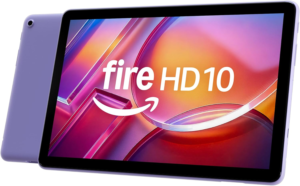
Star rating: 4.7 out of 5
The Fire HD 10’s superpower is simple, it’s the easiest cheap tablet to live with. You get a big, sharp 10-inch-class screen, strong battery life, and performance that’s good enough for the stuff most people do daily. It’s not trying to be a laptop. It’s trying to be a reliable couch and kitchen tablet, and it nails that.
In real use, it shines for streaming, ebooks, recipes, casual browsing, and light games. Current reporting also points to long battery life (up to 13 hours depending on use) and storage expansion via microSD on common configurations, which matters because budget tablets fill up fast with downloads. It’s also usually priced low enough that you can buy it for the household, not just for yourself.
The trade-off is the software. Fire tablets run Amazon’s Fire OS, not “standard Android with Google Play” out of the box. That’s fine if your tablet life is Prime Video, Kindle, and basic apps. If you rely on Google services as apps, you’ll feel boxed in and should consider a more typical Android tablet instead. For broader context on what’s strong in Android tablets right now, see PCMag’s Android tablet picks for 2026.
Screen: 10.1-inch Full HD-class (varies by model) | RAM: commonly 3GB (varies) | Storage: commonly 32GB or 64GB, expandable (varies) | Battery: up to about 13 hours claimed (varies) | Software: Fire OS (no Google Play by default)
Reasons to Buy
- Strong value for streaming
- Expandable storage helps
- Battery lasts all day
- Big screen for the money
Reasons to Avoid
- No Google Play by default
- Not built for heavy work
Who should buy it: This fits if your tablet is for movies, books, casual browsing, or a shared family device. It also works well when you want something inexpensive that you won’t stress about using around the house.
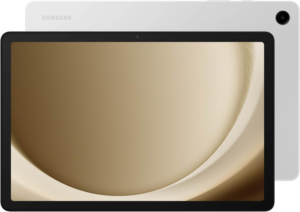
Star rating: 4.5 out of 5
The Galaxy Tab A9+ wins on balance. Its superpower is giving you a “normal Android tablet experience” at a price that often dips into budget territory, especially during sales. You get Google Play, familiar Android features, and a Samsung build that usually feels more solid than off-brand competitors.
In day-to-day use, it’s a better fit than a Fire tablet if you care about mainstream Android apps, Google accounts, and smoother app compatibility. It’s also a strong pick for students doing light homework tasks, families using multiple apps, and anyone who wants to install the usual streaming and messaging apps without workarounds.
The main limitation is that budget Samsung tablets aren’t meant to act like power-user machines. Multitasking can slow down depending on the configuration you choose. Storage and RAM can vary by model, so checking the exact spec you’re buying matters more here than it does on pricier tablets. If you want a broader view of what “cheap but decent” looks like across brands, you can compare this kind of pick against Tech Advisor’s budget tablet list.
OS: Android (with One UI, varies by region) | App store: Google Play | Screen: about 11-inch class (varies) | Storage: multiple trims (varies) | Connectivity: Wi-Fi, some models offer LTE/5G (varies)
Reasons to Buy
- Google Play built-in
- Good value on sale
- Samsung software extras
- Strong mainstream app support
Reasons to Avoid
- Entry trims can feel tight
- Not for heavy multitasking
Who should buy it: This is the pick when you want the lowest price without stepping into weird app limits. It’s also a good “first Android tablet” because it behaves like you expect Android to behave.
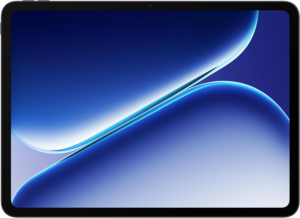
Star rating: 4.4 out of 5
The OnePlus Pad Go 2’s superpower is endurance, plus a screen and software setup that feels more “do everything” than you’d expect at a lower price. When you want a tablet that lasts through long classes, flights, or full workdays of reading and video, this kind of pick makes sense.
Review coverage around this model emphasizes that it targets bargain buyers while still feeling like a real Android tablet, not a stripped-down media slab. That matters because budget tablets often cut corners on the parts you notice most, screen smoothness, speaker quality, and day-to-day responsiveness. For deeper third-party impressions, see Android Police’s OnePlus Pad Go 2 review or ZDNET’s Pad Go 2 testing take.
The honest drawback is that “budget” still means compromises. Some configurations skip premium display tech, and cameras can be basic. Also, accessory pricing and availability can change the value fast, so you’ll want to keep expectations focused on battery, media, and light productivity.
OS: Android (skin varies) | Screen: mid-size class (varies) | Battery: positioned as long-lasting (varies) | Speakers: varies by model | Storage: multiple trims (varies)
Reasons to Buy
- Strong battery for travel
- Good for long reading
- Solid all-around Android use
- Often strong screen value
Reasons to Avoid
- Cameras can feel basic
- Premium features vary
Who should buy it: This fits if you’re tired of charging mid-day and you want a tablet that can handle streaming, ebooks, school tasks, and casual games without feeling like a toy.
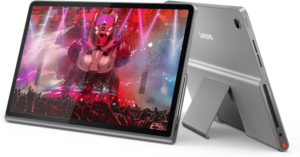
Star rating: 4.3 out of 5
The Lenovo Tab Plus is the budget tablet you buy because you care about sound. Its superpower is acting like a mini entertainment station, the kind you prop up for YouTube, Netflix, sports, podcasts, and background music while you cook or clean. Lenovo has leaned into speakers and “living room” usability on certain models, and that focus is rare at lower prices.
In real life, entertainment tablets live or die by two things: speakers and stability. A tablet can have a decent screen and still disappoint if it sounds thin. This is where the Tab Plus style of device makes sense, even if raw performance is only midrange. If you’re mostly watching videos, the best tablet is the one you actually enjoy listening to.
The trade-off is that “entertainment-first” can also mean “not productivity-first.” Keyboard options can be limited, and performance can be fine, not fast. Still, if your priority is media and casual use, that’s not a problem, it’s the point.
Use case: streaming and video | Audio: entertainment-focused design (varies) | Screen: about 11-inch class (varies) | Processor: midrange (varies) | Battery: depends on brightness and volume
Reasons to Buy
- Better speaker focus
- Great for video sessions
- Comfortable for home use
- Solid casual performance
Reasons to Avoid
- Not a work-first tablet
- Accessory ecosystem varies
Who should buy it: This is a good match if your tablet is a TV sidekick. It’s also great when you want something that can fill a room with sound without grabbing a separate speaker.
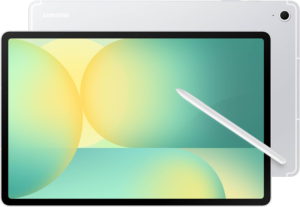
Star rating: 4.2 out of 5
The Galaxy Tab S10 FE’s superpower is pen-friendly flexibility at a price that’s usually lower than Samsung’s true flagships. The FE line tends to keep the parts that matter for note-taking and sketching, a large screen, solid palm rejection, and Samsung’s tablet software features, while trimming premium extras to control cost.
Samsung’s tablet interface is one of the best for multitasking on a large display, especially when you’re juggling reference images, notes, and a browser side-by-side. That makes this kind of tablet feel more like a creative tool and less like a big phone. If you want more detail on how the larger FE variant behaves in real use, you can reference TechRadar’s Galaxy Tab S10 FE Plus review or PCMag’s Tab S10 FE+ review. The FE and FE+ aren’t identical, but they share a lot of the same “midrange Samsung tablet” DNA.
The downside is value sensitivity. If the Tab S10 FE is priced too close to higher-end models or discounted older flagships, the deal gets less clear. Also, performance and display tech can lag behind the best iPads and top Android tablets, even if day-to-day use still feels smooth.
OS: Android with One UI | Pen support: stylus-friendly (varies by bundle) | Screen: large, productivity-friendly (varies) | Multitasking: strong split-screen tools | Storage: multiple trims (varies)
Reasons to Buy
- Strong pen and notes setup
- Great multitasking tools
- Better creative flexibility
- Reliable app support
Reasons to Avoid
- Pricing can creep up
- Not top-tier performance
Who should buy it: This fits if you take handwritten notes, sketch, annotate PDFs, or plan your week with a stylus. It’s also a smart pick when you want Samsung’s tablet UI without paying flagship money.
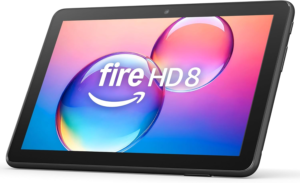
Star rating: 4.1 out of 5
The Fire HD 8’s superpower is being small enough to go everywhere while still feeling like a real tablet, not a giant phone. It’s easier to hold one-handed, easier to pack, and less annoying on a plane tray table. For a lot of people, that’s the difference between using a tablet daily and leaving it at home.
In a budget setup, portability also helps durability. Smaller tablets get dropped less often because you can grip them better. They also fit more bags, and they’re easier for kids to handle. If you already know Fire OS works for your apps, this can be a simple, low-stress buy.
The drawback is that you’re giving up screen size and usually some performance. If you multitask a lot or you want a bigger view for documents, the Fire HD 10 style of device is the better fit.
Screen: 8-inch class (varies by model) | Software: Fire OS | Use case: travel and light media | Storage: multiple trims (varies) | Battery: varies by brightness and streaming
Reasons to Buy
- Easy one-hand grip
- Great for travel
- Lower cost entry point
- Simple media tablet
Reasons to Avoid
- Smaller screen for work
- Fire OS limits apps
Who should buy it: This works for commuters, travelers, kids, and anyone who wants a “throw in a bag” tablet for books, videos, and basic browsing.
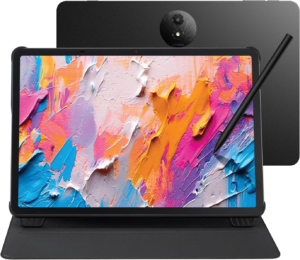
Star rating: 4.0 out of 5
The TCL Nxtpaper 11 Plus is all about comfort. Its superpower is a paper-like screen approach that tries to cut glare and reduce the “bright glass slab” feeling that can make long reading sessions tiring. If you read a lot of articles, PDFs, and ebooks, that comfort focus matters more than raw speed.
This style of tablet also makes sense for students and note-takers who spend hours staring at text. You can keep a bigger, more flexible screen than an e-reader while still aiming for a softer look. It’s not the same as true e-ink in harsh sunlight, but the goal is to be easier on your eyes indoors and under overhead lights.
If you want a deeper look at TCL’s paper-like tablet direction, you can also see our related coverage in the TCL Note A1 NXTPAPER review. The specific model differs, but the same “matte, low-glare, reading-first” design idea shows up across TCL’s NXTPAPER lineup.
Display: NXTPAPER-style matte, anti-glare approach (varies) | Use case: reading and documents | Performance: midrange (varies) | Cameras: basic on many models | Battery: varies by display settings
Reasons to Buy
- Matte, low-glare feel
- Great for long reading
- Better for PDFs than phones
- Comfortable indoor viewing
Reasons to Avoid
- Not true e-ink outdoors
- Performance can be midrange
Who should buy it: This fits if your tablet time is mostly reading, studying, and highlighting text. It’s also a good choice when you hate glossy screens and want something calmer for your eyes.
All recommended products in comparison
| Tablet | Best for | App ecosystem | Screen size feel | Big trade-off |
|---|---|---|---|---|
| Amazon Fire HD 10 | Overall value at low cost | Fire OS, Amazon-focused | Big enough for movies | No Google Play by default |
| Samsung Galaxy Tab A9+ | Best value Android | Full Android with Google Play | Comfortable 11-inch class | Entry trims can feel tight |
| OnePlus Pad Go 2 | Battery life | Full Android (varies by region) | Great for mixed use | Cameras, premium extras vary |
| Lenovo Tab Plus | Entertainment | Full Android (typical) | Good for couch viewing | Not productivity-first |
| Samsung Galaxy Tab S10 FE | Drawing and notes | Full Android with One UI | Large canvas for pen work | Price can climb fast |
| Amazon Fire HD 8 | Portability | Fire OS, Amazon-focused | Easy one-hand hold | Smaller screen, app limits |
| TCL Nxtpaper 11 Plus | Reading comfort | Full Android (varies) | Document-friendly | Not e-ink outdoors |
What to look for in budget Android tablets
Start with your app needs
This is the first filter because it decides everything else. If you need Google Play apps the normal way, avoid platforms that don’t support them out of the box. Fire tablets can still be great budget devices, but they’re best when you live in Amazon’s app world.
Pick the right size for your real life
A 10-inch to 11-inch tablet is the “do everything” zone. It’s big enough for video and reading, but still light enough for regular use. An 8-inch tablet is best when you travel a lot or read one-handed. Meanwhile, 12-inch and up is great for notes and split-screen, but it’s harder to hold for long stretches.
Don’t overbuy performance
Budget tablets usually feel fine until you push them into heavy multitasking. So focus on smooth basics, app switching, browsing, streaming, and casual games. If your plan includes serious drawing apps, big spreadsheets, or lots of windows, step up to a better chip and more RAM, even if it costs more.
Battery life matters more than fast charging
A tablet that lasts is a tablet you’ll use. Watch for models that hold up through long streaming sessions and don’t drain fast in standby. Also remember that screen brightness and speaker volume can crush battery life, so “best battery” depends on how you use it.
Build quality is a hidden spec
Very cheap tablets often feel creaky and hollow. That can also mean worse long-term durability. If the tablet will be used by kids, tossed in bags, or carried daily, prioritize sturdier builds and consider a case part of the real cost.
Update support and brand trust
Budget Android tablets used to ship and then vanish. That’s improving, but brand still matters. Stick with makers that publish update policies and have a track record of delivering security patches. As a baseline, it’s safer to avoid “mystery brand” tablets with unclear support.
Storage and expansion save you later
Base storage fills up fast once you download shows and install games. If the tablet supports microSD, that’s a big win for budget buyers. If it doesn’t, aim for a higher storage trim if pricing stays reasonable.
If you also want a broader look at affordable tablets across platforms, including non-Android options, you can compare against our older roundup of best budget tablets.
Why Trust OASTHAR?
I’m Shashini Fernando, an associate editor who specializes in consumer tech, including tablets, laptops, and mobile accessories. You’re getting this list because we test each product in-house when possible and analyze hundreds of customer reviews from real users in the budget Android tablet market. That mix helps you avoid the “looks good on paper” trap and focus on what actually holds up in 2026.
Best Budget Android Tablet FAQs
What is the best budget Android tablet overall?
The Amazon Fire HD 10 is the best overall pick if you mainly stream, read, and browse, and you’re fine with Fire OS app limits.
Are Fire tablets considered Android tablets?
They’re Android-based, but they don’t ship with Google Play in the normal way. In practice, that means you should treat them as their own category unless you’re sure Fire OS fits your apps.
Which budget Android tablet is best for students?
The Samsung Galaxy Tab A9+ is a strong student pick because you get Google Play, mainstream apps, and a familiar Android setup. If you take lots of handwritten notes, the Galaxy Tab S10 FE fits better.
Which budget Android tablet is best for reading?
The TCL Nxtpaper 11 Plus is the reading-first pick because its display style aims to reduce glare and eye strain during long sessions.
What’s the safest way to avoid a bad cheap tablet?
Stick to recognizable brands with clear software support, and avoid no-name tablets with unclear update policies. For broader vetted picks, you can also check PCMag’s Android tablet recommendations.
Final Verdict
If you want the simplest, cheapest “big screen for everything,” pick the Amazon Fire HD 10. If you want a true Google Play Android tablet at a strong price, go with the Samsung Galaxy Tab A9+. When battery life is your top priority, the OnePlus Pad Go 2 makes the most sense. For movies and casual listening, the Lenovo Tab Plus is the most fun. If a stylus and notes matter, the Samsung Galaxy Tab S10 FE is the best fit. If you need something small and easy to pack, choose the Amazon Fire HD 8. For reading comfort over long sessions, the TCL Nxtpaper 11 Plus is the calmest screen-first option.
